








It’s common for people to confuse Google Tag Manager vs Google Analytics 4 because both are often part of many websites’ tracking setups. But they play entirely different roles: Google Analytics handles analytics and reporting, while Google Tag Manager deploys tracking scripts on your site.
This guide goes deeper into what each one does, how they differ and how to determine which setup is the best fit for your tracking needs.
And for those interested in options outside the Google ecosystem, we’ll explore how privacy-focused alternatives, like Matomo’s free Tag Manager, can give teams complete control over their data.
Google Tag Manager and Google Analytics 4 play different but complementary roles in collecting, organising, and interpreting website activity.
| Google Analytics 4 | Google Tag Manager | |
|---|---|---|
| Role/Purpose | Collecting, processing and reporting analytics data | Deploying and managing marketing and analytics tags |
| Outputs | Reports and dashboards | Data sent to other platforms |
| Setup | GA4 tracking code or SDK | GTM container snippet |
Together, they help connect session metrics with visitor behaviour to give marketing and data teams more flexibility, visibility and control over the information they track.
Google Analytics 4 (GA4) is Google’s event-based platform for collecting and measuring user interactions across websites and apps. It captures page views, scrolls, button clicks and other user interactions to give marketing teams a better understanding of customer journeys and site performance.
GA4’s reporting capabilities depend heavily on custom configuration, with few built‑in reports beyond the basics. Its short data‑retention window also limits how far back teams can analyse trends.
Large, complex datasets may be sampled in GA4, leading to slightly skewed or less precise analyses.
Google Tag Manager (GTM) is a system that lets teams add and manage marketing and analytics tracking codes without changing the website’s code.
Instead of needing a developer to add or modify tracking codes, they can use a simple tag manager interface to deploy and update them independently.
GTM uses a container system to hold the event-tracking tags, triggers and custom variables needed to capture specific data. The GTM container code, a small snippet added to your website or app, activates and manages these elements.
Teams can preview, debug and publish updates directly through the Google Tag Manager interface, reducing the risk of tagging errors and maintaining version control.
GTM supports both Google and third-party tags, giving flexibility for analytics, marketing tools, remarketing and goal conversion tracking.
Google Tag Manager (GTM) and Google Analytics 4 (GA4) are often used together to optimise data collection and reporting.
GTM handles deployment, while GA4 interprets and presents the collected data in reports. Here’s how the integration works in practice:
The pair works well inside Google’s ecosystem, but there are alternative approaches for teams exploring privacy‑centric or sovereign setups.
Matomo Tag Manager is another solution that lets teams add and manage website analytics tracking and marketing code snippets without editing the site’s source files.
Unlike Google Analytics and other deeply interconnected vendor systems, Matomo promotes sovereign, privacy-first setups.
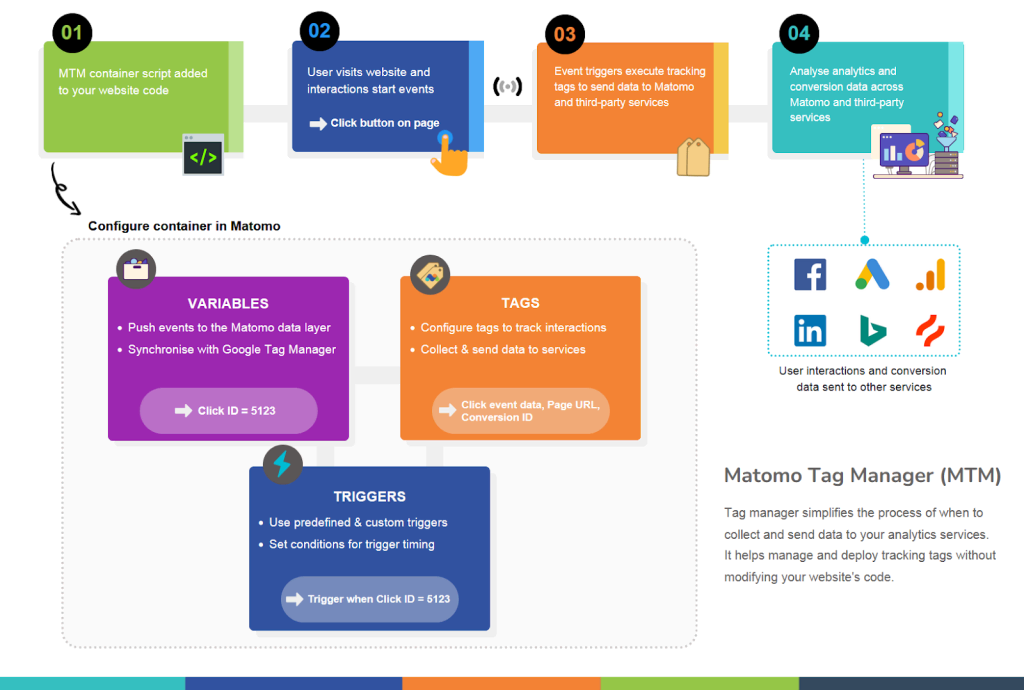
Teams can add, modify, disable, or copy variables, tags, and triggers directly through the Matomo interface, or insert custom HTML or JavaScript tags to track anything not included in the built-in templates.
Beyond that, the Matomo Tag Manager data layer can track more complex actions or information, such as:
Matomo’s Tag Manager integrates with CMPs for consent-aware tracking based on saved user preferences. This ensures that tags and tracking only fire after the user has given informed consent.
By collecting data only when legally permitted, consent manager integrations help organisations respect user choices and support compliance with regulations such as GDPR and the ePrivacy Directive.
Now that you understand how Matomo Tag Manager works, let’s consider how it compares to Google Tag Manager in practice.
Choosing between Matomo and Google’s tools often comes down to how much control and transparency you need over your data. The points below show where Matomo provides a stronger data foundation.
Unlike Google Tag Manager, which operates within Google’s broader ecosystem (including Google Ads), Matomo’s Tag Manager works in tandem with its analytics platform to create a unified, privacy-first measurement environment. You can even run Matomo Tag Manager entirely within your own infrastructure, giving you full oversight into how data is collected, processed and stored.
This design reflects Matomo’s core value of full data ownership. Your organisation decides where analytics data resides, who can access it and how long it is retained. That clarity offers greater transparency and operational independence.
Matomo is fully open-source software (GPL v3 or later), so teams can inspect, modify and extend the codebase. This offers clarity and transparency into tracking, storage, processing and everything else that normally stays behind the scenes on proprietary platforms.
With open-source setups, a global community reviews code and contributes to the platform, continually strengthening its security and reliability.
Choosing an open-source platform like Matomo gives you control over your analytics stack, allowing you to host it on your own server and avoid the unpredictable changes in data, behaviour or monetisation common in closed platforms.
Platforms like GA4 often rely on data sampling, especially for high-traffic sites or detailed segmentation analyses. This can obscure or distort meaningful trends, as you’re only examining a subset of the collected data that may not accurately reflect the actual traffic.
With Matomo, you see 100% of your data. That means analytics dashboards and reports always reflect actual, aggregated user activity, not approximations.
Matomo’s unsampled approach avoids those gaps and supports accurate measurement and clearer insight. This way, you can base your decisions on reality.
| Google Tag Manager (GTM) | Matomo Tag Manager (MTM) | |
|---|---|---|
| Hosting | Google‑hosted | Self‑hosted or Matomo Cloud |
| Data Sovereignty | Controlled by Google | Fully under your control |
| Consent handling | Works with CMPs | Works with CMPs;privacy‑first defaults |
| Tag types | Broad ecosystem, Google‑optimised | Broad ecosystem, vendor‑neutral |
| Integration | Deep ties to GA4 & Google Ads | Designed for Matomo; supports third‑party tags |
| Privacy posture | Google ecosystem rules | Built for GDPR‑aligned tracking |
In 2025, data sovereignty moved from a compliance concern to a strategic priority. According to KPMG’s Ten Key Regulatory Challenges: 2025 Mid-Year Report, organisations face growing scrutiny around how and where data is stored, processed and transferred.
The report highlights growing concerns and rules surrounding the use and protection of third-party data and emphasizes why organisations need to exercise tighter control over how and where their data is stored and managed.
The GDPR, CCPA and other privacy standards require organisations to demonstrate the legality of their data processing, determine data retention periods and manage international data transfers responsibly.
Due to heightened concerns about US data transfers when using Google services and the potential exposure risk, more organisations are choosing privacy-first web analytics that keep all data within EU borders.
Owning and managing your own data systems provides stability and improves audit readiness. You can:
Strong governance and ethical data practices build user trust. When people know their data stays within a secure, well-managed system, they’re more likely to come back. In a market where privacy awareness influences customer choices, businesses that prioritise data sovereignty and user trust have a genuine competitive advantage.
That’s also why it’s important to consider how different tag managers align with your organisational goals and data practices.
Once you know what exactly you need to track and your organisation’s data priorities, certain options will stand out. Start with the questions below.
Google’s tools prioritise convenience, but this comes with trade-offs in data privacy and sovereignty. With Matomo, you’re in control of how your site collects, stores and uses data.
If you’re already deep in Google’s ecosystem and looking for a privacy-first setup, Matomo makes it easy to migrate from Google Tag Manager to Matomo. If you’re switching from GA4, you can import all of your historical data into Matomo and maintain continuity in your reporting.
Matomo offers two deployment options:
Start your 21-day free trial of Matomo Cloud today – building a privacy-first analytics setup that you truly control.
此内容由惯性聚合(RSS阅读器)自动聚合整理,仅供阅读参考。 原文来自 — 版权归原作者所有。