









Are you seeing a spike in your website traffic? That can be either good news or a warning sign.
Sometimes a traffic spike means your content is gaining attention. A blog post may have been shared in the right community, a newsletter might have mentioned you, or a search query could suddenly be driving more visitors to your site.
But not all traffic spikes are worth celebrating. The increase could be caused by bot traffic, referral spam, internal visits, a broken campaign tag, search crawlers, or even a seasonal trend you overlooked.
Before you celebrate or panic, it’s important to understand where the traffic is coming from and what’s actually causing the spike.
This is usually the first thing to check because a spike caused by bots is not something you want to report as growth. There is no single dashboard clue that proves “this is definitely a bot”. But a few strong signals together can make the answer pretty clear.
Quick tip: Before starting your investigation, set the right time period in your analytics tool. For a sudden spike, Last 24 hours, Today and Yesterday are often more useful than a broad monthly view. In Plausible, you can also compare the spike period with the previous period, yesterday, or a custom range for a better comparison view.
The instant tell-tale of bot traffic is that it does not behave like actual people. Bots often leave quickly, hit one page, do not scroll naturally and do not convert. So your engagement would look unnaturally low.
If you’re looking at your analytics dashboard right now, observe the engagement metrics like:
So if your traffic spiked but visit duration collapsed, bounce rate shot up and conversions did not move, be skeptical.
That said, low engagement is not always bot traffic. Viral social traffic can also bounce quickly for instance. A short reference page can have low time on page because people got the answer and left. A landing page built for one action may not create many pageviews per visit.
So the useful question is: does this spike traffic behave differently from the same source, page or audience during normal periods?
This is why you should start isolating the increased traffic by segmenting your dashboard by the exact traffic source, location, page, and/or browser that the spike is coming from.
Using Plausible? Click a country/city, source/channel, page or any other report entries to filter the full dashboard by that segment.
Open your Locations report and look for regions that do not match your normal audience.
For example, unusual traffic spikes from places such as Ashburn or Council Bluffs almost always means that visits are coming from data centers rather than real users.
That does not mean every visit from these places is fake, and it does not mean every unexpected location is suspicious. It just means you should keep looking for supporting evidence.
Unexpected locations can have very normal explanations too. For example:
P.S. If a country is genuinely irrelevant to your site and keeps polluting your stats, you can exclude countries from your stats in most analytics tools (here’s how to do it in Plausible). But treat that as cleanup after you have understood what is happening, not as the first move.
Some spikes can come from scrapers, uptime monitors, vulnerability scanners, AI crawlers, spam bots, click farms or automated tools. Common warning signs include:
If you suspect non-human traffic, compare your analytics with server logs, CDN logs or hosting metrics if you have access. If the traffic caused server load, involve your engineering team. If it only polluted reporting, exclude the spike from your analysis and check whether your analytics setup can filter the obvious spam source.
At this point, if you are reasonably sure that the spike was not from real visitors, you have two jobs:
First, keep that traffic out of your analysis. Do not use it to judge campaign performance, conversion rates, content performance or business growth. If your analytics tool allows it, filter or exclude the affected traffic by source, country, IP address, hostname, page path or any other clear pattern you identified.
Next, check whether your analytics provider can help. Some tools can remove obvious spam traffic, improve their filters, or guide you toward the right exclusion settings.
If support is not available, look for product-specific documentation or community discussions. Bot and spam traffic issues are common, so there is often a known workaround for a specific pattern.
If you use GA4, for example, you may need to handle some of this manually using comparisons, explorations, unwanted referrals, internal traffic rules, data filters, or custom reports depending on what caused the spike.
The exact fix depends on whether the traffic came from a spam referrer, an internal source, a suspicious location, a campaign tagging issue, or a page-specific pattern.
Finally, investigate why the spike happened. If it was only analytics spam, cleanup may be enough. But if the traffic hit login pages, signup forms, checkout flows, API routes, admin-looking URLs or caused server load, treat it as a possible abuse or security issue. In that case, involve the appropriate team and treat it as an urgent issue.
Plausible filters a large amount of bot and spam traffic automatically.
We block known crawlers based on their User-Agent, exclude traffic from many data center IP ranges, filter referrer spam, and apply additional checks to detect non-human traffic patterns.
Because of this filtering, Plausible typically records far fewer pageviews than raw server logs, which count every request including bots and automated scans. In one test we ran, server logs recorded about 18× more pageviews for the same site due to bot traffic.
In another test we ran, we saw how Plausible successfully blocked bot traffic while GA couldn’t.
That said, no analytics system can block every bot. Some sophisticated bots try to mimic real browsers and may occasionally appear in analytics data. We continuously improve our filtering to reduce this.
If you identify traffic you’d like to exclude, you can also filter it manually by IP address, country, page, or hostname. If you are convinced unnatural traffic has made it to your Plausible dashboard, feel free to contact us and we’ll take a look.
Once bot traffic is less likely, the next question is: where did the spike come from?
In Plausible, you can start with Channels and drill into Sources and Campaigns (Or start with Sources or Campaigns directly). If you use GA4, start from the traffic acquisition report.
The main thing to look for is whether all traffic rose together, or whether one source caused the spike.
Depending on your site, the spike could come from Direct, Organic Search, AI referrals, Organic Social, Referral, Email, Paid, Affiliates or any other channel. The investigation logic is the same: isolate the source, check the pages it landed on, and compare engagement with your usual baseline.
This goes hand in hand with the pages report (explained in the next section): sources tell you where people came from, pages tell you what they came for.
Here’s what that would look like in the Plausible dashboard:
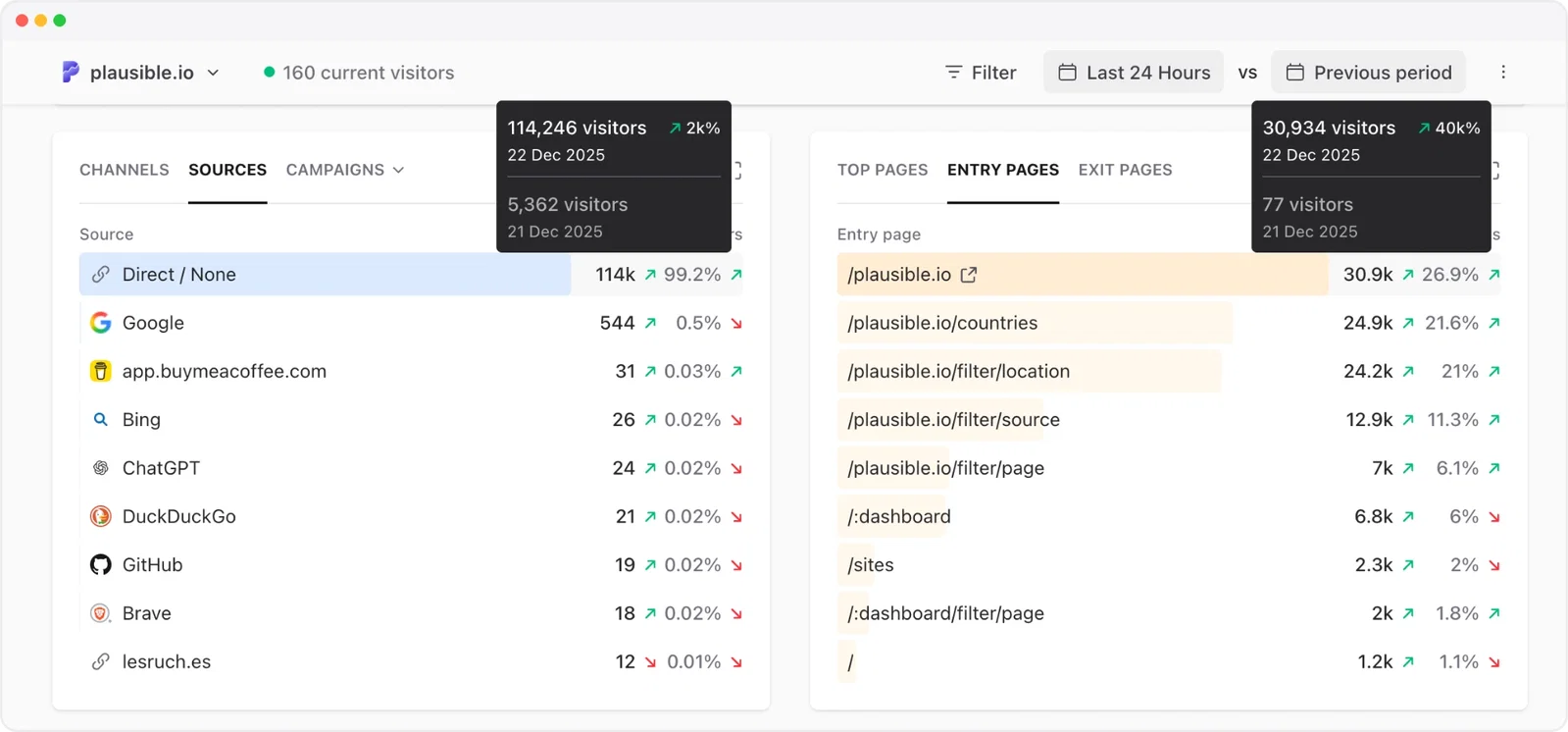
If you filter the dashboard by a source, compare that filtered view with yesterday, the previous period or a custom period too. That helps you confirm whether this source is truly spiking or just following its usual pattern.
If the answer is obvious at this stage, you may not need to keep digging. For example, if you launched a newsletter at 10 AM and Email traffic spiked at 10:05 AM with normal engagement, that is probably your answer. Note it down, compare the outcome with your expectations, and you can move on.
Here is what spikes from different sources mean.
A “Direct/none” traffic spike can mean several things.
It could be good: more people are typing your URL, using bookmarks, searching your brand and clicking through, or sharing your link in private places such as Slack, Discord, WhatsApp, email or newsletters. This is often called dark traffic because the original source is not passed along.
It could also mean attribution got messy. Maybe a campaign link was shared without UTM parameters, a redirect stripped the referrer, or a newsletter tool did not pass source information correctly.
If the spike is Direct, has weak engagement, comes from odd locations and does not convert, it was probably bots.
An organic search spike can happen because a page jumped in rankings, Google started showing it for new queries (especially if they’re trending), a topic became more popular, or your content appeared in a search feature.
If Organic Search is responsible, check whether the spike came from:
In Plausible, you can use the Google Search Console integration to see search terms inside your dashboard. You can also open Search Console directly and compare clicks, impressions, average position and CTR for the spike period.
Google’s guidance for debugging search traffic changes recommends looking at the Search Console performance report, comparing date ranges, separating search types and checking whether the change is limited to specific pages, queries, countries or devices.
AI tools such as ChatGPT, Perplexity, Claude and others are now real referral sources.
They may not send traffic at Google scale, but they can cause visible spikes every now and then, when an answer cites your page, when a topic starts trending in AI chats, or when an AI tool changes something about its working.
We have seen this ourselves at Plausible. For instance, we noticed an increase in ChatGPT traffic after ChatGPT made inline clickable referrals more visible. Earlier too, we saw a ~2,200% surge in AI referral traffic from sources such as ChatGPT, Perplexity, Claude and Phind.
If AI referrals caused the spike, check:
This kind of traffic can be volatile. A page may be cited one week and disappear from answers the next. So treat AI referral spikes as a useful discovery signal, but still judge them by engagement, conversions and whether they bring the kind of visitors you want.
If the spike came from social, click into the exact source.
This may be a post on LinkedIn, X, Reddit, HackerNews, Mastodon, Bluesky or another community. A social spike can be valuable, but it is often short-lived. The question is not only “how many people came?” but “did the right people come?”
Look at engagement and conversions. If a social post sends thousands of visitors who bounce quickly and never sign up, it may be a nice awareness moment but not necessarily a business win. If it sends fewer visitors but they spend time, read more pages or convert, that is a stronger signal.
If you can identify the exact post, you can stop the source investigation here and move to understanding the outcome.
For example, if LinkedIn caused the spike, search LinkedIn for your brand, domain or the landing page URL. Maybe someone tagged you in a post, maybe they did not. Either way, once you find the post, check what people were reacting to, whether the comments reveal confusion or interest, and whether the traffic converted.
If you cannot find the post, check the pages report next. The entry page often tells you what the social conversation was probably about.
If the spike came from a specific referring site, it usually means your link was shared, cited, listed or discussed somewhere there.
Sometimes this is easy to trace. The referring URL may include the exact thread, article, newsletter archive, directory page or documentation page.
You can click into the source, check Referrer URLs if available, search that site for your domain, or search the web for your URL and the date of the spike.
Sometimes you will not be able to find the exact mention. That is okay. You do not always need the exact post.
If you can confirm that the source is real, the traffic is relevant, and the visitors behaved positively, you can stop here and move to understanding the outcome.
If the source is clear but the reason is not, pair it with the pages report. A homepage spike usually means a broader brand mention, while a feature page, docs page or blog post spike points to a more specific conversation.
If you do find the exact mention, read the context. Are people recommending you? Complaining about you? Comparing you with an alternative? Confused about a feature?
That context tells you whether to join the conversation, update the page, add better internal links, or simply save the source and date so you can compare future spikes.
If a paid channel spiked, first confirm that you expected it.
Did someone increase budget? Launch a new campaign? Change targeting? Turn on a new placement? Forget to pause something?
Then check conversions and cost, not only visits.
A paid traffic spike without conversions is not a win. It may mean the campaign is reaching the wrong audience, a landing page is mismatched, the tracking is broken, or low-quality clicks are getting through.
Check the pages that got the spike.
In Plausible, use the Top Pages or Entry Pages report (understand more about them here). Entry Pages are especially useful because they show where people started their visit.
This is the other half of the sources investigation: where did they land?
Ask:
The answer changes your next step.
If one blog post spiked, look for where it was shared and what audience it reached. If a product or pricing page spiked, check campaigns, mentions, brand search and conversions. If many random pages spiked at the same time, especially with poor engagement, you may be looking at bots, crawlers or scraping.
This can also be a good place to stop. If the source was LinkedIn and the entry page was your homepage, the likely story may simply be that someone mentioned your brand. If the source was LinkedIn and the entry page was a specific feature page, investigate whether someone discussed that feature.
Similarly, if the source was Reddit and only one blog post spiked, look for that article in relevant subreddits and check whether the discussion explains the traffic.
This is also where you can separate a happy spike from a hollow one. For example, imagine your blog post gets picked up by a big newsletter and sends 10,000 visitors in a day, that is exciting.
Now imagine a smaller spike of 1,000 visitors to a comparison page, and trial signups also increase. That smaller spike may be more valuable to you.
Here are a few simple ways to read your traffic source + page clues together:
Device and browser reports are useful when the spike is real but still needs explanation.
If traffic rose mostly on mobile, check whether the source was mobile-heavy, like social, and whether the landing page works well on phones. If one browser, OS or device type suddenly dominates the spike, check whether that matches the source or points to something suspicious.
If conversions dropped during the spike, segment by device too. You may discover that the extra traffic was real, but the experience was poor on the device most visitors used.
Once you have a likely explanation, check whether another tool supports it.
You do not need five tools to investigate every traffic spike, but cross-checking is useful when:
For organic search spikes, check Google Search Console. See whether clicks, impressions, queries and pages moved in the same direction as your analytics.
For SEO-related spikes, an SEO tool such as Semrush can help you check keyword movements, ranking changes, backlinks, new SERP features or competitor movement.
For suspicious spikes, check server logs, CDN logs, firewall logs or hosting analytics. These can help you spot crawlers, repeated requests, unusual user agents, data center traffic or pages being hit in a pattern that does not look human.
For campaign spikes, check the source platform too. If a newsletter tool says 400 clicks but your analytics says 8,000 visits, something is off. If an ad platform says spend doubled and your analytics says paid traffic doubled too, that part of the story at least lines up.
This is different from normal bot traffic.
Some automated traffic is just noise in your analytics. But some spikes can be caused by scraping, vulnerability scans, credential stuffing, spam form submissions, fake signups, checkout abuse or a DDoS-style flood. This is especially common for developer tools, SaaS products, open-source projects and sites with login pages, docs, APIs or public forms.
You may not be able to confirm this from your web analytics dashboard alone. Analytics tools usually show the browser-level visit, not every request that hits your infrastructure.
Look for clues such as:
If any of this lines up with the traffic spike, get your engineering or hosting team involved. Check server logs, CDN/firewall logs, rate limits, WAF rules and authentication logs. In that case, the priority is not understanding whether the traffic converted. The priority is protecting the site and keeping the data from being mistaken for real demand.
Not every unexplained spike comes from the outside world. Sometimes the source is internal:
This is especially important if the spike appears in app pages, checkout pages, internal dashboards or other URLs that normal marketing traffic would not usually hit.
Ask around before drawing conclusions. A two-minute message in the marketing, product or engineering channel can save an hour of analytics detective work.
One-day spikes are common. Repeating spikes are a trend.
Check whether the traffic spike happens:
Recurring patterns are usually easier to explain once you know what schedule they match.
If the spike happens every time your newsletter goes out, you have a distribution signal. If it happens every time a crawler runs, you have an automation signal. If it happens only during a holiday shopping period, you may have a seasonal signal.
By now, your spike should fall into one of these buckets:
There is no universal threshold.
It depends on your usual traffic level, business model, and how much the spike could affect decisions.
A small personal blog can reasonably investigate a jump from 100 to 500 visitors because that may reveal a new audience. A large SaaS site may ignore a 2% daily increase unless it affects signups, revenue, support volume or infrastructure.
As a rough rule, investigate when:
If the spike is small, explainable and has no business impact, you do not need to turn it into a forensic exercise.
Here’s a visualization of the practical process that you can save for your reference:
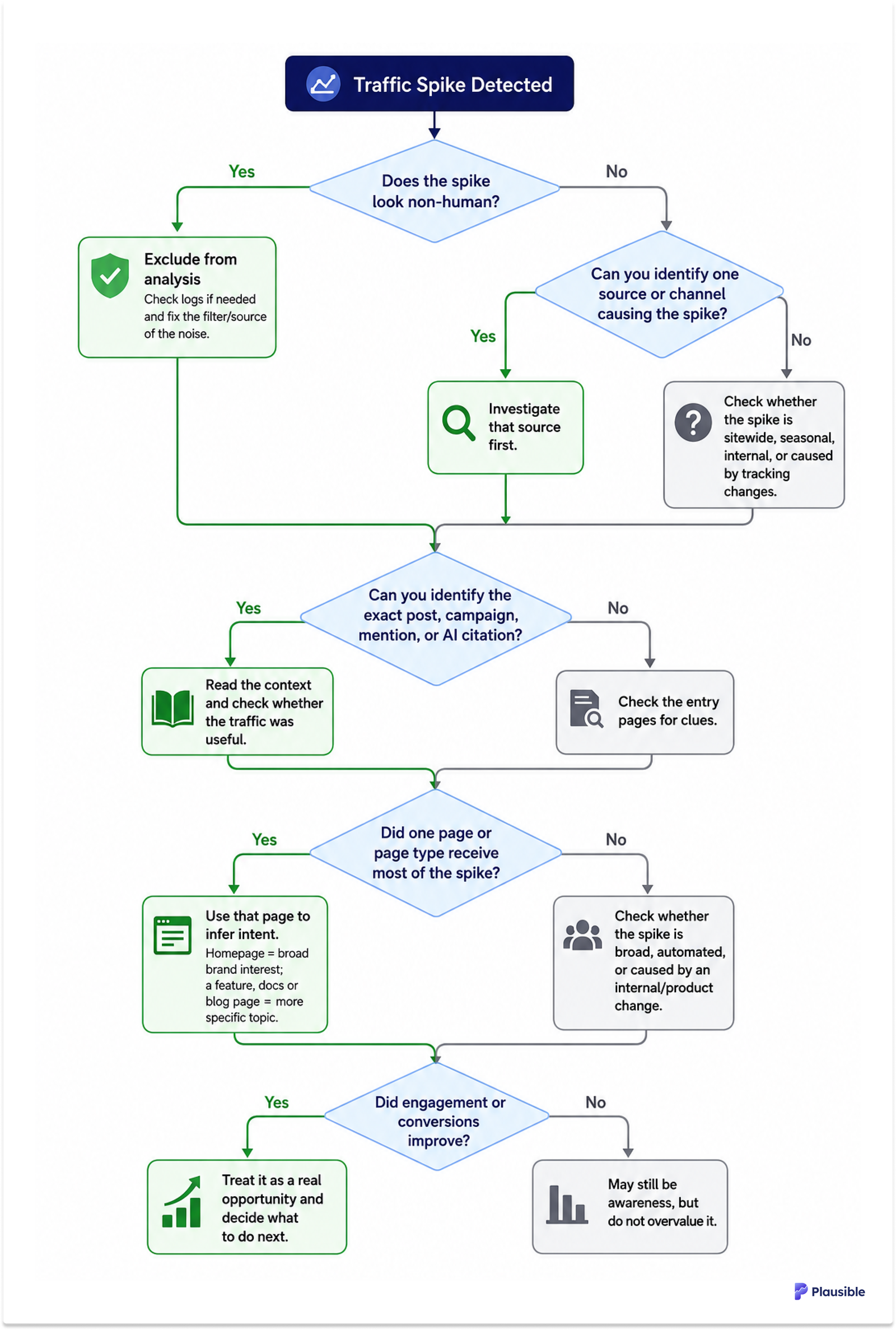
If you want an easier way to notice unusual traffic without babysitting your dashboard, you can set traffic spike notifications in Plausible, the simpler and privacy-friendly alternative to Google Analytics. You will get alerted when current visitors cross your chosen threshold, along with the top sources and pages causing the spike.
And if you’re dealing with the opposite problem, we also have a guide on how to investigate a drop in website traffic.
此内容由惯性聚合(RSS阅读器)自动聚合整理,仅供阅读参考。 原文来自 — 版权归原作者所有。