





Attribution modeling is how marketing teams decide where growth really comes from. In other words, it’s about attributing the touchpoints (specific channels, campaigns, ads, etc.) that led someone to take a desired action (like purchase, sign up, etc.) in your business.
There are multiple ways of doing this, i.e., various models for assigning weightage to different touchpoints and it depends on how deep you want to go into this analysis and what suits your business.
But eventually, it’s about key business questions and informing marketing, sales, product, finance teams, etc., about budget decisions, campaign strategy, and even product direction.
Attribution modeling is simply assigning credit to different interactions (touchpoints) in a buyer’s journey that lead to a desired outcome, like a signup, demo request, or purchase. For eg., did a blog post lead to awareness? Did an ad campaign nudge more people to convert? Or was it a good old email newsletter that sealed the deal?
There are largely two models:
Credit is shared across multiple interactions. This can be evenly shared, weighted by position, or determined by a more data-driven algorithm. There are several sub-models in this type.
Each model has a purpose and a context where it’s most relevant. Which one a business uses depends on what questions they want answered.
But eventually, the goal is to answer relevant business questions like where to allocate budget, which campaign to stop, which to keep running, etc.
For years, attribution models relied heavily on tracking individual users across websites, sessions, and devices. The model has been that if you could follow a person’s path closely enough, you could assign credit with precision.
But third-party cookies have been restricted or eliminated by most browsers. Even user-level tracking breaks at many points due to reasons like rejected consent banners, ad blockers blocking non-privacy-respecting scripts like GA’s. As a result:
Many attribution systems now rely on modeled estimates to fill those gaps rather than direct observation. The numbers might look precise, but they are partially reconstructed almost always.
No tool can fully reconstruct every touchpoint in a modern buyer journey.
Cross-device behavior, private browsing, internal link sharing, offline conversations, and dark social, all do create blind spots.
For many teams, especially smaller B2B or SaaS companies, the question is not “Can we track everything?” but:
“Can we understand which channels and campaigns are influencing results at a reliable level?”
More advanced attribution systems make sense when:
For other teams who do not operate at that scale, a simpler attribution framework that focuses on:
…is more than often enough to guide strategy and overall direction.
Plausible Analytics (we) is a lightweight, privacy-friendly web analytics tool designed to show how people find and interact with your website. It’s also a much simpler alternative to Google Analytics.
Since we’re privacy-first, most privacy-friendly browsers and adblockers don’t block our script, which is why our stats are much more accurate than other tracking tools.
This also means we don’t need to rely on modeled data, nor try to reconstruct complex user journeys. Everything you see on the dashboard is 100% real data.
Plausible does not use cookies or persistent identifiers. It does not track users across devices or build behavioral profiles. We track website level data and aggregated analytics only.
Take a look at our live demo but here’s an overview of the main data you can see in the dashboard:
All of this is presented in a clean dashboard without heavy modeling.
Even without user-level tracking, you can apply several practical attribution models using Plausible’s existing reports. The key is understanding how to interpret the data provided.
Below is a simple framework you can apply right away.
Attribution only works if you define what you’re attributing. In Plausible, set up goals for meaningful actions such as:
Once goals are defined, every report can be filtered by conversions. This turns traffic data into attribution data.
Effectively, Plausible gives you a last-touch view by default since the analytics are sessions based.
You can filter by any goal in the dashboard for any time period.
Tip: You can also filter your dashboard by specific regions or devices/browsers to add context to your analysis.
The Sources section is your most essential area for attribution.
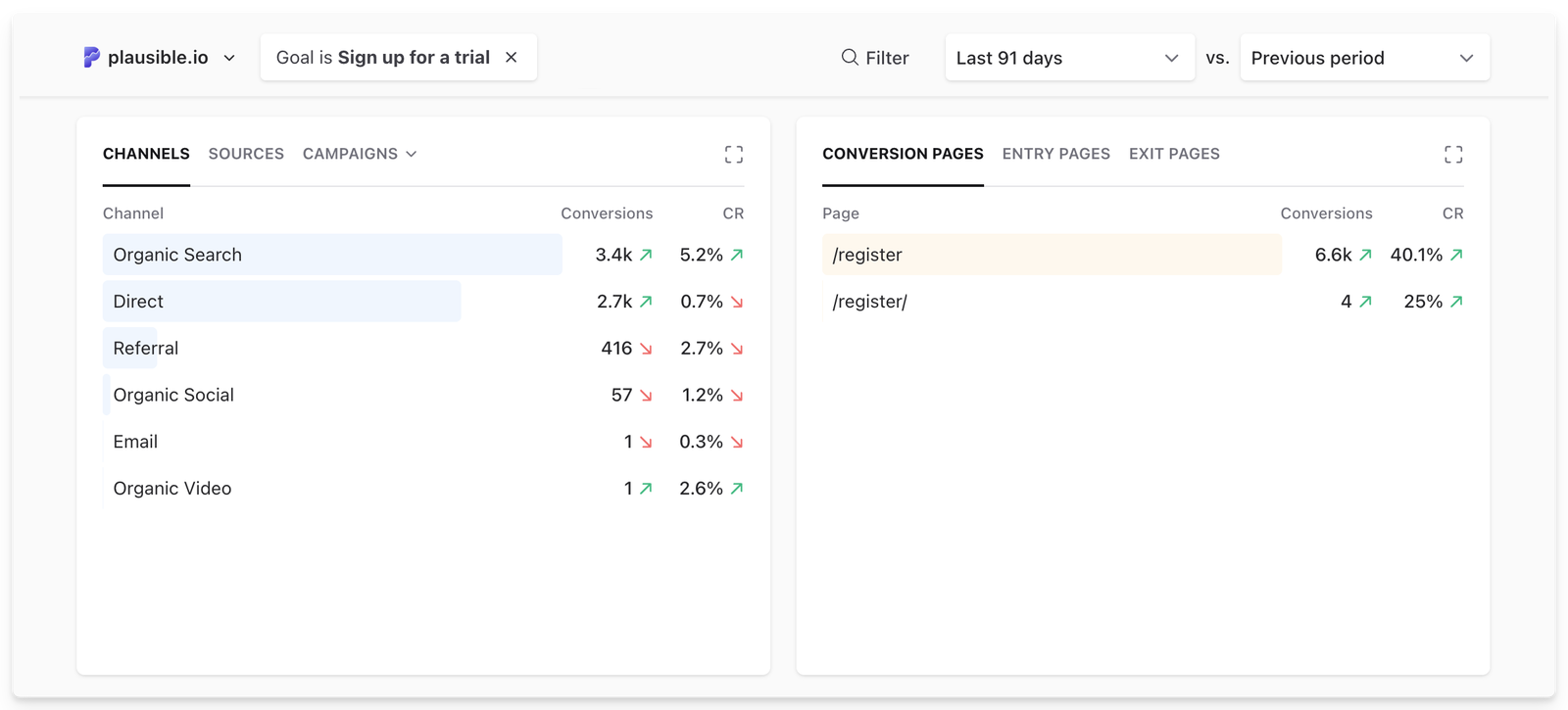
Here you can analyze:
This tells you which channels are capturing new interest and driving immediate action. Use this to answer:
How to use this info:
This is especially useful for paid campaigns, email, and bottom-of-funnel activity.
To understand what creates demand, look at your Entry pages report, while still having the dashboard filtered by the goal in question.
Entry pages show where sessions begin. When you filter by conversions, you can see which landing pages tend to start journeys that result in goal completions.
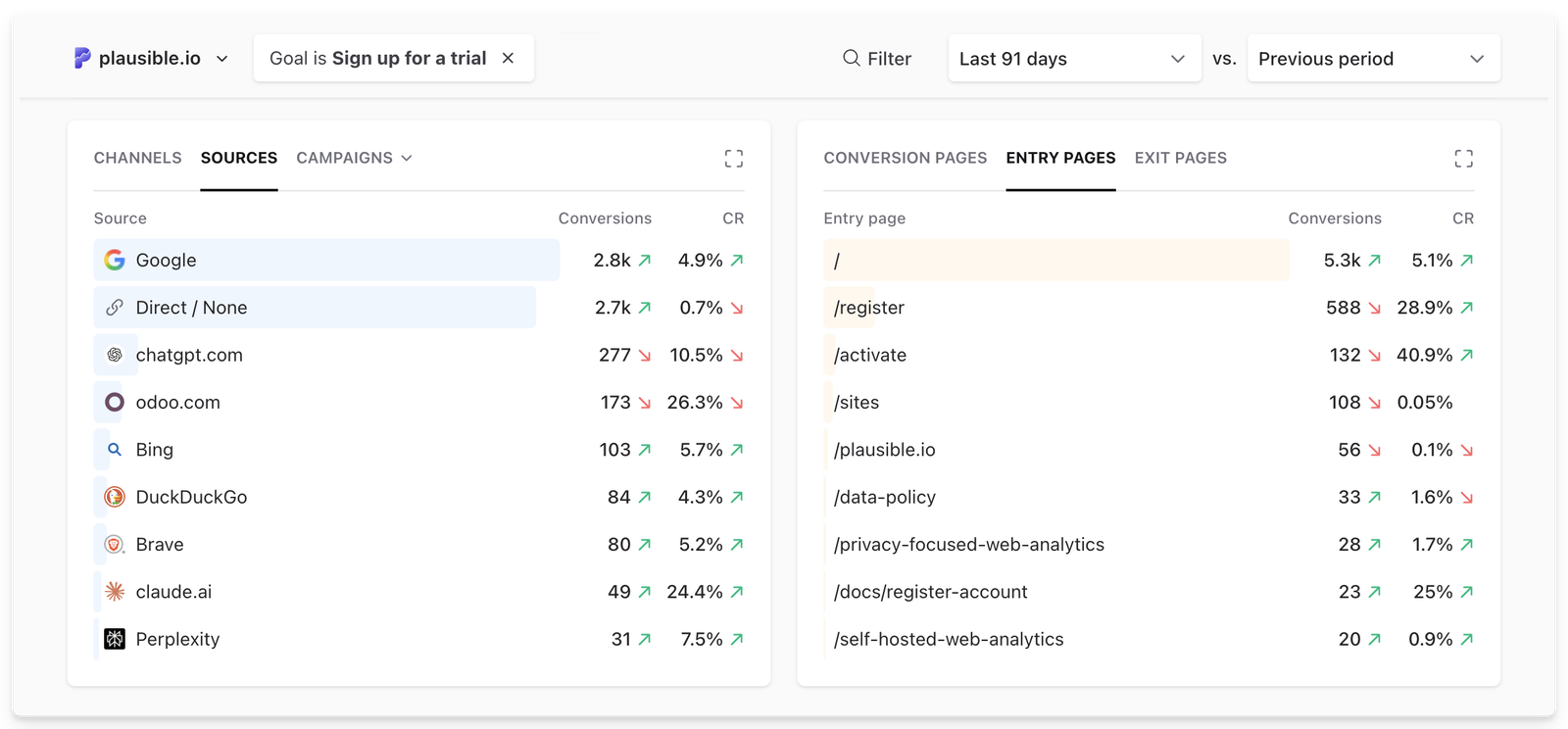
This is your practical first-touch view as you’ll discover:
How this informs decisions:
This is particularly valuable for SEO, content marketing, and awareness campaigns.
P.S. Bonus read: How to analyze top landing pages and exit pages on your website?
UTM tagging is critical for clean campaign attribution. You can standardize parameters such as utm_source, utm_medium, utm_campaign. Use the UTM builder to generate correctly formatted links, or the UTM checker to validate and clean existing ones.
When links are consistently tagged, Plausible lets you break down conversions by campaign.
For this, keep your dashboard filtered by the goal in question, go to: Campaigns tab dropdown → Select from UTM mediums, sources, campaigns, contents, or terms, depending upon the depth/purpose of your analysis.
Now you can compare:
…among absolutely anything you want to track using UTMs.
How this informs decisions:
This layer is often the most actionable because it directly informs where marketing spend should increase or decrease.
Plausible does not reconstruct multi-session journeys, but you can build funnels by stitching together goals to understand if and how many visitors are moving between key steps, what and where the dropoffs are, etc.
For open-ended path analysis, you can also use User Journeys to see what visitors did before or after a conversion. We explain the strategy and examples in our guide to website journey analytics.
Here are some funnel examples:
Then segment funnels by source or campaign.
This helps you identify:
What to do with this info?
This also adds behavioral context to your source-level attribution.
Taken together, this gives you:
Without needing user-level tracking or complex multi-touch modeling.
For teams that require deeper modeling, Plausible data can be exported and layered into broader analytics systems, making it a clean acquisition-level input rather than a closed environment. Check out our APIs, export options, and Looker Studio Connector for this purpose.
Attribution modeling does not have to be complicated to be useful. Many teams make meaningful decisions about budget allocation, content strategy, paid campaigns, and website optimization using the framework given above.
New here? Learn more about us. And start your free trial here (no CC needed).
此内容由惯性聚合(RSS阅读器)自动聚合整理,仅供阅读参考。 原文来自 — 版权归原作者所有。