





Posted by on January 28, 2014

(Credit: Flickr’s Carine06, CC-BY-SA)
Here’s my method of keeping track of stuff to do. Other tools just didn’t work for me. Most to-do list tools make two assumptions, I think:
My work, technology for academics, tends to involve coordinating lots of little projects with lots of different people. At any given moment, there are few tasks “in my court”, and they tend to be small. My primary responsibility is to keep all projects moving, and ensure that projects aren’t held up by a task being with me too long.
So, I ran with the ball in my court / ball in your court metaphor. It’s useful when:
“Projects” here can be very small, and often include very early stage proposals that haven’t formed into anything very concrete.

Trello Tennis in (fictious) action
To start with, the two most important columns:
The goal each day is to move projects from the “my court” column to the “their court” column. I periodically review “my court”, placing the most urgent items at the top. I also review “their court”, checking whether I should follow up or offer assistance.
More columns, that turned out to be useful for me:
Trello works really well for this.
The name of each card consists of both the project name, and a quick summary of my current task (if in my court), or what I’m waiting on if in theirs. Examples:
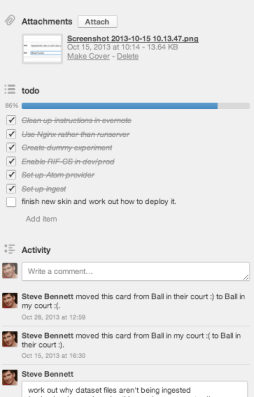
What’s particularly fantastic about using Trello is that each card can also track all the work on that project. Changing the title automatically creates a history trace, or I can add comments to record more information. Need somewhere to record a server name and login details? Use the card’s description field.
You can also use coloured labels to group projects, such as tagging by university in my case.
Of course, each individual project frequently has its own task tracking system: perhaps another Trello board, Github issues, Pivotal Tracker, Google spreadsheets etc. I link to them from the card’s description, ultimately tying together all information systems for all projects under a single roof.
Each day (or whenever):
To make this natural, I order the columns from left to right as follows: Wut, My Court, Blocked, Their Court, All Good, SEP, Archive. Stress is on the left, calm is on the right.
The goal is to get your board to look like this blissful fantasy:
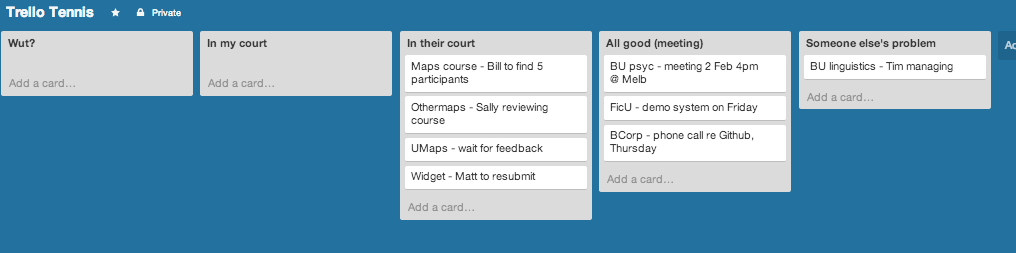
A totally successful day in Trello Tennis land.
These examples are actually tiny compared to (my) reality. By the end of 2013, I had 21 active cards, plus another 10 inactive (SEP and Archive). If you find this technique at all useful, or have any improvements, I’d love to hear about it.
(Added 4 Feb 2014)
Sometimes it gets daunting looking at the huge mounds of work in front of you. Filtering can help cut through the distraction. Two types have worked for me:
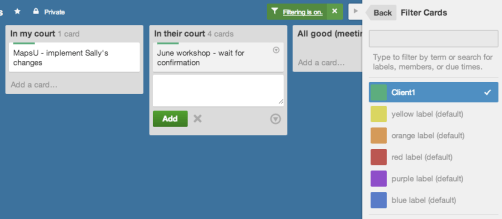
Are you working for a particular client today, and don’t want to see anything related to any other clients? Assign one label per client, then turn on the filter!
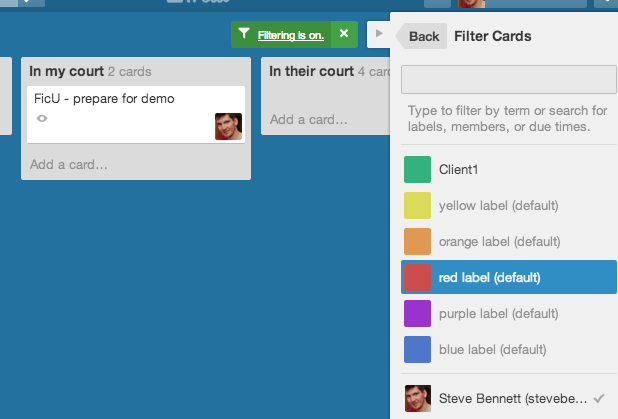 To focus on just one or two tasks that you need to finish, first assign yourself to those cards. Then, filter to only show cards that you’re assigned to. This feature is intended for collaboration, but it works nicely.
此内容由惯性聚合(RSS阅读器)自动聚合整理,仅供阅读参考。 原文来自 — 版权归原作者所有。