惯性聚合 高效追踪和阅读你感兴趣的博客、新闻、科技资讯
阅读原文 在惯性聚合中打开

推荐订阅源

Microsoft Azure Blog
A
Arctic Wolf
Hacker News - Newest:
Hacker News - Newest: "LLM"
T
Threatpost
P
Proofpoint News Feed
cs.CL updates on arXiv.org
cs.AI updates on arXiv.org
www.infosecurity-magazine.com
K
KPMG report finds enterprise disconnect between AI and its ROI | CIO
V
Vulnerabilities – Threatpost
V
V2EX
Webroot Blog
Webroot Blog
OSCHINA 社区最新新闻
OSCHINA 社区最新新闻
P
Privacy & Cybersecurity Law Blog
P
Privacy International News Feed
T
Tor Project blog
P
Proofpoint News Feed
T
Tailwind CSS Blog
C
Cyber Attacks, Cyber Crime and Cyber Security
Recent Commits to openclaw:main
Vercel News
Vercel News
Security Archives - TechRepublic
MongoDB | Blog
MongoDB | Blog
T
Troy Hunt's Blog
Google DeepMind News
NISL@THU
NISL@THU
C
CERT Recently Published Vulnerability Notes
W
WeLiveSecurity
奇客Solidot–传递最新科技情报
奇客Solidot–传递最新科技情报
GbyAI
GbyAI
Y
Y Combinator Blog
T
Threat Research - Cisco Blogs
S
Security Affairs
Google Online Security Blog
S
Securelist
Spread Privacy
Spread Privacy
Recent Announcements
The Register - Security
C
Cybersecurity and Infrastructure Security Agency CISA
爱范儿
爱范儿
H
Help Net Security
Microsoft Security Blog
酷 壳 – CoolShell
酷 壳 – CoolShell
Scott Helme
Scott Helme
The Cloudflare Blog
T
The Blog of Author Tim Ferriss
freeCodeCamp Programming Tutorials: Python, JavaScript, Git & More
钛媒体:引领未来商业与生活新知
钛媒体:引领未来商业与生活新知
B
Blog RSS Feed
AWS News Blog
AWS News Blog

Steve Bennett blogs

Whenever: exploring times and places in film and books Alternative Earth: a procedurally generated map using vector tiles Host your own vector tile server on Glitch Building TinyMap: an itty bitty collaborative mapping tool You might not need PostGIS: streamlined vector tile processing for big map visualisations OpenStreetMap vector tiles: mixing and matching engines, schemas and styles 2015’s proudest moments Your own personal National Map with TerriaJS: no coding and nothing to deploy After the hackathon: 4 classic recipes OpenTrees.org: how to aggregate 373,000 trees from 9 open data sources Cycletour.org: a better map for Australian cycle tours Normalize cross-tabs for Tableau: a free Google Sheets tool 7 reasons to release that government dataset The Data Guru in Residence Web map projections: the bare minimum you need to know Multivariate binary symbol maps with TileMill. The Australian’s menacing editorial Cycletouring and OpenStreetMapping: a beautiful symbiosis Git: what they didn’t tell you One week of Salt: frustrations and reflections. Super lightweight map websites with Github Digital humanities for beginners: get started with the Trove API Trello Tennis Terrain in TileMill: a walkthrough for non-GIS types A TileMill server with all the trimmings Forget trying to remember your servers’ names! Anonymous longitudinal surveys with LimeSurvey Windows red cross errors scam What I learned at e-Research Australasia 2012 A pattern for multi-instrument data harvesting with MyTardis Getting started with Chef on the NeCTAR Research Cloud How OData will solve data sharing and reuse for e-Research 10 things I hate about Git Semantic Google keywords Improving on the “administration rights required” workflow Why is buying stuff from eBay so complicated? Introducing: Cooking for engineers New Gmail feature: auto mailing list management Penny Auctions – a bit of analysis Hello world!
Chromecast in the real world: six casting workflows
steveko · 2014-08-12 · via Steve Bennett blogs

Posted by on August 13, 2014

For such a simple device, Google’s Chromecast has created a surprisingly complex network of technology at my place.

Google says that Chromecast works roughly like this:
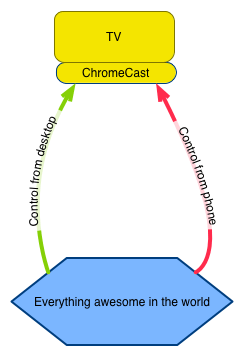
Chromecast Google view

Actually it’s more complicated than that. My setup is about as simple as you can get (no NAS, no existing media servers, no Netflix or Hulu or Foxtel or anything), and it looks like this:
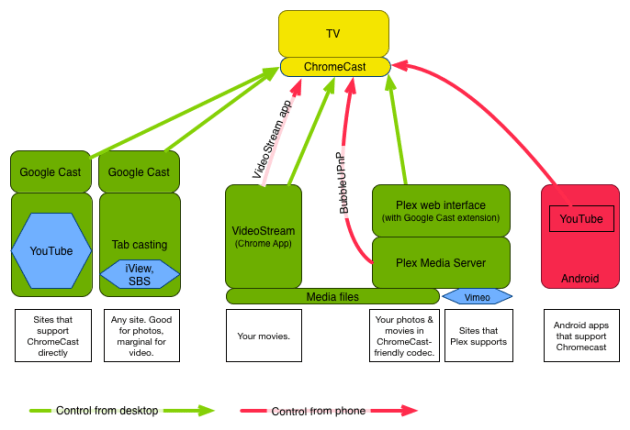
Chromecast in the real world

Chromecast in the real world. Not so simple, really.

Six casting workflows

That is, depending on what exactly I want to watch and how, I have to choose between 6 different workflows:

  1. YouTube? Just go to the YouTube website in Chrome, and click the Chromecast button in the video window. This works really well. Great for music playlists, too.
  2. iView or SBS? Go to the site, and use the Google Cast extension to “TabCast”. This works so-so. It’s great for randomly showing something funny you found on the web, though.
  3. Movies you’ve downloaded? Use the VideoStream Chrome app to load it directly off disk. This works perfectly.
  4. Movies in your Plex library? Use the Plex web interface. For some reason you have to go through http://plex.tv, and the whole experience is a bit complicated. There are some issues with transcoding that I don’t really understand.
  5. Vimeo? Plex to the rescue. Add Vimeo as a channel (a slightly complicated procedure to view your own uploads).
  6. Want to watch something without using your computer? There’s only a couple of “Google Cast ready Android apps” (YouTube is the only one that works well for me), or use BubbleUPnP to access your Plex library.

And I haven’t even mentioned a couple more complications:

My advice? Figure out the smallest number of workflows to do everything you want to do, and get rid of any extraneous apps, servers, websites etc.

Google’s world

Google’s world centres around casting stuff from your phone. If that was all you could do, the Chromecast would suck. There are few apps, a lot of them are very niche (eg, anime or baseball), junk (like this) or just don’t really work (like the Red Bull app, which drops out every few minutes).

Fortunately, third party tools like VideoStream and Plex fill in a lot of the gaps.

But does it work?

The end result is actually great. Compared to having to plug my laptop into the TV, these things are now easy and fun:

  • Put on some background music: go to YouTube, Pandora or GrooveShark, and cast. No more hooking up audio cables.
  • Show a silly video to my partner. Even from the other room. Stuff I previously wouldn’t have bothered with, but it’s so easy – the TV even turns on by itself.
  • Keep watching a video while doing something else. Easy to leave my study, keep watching the same thing while making coffee or something.
  • Show photos: Just go to Google Plus or Flickr, and cast.
