
惯性聚合 高效追踪和阅读你感兴趣的博客、新闻、科技资讯
阅读原文 在惯性聚合中打开

推荐订阅源

奇客Solidot–传递最新科技情报
奇客Solidot–传递最新科技情报
L
LINUX DO - 最新话题
Recorded Future
Recorded Future
月光博客
月光博客
博客园 - 【当耐特】
博客园 - 叶小钗
宝玉的分享
宝玉的分享
量子位
雷峰网
雷峰网
博客园 - 三生石上(FineUI控件)
The Cloudflare Blog
Vercel News
Vercel News
L
LangChain Blog
B
Blog
Y
Y Combinator Blog
爱范儿
爱范儿
GbyAI
GbyAI
S
Security @ Cisco Blogs
T
The Blog of Author Tim Ferriss
A
About on SuperTechFans
博客园 - Franky
P
Palo Alto Networks Blog
Threat Intelligence Blog | Flashpoint
云风的 BLOG
云风的 BLOG
C
Cisco Blogs
Scott Helme
Scott Helme
I
Intezer
T
The Exploit Database - CXSecurity.com
MyScale Blog
MyScale Blog
T
Tor Project blog
D
Darknet – Hacking Tools, Hacker News & Cyber Security
T
Troy Hunt's Blog
N
News and Events Feed by Topic
大猫的无限游戏
大猫的无限游戏
F
Fortinet All Blogs
www.infosecurity-magazine.com
Application and Cybersecurity Blog
Cyber Security Advisories - MS-ISAC
S
Security Affairs
Cyberwarzone
Cyberwarzone
PCI Perspectives
PCI Perspectives
小众软件
小众软件
D
DataBreaches.Net
Exploit-DB.com RSS Feed
Know Your Adversary
Know Your Adversary
Forbes - Security
Forbes - Security
S
Securelist
cs.CV updates on arXiv.org
C
Cyber Attacks, Cyber Crime and Cyber Security
The Last Watchdog
The Last Watchdog

Maggie Appleton

The Dark Forest and Generative AI One Developer, Two Dozen Agents, Zero Alignment Gas Town’s Agent Patterns, Design Bottlenecks, and Vibecoding at Scale January 2026 | Maggie Appleton A Treatise on AI Chatbots Undermining the Enlightenment A Brief History & Ethos of the Digital Garden Vibe Code is Legacy Code May 2025 | Maggie Appleton Home-Cooked Software and Barefoot Developers Statistically, When Will My Baby Be Born? Speculative Calendar Events ChatGPT Would be a Decent Policy Advisor March 2025 | Maggie Appleton The Expanding Dark Forest and Generative AI Humanity's Last Exam Squish Meets Structure Common Misconceptions in AI Undetected AI Exam Answers Unbaited Smidgeons Growing a Human: The First 30 Weeks How to Import Academic Papers from Zotero into Tana December 2024 | Maggie Appleton Aesthetic Command Lines with Hyper, Spaceship, and Oh My Zsh Leaving Elicit July 2024 | Maggie Appleton A Short History of Bi-Directional Links The Pattern Language of Project Xanadu Assumed Audiences Ambient Co-presence On Opening Essays, Conference Talks, and Jam Jars Spinning Worlds, Seasickness, and Dealing with Vestibular Neuritis A Collection of Design Engineers Gathering Structures Daily Notes Pages Historical Trails December 2023 | Maggie Appleton September 2023 | Maggie Appleton Digital Gardening for Non-Technical Folks Language Model Sketchbook, or Why I Hate Chatbots June 2023 | Maggie Appleton Computational Notebooks Folk Interfaces Reverse Outlining with Language Models Command K Bars Spatial Web Browsing A Picture Worth a Thousand Programmes Programmable Notes Programming Portals Teenage Skeuomorphic Desktop Designs Tending Evergreen Notes in Roam Research Growing the Evergreens Why You Own an iPad and Still Can't Draw A Brief Introduction to Digital Anthropology Transclusion and Transcopyright Dreams The Block-Paved Path to Structured Data Empty Pointers and Constellations of AI Metaphors We Web By The Gift Economy Epistemic Disclosure November 2022 | Maggie Appleton Joining Ought July 2022 | Maggie Appleton The Linear Oppression of Note-taking Apps Paleolithic Nostalgia Interoperable Personal Libraries and Ad Hoc Reading Groups The Finest Narrative Non-Fiction Essays Algorithmic Transparency October 2021 | Maggie Appleton The Cultural Anthropology of React August 2021 | Maggie Appleton Natureculture, Moral Purity, and Cultural Boundaries The Echo & Narcissus Writing Club Pink, Soft, Glittering Developers Fetishism & Mechanical Keyboards Making Programming Visual, Spatial, and Learnable Organic, Local, Artisan Data Storage Positioning Elements & Scrollytelling in CSS Painting Roam Research with Custom CSS A Digital Anthropology Reading List The Eponymous Laws of Programming A History of Cyborgs Neologisms GreenSock Animations with React Hooks The Bare Essentials of Greensock September 2020 | Maggie Appleton Illustrating Gatsby's Key Concepts Problematic Proteins New Harvest & Illustrating the Cultivated Meat Podcast Synecdoche: Drawing the Part for the Whole A Meta-Tour of This Site Douglas, Dirt, and Matter Out of Place The Knowledge Hydrant A Naïve Exploration of Computer-Supported Collaborative Learning Silent Synchronous Reading Sessions What the Fork is React Suspense? Visually Workshopping the AWS Cloud Are Data Unions the Future of Data? Pattern Languages in Programming and Interface Design A Metaphorical Reading Collection
Plebeian Programming with Keyboard Maestro
2021-08-19 · via Maggie Appleton

There are some of us who believe digital life should be lived through a series of keyboard shortcuts. There is nothing quite as satisfying as making one quick keyboard gesture and watching a whole cascade of events unfold before you. This is the definition of programmatic magic.

I’m not just talking about vanilla hotkeys like Cmd + S or Cmd + Q that save a file or quit an application.

Any hotkey that triggers a single action like copying text to your clipboard is equally capable of performing multiple actions in quick succession; opening a specific set of files, launching multiple applications, pasting a pre-written string of text, playing a particular song in Spotify, starting a countdown timer, and arranging your desktop windows just the way you want them.

Anything you can manually do on your machine with your two hands can be wrapped up into a programmatic sequence and performed by the machine without you touching it.

These sequences are called macros and you don’t need to know how to programme to create them. Programmatic plebs (like me) can build powerful automations without needing to write a bunch of BASH commands in the Terminal. Programmers traditionally write macro scripts in a language like Bash or Python using the Terminal – an application you already have on your machine that allows you to control your computer with text-based commands.

The exact kind of programming gibberish you will not be writing

The exact kind of programming gibberish you will not be writing

You do need a macro application with a user-friendly interface though. IMHO Keyboard Maestro is one of the best designed and easiest to use options. Now is the time to diclose that Keyboard Maestro have not paid, bribed, or manipulated me to write this post, and the link above is not an affiliate link. Doing this is all my choice as a KM enthusiast. It’s a Mac app (sorry Windows users) that allows you to visually compose small sequences of actions that you can easily trigger at any time.
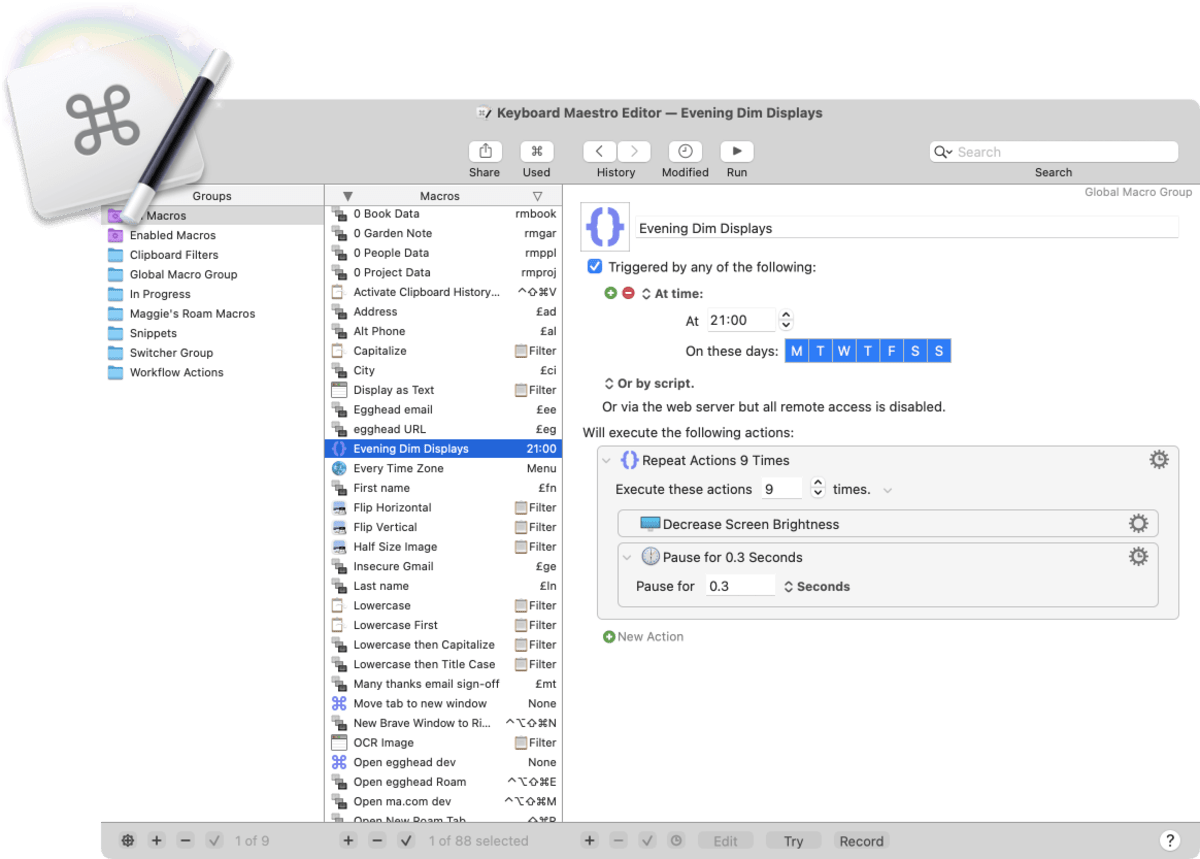
The Keyboard Maestro main window

The Keyboard Maestro main window

There are alternative (Windows-compatible) macro applications that can do similar things: AutoHotKey , Automator , and Macro Recorder . However, I haven’t personally used these and will only be singing the praises of Keyboard Maestro from here on out.

This isn’t going to be a beginner’s guide to using Keyboard Maestro (hereafter known as KM), so I suggest you take a look at this YouTube playlist and this TutsPlus article series if that’s what you need. If you want to get extra intense about learning KM, David Sparks has created a very comprehensive course that covers everything under the macro sun. There is also an official wiki you can reference, but it throws you into the technical weeds a lot.

Rather than giving you I’m going to jump into the ways I use KM and the particular macros I find useful on a daily basis. By seeing some very tangible examples of what KM can do, perhaps you’ll be intruiged and get ideas for what you might want to automate.

Workflow Macros

One of the most basic groups of macros I rely on are what I call workflow macros.

Coming Soon

Feel free to bug me on Bluesky to finish writing this.

Triggers can of course be hotkeys, but you can also use certain times of day, trackpad gestures, or typed strings of text as triggers. You can also use computational events as triggers: your machine waking up, a certain application launching, or connecting to a certain wifi network.

These actions can do anything you can do through manual interaction on your machine – type text, copy/paste from the clipboard, open menus, click buttons, launch applications, navigate to websites. It’s a programmatic version of you that you write instructions for ahead of time.