








My calendar fails me in many ways, but the most egregious is its failure to support speculative events.
Every week, I engage in an elaborate scheduling game with multiple people. I do this with friends I need to get coffee with, professional contacts trying to set up meetings, and new acquaintances who want to catch a weekday breakfast.
We email, WhatsApp or DM each other very specific lists of options.
8-10:30 a.m. on Tuesday, Weds, and Friday next week?
Or 2-3:30 p.m. next next Thursday?
Or 11 a.m. on February 20th?
Once this message is sent, these time blocks need to be marked on my calendar somehow. One naïve, hacky solution is to add them as normal events, but with a ? at the end. Coffee with Paul?
But real calendar events have real repercussions: my co-workers can’t book calls with me at times when I have blocks on my calendar. My watch buzzes me 10 minutes before each one. My Mac pops a little notification reminder in the corner of my screen. Receiving notifications for not-real speculative events is immensely frustrating.

So I don’t want to add them as real events. Because they are not real events. They are speculative possibilities of events. The majority of them won’t be filled, and having both speculative and real events looking and behaving like the same type of thing is messy and confusing. I can’t glance at my calendar to get a quick read on how busy my day or week is.
But I also need to remember who I have promised time slots to! I am often telling multiple people I’m free 8-10:30 a.m. on Tuesday next week. What if they all say yes to that time?
What I need is a new type of calendar primitive: the speculative event . Speculative events may or may not happen. So they show up tentatively. Perhaps with a dashed border and some light opacity.

A very basic implementation of this idea in Mac’s native calendar could be adding a little “unconfirmed” checkbox in the editing window:
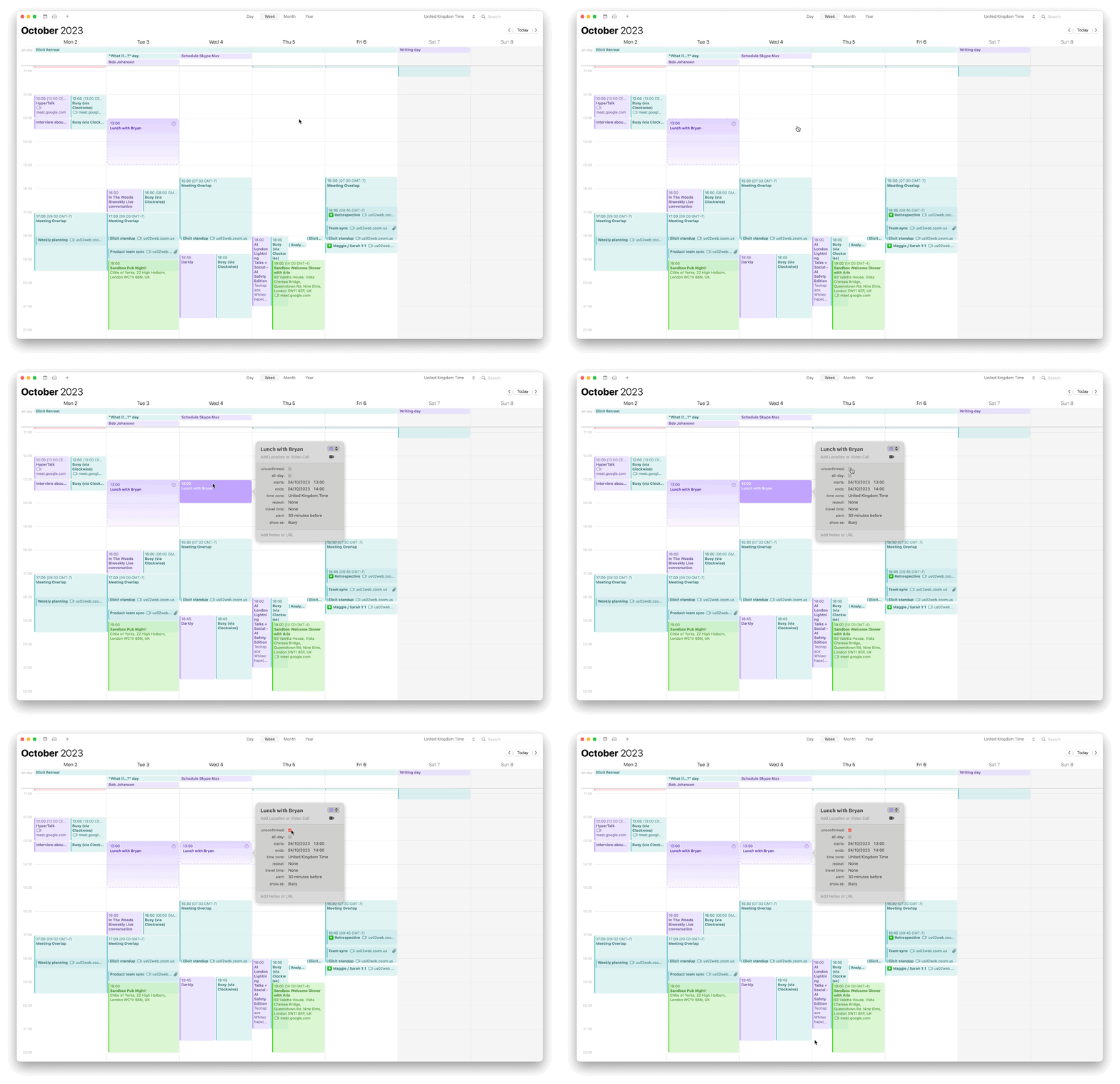
This is not the ideal design solution, but it’s a low-effort starting point. By visually distinguishing these events and turning off their notifications, we’ve solved most of the problem.
Without this, I shall have to continue doing what I do now: sending people lists of times that I may or may not be free for, forgettings I’ve promised those times, booking other events and meetings into those times, and then having to play four extra rounds of oh-sorry-I’m-actually-busy-email-scheduling-ping-pong.
Some of the fancy new calendar startups like Cron and Amie are trying to solve this problem by letting you send someone a link with your available times.
The recipient can then select which slots also work for them, and the event is added to your calendar. This is perfect for professional meetings, but feels a bit impersonal and automated for some contexts. When I’m trying to coordinate dinner with family or a close friend over WhatsApp, sending an automated scheduling link makes me look and feel like an intolerable tech bro.
Maybe I don’t want a perfectly optimised system. Maybe I just want a bit more flexibility in marking up my calendar.
Just as I was finishing this note, I spotted the infamous 37Signals / Basecamp / HEY team announced they’ve added a new calendar view to their email service. And it includes a “maybe” event type!
It works exactly as I described in my concept above. The event displays with a light, monochrome patterned background and doesn’t have notifications. Good to see this out in a real product, although I’m not about to move from my beautiful system-level MacOS calendar to something as quirky as HEY.
End Notes
I’ve had this frustration for a long time. But only had the impulse to mock up a tangible solution after reading Julian Lehr’s beautiful reflection on Multi-layered Calendars .
Seeing others beautifully present ideas always compels me to contribute my own. Thanks to Julian for making the effort, and everyone else consistently publishing small, thoughtful, well-crafted ideas in public.