






Nearly every computer programme created in the last 68 years was made by typing linear characters into a text editor. ASCII symbols arranged from left to right, top to bottom, are the universal medium of code.

Every language from FORTRAN to Python to Haskell works this way.
It’s then unsurprising every major IDE IDE stands for intergrated development environment. Essentially a souped up text editor with lots of helpful functionality for programmers baked in. and code editor is designed to optimise working in text; VS Code, Vim, PyCharm, WebStorm, xCode, Atom, Sublime Text are all text-first environments.

This might seem so obvious it’s not worth pointing out. Textual programming is the water we swim in. We express computation logic in written text because that must naturally and obviously the best medium for it. At least, this is what we tell ourselves from the vantage point of people who have only ever lived in a textual programming world.
What, exactly, might be the alternative to programming in pure text? Am I suggesting we interpretive dance our way through a function that prints out the Fibonacci sequence?
Not exactly. Although I would like to see someone try.
What I want to explore here is the relative lack of visuals, graphics, and spatial design in our current programming environments. While we’ve crafted widely accessible graphical user interfaces (GUIs) for everyone else, programmers remain in the land of typed commands. As the mediators between meatspace and binary logic, we don’t get to click buttons, drag sliders, pan canvases, or select options from dropdown menus while we build. Instead, we type.
There are plenty of good reasons for this – both historical and logical – that we’ll get into. Understanding how we ended up in this purely textual place is a necessary first step if we want to question it.
Inventing the End User
In the early 1980’s a wide new divide opened up. With the rise of personal computing and the arrival of accessible machines like the Macintosh, we created a clear distinction between “programmers” and “end users.” Before that point, the people who designed and wrote computer programmes were primarily the same people who used computer programmes. You couldn’t do much of one without the other.
And all of these people were exclusively using text to talk to their machines. Because it was the only show in town.
The aesthetic of bright green blocky text on black terminals isn’t just a fun, retro media trope – our pre-GUI interfaces geuinely looked like this.
![[object Object]](https://res.cloudinary.com/dxj9qr5gj/image/upload/c_scale,f_auto,q_auto:good,w_1200/v1631569504/maggieappleton.com/notes/learnable-programming/oldinterfaces_shrink_ul4wep.png)
Before the 1980’s showed up with its neon leg warmers and big hair, most computers didn’t even have screens. You blindly typed commands onto a keyboard that punched holes into paper.
Draft in Progress
The quality of writing below this point is haphazard, disjointed, and nonsensical. It's probably a good idea to come back later.
Many, many programmers will argue programming in linear text is simply better. And they’re not entirely wrong. Textual notation is an extremely efficient way to condense meaning. It’s quick to write and allows us to create precise abstractions other programmers can interpret and work with.
By graphical I mean any arrangement of shapes (square, circle, irregular nonagon, what have you) in space that aren’t written words.
By spatial I mean the way we use our understanding of being a body with a front, back, left, right, up, and down, to understand the world around us.
Humans are exceptionally skilled at spatial thinking.
Using visual representations like maps, diagrams, and shapes in 2D / 3D space to communicate meaning is something we’ve been doing far longer than we’ve been typing text into screens. About 43,832 years longer. Taking the 43,900 y.a. hunting scenes found in Sulawesi, Indonesia as a conservative marker of when we first started doing pictorial storytelling on surfaces around us Given all that time, humans are much better at reasoning using graphical and spatial mappings than they are with linear abstract text.
I am certainly not to first to find it odd. People have been harping on about the limitations of textual programming since the beginning of programming. These complainers tend to gather under the umbrella of Visual Programming – a field that encompasses so many efforts and projects it’s hard to figure out what it wants.
What is Visual Programming?
Good question.
The name itself is a bit of a misnomer since anything we see with our eyes technically counts as visual. Which would certainly include linear text. When people use the term they are usually referring to some kind of spatial or graphical programming environment.
Bret Victor coined the term Learnable Programming in his canonical essay lamenting the current state of programming education. Bret has a few concerns with the way most of us learn to code. Mainly that the learning environments we drop people into are poorly designed.
These environments tend to look something like this:
Interfaces from Repl.it, Codesandbox, freeCodeCamp, and Khan Academy
They’re your standard column-based “live coding” interfaces popular across the industry. You write code into one section, and hopefully get the output you expected in another. Syntax is abstracted away from the elements it affects.
Programming into the Void
It’s easy to see why these linear, text-based interfaces seem like the best approach. They look identical to the standard interfaces the whole development industry uses to programme.
We write code into an isolated text editor. If you type the correct sequence of words and symbols into the editor, the correct series of events happens somewhere out of view.
We start this process in a context that looks something like this…


…and get the output in a separate browser window. God only know what happened in the middle.
Functions ran in an some unseen JavaScript engine, interface elements drew themselves onto the canvas, and somewhere a value changed in a distant database.
We’re only shown the end result. To see anything happening in the middle, we have to console.log out data at each step of the way. Or dig into dense developer panels and debuggers. The industry has accepted flying blind as standard operating procedure.
Raising the Programming Bar
We’re training people in the same kind of environment they’ll be working in professionally. In the just-get-a-job-mindset that’s an excellent approach. But Bret isn’t talking about the ideal way to learn programming in the short-term, bootcampy world view. When he talks about these environments as inadequate, he’s referencing a much larger paradigm shift around how we should design human-computer interfaces.
He’s pointing out that the standard text-based, disembodied, non-graphical interfaces we all put up with are unintuitive to humans who live in a highly visual, spatial, embodied world. While most of our modern user interfaces have graduated to a graphical, 3D space-based system, programming is staunchly attached to the linear text paradigm.
There’s good reason for this. While many people have tried to develop visual programming languages , they’ve largely failed to gain traction. There’s lots of well-reasoned arguments explaining why it’s so difficult to design visual systems complex and extensible enough to programme in, so I won’t repeat them here. The fact is that our current visual languages aren’t sophisticated enough to do the job, and we’re a long way from any system that could.
Visual Programming for Learning
While visual programming isn’t great for the scale of complexity professional programmers deal with, it’s ideal for people who are learning to code. When we simply need to explain what’s happening under the hood, graphical representations are the best way to help people build clear mental models.
Computer history legends like Alan Kay and Seymour Paypert were the earliest champions of using intuitive visuals to teach programming. Paypert developed a language called Logo in the late 1960’s where you would type commands to direct a small green turtle around the screen, leaving a visible trail behind it. Through simple instructions like go(20) and turn(90) and for i in range(12): go(20) turn(30) you could draw elaborate graphic patterns. It became widely used in education and a whole generation began their programming lives in Logo.

My own earliest memory of programming involved directing one of these small green amphibians around in circles. If you want a little throwback, you can play with a live Turtle environment at Turtle Academy
The modern manifestation of Logo is MIT’s Scratch learning platform. It expanded the character range beyond just turtles, offering everything from llamas to dancing starfish. It also gives you the syntax as drag-n-drop blocks which visually distinguish variables from loops, logic operations, events, and motion commands.
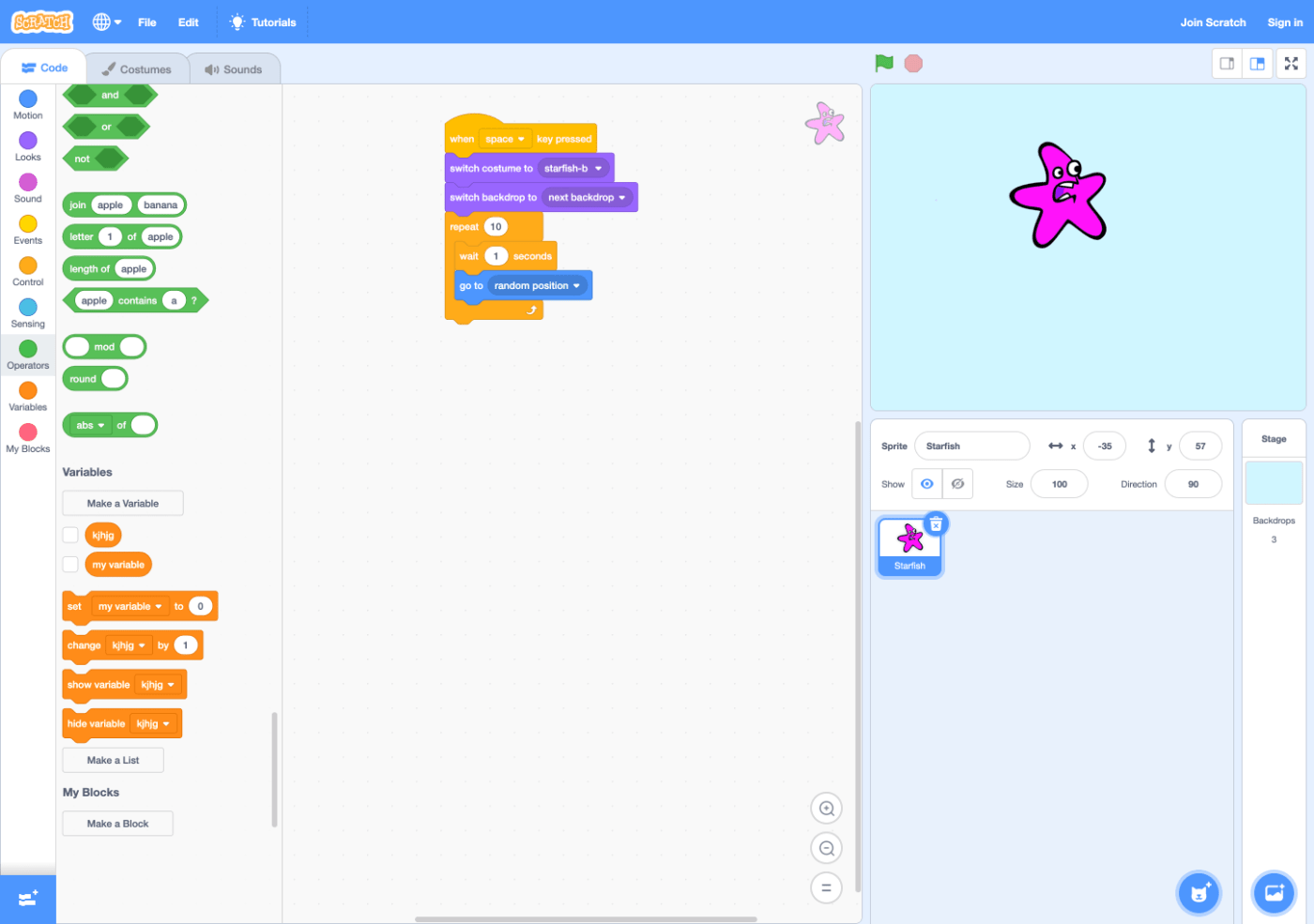
If we look past the campy, child-friendly aesthetics of Scratch, it’s hard to argue this kind of visual interface isn’t helpful. There is no need to memorise the syntax, it’s easy to browse through the available commands, and the physical shape and color of each command limits makes clear where you can and can’t put it. Hovering over operations shows you whether they’re true or false and variables reveal their current value.
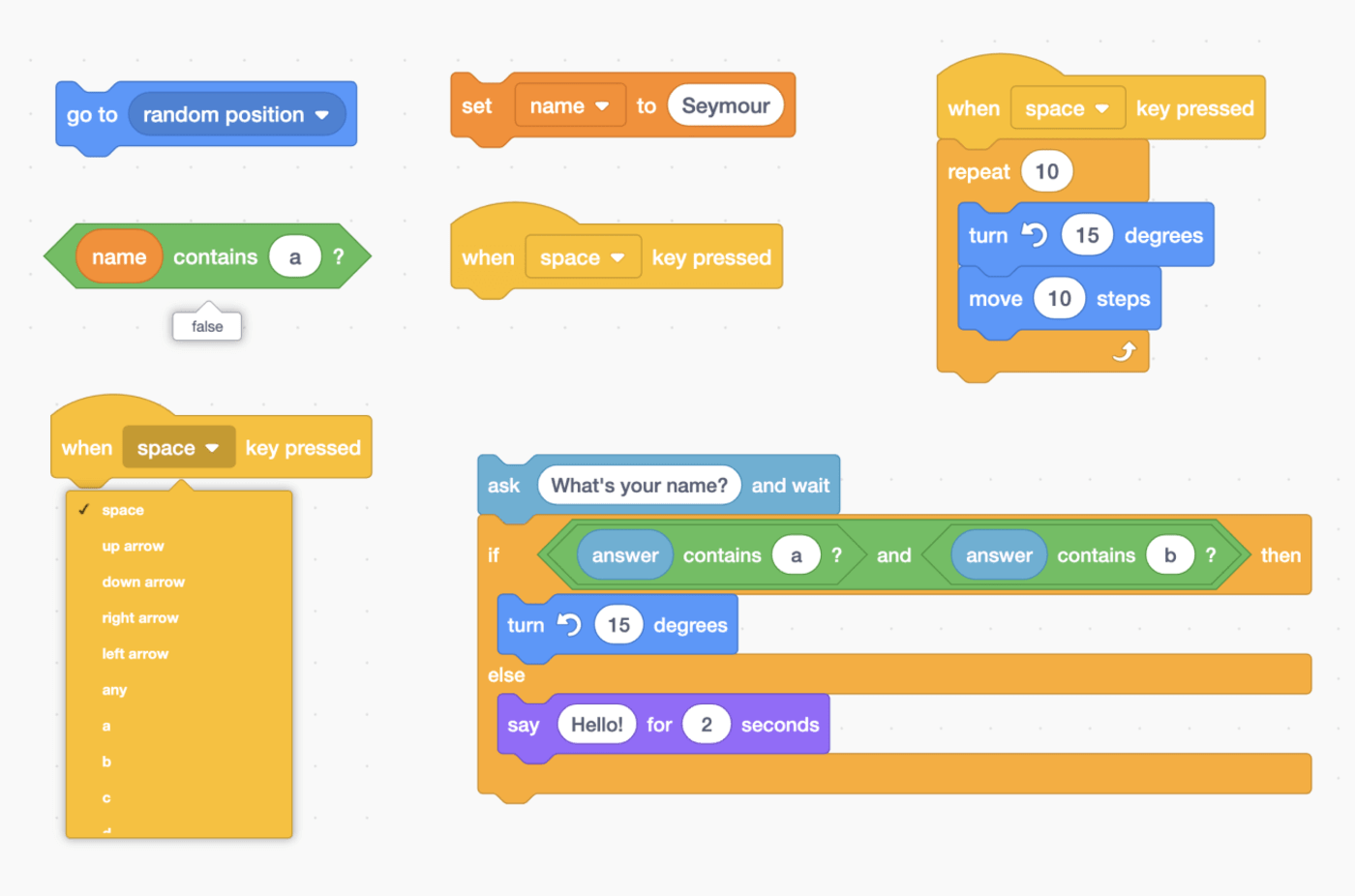
I could wax lyrical about the genius of this approach for paragraphs but I’ll spare you. The autocomplete , syntax highlighting, and linter systems in modern IDEs IDE stands for integrated development environment. These are pimped out code editors that offer programmers a buffet a helpful tools like debuggers, git logs, and advanced search functionality. VSCode, WebStorm, and XCode are all popular IDEs get us close to this, but offer just enough freedom to still hang ourselves sometimes. You also need to know IDEs exist in the first place, and then learn how to setup and effectively use one; a heady challenge in itself. Many beginners flail around in blank, unresponsive code files with no autocompletion, syntax snippets, or linters to assist them until someone lets them in on the industry secret (speaking from personal experience here).
Principles of Learnable Programming
Let’s circle back to Bret Victor and his concept of learnable programming. Bret outlined a set of principles he believed all programming environments should follow if they want their learners to make any headway. He argues a good environment should allow learners to:
- Read the vocabulary of a language by making clear what each keyword and function does
- Follow the flow of what happens at each stage in executing a programme
- See the state as the programme changes variables over time
- Create by reacting to how the programme behaves
- Create by abstracting from the simple to the complex
Most of these are explicitly visual. We need to make what’s happening in the programme readable through visual representations of each syntax element, variable, and change of state over time. As Bret puts it:
“People understand what they can see. If a programmer cannot see what a program is doing, she can’t understand it.”
I won’t expand on these too much as Bret elaborates on them in the original piece and provides plenty of tangible examples of how they might look in an interface. These principles amount to a kind of Pattern Language
Pattern Languages in Programming and Interface Design
Notes on pattern languages and Christopher Alexander's legacy on software programming - they’re a set of design rules that loosely define how a system should work, rather than a strict specification or implementation.Since Bret wrote his piece in 201214ya , it’s recieved plenty of buzz and cultish admiration (deservedly, IMHO). But I haven’t seen it fully applied in any live learning platforms.
The world of programming education has certainly stepped up its visual game over the last decade. It’s no longer just two column, text-based execution contexts. We’re now swimming in interactive visual environments and gamified educational platforms.
I began researching the field to see how many of them were putting Bret’s principles into practice. The examples I looked at ranged from full-on illustrated games to lightly animated sequences of text. As I explored, I started to notice design patterns beyond the principles Bret outlined.
While Bret defined a set of ideals for a hypothetical learning platform, I became more interested in finding patterns in what already exists. While we’re a long way from achieving the ‘ideal’ system, there’s plenty of good design happening here and now.