


Assumed Audience
Active users of Roam Research interested in learning new techniques and workflows that will help them connect and organise their ideas
Just like a good seventeenth-century English garden, this Digital Garden
A Brief History & Ethos of the Digital Garden
A newly revived philosophy for publishing personal knowledge on the web has two sides to it – the private and the public. Everything I post here first sprouts in my Roam Research garden. If you have never heard of Roam, first stop by Anne-Laure LeCunff’s articles on Roam for Metacognition , and the more hands-on The Beginner’s Guide to Roam . Otherwise, the rest of this post will be completely bewildering. While many digital gardeners choose to make their entire notes database public, I’m a bit more reserved. The notes and thoughts I post here are closer to in-progress, informal essays. Lightly edited collections of ideas instead of the raw words that come to me as I parse through books, papers, podcasts, and subconscious thoughts.Roam is where my unfiltered and unshaped thinking happens. It acts as a place I can externalise my thoughts to see what I think, clarify those thoughts, and connect them together.
There are many names for systems like this; second brains
Building a Second Brain: The Illustrated Notes
Illustrated notes on the Building A Second Brain course , tools for thought , or personal knowledge management practices. Perhaps “intentional notetaking” sufficiently captures it.My approach is heavily influenced by the Zettelkasten system; a method that focuses on constructing a web of declarative, connected notes that act as building blocks for creative output. If you are new to the idea of Zettelkasten, I strongly recommend you read the introductory material . Understanding this approach to knowledge work is far more profound and transformative than any app will ever be. Sonke Ahren’s How to Take Smart Notes book, as well as Andy Matuschak ’s Evergreen Notes approach are both great introductions to the Zettelkasten ethos. I’m particularly taken with Andy’s interpretation of it and illustrated a summary of the evergreen notes system in Growing the Evergreens
Growing the Evergreens
Illustrated notes on the concept of 'Evergreen notes' and how to write them .This TLDR is you focus on writing atomic, declarative notes in your own words. The titles of these “Evergreen” or “Zettel” notes are statements; things you believe based on what you’ve read and experienced in the world. Things like “Naming is the hardest part of programming”, or “Fitness culture has replaced religion in modern society”. You follow this up with a paragraph or two explaining the statement and any literary references that led you to that belief.

You then combine these Evergreen notes into sequences. Each note can belong to multiple lines of thought. Connecting them together easily allows you to create outlines for articles, papers, or other forms of knowledge work. By using this core collection of beliefs as a starting point to build arguments and logical conclusions, you’re never faced with a blank page. Realisations emerge from the bottom up.

Evergreens / Zettelkasten and Roam Research
There’s plenty of hype and chatter about Zettelkasten systems in the Roam community. However, I haven’t seen many walkthroughs of well-developed databases filled with Zettels. Two notable exceptions to this are Joel Chan and Beau Haan , both of whom have very thoughtfully mapped the qualities of a Zettelkasten into a Roam system.
Most other tutorials lack practical examples outside the realm of productivity and note-taking. They fail to show what a collection of real Zettels looks like, how they emerge from research, and how they connect to lead to meaningful output.
I’m sharing my system here to put one more tangible example out into the world. I’ve been working with Zettels in Roam for over a year and have 150+ of them written Which is still a meagre beginner pile compared to the 90,000 Niklas Luhmann wrote over the course of his career. #ZettelGoals . They have helped me clarify my beliefs, synthesise my understanding of other people’s work, see connections across many different texts, spot holes in my arguments, and guided my research. They feed into my digital garden notes, essays, and conference talks. While I am certainly not a decorated academic or prominent researcher, they serve my plebian needs as an everyday knowledge worker.
My system is not an ideal or universal template. It certainly has flaws I’m oblivious to and will learn over time. If you notice potential flaws, I would love to hear your thoughts only if you’ve been working in a Zettelkasten for 6+ months and creating public-facing work with it. It may not fit what you want and need from a system. But taken with a grain of salt, this post may give you ideas for your own Roam-based Zettelkasten.
A tour through the Evergreens
The easiest way to show you this system is to walk you through it. I’ve recorded a quick video tour here, but you can also find the written version below.
Anatomy of an Evergreen Note
Zettels in my system are called Evergreens. Evergreens each have their own page. Their titles begin with the ✱ symbol and make a declarative statement – a single sentence that captures the main thesis.
The ✱ symbol I paste this in with a keyboard shortcut. You can set this up with any text expander app like TextExpander or Alfred allows me to quickly search my database for Evergreens using the navigation bar and immediately have my results filtered for only Evergreens

The primary links to these notes are all kept on a single page called (appropriately) Evergreens. They’re roughly grouped into large themes that my work centres around; design, embodied cognition, visual explanations, cultural anthropology, technology, economics, education, etc.

The order of the notes isn’t critically important, but I generally try to arrange them as threads of an ongoing conversation. Each new Evergreen note continues or builds off a train of thought already emerging on the page.
The numbers to the right of each Evergreen are block references – they count the number of times I’ve connected that Evergreen note to another one. I’ll expand on how that works a bit later on.
Inside each of these Evergreens, I add the “Evergreens” tag as a top-level reference. This makes it possible to search Evergreens with queries elsewhere in my database. Under that, I expand on the main thesis in 2-3 paragraphs. I then have sections for Literature Notes, Fleeting Notes, related tags, and Branches.
Here are two examples of what a fully fleshed Evergreen looks like in my system:


Seeing these hopefully gives you a more tangible understanding of what Evergreens look like. Let’s break down each section in more detail:
Literature notes link to any books or articles that led me to this belief or realisation. I keep book notes on their own page while articles, podcasts, and video lecture notes live on daily notes pages. I add either the page reference or the block reference to each literature item, then nest block references to specific relevant notes under it. This allows me to see where I first stumbled upon the idea, and open up a full set of notes on the text if I want to find connected ideas. This is usually where Evergreens begin; I come across an idea in something I’m reading or researching that resonates.
Fleeting notes are where I put my loose and scattered thoughts on the topic. They’re the scratchpad area where I try to figure out what the Evergreen is about, phrase the idea in different ways, and add examples of where I see the principle applied in real life. These are written alongside literature notes; they’re my immediate reactions to the idea that help me figure out why I find it interesting, expand on it, and phrase it in my own words.
The Related to section is where I add any topic tags. This is useful for querying your notes later on. For example, if I want to find evergreens related to Infrasturcture or Gender Norms while I’m writing an essay, later on, I can construct a query for ‘Evergreens’ + ‘Gender Norms’ and find what I need.
Branches are what connect different Evergreen notes together. These are block references from the main Evergreens page. To create these, I find Evergreen notes that are related to the note I’m currently creating. I then copy the block reference that holds the Evergreen on the main page and paste it under Branches.

This might seem odd to do. Why create a block reference instead of just putting a link to the Evergreen page in?
This trick creates a different type of link to a page reference. It makes it easier to see chains of related Evergreens. If we now go to our Evergreens page and click on the number next to each Evergreen note, it opens up a condensed view of all the notes I think are related to this one:

Arranging Evergreens in this format allows us to build multiple chains of conversation between notes, and quickly reference them when we’re trying to outline own our essays, talks, or original creations.
Working in a Constantly Evolving System
I started writing this post back in March of 20206ya after I did a tour of my Roam database with Rob Haisfield . Rob has been hosting a series on Youtube where Roamers walk through their databases showing all the ways they’ve adapted the system to their particular needs. These are essentially a COVID-friendly version of MTV Cribs for personal knowledge management nerds. Conspicuous consumption in the age of sense-making knowledge work.
Here’s the original video tour:
My system has changed significantly since I did this walkthrough tour, but it covers a lot of the same concepts I outlined above. My philosophies haven’t changed, only my implementation methods.
I mention in the video that I expect my Roam system to evolve over time. I still think that’s true.
Thanks to the thriving #roamcult community, building and tending my Roam space has become a glorious exercise in knowledge management, experimental workflows, and collective problem-solving.
There is no one way to use Roam. Seeing the wide diversity of systems Roamers build is the whole point. It’s a grand communal experiment.
Page Prefixes
I have a handful of page prefixes that help me distinguish between page types. I use Roam’s namespaces feature for these which allows me to prefix pages with full words, but collapse these into shorter letters:
- Books/
- Courses/
- Projects/
- ✱ for Evergreen notes
- ⍜ for research questions
- ⌆ for speculative outlines of original creations
- ➽ for original creations themselves – drafts that are/will be public at some point. Essays, digital garden notes , conference talks, video tutorials, and livestream/podcast outlines all fall under this umbrella
These are handy for quickly searching for a certain type of note - the prefix lets you quickly scan through all your books/projects/Evergreen from just the inline search system
It also means you can create multiple pages with the same title, but of different types.
For example, Book/ Meat Planet and ➽ Meat Planet are two different pages in my database. One is my notes on the book Meat Planet , and the second is a planning and draft-writing space for an illustrated essay I made that took what I learned from the book and expanded it into an original creation.
Keyboard Maestro
Keyboard Maestro is the salt to my digital kitchen. Combining it with anything makes the original better. This holds true for Roam.
It’s an app that helps you write macros - tiny automated sequences of events on your machine – within a pleasantly visual interface.

This includes opening applications, typing text, clicking buttons, rearranging windows, etc.
Within the context of Roam, I find it handy for three things:
1. Capturing Links
Whenever I find an article, academic paper, podcast, or video I want to save, I’m able to hit a specific hotkey that snaps up the page title and URL, then formats it into a Roam-friendly markdown link.

I also have it set to auto-magically add specific tags to the end based on the type of link. So Ctrl + A tags it with #Article, and Ctrl + V tags it with #Video, etc.
2. Auto-Opening Windows
I have two hotkeys set up that make opening Roam frictionless. One opens it as a new window, and another opens it as a new tab to the right.

3. Templating
To help keep my database consistent, I have a set of pre-written templates I can pop into different kinds of pages - daily notes, books, projects, evergreen notes, etc.
These add sets of metadata into the front that make it easy for me to query pages later on.
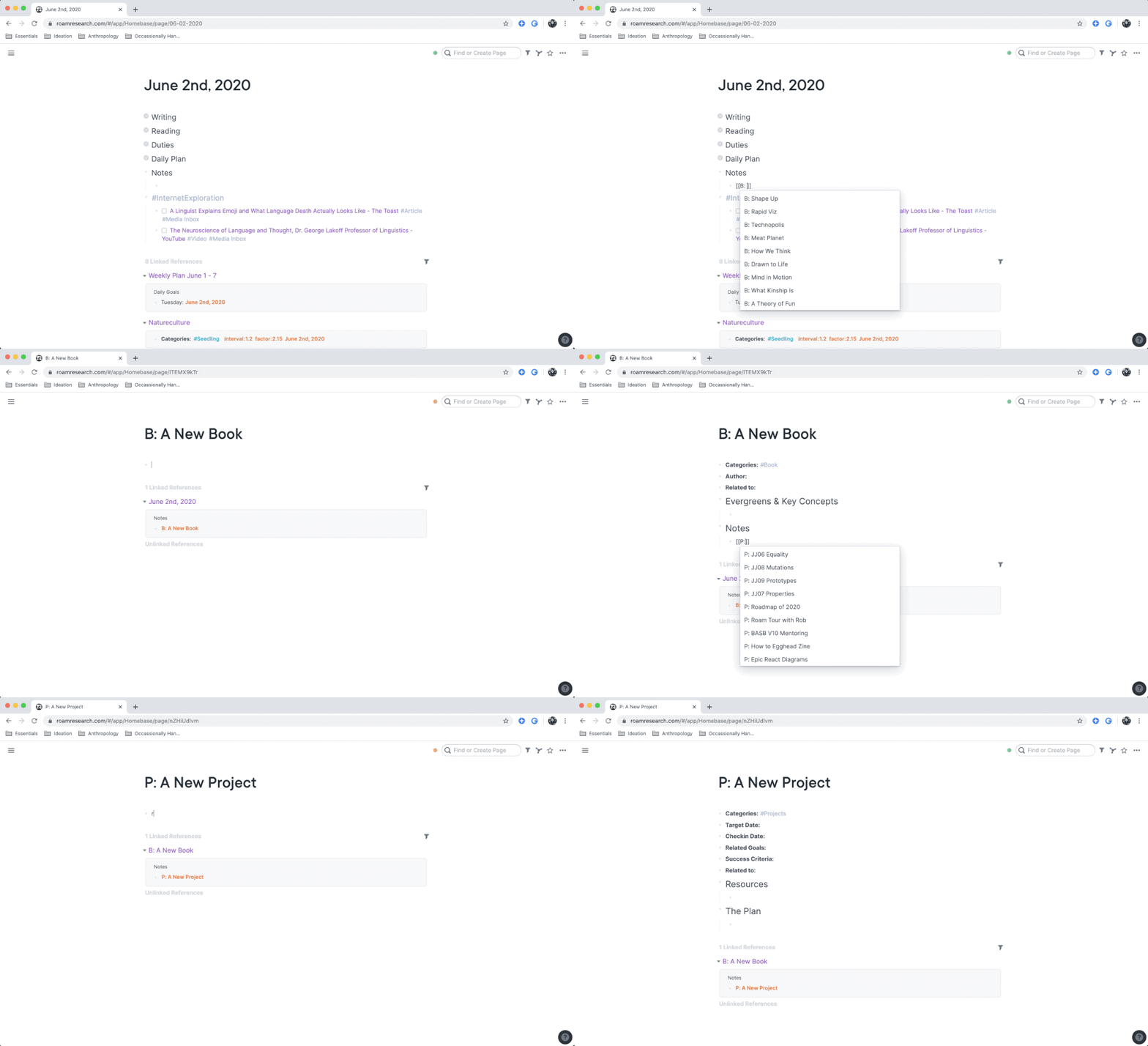
You can use any snippet-expander app for this, such as Alfred, or TextExpander. Feel free to grab these macros for yourself:
Open Note Streams
I like keeping an open stream that runs from source material to Roam to this digital garden. It’s always flowing.
The open stream means the reading, note-taking, reflecting, developing ideas, and publishing process is a continuous repeating cycle. Not a linear pipeline.
Instead of reading a whole book. Then importing the notes. Then highlighting and reflecting on them. Then crafting a summary. Then uploading the “finished work” to the internet, I instead do all of those at once. In very small chunks.
Let’s take a book I’m currently reading, Making by Tim Ingold. My stream of notes on it currently lives in three places simultaneously.
First, Drafts app is where I capture book notes when I’m away from my desk (Roam’s quick capture feature isn’t its strong suit).

It’s nice and simple, and always perfectly syncs between my iOS devices and the desktop app.
I read on my phone (because I’m an awful person). While out walking around (because I’m a truly awful person). Or in the evening on my iPad. All my books are on Kindle or in PDFs I use PDF Expert solely for it’s ‘reading mode’ feature.

I transfer notes from Drafts into Roam every few days. This gives me the chance to link up related concepts, bold key points, highlight really key points, and start collecting Evergreen Notes & Key Concepts at the top of my note.
I’ve also become a convert to the church of Taking Notes in Your Own Words. I still copy and paste key quotes, but I try to rephrase and rewrite ideas in my own terms as much as possible. Doing this just makes synthesising much easier and faster. It also helps me think. Which is the point of this entire note-taking carnival.

As my Roam notes develop, I transfer chunks of them over to my public notes on the book. Every time I add more notes to the end I lightly clean up the earlier sections and update the “last tended” date.
The idea is that by the time I finish reading a book, I’ve already done the majority of my thinking, reflecting, writing, and synthesising on it. And created a readable summary n+1 other people might find helpful.
I also like that the system allows me to take my sweet time with a book. I can read it deeply, think about it properly, and let my notes on it mature without ending up with a huge backlog of them.