
惯性聚合 高效追踪和阅读你感兴趣的博客、新闻、科技资讯
阅读原文 在惯性聚合中打开

推荐订阅源

Security Archives - TechRepublic
T
The Exploit Database - CXSecurity.com
P
Proofpoint News Feed
Scott Helme
Scott Helme
NISL@THU
NISL@THU
Cisco Talos Blog
Cisco Talos Blog
C
Cybersecurity and Infrastructure Security Agency CISA
AWS News Blog
AWS News Blog
V
Vulnerabilities – Threatpost
J
Java Code Geeks
U
Unit 42
The GitHub Blog
The GitHub Blog
H
Help Net Security
T
Tenable Blog
aimingoo的专栏
aimingoo的专栏
Jina AI
Jina AI
Spread Privacy
Spread Privacy
Apple Machine Learning Research
人人都是产品经理
人人都是产品经理
L
Lohrmann on Cybersecurity
T
Threatpost
让小产品的独立变现更简单 - ezindie.com
Engineering at Meta
Engineering at Meta
A
About on SuperTechFans
I
InfoQ
Microsoft Azure Blog
B
Blog
L
LINUX DO - 最新话题
K
Kaspersky official blog
cs.CV updates on arXiv.org
T
Threat Research - Cisco Blogs
C
Check Point Blog
T
The Blog of Author Tim Ferriss
有赞技术团队
有赞技术团队
宝玉的分享
宝玉的分享
Help Net Security
Help Net Security
Google DeepMind News
A
Arctic Wolf
Y
Y Combinator Blog
N
News | PayPal Newsroom
M
MIT News - Artificial intelligence
Latest news
Latest news
H
Hacker News: Front Page
Blog — PlanetScale
Blog — PlanetScale
腾讯CDC
I
Intezer
爱范儿
爱范儿
F
Fortinet All Blogs
P
Palo Alto Networks Blog
C
CERT Recently Published Vulnerability Notes

John Bokma's Hacking and Hiking

Failed to verify signature archive-contents.sig in Emacs Aquamacs 3.6 Hangs When Saving An Encrypted File How To Create a Bootable LibreELEC Installation using Mac OS Running pdflatex Using the Alpine Pandoc LaTeX Docker Image A Docker Image for Sass Timezones in Alpine Docker Containers A Tale of Three Docker Images Debugging a Perl Docker container Perl Time::Piece Unicode Issue Giving Docker Desktop for macOS a Second Chance Flashing another TP-Link TL-WDR4300 with OpenWrt firmware Rehousing two tarantulas Getting started with the Perl version of tumblelog on Ubuntu 18.04 LTS A visit to Avonturia De Vogelkelder Flashing a TP-Link TL-WDR4300 with OpenWrt firmware Mounting a VDI File in a Different VirtualBox Guest Wireless Headless Raspberry Pi - John Bokma A Matter of Time - John Bokma Hand coding an RSS 2.0 feed in Python RFC #822 and RFC #3339 dates in Perl RFC #822 and RFC #3339 dates in Python Hand coding an RSS 2.0 feed in Perl Nav Element with no Heading Rewriting CommonMark Nodes in Perl "right" this time
PAR trouble
John Bokma · 2023-01-29 · via John Bokma's Hacking and Hiking

January 28, 2023

Years ago I wrote a Perl program on Windows using WxWidgets to give it a graphical user interface. The program is used by a customer of mine to check bills of materials (BOMs). However the latest version I had made earlier this week, using the PAR packager program to turn it into a self contained executable, didn't work on his computer.

I guessed that one or more DLLs were missing from the executable, which did work on my development system: a Windows 10 virtual machine running on a Mac mini late 2014. So, somehow the executable could find the DLLs on my machine but not on his. How to see which DLLs are loaded by an executing program and their location in the file system? A Google search gave the answer: perfmon.exe.

Because the program stopped working on the customer's machine when I had added support for https I made the following minimal program to test:

use strict;
use warnings;

use LWP::UserAgent;
use LWP::Protocol::https;

print LWP::UserAgent->new()->get("https://www.google.com")->content;
while (1) {
    sleep 10;
}

It fetches the front page of Google using https and then keeps sleeping 10 seconds "forever". I turned this little Perl program into an executable using:

pp https.pl -o https.exe

Next, I started this program via the command prompt. In another command prompt I ran perfmon to open the Resource Monitor as follows:

C:\Windows\System32\perfmon.exe /res
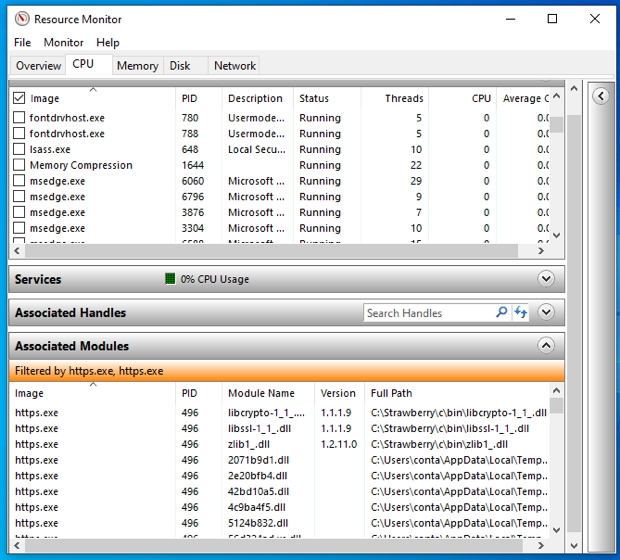
Resource Monitor showing DLLs loaded by https.exe
Resource Monitor showing DLLs loaded by https.exe.

In the Resource Monitor I selected the CPU tab, located https.exe and selected each version found. Next, I expanded the Associated Modules pane and noticed that the following three modules where loaded from the location of Strawberry Perl:

C:\Strawberry\c\bin\libcrypto-1_1_.dll
C:\Strawberry\c\bin\libssl-1_1_.dll
C:\Strawberry\c\bin\zlib1_.dll

I added those paths each with an -l switch to a text file I called ppoptions_file.txt as follows. Note that each back slash has to be replaced with a forward slash:

-l C:/Strawberry/c/bin/libcrypto-1_1_.dll
-l C:/Strawberry/c/bin/libssl-1_1_.dll
-l C:/Strawberry/c/bin/zlib1_.dll

And the mkexe.bat file I use to create the BOM checker executable was changed to use this options file as follows:

call wxpar @ppoptions_file.txt --gui -o bomchecker.exe wcheckbill.pl
del bomchecker.wxparargs

Running mkexe.bat created a new bomchecker.exe which ran without any problems on another Windows 10 virtual machine on which Strawberry Perl had not been installed.

Related