惯性聚合 高效追踪和阅读你感兴趣的博客、新闻、科技资讯
阅读原文 在惯性聚合中打开

推荐订阅源

S
SegmentFault 最新的问题
Spread Privacy
Spread Privacy
Google DeepMind News
WordPress大学
WordPress大学
Blog — PlanetScale
Blog — PlanetScale
OSCHINA 社区最新新闻
OSCHINA 社区最新新闻
Apple Machine Learning Research
SecWiki News
SecWiki News
腾讯CDC
P
Privacy International News Feed
Webroot Blog
Webroot Blog
J
Java Code Geeks
爱范儿
爱范儿
A
About on SuperTechFans
S
Secure Thoughts
cs.CL updates on arXiv.org
D
DataBreaches.Net
Cloudbric
Cloudbric
Security Archives - TechRepublic
CTFtime.org: upcoming CTF events
C
Cyber Attacks, Cyber Crime and Cyber Security
P
Proofpoint News Feed
钛媒体:引领未来商业与生活新知
钛媒体:引领未来商业与生活新知
H
Hackread – Cybersecurity News, Data Breaches, AI and More
Security Latest
Security Latest
Forbes - Security
Forbes - Security
小众软件
小众软件
www.infosecurity-magazine.com
C
Cybersecurity and Infrastructure Security Agency CISA
T
Threatpost
量子位
MongoDB | Blog
MongoDB | Blog
奇客Solidot–传递最新科技情报
奇客Solidot–传递最新科技情报
月光博客
月光博客
W
WeLiveSecurity
P
Privacy & Cybersecurity Law Blog
Vercel News
Vercel News
Google Online Security Blog
云风的 BLOG
云风的 BLOG
GbyAI
GbyAI
S
Security @ Cisco Blogs
T
The Exploit Database - CXSecurity.com
Help Net Security
Help Net Security
V
Visual Studio Blog
C
CXSECURITY Database RSS Feed - CXSecurity.com
Application and Cybersecurity Blog
博客园 - 聂微东
P
Proofpoint News Feed
C
CERT Recently Published Vulnerability Notes
Attack and Defense Labs

Iterm2 - 标签 - cywhat's blog

暂无文章

Iterm2/Mac自带终端工具快速ssh
cywhat · 2019-01-26 · via Iterm2 - 标签 - cywhat's blog

1、新建文件(最好在根目录)

下面就是脚本文件,比较low,大神勿喷,会更炫酷写法的小伙伴可以自己参考这个思路写,不会的/懒得写的直接复制就好

 1
 2
 3
 4
 5
 6
 7
 8
 9
10
11
12
   #!/usr/bin/expect -f
  set hostname [lindex $argv 0]
  set user [lindex $argv 1]
  set password [lindex $argv 2]
  set timeout 30
  spawn ssh -tt $user@$hostname;
  expect {
    "yes/no" { send "yes\r";exp_continue }
    "*password:" { send "$password\r";}
  }
  interact
  ~

2、安装expect

1
sudo yum install expect

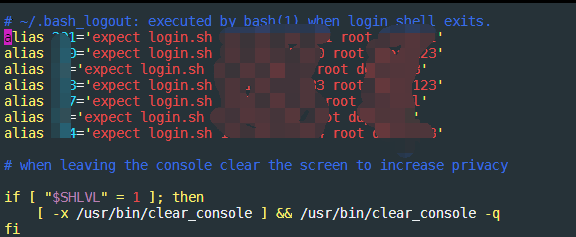
3、设置别名(快捷登录需要输入的名称)

1
2
3
vim bash_profile

alias 别名='expect login.sh 机器ip 登录账户 登录密码'

ps:别名就是你登陆终端之后输入这个别名就会自动登陆/或者操作你的指令!

https://img-blog.csdnimg.cn/img_convert/81b5757e6ba93a39660195244f1b4d1b.png    

关注一下再走吧

公众号 小程序

赞赏支持

微信打赏 支付宝打赏