惯性聚合 高效追踪和阅读你感兴趣的博客、新闻、科技资讯
阅读原文 在惯性聚合中打开

推荐订阅源

J
Java Code Geeks
Martin Fowler
Martin Fowler
MongoDB | Blog
MongoDB | Blog
博客园 - Franky
Cyber Security Advisories - MS-ISAC
Microsoft Security Blog
H
Hackread – Cybersecurity News, Data Breaches, AI and More
博客园_首页
腾讯CDC
D
Docker
The Cloudflare Blog
量子位
爱范儿
爱范儿
L
LangChain Blog
博客园 - 三生石上(FineUI控件)
博客园 - 司徒正美
aimingoo的专栏
aimingoo的专栏
Blog — PlanetScale
Blog — PlanetScale
Jina AI
Jina AI
Apple Machine Learning Research
Hugging Face - Blog
Hugging Face - Blog
博客园 - 聂微东
Vercel News
Vercel News
MyScale Blog
MyScale Blog

Nginx - 标签 - cywhat's blog

nginx解决多个端口映射80的配置 nginx配置实现ip访问指定URL Python+virtualenv+Django+nginx+uwsgi+centos7部署web应用
web服务 访问Linux中的静态文件
cywhat · 2021-03-30 · via Nginx - 标签 - cywhat's blog

报错404,NOT FOUND可能是因为nginx.conf配置文件的俩处地方配置有误,按照下面,检查你的配置之后99.9999%是可以在浏览器访问Linux的静态文件的

1.检查nginx是否打开允许访问本地文件的配置

1
vim nginx.conf

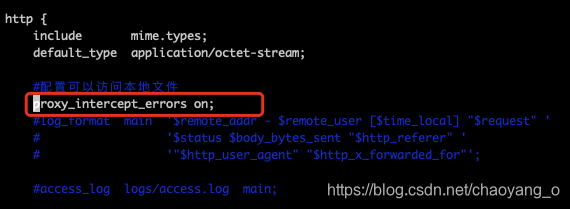
2.查找如下图的配置项,没有的话添加即可,注意是在http这个服务中

https://img-blog.csdnimg.cn/20210329180009631.png?x-oss-process=image/watermark,type_ZmFuZ3poZW5naGVpdGk,shadow_10,text_aHR0cHM6Ly9ibG9nLmNzZG4ubmV0L2NoYW95YW5nX28=,size_16,color_FFFFFF,t_70

1
proxy_intercept_errors on;

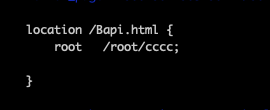
3.检查需要访问文件的路径是否配置正确,例如我要访问的静态文件名称为Bapi.html,文件存放路径为root/cccc/Bapi.html,配置如下
https://img-blog.csdnimg.cn/20210329180232275.png

4.访问静态文件

https://img-blog.csdnimg.cn/20210329180310114.png 可以访问,我是有域名的,所以我的访问直接就是域名+Bapi.html 其他格式的文件同理。

关注一下再走吧

公众号 小程序

赞赏支持

微信打赏 支付宝打赏