惯性聚合 高效追踪和阅读你感兴趣的博客、新闻、科技资讯
阅读原文 在惯性聚合中打开

推荐订阅源

WordPress大学
WordPress大学
T
Threatpost
阮一峰的网络日志
阮一峰的网络日志
美团技术团队
F
Fortinet All Blogs
The GitHub Blog
The GitHub Blog
月光博客
月光博客
V
Visual Studio Blog
T
Tailwind CSS Blog
Stack Overflow Blog
Stack Overflow Blog
博客园 - 聂微东
Jina AI
Jina AI
J
Java Code Geeks
Martin Fowler
Martin Fowler
大猫的无限游戏
大猫的无限游戏
Recorded Future
Recorded Future
C
Check Point Blog
腾讯CDC
N
Netflix TechBlog - Medium
aimingoo的专栏
aimingoo的专栏
罗磊的独立博客
Hacker News: Ask HN
Hacker News: Ask HN
SecWiki News
SecWiki News
博客园 - Franky
Hacker News - Newest:
Hacker News - Newest: "LLM"
N
News | PayPal Newsroom
cs.AI updates on arXiv.org
S
Security @ Cisco Blogs
W
WeLiveSecurity
The Last Watchdog
The Last Watchdog
Cloudbric
Cloudbric
F
Full Disclosure
The Cloudflare Blog
Y
Y Combinator Blog
Exploit-DB.com RSS Feed
Recent Commits to openclaw:main
Cyber Security Advisories - MS-ISAC
Google DeepMind News
MongoDB | Blog
MongoDB | Blog
S
Schneier on Security
Spread Privacy
Spread Privacy
L
LINUX DO - 热门话题
AI
AI
N
News and Events Feed by Topic
T
Tor Project blog
P
Palo Alto Networks Blog
让小产品的独立变现更简单 - ezindie.com
H
Hackread – Cybersecurity News, Data Breaches, AI and More
G
Google Developers Blog

Node - 分类 - cywhat's blog

node切换版本
Linux管理node版本
cywhat · 2021-04-08 · via Node - 分类 - cywhat's blog

1.安装nvm

1
curl -o- https://raw.githubusercontent.com/nvm-sh/nvm/v0.35.2/install.sh | bash

或者

1
wget -qO- https://raw.githubusercontent.com/nvm-sh/nvm/v0.35.2/install.sh | bash

2.nvm会自己添加环境变量,但是需要我们手动让环境变量生效

1
source ~/.bashrc

ps:如果没有环境变量,需要手动添加:

1
2
export NVM_DIR="$([ -z "${XDG_CONFIG_HOME-}" ] && printf %s "${HOME}/.nvm" || printf %s "${XDG_CONFIG_HOME}/nvm")"
[ -s "$NVM_DIR/nvm.sh" ] && \. "$NVM_DIR/nvm.sh" # This loads nvm

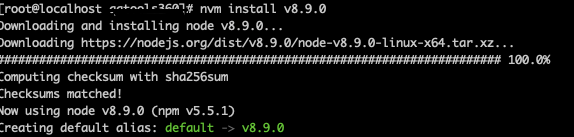
3.nvm安装指定版本node

1
nvm install v8.9.0

https://img-blog.csdnimg.cn/20210407173742911.png

4.切换node版本

1
nvm use v8.9.0

https://img-blog.csdnimg.cn/20210407173820659.png

5.查看node版本

1
node -v

https://img-blog.csdnimg.cn/20210407173858582.png

关注一下再走吧

公众号 小程序

赞赏支持

微信打赏 支付宝打赏