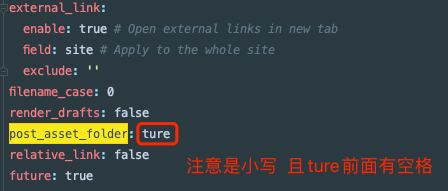
1.更改hexo配置文件
1
|
vim _config.yml #配置_config.yml里面的post_asset_folder:false 设置为 true 如图
|
2.安装npm插件
1
|
npm install https://github.com/CodeFalling/hexo-asset-image --save
|
3.清除hexo缓存
4.创建新的文章
1
|
hexo new "XXA" #创建完文章后,会发现 _post 目录下多出一个XXA的文件夹,把图片放入该文件夹中
|
5.然后文章中引入图片
1
|
{% asset_img img7.png This is an image %} #img7.png为你的图片名称,不可重复 This is an image是图片介绍
|
ps:唯一的缺点就是 预览的时候看不见图片 需要重新发布
6.重新发布
如果以上操作未生效,图片还不显示,进行以下操作:
1.打开/node_modules/hexo-asset-image/index.js
1
|
vim /node_modules/hexo-asset-image/index.js
|
2.替换以下内容(建议备份原index.js文件)
 1
 2
 3
 4
 5
 6
 7
 8
 9
10
11
12
13
14
15
16
17
18
19
20
21
22
23
24
25
26
27
28
29
30
31
32
33
34
35
36
37
38
39
40
41
42
43
44
45
46
47
48
49
50
51
52
53
54
55
56
57
58
59
60
61
|
'use strict';
var cheerio = require('cheerio');

// http://stackoverflow.com/questions/14480345/how-to-get-the-nth-occurrence-in-a-string
function getPosition(str, m, i) {
    return str.split(m, i).join(m).length;
}

var version = String(hexo.version).split('.');
hexo.extend.filter.register('after_post_render', function (data) {
    var config = hexo.config;
    if (config.post_asset_folder) {
        var link = data.permalink;
        if (version.length > 0 && Number(version[0]) == 3)
            var beginPos = getPosition(link, '/', 1) + 1;
        else
            var beginPos = getPosition(link, '/', 3) + 1;
        // In hexo 3.1.1, the permalink of "about" page is like ".../about/index.md".
        var endPos = link.lastIndexOf('/') + 1;
        link = link.substring(beginPos, endPos);

        var toprocess = ['excerpt', 'more', 'content'];
        for (var i = 0; i < toprocess.length; i++) {
            var key = toprocess[i];

            var $ = cheerio.load(data[key], {
                ignoreWhitespace: false,
                xmlMode: false,
                lowerCaseTags: false,
                decodeEntities: false
            });

            $('img').each(function () {
                if ($(this).attr('src')) {
                    // For windows style path, we replace '\' to '/'.
                    var src = $(this).attr('src').replace('\\', '/');
                    if (!/http[s]*.*|\/\/.*/.test(src) &&
                        !/^\s*\//.test(src)) {
                        // For "about" page, the first part of "src" can't be removed.
                        // In addition, to support multi-level local directory.
                        var linkArray = link.split('/').filter(function (elem) {
                            return elem != '';
                        });
                        var srcArray = src.split('/').filter(function (elem) {
                            return elem != '' && elem != '.';
                        });
                        if (srcArray.length > 1)
                            srcArray.shift();
                        src = srcArray.join('/');
                        $(this).attr('src', config.root + link + src);
                        console.info && console.info("update link as:-->" + config.root + link + src);
                    }
                } else {
                    console.info && console.info("no src attr, skipped...");
                    console.info && console.info($(this));
                }
            });
            data[key] = $.html();
        }
    }
});
|
3.然后清空缓存,再次发布
1
2
3
|
hexo clean

hexo d -g
|
关注一下再走吧
 公众号
公众号
 小程序
小程序
赞赏支持
 微信打赏
微信打赏
 支付宝打赏
支付宝打赏



