小tips
该文章仅仅针对Loveit主题有效,其他自己尝试。
添加文章打赏功能
注意
PS: 使用hugo版本必须为拓展版hugo_extended,如下图
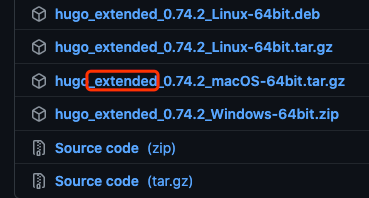
1.配置添加
在 config.toml 添加下面的变量
1
2
3
4
|
  [params.reward]                           # 文章打赏
    enable = true                           # true为开启 flase为关闭
    wechat = "/images/wechat.png"           # 微信二维码文件路径
    alipay = "/images/alipay.png"           # 支付宝二维码文件路径
|
注意一下
这里是对全局文章生效,也可以在每篇文章的文件头里添加如下变量来控制是否启用该功能:
1
2
3
4
5
6
|
title: "xxxx"
date: 2021-10-21T16:36:41+08:00
draft: false
tags: ["xxx","xxx"]
categories: ["xxx","xxx"]
reward: false                               # flase关闭该文章打赏功能
|
2.修改主题中的国际化文件
在 config.toml 配置文件中修改中文预演代码为小写的 zh-cn,如下:
1
|
defaultContentLanguage = "zh-cn"
|
在 \themes\LoveIt\i18n\zh-CN.toml 中添加如下配置:
1
2
3
4
5
6
7
8
|
[reward]
other = "赞赏支持"                          #other中的文字可以自由更改

[rewardAlipay]
other = "支付宝打赏"

[rewardWechat]
other = "微信打赏"
|
3.添加模板文件
在 \themes\layouts\partials\single\ 中新建 reward.html html内容如下:
 1
 2
 3
 4
 5
 6
 7
 8
 9
10
11
12
13
14
15
16
17
18
19
20
21
22
|
{{ if or .Params.reward (and .Site.Params.reward.enable (ne .Params.reward false)) -}}
<div class="post-reward">
    <input type="checkbox" name="reward" id="reward" hidden/>
    <label class="reward-button" for="reward">{{ T "reward" }}</label>
    <div class="qr-code">
        {{ $qrCode := .Site.Params.reward }}
        {{- $cdnPrefix := .Site.Params.cdnPrefix -}}
        {{ with $qrCode.wechat -}}
        <label class="qr-code-image" for="reward">
            <img class="image" src="{{ $cdnPrefix }}{{ . }}">
            <span>{{ T "rewardWechat" }}</span>
        </label>
        {{- end }}
        {{ with $qrCode.alipay -}}
        <label class="qr-code-image" for="reward">
            <img class="image" src="{{ $cdnPrefix }}{{ . }}">
            <span>{{ T "rewardAlipay" }}</span>
        </label>
        {{- end }}
    </div>
</div>
{{- end }}
|
4.修改模板文件
修改 /themes/LoveIt/layouts/posts/single.html 找到 {{- /* Content */ -}}
修改前内容
1
2
3
4
5
|
{{- /* Content */ -}}
<div class="content" id="content">
    {{- dict "Content" .Content "Ruby" $params.ruby "Fraction" $params.fraction "Fontawesome" $params.fontawesome | partial "function/content.html" | safeHTML -}}
</div>
|
修改为如下内容
修改后内容
1
2
3
4
5
6
7
8
|
{{- /* Content */ -}}
<div class="content" id="content">
    {{- dict "Content" .Content "Ruby" $params.ruby "Fraction" $params.fraction "Fontawesome" $params.fontawesome | partial "function/content.html" | safeHTML -}}

	{{- /* Reward */ -}}  #新增
	{{- partial "single/reward.html" . -}}  #新增
</div>
|
5.新增css代码
在 /themes/assets/css/ 中的 _custom.scss 添加如下内容
 1
 2
 3
 4
 5
 6
 7
 8
 9
10
11
12
13
14
15
16
17
18
19
20
21
22
23
24
25
26
27
28
29
30
31
32
33
34
35
36
37
38
39
40
41
42
43
44
45
46
47
48
49
50
51
52
53
|
/* 打赏 */
article .post-reward {
    margin-top: 20px;
    padding-top: 10px;
    text-align: center;
    border-top: 1px dashed #e6e6e6
}

article .post-reward .reward-button {
    margin: 15px 0;
    padding: 3px 7px;
    display: inline-block;
    color: #c05b4d;
    border: 1px solid #c05b4d;
    border-radius: 5px;
    cursor: pointer
}

article .post-reward .reward-button:hover {
    color: #fefefe;
    background-color: #c05b4d;
    transition: .5s
}

article .post-reward #reward:checked~.qr-code {
    display: block
}

article .post-reward #reward:checked~.reward-button {
    display: none
}

article .post-reward .qr-code {
    display: none
}

article .post-reward .qr-code .qr-code-image {
    display: inline-block;
    min-width: 200px;
    width: 40%;
    margin-top: 15px
}

article .post-reward .qr-code .qr-code-image span {
    display: inline-block;
    width: 100%;
    margin: 8px 0
}

article .post-reward .qr-code .image {
    width: 200px;
    height: 200px
}
|
6.测试查看
关注一下再走吧
 公众号
公众号
 小程序
小程序
赞赏支持
 微信打赏
微信打赏
 支付宝打赏
支付宝打赏





