惯性聚合 高效追踪和阅读你感兴趣的博客、新闻、科技资讯
阅读原文 在惯性聚合中打开

推荐订阅源

T
The Blog of Author Tim Ferriss
cs.CV updates on arXiv.org
云风的 BLOG
云风的 BLOG
Cyber Security Advisories - MS-ISAC
P
Palo Alto Networks Blog
D
Docker
H
Hackread – Cybersecurity News, Data Breaches, AI and More
S
Schneier on Security
Engineering at Meta
Engineering at Meta
I
InfoQ
L
LangChain Blog
Cyberwarzone
Cyberwarzone
T
Tenable Blog
WordPress大学
WordPress大学
P
Privacy & Cybersecurity Law Blog
罗磊的独立博客
Apple Machine Learning Research
Threat Intelligence Blog | Flashpoint
Jina AI
Jina AI
C
CERT Recently Published Vulnerability Notes
Scott Helme
Scott Helme
博客园 - 三生石上(FineUI控件)
酷 壳 – CoolShell
酷 壳 – CoolShell
Know Your Adversary
Know Your Adversary
D
Darknet – Hacking Tools, Hacker News & Cyber Security
The Last Watchdog
The Last Watchdog
Last Week in AI
Last Week in AI
Cloudbric
Cloudbric
S
SegmentFault 最新的问题
爱范儿
爱范儿
Application and Cybersecurity Blog
博客园 - 叶小钗
AI
AI
T
Tor Project blog
I
Intezer
T
Threatpost
www.infosecurity-magazine.com
V
Visual Studio Blog
N
News and Events Feed by Topic
Latest news
Latest news
S
Security Affairs
博客园 - Franky
Microsoft Security Blog
C
Cyber Attacks, Cyber Crime and Cyber Security
K
KPMG report finds enterprise disconnect between AI and its ROI | CIO
B
Blog RSS Feed
C
Cybersecurity and Infrastructure Security Agency CISA
Hugging Face - Blog
Hugging Face - Blog
小众软件
小众软件
S
Securelist

Hugo - 分类 - cywhat's blog

Failed to Extract Shortcode:template for Shortcode Admonition Not Found Hugo的Loveit主题修改sitemap Site.webmanifest异常处理 Loveit主题开启文章赞赏 Loveit主题的一些美化设置
Loveit开启评论功能
cywhat · 2021-10-21 · via Hugo - 分类 - cywhat's blog

小tips

该文章仅仅针对Loveit主题有效,其他自己尝试。

Loveit开启评论

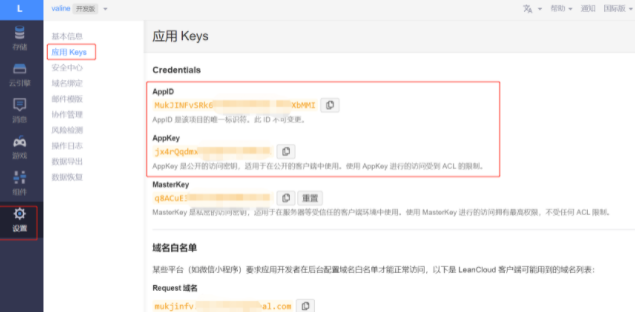
loveit自带的有valine的配置,我们需要先注册一些要用到的信息

1.注册Leancloud

评论系统依赖于 leancloud,所以需要先在leancloud中进行相关的准备工作。

登录 或 注册 LeanCloud(国际版) 必须验证邮箱和手机号

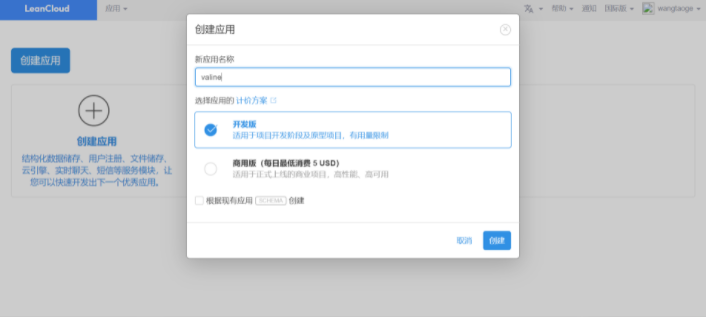
成功后,进入后台点击左上角的创建应用:
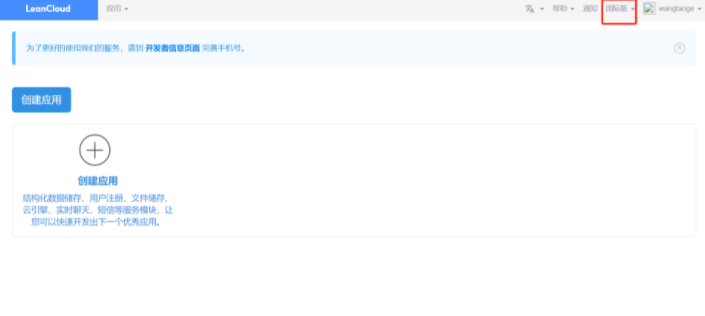
/img/img21.png

/img/img22.png

/img/img23.png

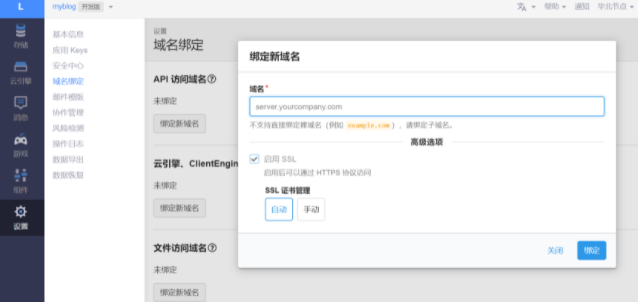
2.域名绑定

/img/img24.png

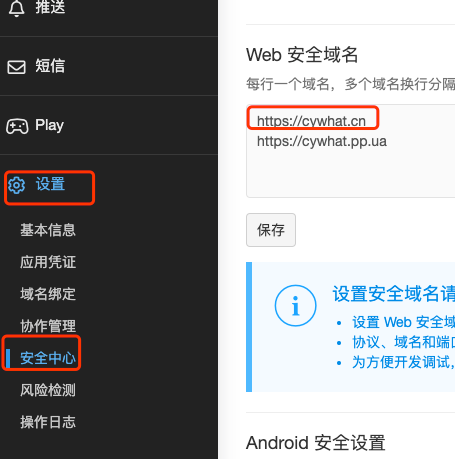
3.绑定安全域名

设置–安全中心–web安全域名

/img/img40.png

4.修改配置

config.toml中找到 valine 将需要内容加入

 1
 2
 3
 4
 5
 6
 7
 8
 9
10
11
12
13
14
[params.page.comment.valine]
        enable = true                                       # true为开启 false为关闭
        appId = "XWDPvzYoXXXXXGqOm-MdYXbMMI"                # 需要更换为自己的
        appKey = "U3pRXXXXXSADAXAaAaoRQ"                    # 需要更换为自己的
        placeholder = "说点什么吧"
        avatar = "mp"
        meta= ""
        pageSize = 10
        lang = ""
        visitor = true
        recordIP = true
        highlight = true
        enableQQ = false
        serverURLs = "https://mukjinfv.api.lncldglobal.com" # URL不需要替换

注意

如果不希望该文章被评论,在title加入字段 comment 且值为 false 即可

1
2
3
4
title: "关于"
date: 2021-10-19T22:01:44+08:00
reward: false
comment: false                                # comment为false时 该文章不可被评论

关注一下再走吧

公众号 小程序

赞赏支持

微信打赏 支付宝打赏