一、安装前准备
1.检查是否已经安装过mysql,执行命令
 1
 2
 3
 4
 5
 6
 7
 8
 9
10
11
|
# 查找已经安装的mysqld
rpm -qa | grep mysqld

# 查找已经安装的mariadb
rpm -qa | grep mariadb

# 查看正在运行的端口号
netstat -tunlp | grep 3306

# 删除查找到的文件
rpm -e --nodeps  mysqld/mariadb文件
|
2.查询所有Mysql对应的文件夹
1
2
3
4
|
whereis mysqld

# 删除查找到的文件
rm -rf  mysqld文件
|
并再次执行whereis mysqld验证是否删除完毕
3.下载Mysql安装包
下载命令:
1
2
3
4
|
wget https://mirrors.cloud.tencent.com/mysql/yum/mysql-5.7-community-el7-x86_64/mysql-community-common-5.7.41-1.el7.x86_64.rpm
wget https://mirrors.cloud.tencent.com/mysql/yum/mysql-5.7-community-el7-x86_64/mysql-community-libs-5.7.41-1.el7.x86_64.rpm
wget https://mirrors.cloud.tencent.com/mysql/yum/mysql-5.7-community-el7-x86_64/mysql-community-client-5.7.41-1.el7.x86_64.rpm
wget https://mirrors.cloud.tencent.com/mysql/yum/mysql-5.7-community-el7-x86_64/mysql-community-server-5.7.41-1.el7.x86_64.rpm
|
其他版本下载
二、安装Mysql
1.安装前再次确认没有安装其他版本的mysqld或者mariadb
2.安装依赖
1
2
3
|
yum install libaio

yum install net-tools
|
3.安装mysqld服务【一定要按顺序来】
1
2
3
4
|
rpm -ivh mysql-community-common-5.7.41-1.el7.x86_64.rpm
rpm -ivh mysql-community-libs-5.7.41-1.el7.x86_64.rpm
rpm -ivh mysql-community-client-5.7.41-1.el7.x86_64.rpm
rpm -ivh mysql-community-server-5.7.41-1.el7.x86_64.rpm
|
4.验证安装结果
1
2
3
4
5
6
7
|
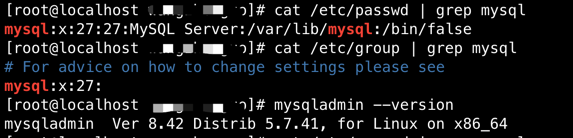
# mysqld安装成功以后会自动创建mysqld用户和组
cat /etc/passwd | grep mysql

cat /etc/group | grep mysql

# 查看mysql版本,如出现版本号即安装成功
mysqladmin --version
|
三、启动Mysqld
1、启动mysqld
1
|
systemctl start mysqld.service
|
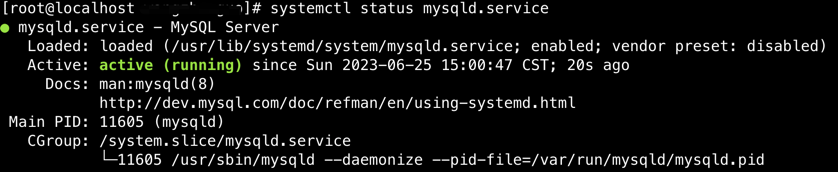
2、查看mysqld运行状态
1
|
systemctl status mysqld.service
|
3、开机自启
1
|
systemctl enable mysqld.service
|
四、连接Mysqld
1、查看初始密码
1
|
cat /var/log/mysqld.log | grep password
|

2、登录
3、修改密码
1
|
SET PASSWORD FOR 'root'@'localhost' = PASSWORD('newpasswd');
|
4、修改为弱口令密码【如有需要,eg:123456】
 1
 2
 3
 4
 5
 6
 7
 8
 9
10
11
12
|
# 依次执行
set global validate_password_policy=0;

set global validate_password_mixed_case_count=0;

set global validate_password_number_count=3;

set global validate_password_special_char_count=0;

set global validate_password_length=3;

SET PASSWORD FOR 'root'@'localhost' = PASSWORD('123456');
|
5、修改后验证新密码
1
2
3
4
5
|
# 退出
exit

# 使用新密码登录
mysql -uroot -p
|
6、开放远程连接【可选】
 1
 2
 3
 4
 5
 6
 7
 8
 9
10
11
|
# 登录
mysql -uroot -p

# 使用mysql库
mysql>use mysql;

# 允许远程登录
msyql>update user set user.Host='%' where user.User='root';

# 刷新权限
mysql>flush privileges;
|
五、数据库备份和迁移
1、开启远程连接[备份和迁移必须执行]
 1
 2
 3
 4
 5
 6
 7
 8
 9
10
11
|
# 登录
mysql -uroot -p

# 使用mysql库
mysql>use mysql;

# 允许远程登录
msyql>update user set user.Host='%' where user.User='root';

# 刷新权限
mysql>flush privileges;
|
2、重启
1
|
systemctl restart mysqld.service
|
3、备份
1
2
|
# 导出x.x.x.x的database库到当前文件的
mysqldump -hx.x.x.x -uroot -p"123456" database > ./database.sql
|
4、备份好的文件传输到其他机器
5、恢复备份文件
1
2
|
# 恢复x.x.x.的database.sql文件到database库
mysql -hx.x.x.1 -uroot -p'123456' database < database.sql
|
6、验证恢复文件
1
2
3
4
5
6
7
8
|
# 登录
mysql -uroot -p

# 使用库
use database

# 查看表
show tables;
|
补充说明:
-
安装mysqld时,可能会出现错误:
-
依次执行以下命令安装编译mysql需要的插件
1
2
3
|
yum install  libaio-devel.x86_64

yum -y install numactl
|
关注一下再走吧
 公众号
公众号
 小程序
小程序
赞赏支持
 微信打赏
微信打赏
 支付宝打赏
支付宝打赏





