


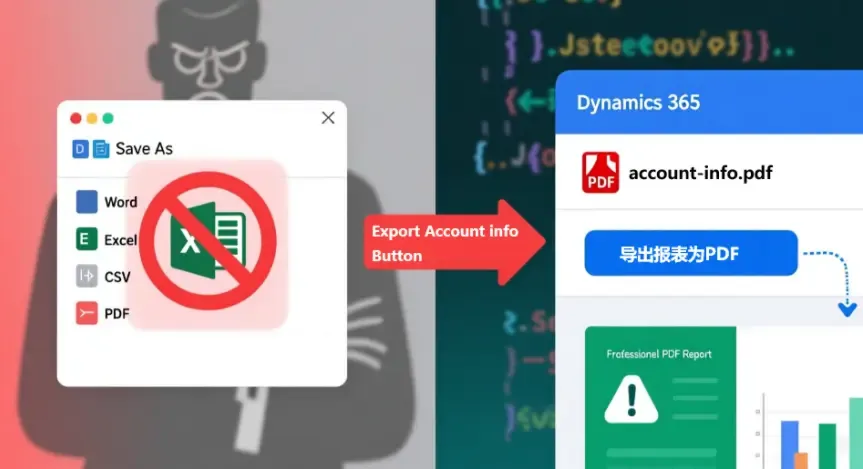
本文介绍如何在Dynamics 365中限制SSRS报表只能导出PDF(自定义)
Table of contents
Open Table of contents
- 背景
- 解决思路
- 详细步骤(JS调用SSRS导出PDF)
- 假设
- Step 1. 添加Web资源
- Step 2. 配置自定义按钮
- 补充说明
- 1. 为什么不使用“Convert to PDF”功能?
- 2. Account.js 中的 CRM_FilteredAccount 在哪里找?
- 3. Account.js 核心方法说明
- 附录
- Account.js
背景
最近在实施一个 Dynamics 365 项目,我们为报价单自定义开发了一张蛮复杂的 SSRS 报表(甲方公司各种复杂的计算公式、报价单格式布局、审批人签章),用作销售团队向客户提供的标准报价模板,但是他们管理层反馈现在销售部门的用户在系统里打印报价单可以选择很多种导出格式(如下截图),担心他们导出成 Excel 格式后继续在线下“加工”,希望系统限制一下,只能导出 PDF 格式
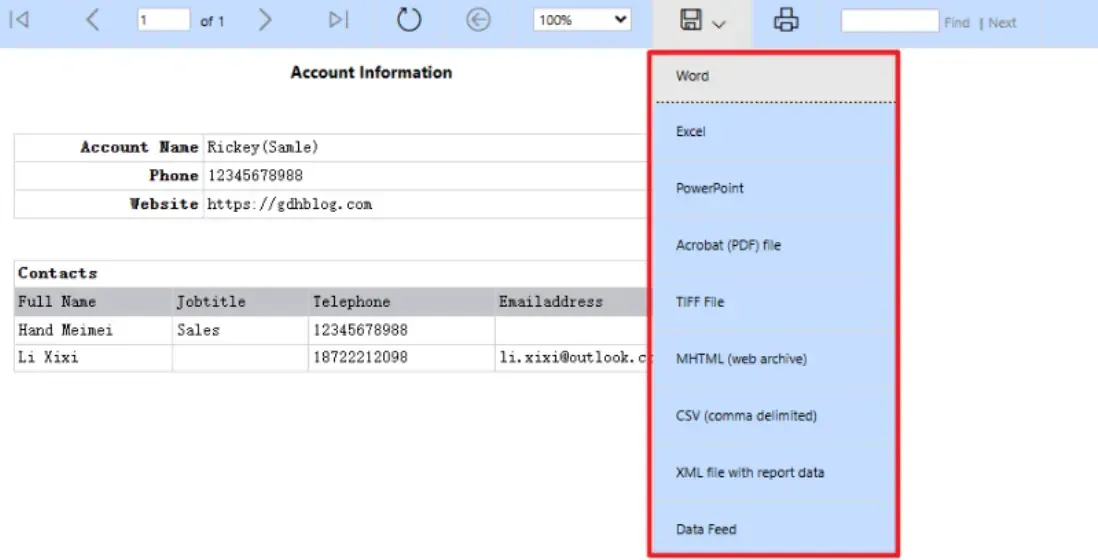
因为 Dynamics 365 标准的报表“另存为”本身就是可以选择怎么多格式,同时我还咨询了微软,这些格式并不能做配置隐藏掉,所以只能想想别的办法了!
NOTE
其实就算系统限制只能导出 PDF 格式,也防止不了用户继续在线下“加工”,毕竟 PDF 也是可以编辑的,这也只能是“防君子不防小人”
解决思路
经过综合考虑(考虑到现有报表已投入大量开发资源),采用了方案二,通过自定义按钮实现直接导出SSRS报表的PDF文件
| 方案 | 实现方式 | 优点 | 缺点 |
|---|---|---|---|
| 方案一 前端生成 PDF |
使用第三方 JS 库(如 PrintJS)重新设计报表 | 完全自定义, 控制灵活 |
需要重新开发, 成本较高 |
| 方案二 JS调用SSRS导出PDF |
通过 JavaScript 调用现有 SSRS 报表, 强制导出 PDF 格式 |
复用现有报表, 开发效率高 |
依赖现有报表结构 |
详细步骤(JS调用SSRS导出PDF)
假设
客户实体上有一张自定义的 SSRS 报表,报表名称为 PrintAccount.rdl,现在我们将在客户实体上新添自定义按钮,点击按钮后直接导出这张报表的 PDF 文件,下面是详细的实现步骤
Step 1. 添加Web资源
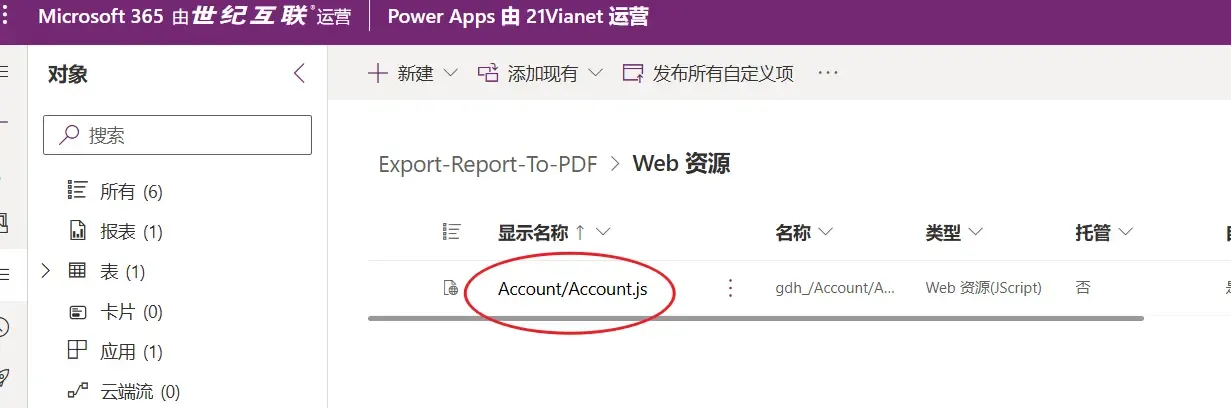
- 在 Web 资源中创建
Account.js文件 - 将附录中的完整代码复制到文件中
- 保存后务必发布更改
Step 2. 配置自定义按钮
TIP
这里我使用新版的按钮编辑界面,你也可以使用 Ribbon Workbench 添加按钮,达到目的就行
(1) 登录 Power Apps → 应用 → 选择应用 → 编辑
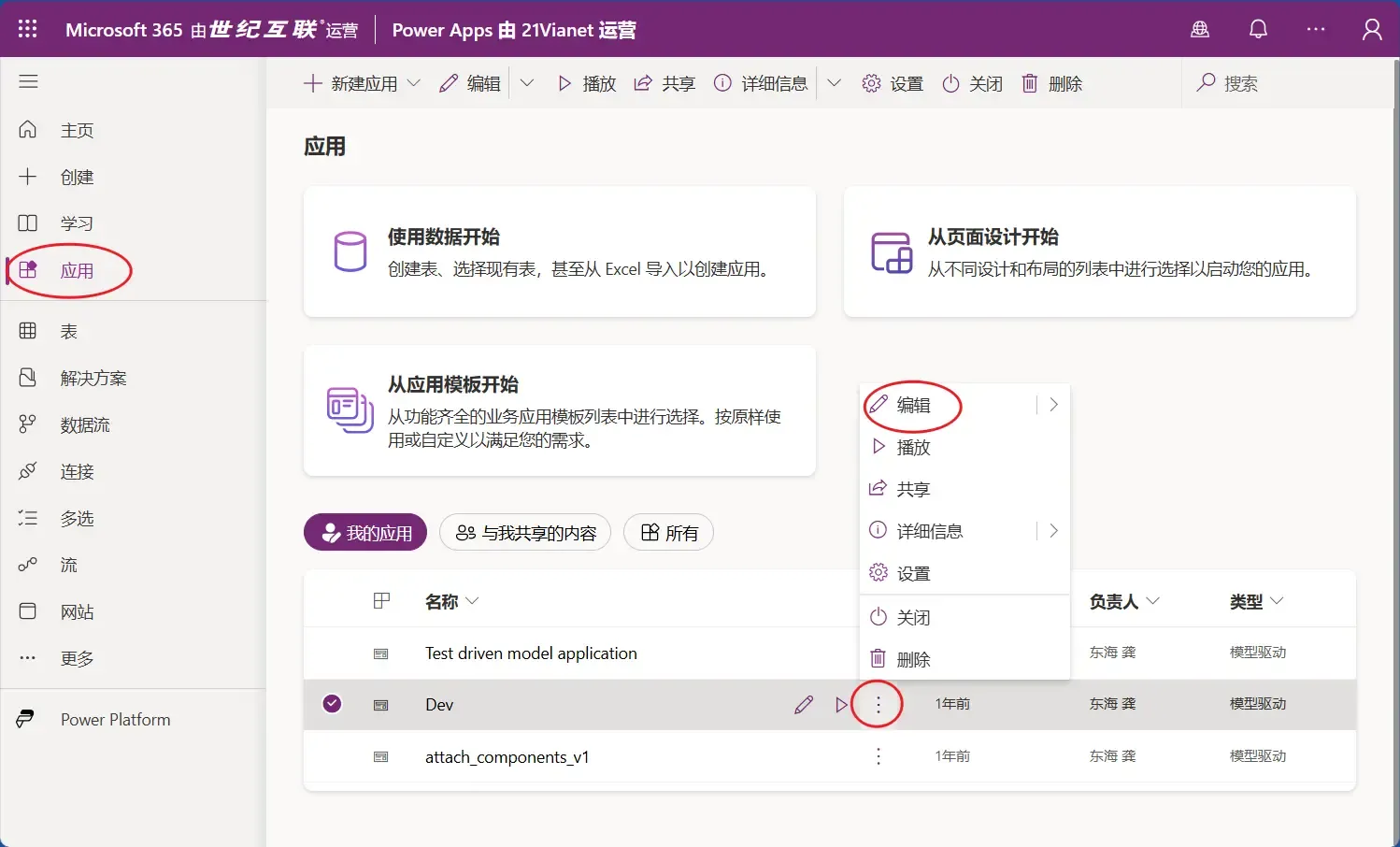
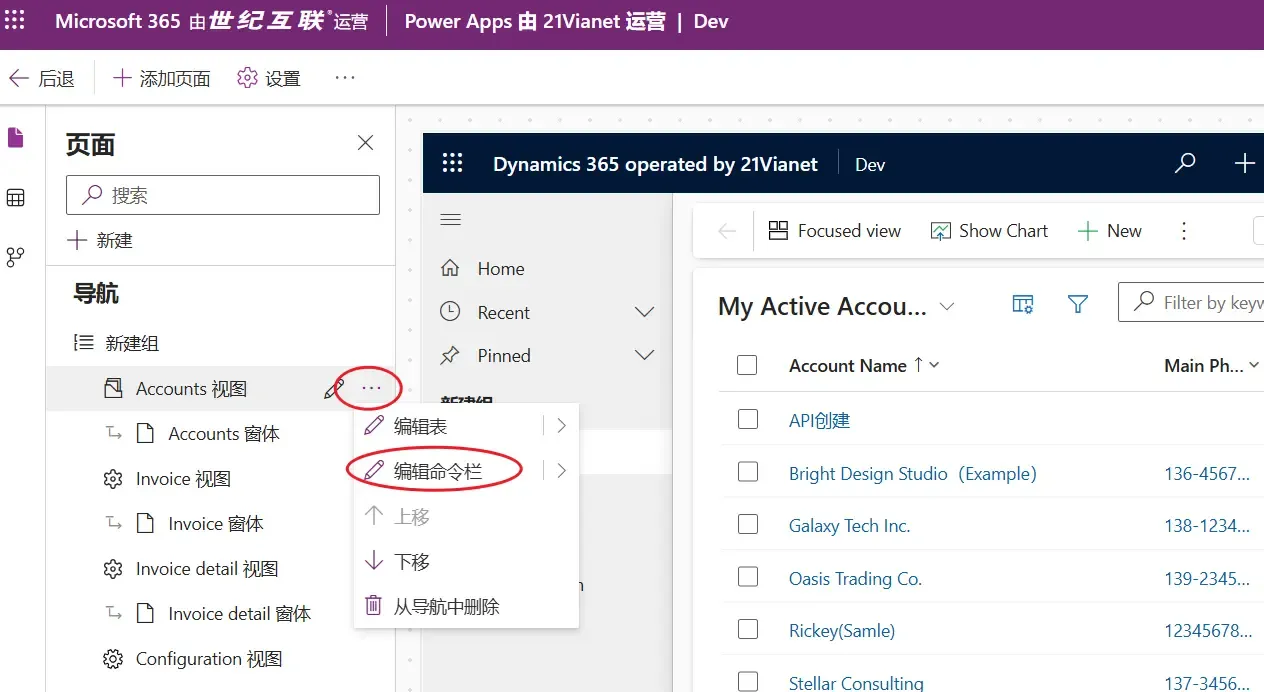
(2) 选择客户视图 → 编辑命令栏
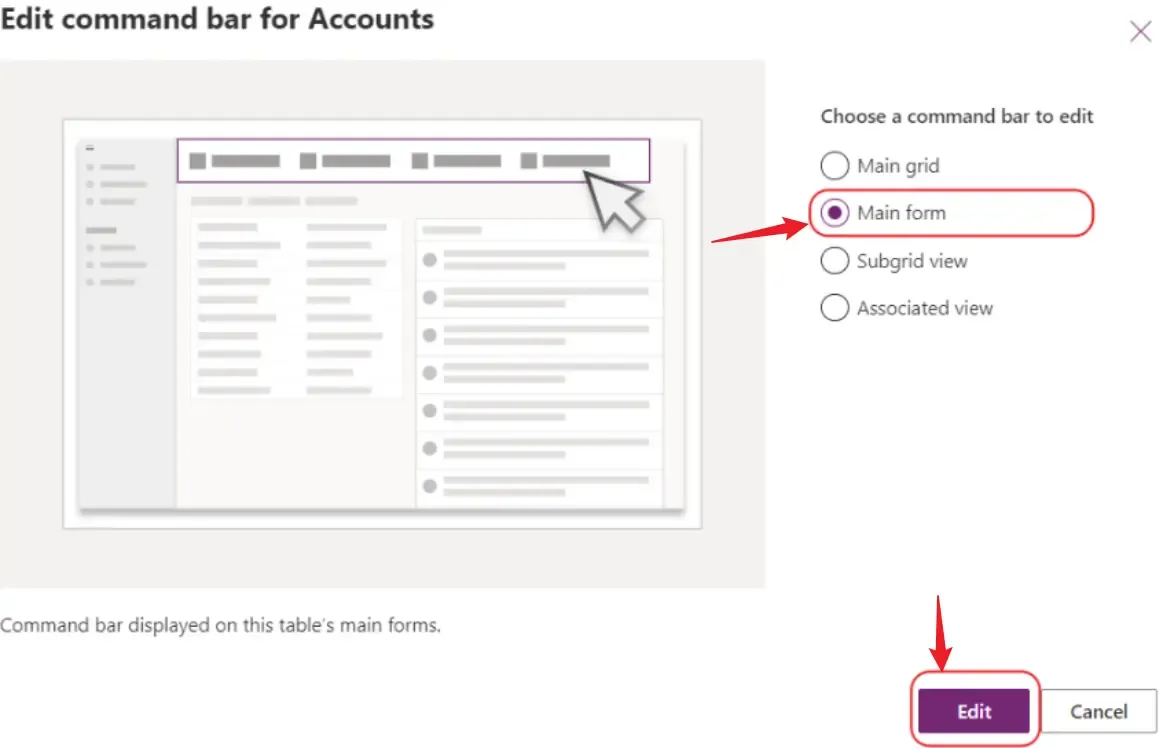
(3) 选择 Main Form
(4) 绑定Account.js,并填写相关属性
- Label:
Export Account info - Action:
Run JavaScript - Library:
gdh_/Account/Account.js(根据实际情况填写) - Parameter 1:
Gdh.D365.Account.ExportPrintAccountReportPDF(根据实际情况填写)
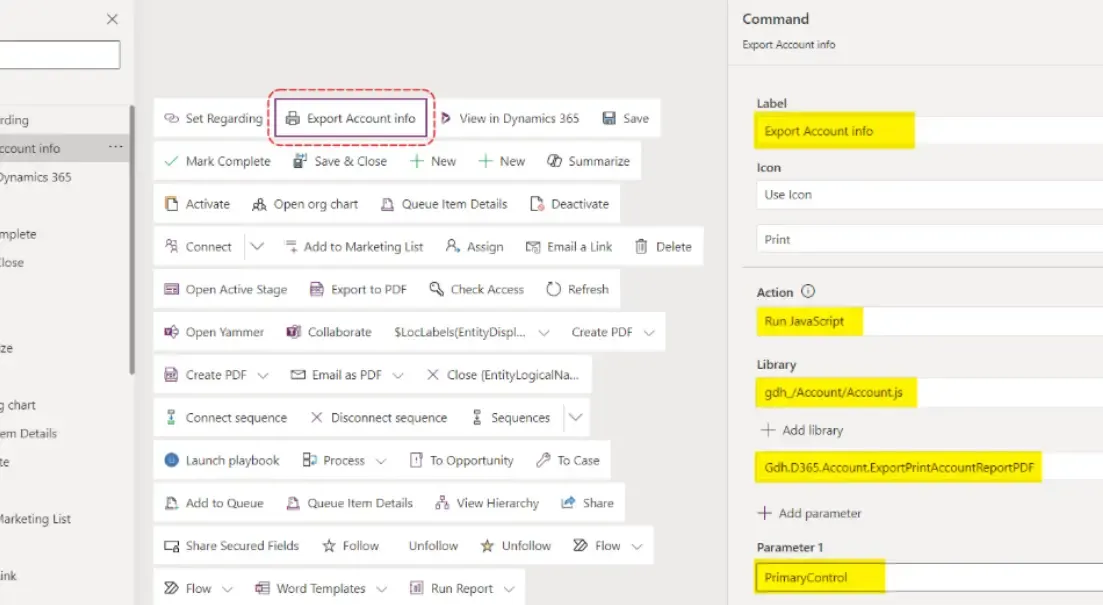
最后保存并发布
补充说明
1. 为什么不使用“Convert to PDF”功能?
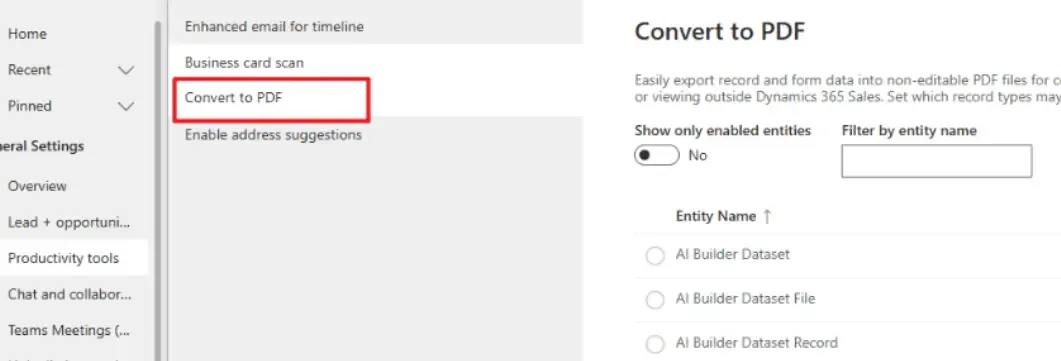
因为”Convert to PDF”功能存在以下限制:
- 关联数据过滤问题:无法过滤停用的关联记录
- 举个例子:客户与联系人是一对多关系,使用 Word 模板转 PDF 时,即使联系人已停用,仍会显示在输出中
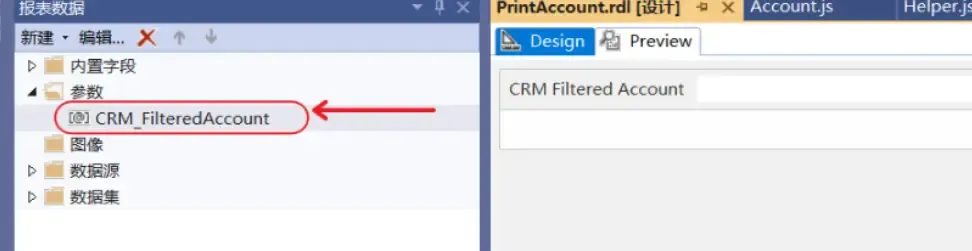
2. Account.js 中的 CRM_FilteredAccount 在哪里找?
代码中的 CRM_FilteredAccount 是 SSRS 报表的参数,用于传递 FetchXML 查询条件:
3. Account.js 核心方法说明
ExportPrintAccountReportPDF();→ 导出 PDF 主方法GetReportIdByReportFileName();→ 获取报表 IDExecuteReport();→ 执行报表生成Get_SSRS_Report_PDFBase64();→ 获取 PDF Base64 数据
附录
Account.js
/**
 * Account Entity Javascript.
 */
if (Gdh === undefined) {
  var Gdh = {};
}
if (Gdh.D365 === undefined) {
  Gdh.D365 = {};
}
Gdh.D365.Account = (function () {
  "use strict";
  return {
    Constants: {
      Fields: {
        AccountName: "name",
        Phone: "telephone1",
        Fax: "fax",
        Website: "websiteurl",
      },
      Reports: {
        PrintAccountReport: "PrintAccount.rdl",
      },
      SystemAdminId: "SystemAdminId",
    },
    OnLoad: function (ExecutionContext) {
      try {
        let objFormContext = ExecutionContext.getFormContext();
      } catch (e) {
        console.error("Error during OnLoad: ", e);
      }
    },
    ExportPrintAccountReportPDF: function (primaryControl) {
      let objFormContext = primaryControl;
      let CurrentAccountId = objFormContext.data.entity
        .getId()
        .replace("{", "")
        .replace("}", "");
      let that = this;
      console.log(CurrentAccountId, CurrentAccountId);
      let selectAttributes = `${that.Constants.Fields.AccountName}`;
      console.log(selectAttributes, selectAttributes);
      let accountEn = this.RetrieveSingleRecord(
        "accounts",
        CurrentAccountId,
        selectAttributes
      );
      let accountName = accountEn[this.Constants.Fields.AccountName];
      // CRM_FilteredAccount -> SSRS report argument
      let reportPrefilter =
        "CRM_FilteredAccount=" +
        "<fetch version='1.0' output-format='xml-platform' mapping='logical' distinct='false'>" +
        "<entity name='account'>" +
        "  <all-attributes />" +
        "  <filter type='and'>" +
        "    <condition attribute='accountid' operator='eq' value='" +
        CurrentAccountId +
        "' />" +
        "  </filter>" +
        "</entity>" +
        "</fetch>";
      let arrReportSession = this.ExecuteReport(
        this.Constants.Reports.PrintAccountReport,
        reportPrefilter
      );
      this.Get_SSRS_Report_PDFBase64(arrReportSession, 2052)
        .then(function (base64String) {
          // Size of the file in KB
          let fSize =
            encodeURIComponent(base64String).replace(/%../g, "x").length / 1024;
          let openFileOptions = { openMode: 2 };
          let file = {};
          file.fileContent = base64String;
          file.fileSize = fSize;
          // Set file name
          file.fileName = accountName + " - Info" + ".pdf";
          file.mimeType = "application/pdf";
          Xrm.Navigation.openFile(file, openFileOptions);
        })
        .catch(function (error) {
          console.error(error);
        });
    },
    GetReportIdByReportFileName: function (reportFileName) {
      let lValue = "";
      let lResponse = this.RetrieveMultipleRecord(
        "reports",
        "filename eq '" + reportFileName + "'",
        "reportid",
        false
      );
      if (
        lResponse !== null &&
        lResponse !== undefined &&
        lResponse.value.length > 0
      ) {
        lValue = lResponse.value[0]["reportid"];
      }
      return lValue;
    },
    ExecuteReport: function (reportFileName, reportPrefilter) {
      let reportGuid = this.GetReportIdByReportFileName(reportFileName);
      let pth = this.GetClientUrl() + "/CRMReports/rsviewer/ReportViewer.aspx";
      let orgUniqueName = Xrm.Utility.getGlobalContext().getOrgUniqueName();
      let query =
        "id=%7B" +
        reportGuid +
        "%7D&uniquename=" +
        orgUniqueName +
        "&iscustomreport=true&reportnameonsrs=&reportName=" +
        reportFileName +
        "&isScheduledReport=false&p:" +
        reportPrefilter;
      let retrieveEntityReq = new XMLHttpRequest();
      retrieveEntityReq.open("POST", pth, false);
      retrieveEntityReq.setRequestHeader("Accept", "*/*");
      retrieveEntityReq.setRequestHeader(
        "Content-Type",
        "application/x-www-form-urlencoded"
      );
      retrieveEntityReq.send(query);
      let x = retrieveEntityReq.responseText.lastIndexOf("ReportSession=");
      let y = retrieveEntityReq.responseText.lastIndexOf("ControlID=");
      let ret = [];
      ret[0] = retrieveEntityReq.responseText.slice(x + 14, x + 14 + 24);
      ret[1] = retrieveEntityReq.responseText.slice(y + 10, y + 10 + 32);
      return ret;
    },
    /**
     *
     * @param {any} arrResponseSession
     * @param {any} lcId (Language code)
     * @returns
     */
    Get_SSRS_Report_PDFBase64: function (arrResponseSession, lcId) {
      let that = this;
      return new Promise(function (resolve, reject) {
        let pth =
          that.GetClientUrl() +
          "/Reserved.ReportViewerWebControl.axd?ReportSession=" +
          arrResponseSession[0] +
          "&Culture=" +
          lcId +
          "&CultureOverrides=True&UICulture=" +
          lcId +
          "&UICultureOverrides=True&ReportStack=1&ControlID=" +
          arrResponseSession[1] +
          "&OpType=Export&FileName=Public&ContentDisposition=OnlyHtmlInline&Format=PDF";
        let retrieveEntityReq = new XMLHttpRequest();
        retrieveEntityReq.open("GET", pth, true);
        retrieveEntityReq.setRequestHeader("Accept", "*/*");
        retrieveEntityReq.responseType = "arraybuffer";
        retrieveEntityReq.onreadystatechange = function () {
          if (
            retrieveEntityReq.readyState == 4 &&
            retrieveEntityReq.status == 200
          ) {
            let binary = "";
            let bytes = new Uint8Array(this.response);
            for (let i = 0; i < bytes.byteLength; i++) {
              binary += String.fromCharCode(bytes[i]);
            }
            let base64PDFString = btoa(binary);
            resolve(base64PDFString);
          }
        };
        retrieveEntityReq.send();
      });
    },
    GetClientUrl: function () {
      let lGlobalContext = "";
      try {
        lGlobalContext = Xrm.Utility.getGlobalContext();
      } catch (e) {
        lGlobalContext = parent.Xrm.Utility.getGlobalContext();
      }

      if (lGlobalContext !== null) {
        return lGlobalContext.getClientUrl();
      }
      return null;
    },
    RetrieveMultipleRecord: function (
      lEntityName,
      lFilter,
      lCommaSeparatedAttributeNames,
      isAdmin
    ) {
      let lResponse = null;
      let lXMLHttpRequest = new XMLHttpRequest();
      lXMLHttpRequest.open(
        "GET",
        this.GetClientUrl() +
          "/api/data/v9.2/" +
          lEntityName +
          "?$select=" +
          lCommaSeparatedAttributeNames +
          "&$filter=" +
          lFilter,
        false
      );
      lXMLHttpRequest.setRequestHeader("OData-MaxVersion", "4.0");
      lXMLHttpRequest.setRequestHeader("OData-Version", "4.0");
      lXMLHttpRequest.setRequestHeader("Accept", "application/json");
      lXMLHttpRequest.setRequestHeader(
        "Content-Type",
        "application/json; charset=utf-8"
      );
      lXMLHttpRequest.setRequestHeader(
        "Prefer",
        'odata.include-annotations="*"'
      );
      // If IsAdmin is true, it is executed as an administrator
      if (isAdmin) {
        lXMLHttpRequest.setRequestHeader(
          "MSCRMCallerID",
          this.GetConfigurationValue(this.Constants.SystemAdminId)
        );
      }
      lXMLHttpRequest.onreadystatechange = function () {
        if (this.readyState === 4) {
          lXMLHttpRequest.onreadystatechange = null;
          if (this.status === 200) {
            lResponse = JSON.parse(this.response);
          } else {
            Xrm.Navigation.openAlertDialog(
              "An exception has occurred, please contact the system administrator."
            );
            console.log("Error:");
            console.log(this.statusText);
          }
        }
      };
      lXMLHttpRequest.send();
      return lResponse;
    },
    RetrieveSingleRecord: function (
      lEntityName,
      lEntityId,
      lCommaSeparatedAttributeNames,
      admin
    ) {
      let lResponse = null;
      let lXMLHttpRequest = new XMLHttpRequest();
      lXMLHttpRequest.open(
        "GET",
        this.GetClientUrl() +
          "/api/data/v9.2/" +
          lEntityName +
          "(" +
          lEntityId +
          ")" +
          "?$select=" +
          lCommaSeparatedAttributeNames,
        false
      );
      lXMLHttpRequest.setRequestHeader("OData-MaxVersion", "4.0");
      lXMLHttpRequest.setRequestHeader("OData-Version", "4.0");
      lXMLHttpRequest.setRequestHeader("Accept", "application/json");
      lXMLHttpRequest.setRequestHeader(
        "Content-Type",
        "application/json; charset=utf-8"
      );
      lXMLHttpRequest.setRequestHeader(
        "Prefer",
        'odata.include-annotations="*"'
      );
      if (admin) {
        lXMLHttpRequest.setRequestHeader(
          "MSCRMCallerID",
          this.GetConfigurationValue(this.Constants.SystemAdminId)
        );
      }
      lXMLHttpRequest.onreadystatechange = function () {
        if (this.readyState === 4) {
          lXMLHttpRequest.onreadystatechange = null;
          if (this.status === 200) {
            lResponse = JSON.parse(this.response);
          } else {
            Xrm.Navigation.openAlertDialog(
              "An exception has occurred, please contact the system administrator."
            );
            console.log("Error:");
            console.log(this.statusText);
          }
        }
      };
      lXMLHttpRequest.send();
      return lResponse;
    },
    /**
     * Get Configuration Value
     * P.S: This is my own new configuration entity, there are two main fields: (1) name , (2) value.
     * if you need to use, please create and modify the following field information
     * @param {any} configName
     * @returns
     */
    GetConfigurationValue: function (configName) {
      let lValue = "";
      let lResponse = this.RetrieveMultipleRecord(
        "Your Config Entity Logical Collection Name",
        "gdh_name eq '" + configName + "'",
        "gdh_value"
      );
      if (
        lResponse !== null &&
        lResponse !== undefined &&
        lResponse.value.length > 0
      ) {
        lValue = lResponse.value[0][this.Constants.ConfigurationsField.Value];
      }
      return lValue;
    },
  };
})();Account.js
(完)
如果这篇文章刚好帮到了你,欢迎请我喝杯咖啡!