





在 D365 项目中,SSRS 报表无法直接查询多选项字段。本文结合实际经验,介绍通过插件、工作流,将多选项的显示名称同步存储到文本字段中
Table of contents
Open Table of contents
- 背景与问题
- 解决思路
- 示例说明
- 实现方式
- 方式一:插件(推荐)
- 方式二:工作流(低代码)
- 插件代码示例
背景与问题
在 Dynamics 365 项目中制作 SSRS 分页报表 时,如果报表字段来自 多选项(Multi Select Option Set),基本都会踩到同一个坑:
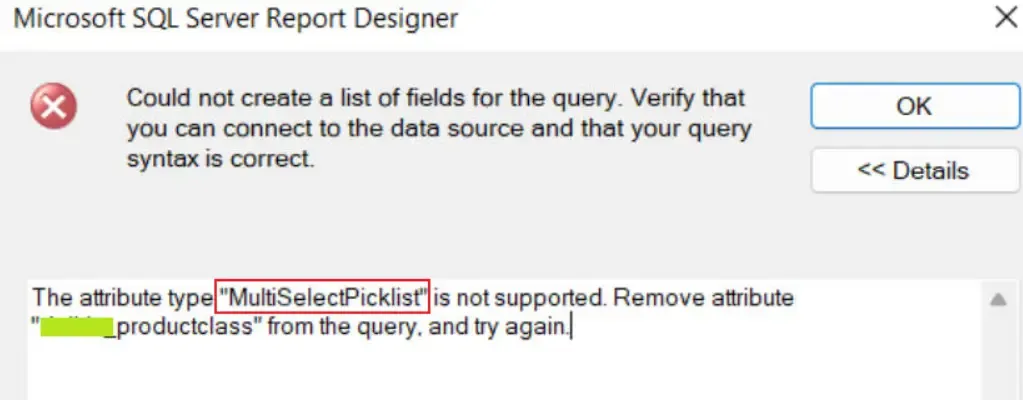
多选项字段 无法直接 添加到 SSRS 数据集(无论是 FetchXML 还是 SQL 方式)
在 Report Designer 中尝试添加字段时,系统会直接阻止并提示错误。
解决思路
在实际项目中,一个 稳定且通用 的做法是:
- 新增一个 文本字段
- 用来存储多选项字段当前选中值的 显示名称
- 在多选项字段变更时,同步更新该文本字段
- SSRS 报表 只使用文本字段进行展示
这样做的好处是:
- 不依赖报表侧的特殊处理
- 数据在数据库层面就是可读文本
- 对后续统计、导出、对接都更友好
多选项之间的分隔符(例如英文逗号
,),只需要在项目中与业务方提前约定即可
示例说明
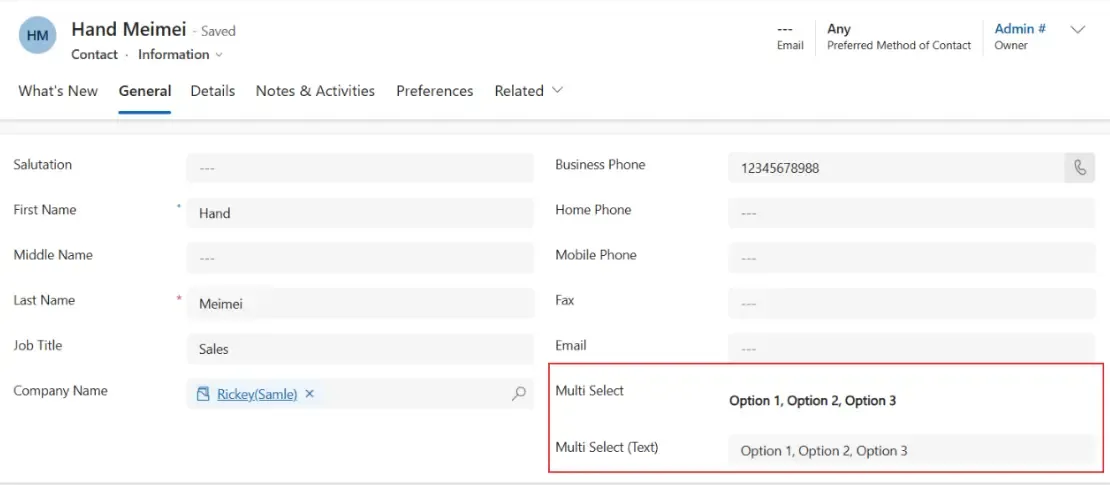
以 Contact 实体为例:
| 字段类型 | 字段名 |
|---|---|
| Multi Select Option Set | gdh_multi_select |
| Text | gdh_multi_select_text |
当用户修改 gdh_multi_select 时,系统会自动将选中项的 显示名称拼接后 写入 gdh_multi_select_text
实现方式
根据项目复杂度和技术栈不同,可以选择以下两种实现方式。
方式一:插件(推荐)
插件方案更适合:
- 对数据一致性要求高
- 有开发资源
- 不希望引入第三方组件的项目
注册方式
- 实体:Contact
- Message:Create / Update
- Stage:Post-Operation
- Filtering Attributes:
gdh_multi_select
插件逻辑非常简单:
当检测到多选项字段发生变化时,读取其选中值对应的显示名称,并更新到文本字段
插件完整代码见文末
方式二:工作流(低代码)
如果项目中不方便开发插件,也可以使用工作流方案。
这里借助第三方工具 Dynamics-365-Workflow-Tools :
GitHub 地址:
https://github.com/demianrasko/Dynamics-365-Workflow-Tools
安装 Dynamics-365-Workflow-Tools 基本步骤
| # | 基本步骤说明 |
|---|---|
| 1 | 打开 GitHub 仓库,进入 Releases(页面右下角) |
| 2 | 下载 Dynamics 365 Workflow Tools Solution(建议使用 Latest 版本) |
| 3 | 将解决方案导入到系统中,并按向导完成安装 |
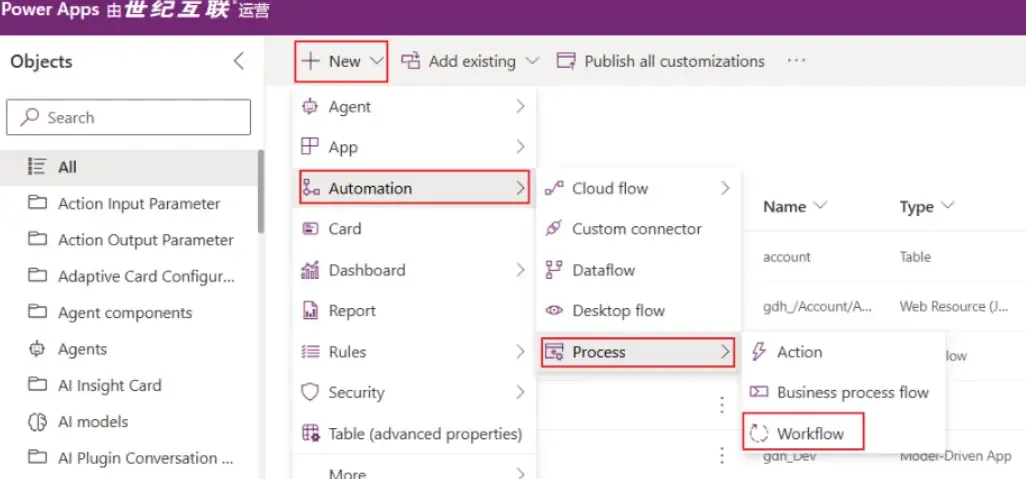
在 Power Apps 中新建 Workflow
新建 Workflow:
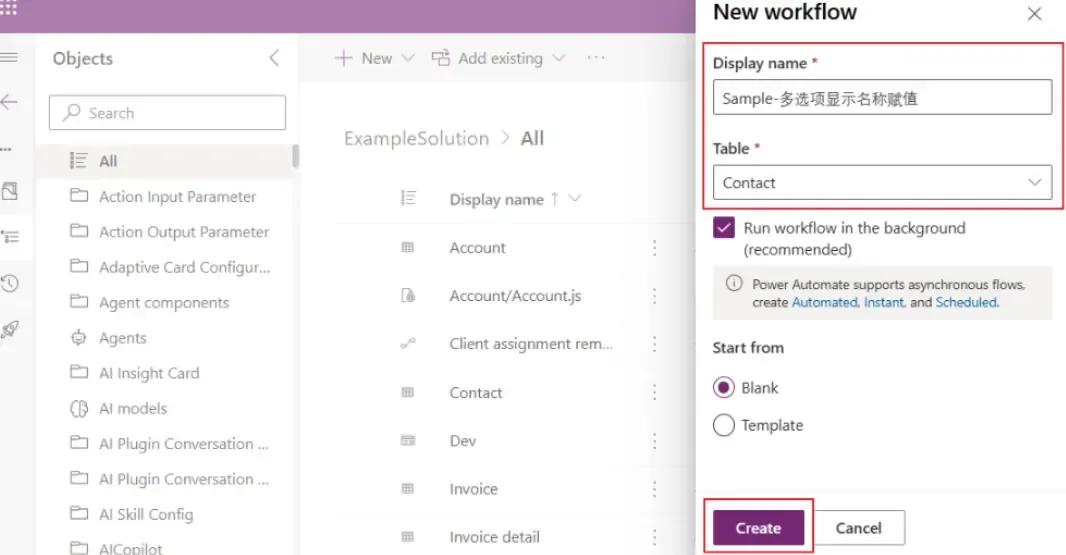
填写一个有意义的名称,并选择空白模板后点击 Create。
选择 Workflow-Tools → 选择 GetMultiSelectOptionSet
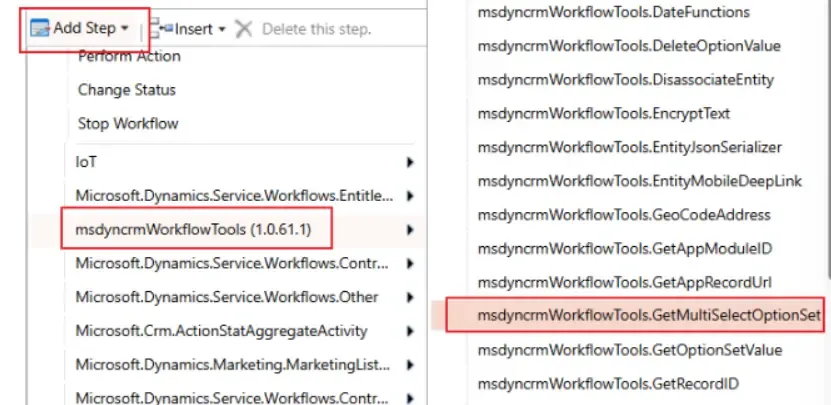
点击 Set Properties
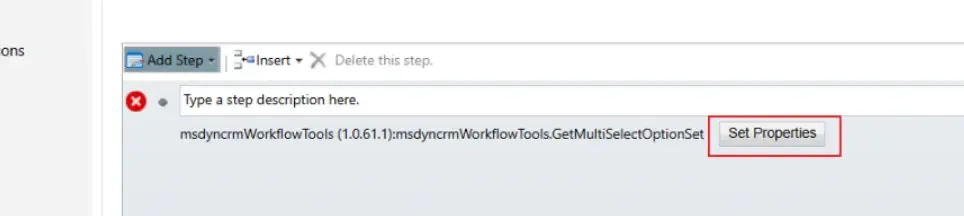
填写/选择 参数 (参数如下) → 保存并关闭
| # | 参数 |
|---|---|
| 1 | Source Record URL |
| 2 | Attribute Name |
| 3 | Retrieve Options Names |
添加更新步骤 → 点击 Set Properties
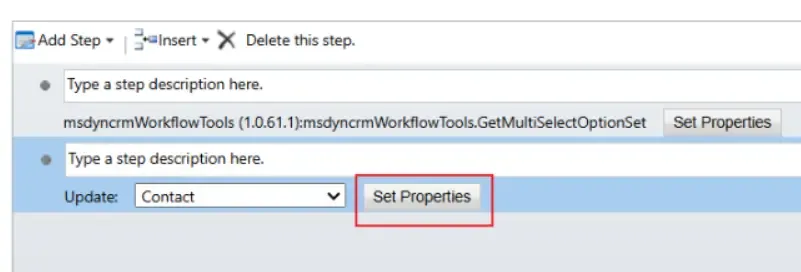
为字段赋值 → 保存并关闭
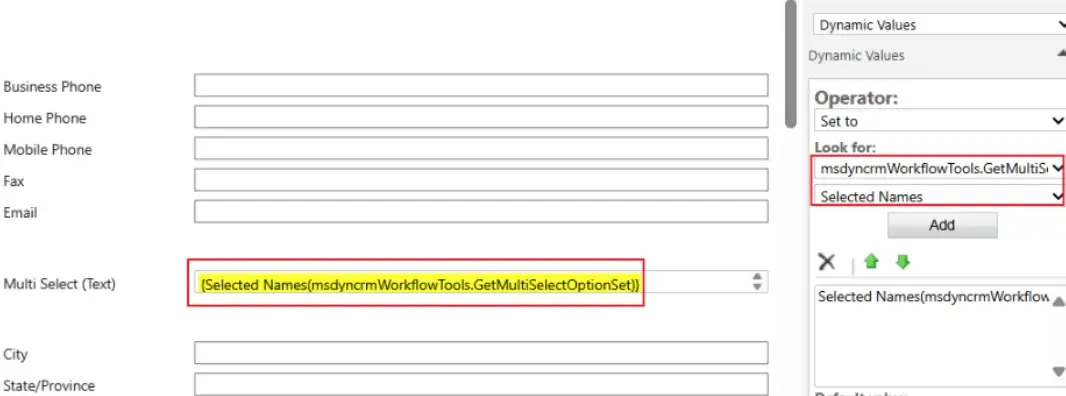
最后激活工作流即可
这种方式实现成本低,但在性能和可控性上略逊于插件,更适合轻量级场景
插件代码示例
using Microsoft.Crm.Sdk.Messages;
using Microsoft.Xrm.Sdk;
using Microsoft.Xrm.Sdk.Messages;
using Microsoft.Xrm.Sdk.Metadata;
using Microsoft.Xrm.Sdk.Query;
using System;
using System.Collections.Generic;
using System.IdentityModel.Metadata;
using System.Linq;
using System.Runtime.Remoting.Services;
using System.Text;
using System.Threading;
using System.Threading.Tasks;

namespace Blog.D365.Plugins.Contact
{
    public class ContactPostUpdatePlugin : IPlugin
    {
        public void Execute(IServiceProvider serviceProvider)
        {
            ITracingService tracer = (ITracingService)serviceProvider.GetService(typeof(ITracingService));
            IPluginExecutionContext context =
                (IPluginExecutionContext)serviceProvider.GetService(typeof(IPluginExecutionContext));
            try
            {
                if (context.InputParameters.Contains("Target") &&
                context.InputParameters["Target"] is Entity)
                {
                    IOrganizationServiceFactory factory =
                        (IOrganizationServiceFactory)serviceProvider.
                        GetService(typeof(IOrganizationServiceFactory));
                    IOrganizationService service = factory.CreateOrganizationService(context.UserId);
                    IOrganizationService serviceAdmin = factory.CreateOrganizationService(null);
                    Entity targetEntityRecord = (Entity)context.InputParameters["Target"];

                    // "context.Stage == 40" -> PostOperation
                    if (context.Stage == 40 && targetEntityRecord.Attributes.Contains("gdh_multi_select") &&
                        (context.MessageName == "Create" || context.MessageName == "Update"))
                    {
                        SetMultiSelectText(serviceAdmin, targetEntityRecord);
                    }
                }
            }
            catch (Exception ex)
            {
                tracer.Trace($"ContactPostUpdatePlugin unexpected exception:\n{ex.Message}");
                throw;
            }
        }

        private void SetMultiSelectText(IOrganizationService organization, Entity contactEn)
        {
            if (contactEn.Attributes.Contains("gdh_multi_select"))
            {
                OptionSetValueCollection optionSetValues =
                    contactEn.GetAttributeValue<OptionSetValueCollection>("gdh_multi_select");
                string roleText =
                    GetMultiSelectOptionSetLabels(
                      organization,
                      "contact",
                      "gdh_multi_select",
                      optionSetValues);
                if (!string.IsNullOrEmpty(roleText))
                {
                    Entity updateContact = new Entity(contactEn.LogicalName, contactEn.Id);
                    updateContact["gdh_multi_select_text"] = roleText;
                    organization.Update(updateContact);
                }
            }
        }

        public static string GetMultiSelectOptionSetLabels(
            IOrganizationService service,
            string entityLogicalName,
            string attributeLogicalName,
            OptionSetValueCollection values,
            int? languageCode = null)
        {
            if (values == null || !values.Any())
                return string.Empty;
            // Retrieve the attribute metadata
            RetrieveAttributeRequest retrieveAttributeRequest = new RetrieveAttributeRequest
            {
                EntityLogicalName = entityLogicalName,
                LogicalName = attributeLogicalName,
                RetrieveAsIfPublished = true
            };
            RetrieveAttributeResponse retrieveAttributeResponse =
            (RetrieveAttributeResponse)service.Execute(retrieveAttributeRequest);
            MultiSelectPicklistAttributeMetadata attributeMetadata =
            retrieveAttributeResponse.AttributeMetadata as MultiSelectPicklistAttributeMetadata;
            if (attributeMetadata == null)
                throw new InvalidPluginExecutionException("Attribute is not a Metadata.");
            // Prepare a map from option value to label
            Dictionary<int, string> optionLabels = attributeMetadata.OptionSet.Options.ToDictionary(
                o => o.Value.GetValueOrDefault(),
                o => GetLocalizedLabel(o, languageCode)
            );
            // Map selected values to labels
            var selectedLabels = values
                .Select(v => optionLabels.ContainsKey(v.Value) ?
                optionLabels[v.Value] : $"(Unknown {v.Value})")
                .ToList();
            return string.Join(", ", selectedLabels);
        }

        private static string GetLocalizedLabel(OptionMetadata option, int? languageCode = null)
        {
            if (languageCode.HasValue)
            {
                var label = option.Label.LocalizedLabels
                    .FirstOrDefault(l => l.LanguageCode == languageCode.Value);
                return label?.Label ?? $"(No label for {option.Value})";
            }
            else
            {
                return option.Label.UserLocalizedLabel?.Label ?? $"(No label for {option.Value})";
            }
        }

        public static int GetCurrentUserLanguageCode(IOrganizationService service)
        {
            WhoAmIResponse whoAmI = (WhoAmIResponse)service.Execute(new WhoAmIRequest());
            Guid userId = whoAmI.UserId;
            QueryExpression query = new QueryExpression("usersettings");
            query.Criteria.AddCondition(
              new ConditionExpression("systemuserid", ConditionOperator.Equal, userId));
            query.ColumnSet.AddColumns("uilanguageid");
            Entity result = service.RetrieveMultiple(query).Entities.FirstOrDefault();
            return result != null && result.Attributes.Contains("uilanguageid")
                ? (int)result["uilanguageid"]
                : 1033;
        }
    }
}
(完)
如果这篇文章刚好帮到了你,欢迎请我喝杯咖啡!