


CAUTION
原来的码语法展示是基于Hugo的,现在本站已更新为Astro,所以展示的是AstroPaper主题下的代码语法展示
本文详细介绍主题中的代码展示方式,从基础的行内代码、pre标签到主题特有的Shiki增强语法,包括代码差异高亮、多行标记等功能。
Table of contents
Open Table of contents
- 行内代码
- 纯 pre 标签代码块
- 使用反引号的代码块
- AstroPaper 特有的代码块功能
- 1. 代码差异高亮
- 代码差异高亮(多行)
行内代码
`This is Inline Code`This is Inline Code
纯 pre 标签代码块
<pre>
This is pre text
</pre>
This is pre text
使用反引号的代码块
```html file="data/blog/code-syntax-guide.md"
<!DOCTYPE html>
<html lang="en">
  <head>
    <meta charset="utf-8" />
    <title>Example HTML5 Document</title>
    <meta
      name="description"
      content="Sample article showcasing basic Markdown ..."
    />
  </head>
  <body>
    <p>Test</p>
  </body>
</html>
```<!DOCTYPE html>
<html lang="en">
<head>
<meta charset="utf-8" />
<title>Example HTML5 Document</title>
<meta
name="description"
content="Sample article showcasing basic Markdown ..."
/>
</head>
<body>
<p>Test</p>
</body>
</html>data/blog/code-syntax-guide.mdAstroPaper 特有的代码块功能
AstroPaper主题集成的 Shiki 代码高亮器的增强语法
1. 代码差异高亮
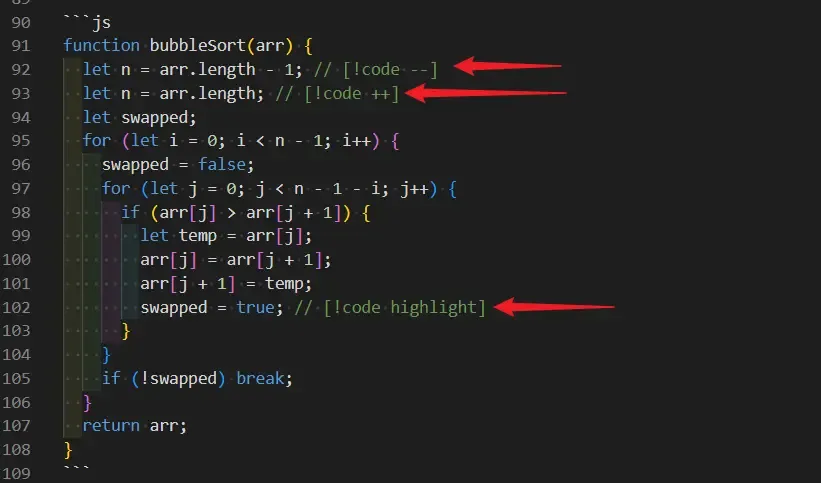
<!-- [!code ++] -->表示新增的代码行<!-- [!code --] -->表示删除的代码行<!-- [!code highlight] -->高亮某行
function bubbleSort(arr) {
  let n = arr.length - 1;
  let n = arr.length;
  let swapped;
  for (let i = 0; i < n - 1; i++) {
    swapped = false;
    for (let j = 0; j < n - 1 - i; j++) {
      if (arr[j] > arr[j + 1]) {
        let temp = arr[j];
        arr[j] = arr[j + 1];
        arr[j + 1] = temp;
        swapped = true;
      }
    }
    if (!swapped) break;
  }
  return arr;
}
代码差异高亮(多行)
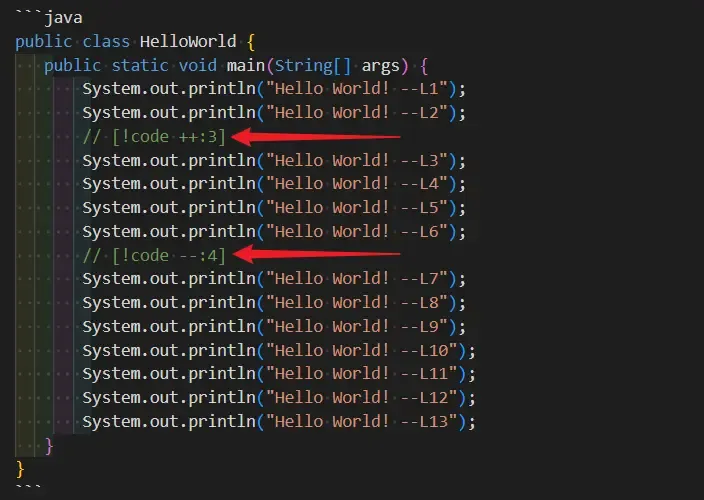
[!code ++:3]表示从这一行开始,接下来的 3 行都是新增的代码[!code --:3]表示从这一行开始,接下来的 3 行都是删除的代码
public class HelloWorld {
   public static void main(String[] args) {
       System.out.println("Hello World! --L1");
       System.out.println("Hello World! --L2");
       System.out.println("Hello World! --L3");
       System.out.println("Hello World! --L4");
       System.out.println("Hello World! --L5");
       System.out.println("Hello World! --L6");
       System.out.println("Hello World! --L7");
       System.out.println("Hello World! --L8");
       System.out.println("Hello World! --L9");
       System.out.println("Hello World! --L10");
       System.out.println("Hello World! --L11");
       System.out.println("Hello World! --L12");
       System.out.println("Hello World! --L13");
   }
}
(完)
如果这篇文章刚好帮到了你,欢迎请我喝杯咖啡!