


In this series, we've explored the security landscape of AI coding agents in CI/CD environments, examining the fundamental challenges, GitHub Copilot's built-in firewall approach, and Claude Code's unrestricted architecture. Now, let's examine Google's Gemini CLI - an agent that takes a unique middle path with flexible authentication and built-in observability, yet still requires runtime security monitoring for complete visibility.
.jpg)
Google's run-gemini-cli GitHub Action represents a distinctive philosophy in AI coding agents. Unlike Copilot's restrictive firewall or Claude's completely open architecture, Gemini offers a hybrid approach that emphasizes flexibility in deployment while providing native observability features through Google Cloud integration.
This design allows Gemini to:
However, this observability focuses on application-level metrics rather than runtime security. While you can monitor Gemini's performance and API usage through Google Cloud, you lack visibility into:
This creates a critical gap: Gemini tells you what it accomplished, but not how it accomplished it at the system level.
Gemini CLI provides extensive configuration options that shape the agent's behavior and integration:
- uses: google-github-actions/run-gemini-cli@v1
  with:
    prompt: "You are a security-conscious coding assistant"
    settings: |
      {
        "model": "gemini-1.5-pro",
        "temperature": 0.7
      }
    use_vertex_ai: true
    gcp_project_id: ${{ vars.GOOGLE_CLOUD_PROJECT }}
The agent also supports project-specific context through a GEMINI.md file, allowing teams to define coding conventions and architectural patterns. These controls are valuable for guiding Gemini's behavior, but they operate at the instruction level, not the execution level.
What these configurations don't provide:
The authentication options - from simple API keys to Workload Identity Federation - secure the connection to Google's services but don't restrict what the agent can do once it's running in your GitHub Actions environment.
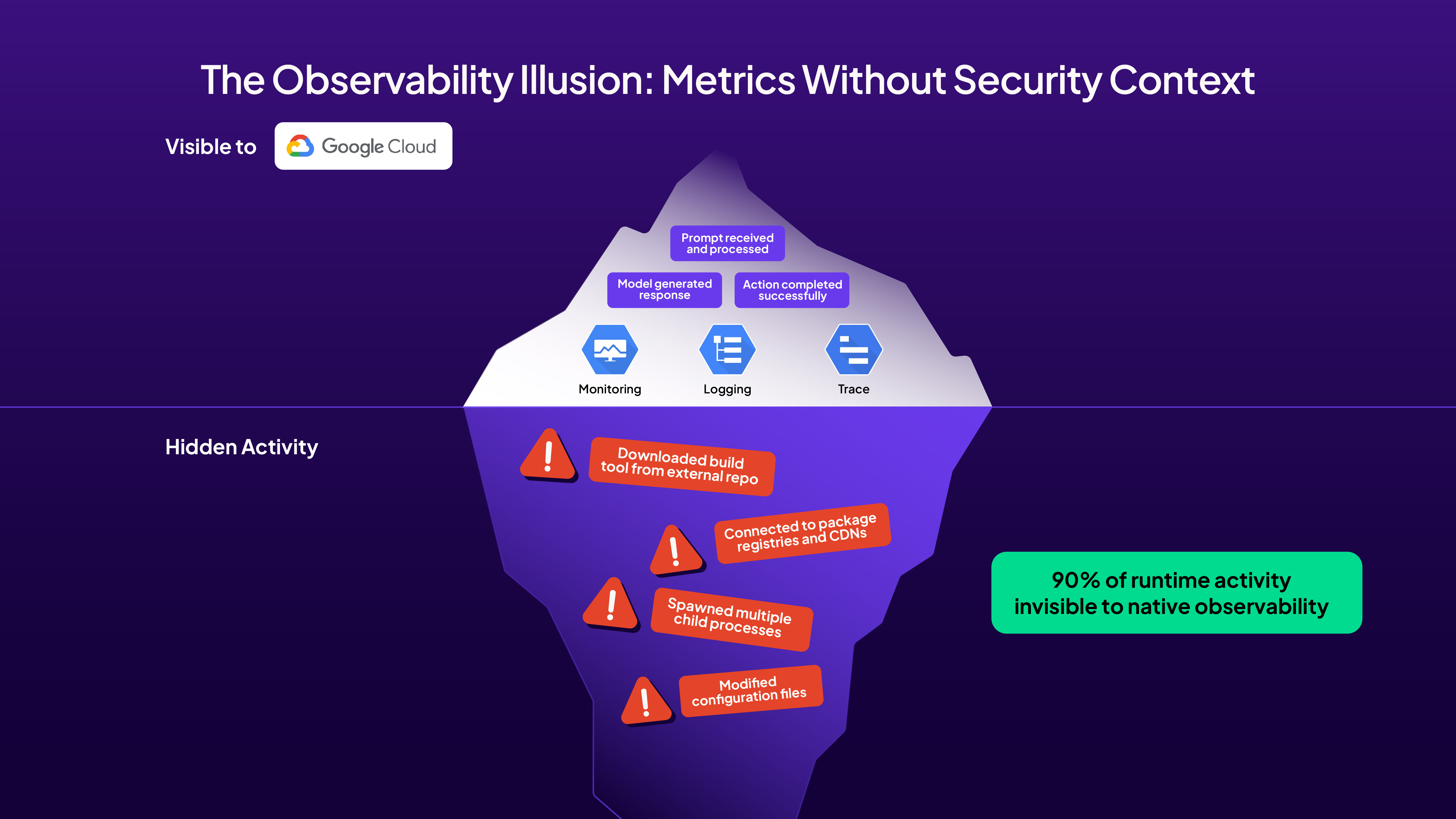
Gemini's native observability features might initially seem sufficient for security monitoring. The agent can send detailed telemetry to Google Cloud, including:
However, this telemetry operates at the wrong layer for security purposes. Consider this scenario: Gemini is asked to "optimize the build process" in an issue comment. The Google Cloud logs will show:
What's missing is the security-critical information:
This disconnect between application observability and runtime security creates dangerous blind spots in your CI/CD pipeline.
Let's examine what happens when Google's run-gemini-cli reviews production code. We triggered Gemini by adding a "@gemini-cli /review" comment on pull request #2, asking it to review code that implemented a Python program for text-to-image generation and OCR extraction - code originally created by GitHub Copilot.
This simple review request triggered GitHub Actions workflow run #17576743322, executing multiple jobs including dispatch, debugger, review, and fallthrough. The review job alone took 1 minute 18 seconds, during which Harden-Runner captured every network call, process spawn, and API interaction. You can explore the complete Harden-Runner insights here.

On this insights page, you can find detailed information about:
Network Events: https://app.stepsecurity.io/github/step-security/coding-agent-security/actions/runs/17576743322?tab=network-events&jobId=49923641852
Process Events: https://app.stepsecurity.io/github/step-security/coding-agent-security/actions/runs/17576743322?tab=process-events&jobId=49923641852
The Harden-Runner insights reveal Gemini's extensive network footprint across 51 HTTPS events to 9 different destinations. Here's what we observed:
1. Google Cloud AI Infrastructure
a. Node.js process (PID 2512) made POST calls to play.googleapis.com at /log?format=json&hasfast=true
b. The same process connected to generativelanguage.googleapis.com with POST requests to:
i. /v1beta/models/gemini-2.5-pro:countTokens
ii. /v1beta/models/gemini-2.5-pro:streamGenerateContent?alt=sse
c. These API calls show Gemini counting tokens and streaming content generation in real-time
2. Container Infrastructure and Dependencies
a. Docker daemon (PID 1191) connected to multiple container registries:
i. ghcr.io with GET calls to /v2/ and HEAD to /v2/github/github-mcp-server/manifests/latest
ii. pkg-containers.githubusercontent.com accessing numerous SHA-based blobs for container layers
b. The dockerd process fetched specific container images with calls like:
i. /ghcr1/blobs/sha256:4eff9a62d888790350b2481ff4a4f38f9c94b3674d26b2f2c85ca39...
ii. Multiple layer downloads indicating container image assembly
3. Node.js Runtime Dependencies
a. Node process (PID 2400) accessed nodejs.org with GET requests to:
i. /download/release/v20.19.4/node-v20.19.4-headers.tar.gz
ii. /download/release/v20.19.4/SHASUMS256.txt
b. This shows Gemini dynamically downloading Node.js headers for native module compilation
4. Package Registry Activity
a. Environment process (PID 2382) connected to registry.npmjs.org with 9 distinct API calls:
i. GET requests to /@google/gemini-cli for the main package
ii. Fetching type definitions: /fzf, /diff, /ink, /zod, /glob, /open, /react, /dotenv
iii. This reveals Gemini's dependency chain and the tools it uses for code analysis
5. GitHub Integration Layer
a. Multiple processes accessed github.com for repository operations:
i. git-remote-http (PID 2366) called /step-security/coding-agent-security/info/refs?service=git-upload-pack
ii. Node process (PID 2459) downloaded /microsoft/ripgrep-prebuilt/releases/download/v13.0.0-10/ripgrep-v13.0.0-10-x86_64-unknown-linux-musl.tar.gz
iii. GitHub MCP server integration for enhanced code understanding
6. Release Asset Downloads
a. Node process (PID 2459) made extensive calls to release-assets.githubusercontent.com:
i. Downloaded multiple GitHub release assets with specific version tags
ii. Each download included authentication parameters and signature verification
iii. Example: /github-production-release-asset/194786020/f10f13614-f391-4bd8-9ebd-bfab0f8b48fc?...
From this runtime analysis, several critical security insights emerge about Gemini's architecture:
The workflow showed:
The API calls reveal Gemini's sophisticated token management:
The extensive Docker activity (PID 1191) reveals Gemini's security architecture:
The logging calls to play.googleapis.com/log reveal extensive telemetry:
The workflow exposed significant supply chain dependencies:
These findings demonstrate that while Gemini provides excellent observability through Google Cloud, only runtime monitoring tools like Harden-Runner can reveal the complete picture of network activity, process execution, and dependency resolution. The 51 HTTPS events across 9 destinations for a simple code review task illustrates the complexity hidden beneath Gemini's seemingly straightforward operation. This reinforces our recommendation: regardless of native observability features, runtime security monitoring remains essential for production AI agent deployments.
Securing Gemini GitHub Action in production requires leveraging both its native features and external runtime monitoring:
Together, these layers create a comprehensive security posture that maintains Gemini's flexibility while ensuring transparency and control.
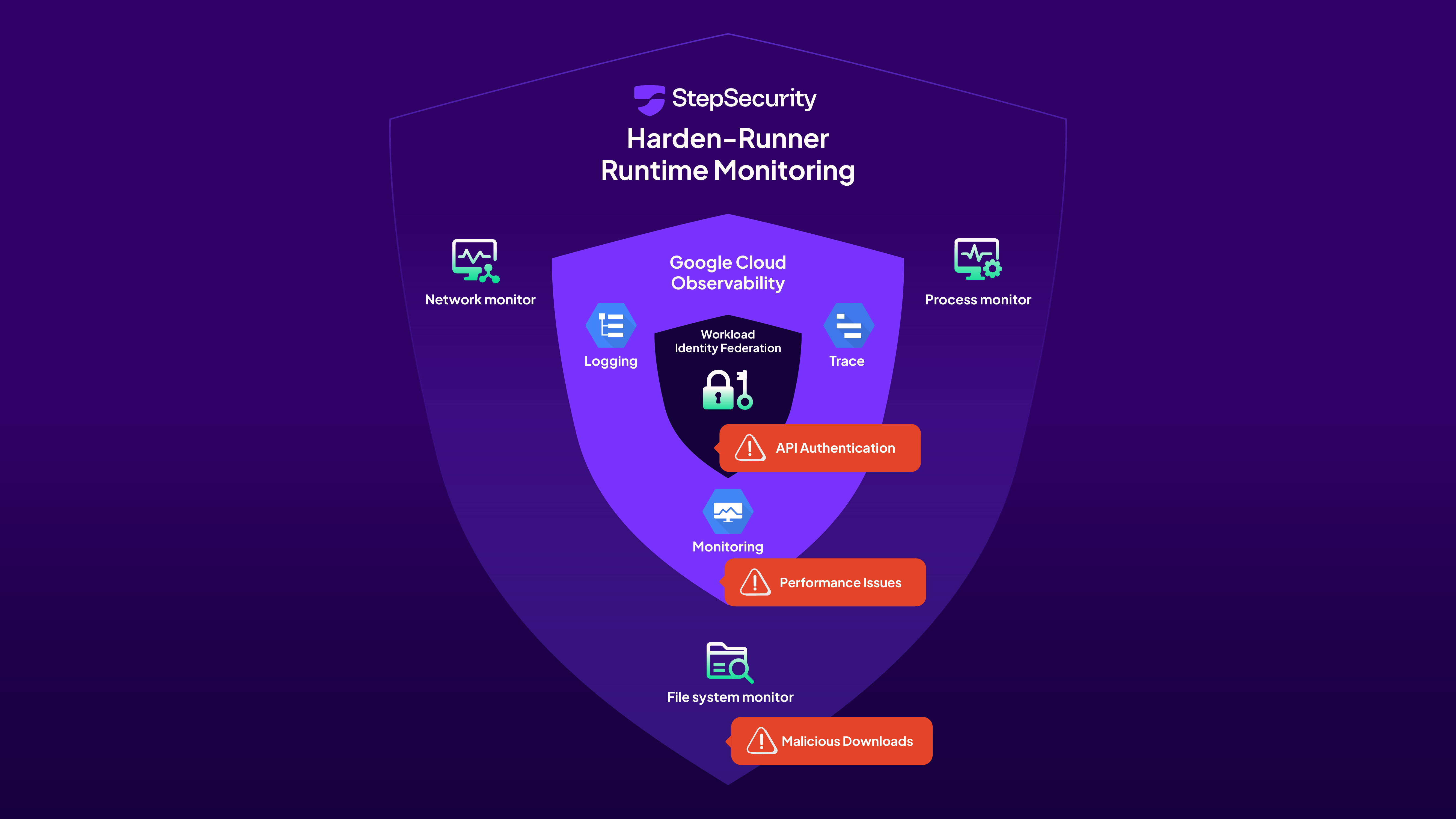
Google's Gemini CLI offers enterprise-grade observability and flexible deployment options, but application-level telemetry alone cannot provide the security visibility required for production CI/CD environments. While Google Cloud provides performance insights and audit trails, only runtime monitoring tools like Harden-Runner can reveal the complex chains of network calls, process executions, and file operations that occur during agent execution.
This combination of Gemini's native features with Harden-Runner creates true defense-in-depth for AI-powered development. Whether organizations choose GitHub Copilot's restricted approach, Claude Code's unrestricted power, or Gemini's flexible middle path, runtime monitoring remains the essential foundation for secure AI-powered CI/CD pipelines.
.jpg)
此内容由惯性聚合(RSS阅读器)自动聚合整理,仅供阅读参考。 原文来自 — 版权归原作者所有。