
惯性聚合 高效追踪和阅读你感兴趣的博客、新闻、科技资讯
阅读原文 在惯性聚合中打开

推荐订阅源

C
CXSECURITY Database RSS Feed - CXSecurity.com
K
Kaspersky official blog
A
Arctic Wolf
Attack and Defense Labs
L
LINUX DO - 热门话题
N
News | PayPal Newsroom
cs.CV updates on arXiv.org
L
Lohrmann on Cybersecurity
PCI Perspectives
PCI Perspectives
cs.AI updates on arXiv.org
The Last Watchdog
The Last Watchdog
B
Blog RSS Feed
让小产品的独立变现更简单 - ezindie.com
W
WeLiveSecurity
Know Your Adversary
Know Your Adversary
博客园 - Franky
T
Tenable Blog
T
Tailwind CSS Blog
钛媒体:引领未来商业与生活新知
钛媒体:引领未来商业与生活新知
Help Net Security
Help Net Security
WordPress大学
WordPress大学
T
The Exploit Database - CXSecurity.com
www.infosecurity-magazine.com
博客园 - 司徒正美
阮一峰的网络日志
阮一峰的网络日志
D
Darknet – Hacking Tools, Hacker News & Cyber Security
H
Heimdal Security Blog
TaoSecurity Blog
TaoSecurity Blog
S
Security Affairs
J
Java Code Geeks
小众软件
小众软件
freeCodeCamp Programming Tutorials: Python, JavaScript, Git & More
Apple Machine Learning Research
NISL@THU
NISL@THU
O
OpenAI News
The Cloudflare Blog
月光博客
月光博客
Google Online Security Blog
V
V2EX
罗磊的独立博客
美团技术团队
博客园 - 三生石上(FineUI控件)
Security Latest
Security Latest
奇客Solidot–传递最新科技情报
奇客Solidot–传递最新科技情报
C
Cyber Attacks, Cyber Crime and Cyber Security
cs.CL updates on arXiv.org
Cyberwarzone
Cyberwarzone
L
LINUX DO - 最新话题
Hacker News - Newest:
Hacker News - Newest: "LLM"
大猫的无限游戏
大猫的无限游戏

Step Security Blog

Announcing Dependabot Configuration Enhancements: Cooldown and Group Support - StepSecurity Securing Vibe Coding and AI Coding Agents: An End-to-End Approach with StepSecurity - StepSecurity Introducing StepSecurity Dev Machine Guard: Protecting Developer Machines from Supply Chain Attacks - StepSecurity Top 2024 Predictions for CI/CD Security - StepSecurity Dev Machine Guard Is Now Open Source: See What's Really Running on Your Developer Machine - StepSecurity Datadog's DevSecOps 2026 Report Validates What We've Been Building - StepSecurity hackerbot-claw: An AI-Powered Bot Actively Exploiting GitHub Actions - Microsoft, DataDog, and CNCF Projects Hit So Far - StepSecurity Cline Supply Chain Attack Detected: cline@2.3.0 Silently Installs OpenClaw - StepSecurity StepSecurity’s Unified Protection Across the SDLC Infrastructure Threat Framework (SITF) - StepSecurity @velora-dex/sdk Compromised on npm: Malicious Version Drops macOS Backdoor via launchctl Persistence - StepSecurity axios Compromised on npm - Malicious Versions Drop Remote Access Trojan - StepSecurity Behind the Scenes: How StepSecurity Detected and Helped Remediate the Largest npm Supply Chain Attack - StepSecurity 10 Layers Deep: How StepSecurity Stops TeamPCP's Trivy Supply Chain Attack on GitHub Actions - StepSecurity Malicious IoliteLabs VSCode Extensions Target Solidity Developers on Windows, macOS, and Linux with Backdoor - StepSecurity TeamPCP Plants WAV Steganography Credential Stealer in telnyx PyPI Package - StepSecurity litellm: Credential Stealer Hidden in PyPI Wheel - StepSecurity Checkmarx KICS GitHub Action Compromised: Malware Injected in All Git Tags - StepSecurity CanisterWorm: How a Self-Propagating npm Worm Is Spreading Backdoors Across the Ecosystem - StepSecurity Trivy Compromised a Second Time - Malicious v0.69.4 Release, aquasecurity/setup-trivy, aquasecurity/trivy-action GitHub Actions Compromised - StepSecurity bittensor-wallet 4.0.2 Compromised on PyPI - Backdoor Exfiltrates Private Keys - StepSecurity Malicious npm Releases Found in Popular React Native Packages - 130K+ Monthly Downloads Compromised - StepSecurity Malicious Polymarket Bot Hides in Hijacked dev-protocol GitHub Org and Steals Wallet Keys - StepSecurity ForceMemo: Hundreds of GitHub Python Repos Compromised via Account Takeover and Force-Push - StepSecurity xygeni-action Compromised: C2 Reverse Shell Backdoor Injected via Tag Poisoning - StepSecurity kubernetes-el Compromised: How a Pwn Request Exploited a Popular Emacs Package - StepSecurity How StepSecurity Caught a Release Storm in Microsoft’s @types Packages - StepSecurity Harden Runner Now Supports Windows and macOS GitHub Actions Runners - StepSecurity 10,000 Open-Source Projects Now Secured by Harden-Runner Community-Tier: A Milestone Three Years in the Making - StepSecurity 20+ Popular NPM Packages Compromised (Chalk, Debug, Strip-ANSI, Color-Convert, Wrap-ANSI...) - StepSecurity 2024 in Review: The Evolution of CI/CD Security & What's Next - StepSecurity How to Use Docker in Actions Runner Controller (ARC) Runners Securely - StepSecurity Celebrating 1000 Repositories Secured with Harden Runner: A Journey of Growth and Collaboration - StepSecurity StepSecurity Detects Early Supply Chain Risk Signals in kilocode npm - StepSecurity Another npm Supply Chain Attack: The 'is' Package Compromise - StepSecurity anthropics/claude-code-action Security: How to Secure Claude Code in GitHub Actions with Harden-Runner - StepSecurity Harden-Runner detection: tj-actions/changed-files action is compromised - StepSecurity StepSecurity's Catalog of Fixes - StepSecurity Orchestrating Security: StepSecurity's Impact on 400+ Repositories and Future Plans - StepSecurity Announcing Anomalous Outbound Call Detection Using Machine Learning - StepSecurity Announcing GitHub Actions Advisor and StepSecurity Maintained Actions - StepSecurity Analysis of Backdoored XZ Utils Build Process with Harden-Runner - StepSecurity Announcing General Availability of Harden Runner - StepSecurity Milestone Achieved: 2500+ Public Repositories Secured with Harden-Runner - StepSecurity Build secretless CI/CD pipelines using wait-for-secrets - StepSecurity Introducing Apps & PATs: Centralized Visibility for GitHub Apps and Personal Access Tokens - StepSecurity CVE-2026-22709: Critical Sandbox Escape Vulnerability in vm2 - StepSecurity StepSecurity Now Supports Dark Mode - StepSecurity 2025 in Review: The Evolution of Supply Chain Security & What's Next - StepSecurity Bake Harden-Runner Into GitHub's Custom Runner Images for Organization-Wide CI/CD Security - StepSecurity StepSecurity Is Now Available on Azure Marketplace - StepSecurity Critical Remote Code Execution Vulnerabilities Discovered in React Server Components and Next.js - StepSecurity How Harden Runner Detected the Sha1-Hulud Supply Chain Attack in CNCF's Backstage Repository - StepSecurity Sha1-Hulud: The Second Coming - Zapier, ENS Domains, and Other Prominent NPM Packages Compromised - StepSecurity Supply Chain Security Alert: eslint-config-prettier Package Shows Signs of Compromise - StepSecurity 9,000 Open-Source Projects Now Secured by Harden-Runner - StepSecurity Shai-Hulud: Self-Replicating Worm Compromises 500+ NPM Packages - StepSecurity Introducing npm Package Search: Find Where Any Package Was Introduced Across Your GitHub Organizations - StepSecurity StepSecurity Is Sponsoring GitHub Universe 2025 - StepSecurity s1ngularity: Popular Nx Build System Package Compromised with Data-Stealing Malware - StepSecurity Introducing StepSecurity Threat Intelligence: Real-Time Supply Chain Attack Alerts for Your SIEM - StepSecurity 8,000 Strong: Harden-Runner's Growing Impact on CI/CD Security - StepSecurity Securing Google Gemini in GitHub Actions with Harden-Runner - StepSecurity GhostAction Campaign: Over 3,000 Secrets Stolen Through Malicious GitHub Workflows - StepSecurity Introducing the NPM Package Cooldown Check - StepSecurity Securing GitHub Copilot in GitHub Actions with Harden-Runner - StepSecurity Calculate Your CI/CD Security ROI with StepSecurity's New ROI Calculator - StepSecurity How StepSecurity Harden Runner Detected Unexpected Microsoft Defender Installation on GitHub-hosted Ubuntu Runners - StepSecurity StepSecurity Harden Runner: Detect source code tampering during the build process - StepSecurity Suspicious Tag Movement in AWS’s GitHub Action: What Happened and Why It Matters - StepSecurity When 'Changed Files' Changed Everything: Our Black Hat 2025 Presentation on the tj-actions Supply Chain Breach - StepSecurity Lessons from AWS CodeBuild’s Memory-Dump Incident (CVE-2025-8217) - StepSecurity Supply Chain Security Alert: num2words PyPI Package Shows Signs of Compromise - StepSecurity When AI Meets CI/CD: Coding Agents in GitHub Actions Pose Hidden Security Risks - StepSecurity The GitHub Warning Everyone Ignores: 'This Commit Does Not Belong to Any Branch' - StepSecurity 8 GitHub Actions Secrets Management Best Practices to Follow - StepSecurity reviewdog GitHub Actions are compromised - StepSecurity 7,000 Open-Source Projects Now Secured by Harden-Runner - StepSecurity Replace Third-Party Actions with StepSecurity Maintained Actions via Automated Pull Requests - StepSecurity StepSecurity Is Now Available on AWS Marketplace - StepSecurity Introducing StepSecurity Artifact Monitor: Detect Unauthorized Software Releases in minutes, not months - StepSecurity Introducing Workflow Run Policies: Guardrails for Blocking Non-Compliant GitHub Actions Runs - StepSecurity Harden-Runner Detects New Traffic to release-assets.githubusercontent.com Across Multiple Customers - StepSecurity Grafana GitHub Actions Security Incident - StepSecurity Export Harden-Runner Security Insights and Detections to Amazon S3 - StepSecurity Evolving Harden-Runner’s disable-sudo Policy for Improved Runner Security - StepSecurity Announcing Policy-Driven Automated Pull Requests for CI/CD Misconfiguration Remediation - StepSecurity Announcing StepSecurity’s Integration with RunsOn: Secure and Optimized CI/CD Pipelines - StepSecurity Secure Repo Just Got Better: New Features for GitHub Actions Security Best Practices - StepSecurity Why Compliance Auditors Are Looking at Your CI/CD Runners - And How to Prepare - StepSecurity Harden-Runner Flags Anomalous Outbound Call, Leading to Docker Documentation Update - StepSecurity StepSecurity Harden-Runner Now Secures GitHub Actions Workflows for Over 5,000 Open Source Projects - StepSecurity GitHub Actions Pwn Request Vulnerability - StepSecurity Prevent Ultralytics Style CI/CD Security Attacks with Network Security Controls - StepSecurity PyTorch Supply Chain Compromise - StepSecurity Unified Network Egress View: Centralize GitHub Actions Network Destinations for Your Enterprise - StepSecurity Uniting Developers and Security: Celebrating the Success of 500+ Open Source Projects Using StepSecurity's Orchestration Platform - StepSecurity StepSecurity Recognized Among CRN’s "10 Hottest DevOps Startups Of 2024" - StepSecurity Streamline Your GitHub Actions Workflows with StepSecurity’s Latest Feature - StepSecurity StepSecurity Steps Up the Security Game with SOC 2 Type 2 Compliance - StepSecurity StepSecurity's Alignment with CISA's CI/CD Security Guidance - StepSecurity
5 Effective Third-Party GitHub Actions Governance Best Practices - StepSecurity
2025-07-08 · via Step Security Blog

Introduction 

When we talk about GitHub Actions security, we cannot skip mentioning third-party GitHub Actions. GitHub Actions, with its vast repository of over 20,000 third-party actions, presents both opportunities and challenges for organizations. While these actions offer convenience, they also introduce potential security vulnerabilities. As third-party GitHub Actions run in the context of enterprises’ GitHub Actions environment, they have access to highly sensitive assets such as deployment cloud credentials, source code, and production builds. A breach in a GitHub Actions workflow can have far-reaching consequences, leading to the compromise of enterprise data and production environment.  As organizations increasingly rely on third-party actions to enhance their GitHub workflows, ensuring the security of these actions is a pressing concern for the security team. 

In this blog, we will talk about best practices for securely managing third-party GitHub Actions. Check out our other blogs from the GitHub Action security series: 

GitHub Actions Security Best Practices (With Checklist) 

8 GitHub Actions Secrets Management Best Practices to Follow

GITHUB_TOKEN: How It Works and How to Secure Automatic GitHub Action Tokens

Pinning GitHub Actions for Enhanced Security: Everything You Should Know

But first, let’s understand the basics of third-party GitHub Actions. 

What are Third-Party GitHub Actions and Why Do You Need to Secure Them? 

Third-party GitHub Actions are actions created and maintained by an individual or organization that can be reused by other users on GitHub in their CI/CD pipelines. These actions may involve a bad actor that may pose a risk to your projects. Even though it may be very convenient to use a third-party GitHub Action in your workflow, you must ensure that it goes through a screening process and is deemed safe by the security team.  

Risks of using third-party GitHub Actions 

Using an unchecked or unreviewed third-party GitHub Action comes with various risks: 

  1. Open-source maintainers typically work with limited resources to maintain their open-source Actions. In many cases, maintainers lose motivation to maintain their Actions. Such Actions while still usable, are considered abandoned as no-one is maintaining it anymore. These abandoned Actions are highly risky because of unmitigated vulnerabilities in their code or dependencies. 
  1. Malicious actors can add a backdoor into the Action, which gets executed in your enterprise environment when the Action is run.  
  1. Deletion of a repository is also possible causing your GitHub Actions CI/CD pipelines to break.  

Now, let’s understand how you can securely leverage third-party GitHub Actions in your workflows and ensure the highest level of GitHub Actions security.  

Try StepSecurity for Free

Enforce “allow specific third-party GitHub Actions” policy 

The default setting on GitHub allows enterprises to use all third-party GitHub Actions. To ensure you do not use unmaintained and unsafe third-party actions (or abandonware) that may pose a risk to your workflows, make sure to change this setting to “allow enterprise, and select non-enterprise, actions and reusable workflows”. This setting will enable you to limit the third-party actions being used in your organizations and explicitly choose the safe ones. Typically, after the setting has been changed, DevOps or Security teams of an organization will perform due diligence and approve or decline the use of a third-party GitHub Action.  

Here’s a screenshot of the setting showing how to choose the “allow enterprise, and select non-enterprise, actions and reusable workflows” option. 
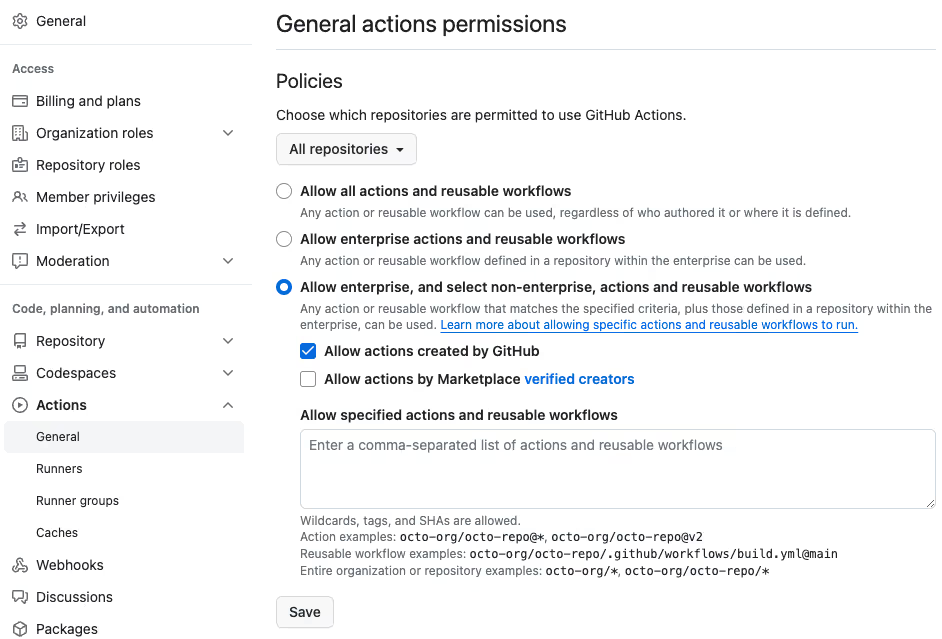
GitHub Actions Security enforce policy

Screenshot showing all the policiy options you can select under General actions permission

Which option to choose under “allow select actions” 

  1. One good option under “allow select actions” is the “allow actions created by GitHub” box. This will allow the usage of all GitHub-owned Actions as they’re well maintained and secure to use. This also means the only people who can make changes to the action are the people at GitHub.  
  1. The next option under the “allow select actions” is “allow marketplace actions by verified creators”. Verified creators are partners who work closely with GitHub and can be trusted when it comes to third-party actions.  
  1. And finally, the last option “allow specified actions” enables you to explicitly specify the actions you want to allow in your organization for usage.  

Review the Source Code 

Before using a third-party Action in your workflow, make sure you’re auditing the source code. This must be done to ensure that there are no malicious agents or questionable actions in your workflow.  

Checklist for source code auditing 

Here are a few things you should be checking when auditing the source code of the Action. There are several guides on the internet on how to perform security code assessment depending upon the resources you have. At a high level, you should look for code or patterns that: 

  1. Access sensitive information as part of their operations such as environment variables, hosts files, etc. 
  1. Dynamically download code and execute it 
  1. Outbound network calls to unexpected and unknown sources 

Make sure you understand what the Action is doing and that it is handling the GitHub secrets as it should. Any malicious code found should be properly audited and the action be rejected to keep your GitHub Actions security intact.   

Fork Risky Third-Party Actions 

One fundamental best practice you can follow to secure your GitHub Actions workflows from threats is to fork risky third-party actions.

Benefits of Forking 

Here’s why forking can be very beneficial for securing your workflows:  

  • By forking a repository, you will gain granular control over actions including updates and reviews  
  • When you fork an action, it gives you a copy of it that can be used in case the repository is deleted or compromised 
  • It provides change management, empowering you to review updates   before sending it out for production 
  • It gives you the surety of the source code being intact between runs 

Post forking, you should apply missing security controls such as branch protection, code updates, etc. In addition, you need to make sure that the forked GitHub Action is being maintained regularly. This includes upgrading vulnerabilities and dependencies for security hardening of the actions. Maintaining forked actions can be quite a time-consuming task and may require dedicated personnel to specifically do it. As a good citizen, we also encourage enterprises following this practice to merge their code improvements upstream so that the entire community can benefit. 
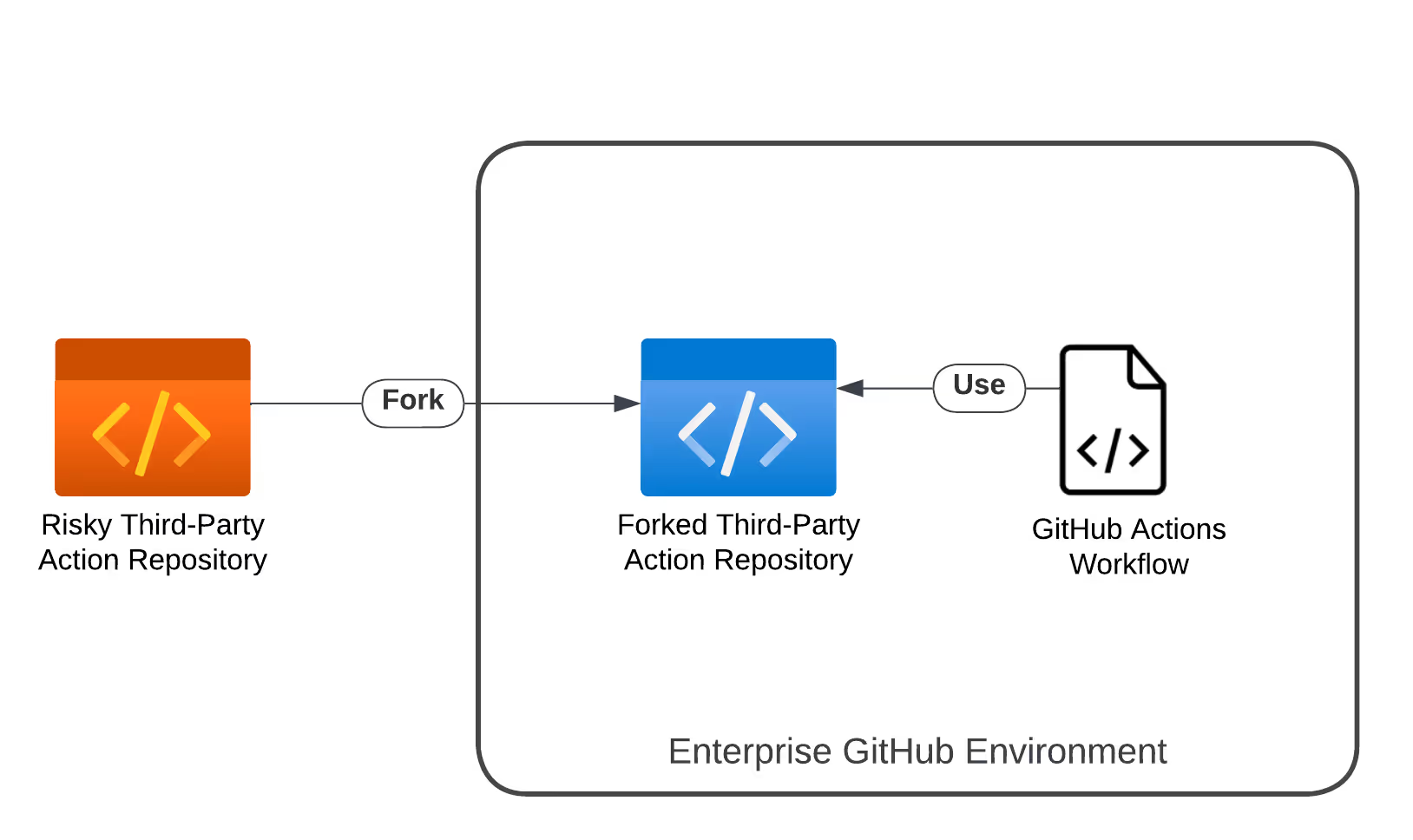
Image showing how forking works and how you can use the forked repositories

One of the first things you should do to enhance your GitHub Actions security after checking a third-party Action and choosing them is to pin them. This means you must pin the action’s major and minor versions to ensure you’re always using the same version in your workflows.  

In the following screenshot, you’ll see tags getting translated into pinned Hashes in one of the workflows in Azure’s project “bridge to kubernetes”.
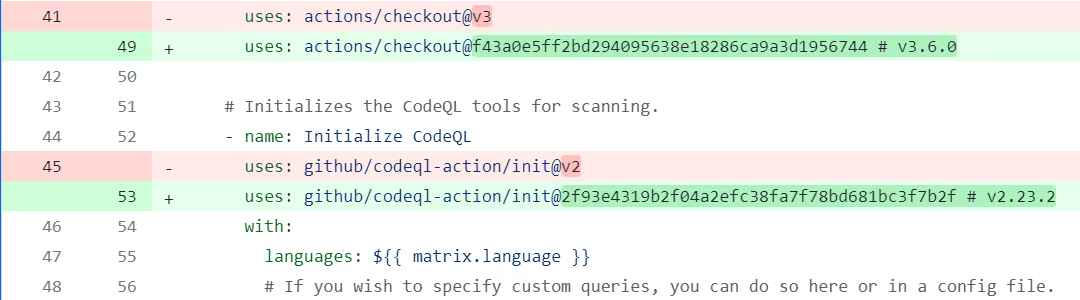
GitHub Actions Security Pin Third Party Actions

Screenshot showing tags being translated into pinned hashes in an Azure project

The role of Full-Length Commit SHA 

To ensure that the source code of the version you’re using hasn’t been altered you must pin the action to the full-length commit SHA. The value of commit SHA is unique for each commit and is immutable. This ensures that your GitHub Actions workflows will always use the same release of the Action and forces developers to manually deploy every single update to the Action.  

If you’re using an Action by a reputed organization like GitHub, you can skip using the full-length commit SHA as they’re usually well maintained and updated. 

Check Who the Author and Contributors Are 

Author Verification 

If you’re using a third-party Action owned by an individual developer(s), it is important to verify the author. Doing this will help you understand if the action is secure for usage or not. Check the author’s profile. You can also check the links they’ve added in their profiles (like LinkedIn and X) to verify. If they’re from an organization, chances are, the author is a professional developer and may maintain the action regularly too. Although, if you find anything fishy, it is best to avoid using the action.  

Contributors Verification 

Analyzing the number of contributors and seeing who they are can also help you decide if a third-party Action is safe to use or not. If the action has a lot of contributors, it is more likely to be secured. Moreover, if the contributors are from the same organization, the action is more likely to be maintained properly over time and be secure for usage.  

Learn How to Confidently Manage Risks of Third-Party GitHub Actions in Your CI/CD 

StepSecurity’s January 2024 webinar on managing risks of third-party GitHub Actions talks about how you effectively maintain and securely use third-party Actions. Watch the full recording of the webinar in the summary blog post

  • Gain insights on GitHub Actions risks and security best practices  
  • Learn about third-party GitHub Actions, risks involved and current governance processes  
  • Learn practical skills on maintaining third-party GitHub Actions in a hands-on lab 

Conclusion 

As organizations navigate the complexities of GitHub Actions security, a proactive approach to managing third-party actions is important. By integrating the third-party Actions best practices mentioned in this blog, you can actively fortify your GitHub Actions workflows against potential threats.  

And if you’re looking to further discuss your concerns and challenges about the GitHub Actions security of your organization, our team is here to help you out. Try the StepSecurity app for free and enhance your GitHub Actions security now!  

Try StepSecurity for Free

Frequently Asked Questions

Are third-party GitHub Actions safe to use?

Third-party GitHub actions can have bad actors or malicious code that could compromise your workflows. Since third-party Actions are created by individual contributors, it is important to ensure you follow the best practices of third-party GitHub Actions management.  

How do I restrict access to GitHub Actions?

GitHub provides options to control access to Actions within your organization. You can restrict actions to local ones or disable them entirely for enhanced security. Additionally, managing the use of self-hosted runners can further reduce security risks if compromised.

What Should I Consider When Reviewing the Source Code of a Third-Party Action?

When auditing source code, focus on identifying any access to sensitive information, dynamic code execution, or outbound network calls to unknown sources. Ensure the action handles GitHub secrets securely and be vigilant for any signs of malicious code.