








Google Wallet, the first digital wallet partner for TSA PreCheck Touchless ID, will help eligible travelers move through security quickly with any TSA PreCheck supported airline.
General summary
You can now use Google Wallet to breeze through airport security with TSA PreCheck Touchless ID. Simply add your passport to your wallet, check in for your flight, and opt in through your boarding pass to enable facial verification at participating checkpoints. Your information remains encrypted and secure, and you only share it with the TSA when you choose to do so.
Summaries were generated by Google AI. Generative AI is experimental.
Your browser does not support the audio element.
Listen to article
This content is generated by Google AI. Generative AI is experimental
[[duration]] minutes
Getting through airport security just got a whole lot easier. Google Wallet is the first digital wallet to partner with the Transportation Security Administration’s (TSA) on its PreCheck® Touchless ID program. This means you can glide through security using just the TSA’s secure facial comparison — no need to fumble for your physical ID or boarding pass at the checkpoint.
Currently, TSA PreCheck Touchless ID is available at 65 airports nationwide, but only for travelers on a limited number of airlines, and you have to manually upload your passport information for each airline. With the new Google Wallet integration rolling out over the coming weeks, the process will be much simpler. If you have TSA PreCheck and are flying on any of the 100 participating airlines, you can easily opt in once with the help of Google Wallet, which will save you time and minimize hassle every time you fly.
Set up TSA PreCheck Touchless ID for your next flight
- Add a digital ID: Create an ID pass using your passport information in Google Wallet if you haven’t already done so.
- Check in: Check in for your flight as usual and save your boarding pass to Google Wallet.
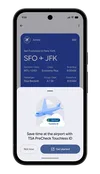
- Opt in: If you’re eligible, you’ll see a “Get started” button on your boarding pass, which will direct you to the TSA enrollment page.
- Give the green light: Agree to securely share your ID pass and the boarding pass for your upcoming trip with the TSA.
- Look for the badge: Once the TSA confirms your enrollment, a TSA PreCheck Touchless ID indicator will appear on your Google Wallet boarding pass, meaning you’re ready to use the express TSA PreCheck Touchless ID line at the airport.
Breeze through airport security with TSA PreCheck Touchless ID and Google Wallet.
We know privacy is top of mind when you travel. Rest assured, your information is only shared with the TSA after you explicitly opt in and authenticate by unlocking your device using a biometric, PIN or pattern. And digital IDs in Google Wallet are always encrypted and stored directly on your phone, so you have complete control over who can read the contents of your digital ID.
From supporting digital IDs to scan-to-add passes and more, Google Wallet is constantly working to put your digital credentials at your fingertips. This new TSA collaboration is one more way we're making your digital life simpler and more secure.
Done. Just one step more.
Check your inbox to confirm your subscription.
You are already subscribed to our newsletter.
You can also subscribe with a