





Catch up on what you’ve read so far and explore themes, context or characters without leaving your book using our new reading companion in Google Play Books.
General summary
Google Play Books now features Book insights, an artificial intelligence tool that helps you summarize chapters, clarify confusing text, and answer specific questions about your reading. You can access this feature by clicking the lightbulb icon or highlighting text in select English titles on the Android app or web reader. Try it out now and earn 15 times the Play Points on any book purchases made between June 19 and June 21.
Summaries were generated by Google AI. Generative AI is experimental.
Bullet points
- "3 ways Book insights helps you get more from your reading" explains new AI features.
- Use "Catch me up" to get quick summaries of what you have already read.
- Highlight confusing text to get instant clarity and helpful follow-up questions.
- Ask your own questions to get spoiler-free context about characters or plot points.
- Look for the "Tools" badge on eligible English ebooks to start using these features.
Summaries were generated by Google AI. Generative AI is experimental.
Basic explainer
Google Play Books now has an AI tool called Book insights to help you understand what you're reading. It can summarize chapters, explain confusing parts and answer your specific questions about the story. You just click the lightbulb icon while reading to get started. It’s a great way to keep track of characters and plot points without getting spoilers.
Summaries were generated by Google AI. Generative AI is experimental.
Explore other styles:

Your browser does not support the audio element.
Listen to article
This content is generated by Google AI. Generative AI is experimental
[[duration]] minutes
Google Play Books is making it easier for you to get more from your reading with Book insights, now available in the Play Books Android app and web reader. You’ll have access to this helpful reading companion, which is built with Gemini, when you’re reading select English titles, including thousands that are available at no charge. Try Book insights today in free-of-charge titles like “Romeo and Juliet,” “Moby Dick” or “Pride and Prejudice.”
Here are three ways Book insights can help you get more from your reading.
1. Get a recap of what you’ve read so far.
If you’re returning to a book, there’s no need to flip through previous chapters to remember where you left off. With “Catch me up” in Book insights, you can get back on track with a summary of what you’ve already read. If a book is enabled for Book insights, click on the lightbulb in the top-right corner and then click the “Catch me up” button to generate a recap.
Users can tap “Catch me up” to generate a recap of what they’ve read so far.
2. Get more clarity as you read by highlighting text.
Curiosity can strike any time when you’re reading, and now you can learn more without leaving your book. For example, if you’re reading a play by Shakespeare and come across a confusing phrase, highlight the text to see a few questions that will help clarify. Suggested follow-up prompts can help you connect even more dots within the book.
Users can select text and be prompted with relevant questions or ask their own.
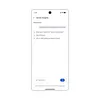
3. Ask whatever question is on your mind.
If you don’t see a relevant question prompt, ask your own in the “Ask Play Books” box. For example, keeping track of all the characters in an epic novel might get tricky. Ask, “Was this character introduced earlier in the book?” for reminders and additional context. Book insights is designed to give spoiler-free answers by only referencing the text up to your current reading position. However, generative AI is experimental and may make mistakes.
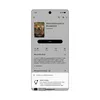
Book insights is available now in select English ebooks; check out this selection of titles with Book insights enabled. Eligible ebooks will have a “Tools” badge on the book’s detail page, which showcases available AI tools and may include Book insights. To use Book insights, start reading one of these books and then highlight any text in the book or click the lightbulb icon in the top navigation bar in the Play Books Android app or the web reader.
Ebooks enabled for Book insights will have a “Tools” badge on the book’s detail page to show available AI tools.
To celebrate the launch of Book insights, here’s a special offer: Earn 15x Play Points on any Play Books purchases from June 19 to 21, regardless of your current Play Points level.
Done. Just one step more.
Check your inbox to confirm your subscription.
You are already subscribed to our newsletter.
You can also subscribe with a