
惯性聚合 高效追踪和阅读你感兴趣的博客、新闻、科技资讯
阅读原文 在惯性聚合中打开

推荐订阅源

酷 壳 – CoolShell
酷 壳 – CoolShell
T
Threatpost
Latest news
Latest news
N
News | PayPal Newsroom
Threat Intelligence Blog | Flashpoint
Help Net Security
Help Net Security
D
Darknet – Hacking Tools, Hacker News & Cyber Security
AI
AI
Simon Willison's Weblog
TaoSecurity Blog
TaoSecurity Blog
The Last Watchdog
The Last Watchdog
L
LINUX DO - 热门话题
Google DeepMind News
T
Threat Research - Cisco Blogs
O
OpenAI News
钛媒体:引领未来商业与生活新知
钛媒体:引领未来商业与生活新知
T
The Exploit Database - CXSecurity.com
NISL@THU
NISL@THU
Application and Cybersecurity Blog
S
Securelist
小众软件
小众软件
cs.CL updates on arXiv.org
Martin Fowler
Martin Fowler
S
SegmentFault 最新的问题
Cisco Talos Blog
Cisco Talos Blog
云风的 BLOG
云风的 BLOG
AWS News Blog
AWS News Blog
GbyAI
GbyAI
N
News and Events Feed by Topic
cs.CV updates on arXiv.org
美团技术团队
Engineering at Meta
Engineering at Meta
A
About on SuperTechFans
博客园 - 三生石上(FineUI控件)
S
Schneier on Security
博客园 - 聂微东
V2EX - 技术
V2EX - 技术
T
Troy Hunt's Blog
SecWiki News
SecWiki News
S
Secure Thoughts
B
Blog RSS Feed
Hugging Face - Blog
Hugging Face - Blog
WordPress大学
WordPress大学
腾讯CDC
H
Heimdal Security Blog
Exploit-DB.com RSS Feed
Apple Machine Learning Research
月光博客
月光博客
www.infosecurity-magazine.com
P
Privacy International News Feed

WishMeLz - Linux

目标域名在线测试 - WishMeLz NodeBB 搭建安装笔记 v4.x - WishMeLz puppeteer在Linux端 依赖库确实 libdrm.so.2,libnss3.so Linux 工具箱整理 - WishMeLz docker 镜像加速 - WishMeLz Certimate 使用教程 - WishMeLz PM2搭配nvm使用不同版本Node启动项目 - WishMeLz cors-anywhere Nodejs实现静态资源代理,使用ESA加速访问 - WishMeLz shell脚本备份数据库 - WishMeLz
ip自签名ssl证书 - WishMeLz
Wish · 2024-12-06 · via WishMeLz - Linux

1、创建私钥

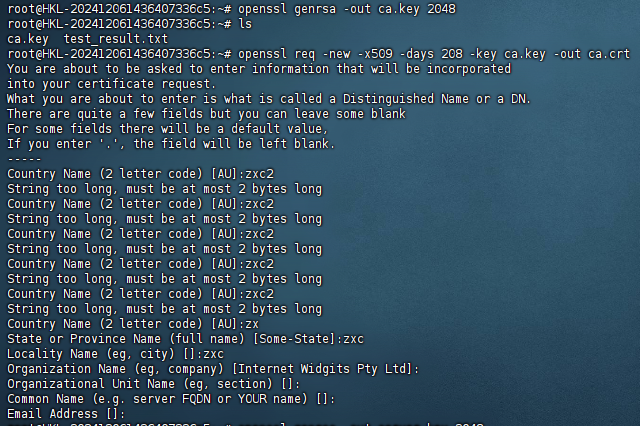
openssl genrsa -out ca.key 2048

2 创建公钥

openssl req -new -x509 -days 208 -key ca.key -out ca.crt
2024-12-06T07:07:11.png

3生成密钥对

先装备两个文件openssl.cnf v3.ext。 其中的 IP.1 记得对应

openssl.cnf 如下:

[req]
distinguished_name = req_distinguished_name
req_extensions = v3_req

[req_distinguished_name]
countryName = Country Name (2 letter code)
countryName_default = US
stateOrProvinceName = State or Province Name (full name)
stateOrProvinceName_default = NY
localityName = Locality Name (eg, city)
localityName_default = NYC
organizationalUnitName  = Organizational Unit Name (eg, section)
organizationalUnitName_default  = xxx
commonName = xxx
commonName_max  = 64

[ v3_req ]
# Extensions to add to a certificate request
basicConstraints = CA:TRUE
keyUsage = nonRepudiation, digitalSignature, keyEncipherment
subjectAltName = @alt_names

[alt_names]
IP.1 = 356.121.271.20

v3.ext 如下:

 authorityKeyIdentifier=keyid,issuer
basicConstraints=CA:FALSE
keyUsage=digitalSignature, nonRepudiation, keyEncipherment, dataEncipherment
subjectAltName=@alt_names
[alt_names]
IP.1 = 356.121.271.20

4 生成服务器证书

生成私钥server.key

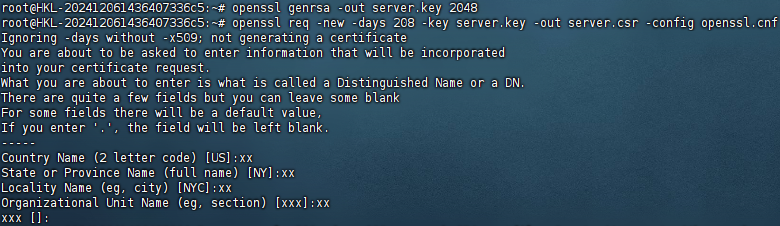
openssl genrsa -out server.key 2048

生成公钥

openssl req -new -days 208 -key server.key -out server.csr -config openssl.cnf
2024-12-06T07:12:44.png

自签名

openssl x509 -days 208 -req -sha256 -extfile v3.ext -CA ca.crt -CAkey ca.key -CAcreateserial -in server.csr -out server.crt


2024-12-06T07:13:18.png

2024-12-06T07:13:56.png


最后编辑时间为: December 6th , 2024 at 03:14 pm
本文由 Wish 创作,采用 知识共享署名 4.0 国际许可协议进行许可
可自由转载、引用,但需署名作者且注明文章出处

标签 : 无标签