






可有可无的东西, 因为没有它也可以方便达成其目的, 使用它貌似更形象一些; 也可以通过它调用其他 js 库.
利用类似手段, 有人推出了 CGDevTools; 它主要是利用 JQuery 扩展而成, 而 TMS For IW 是通过传统的继承体系.
下面示例主要参考了: http://jqueryui.com
TIWJQueryWidget 所在单元及继承链:
IWCompJQueryWidget.TIWJQueryWidget < TComponent < TPersistent < TObject
主要成员:
property ContentFiles: TStringList //链接需要的 js 和 css 文件(远程或本地); 可用当前窗体的 ContentFiles; 如果全站使用可从 ServerController 单元 ContentFiles
property OnReady: TStringList      //调用; 可用 AddToInitProc() 代替
示例(http://jqueryui.com/datepicker/):
{在窗体上添加两个 IWEdit 和一个 IWJQueryWidget}
procedure TIWForm1.IWAppFormCreate(Sender: TObject);
begin
  IWJQueryWidget1.ContentFiles.Add('//code.jquery.com/ui/1.10.4/themes/smoothness/jquery-ui.css');
  IWJQueryWidget1.ContentFiles.Add('//code.jquery.com/jquery-1.10.2.js');
  IWJQueryWidget1.ContentFiles.Add('//code.jquery.com/ui/1.10.4/jquery-ui.js');
//  IWJQueryWidget1.ContentFiles.Add('//jqueryui.com/resources/demos/style.css');

  IWJQueryWidget1.OnReady.Add('$(".MyEditClass").datepicker();'); //.MyEditClass

  IWEdit1.Css := 'MyEditClass';
  IWEdit2.Css := 'MyEditClass';
end;

{抛开 IWJQueryWidget, 换种写法:}
procedure TIWForm1.IWAppFormCreate(Sender: TObject);
begin
  ContentFiles.Add('//code.jquery.com/ui/1.10.4/themes/smoothness/jquery-ui.css');
  ContentFiles.Add('//code.jquery.com/jquery-1.10.2.js');
  ContentFiles.Add('//code.jquery.com/ui/1.10.4/jquery-ui.js');

  AddToInitProc('$(".MyEditClass").datepicker();');

  IWEdit1.Css := 'MyEditClass';
  IWEdit2.Css := 'MyEditClass';
end;
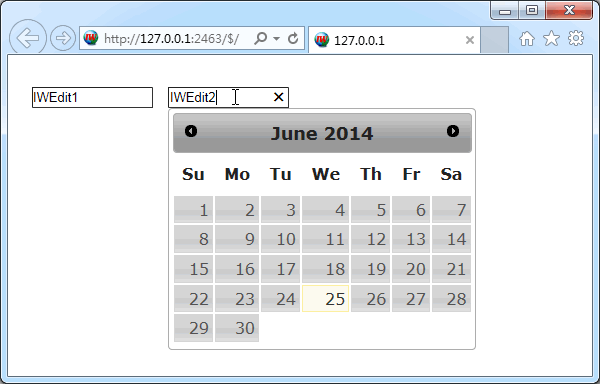
效果图:
示例(http://jqueryui.com/accordion/):
{在窗体上放 IWJQueryWidget 和 IWText 各一个}
procedure TIWForm1.IWAppFormCreate(Sender: TObject);
begin
  ContentFiles.Add('http://code.jquery.com/ui/1.10.4/themes/smoothness/jquery-ui.css');
  ContentFiles.Add('http://code.jquery.com/jquery-1.10.2.js');
  ContentFiles.Add('http://code.jquery.com/ui/1.10.4/jquery-ui.js');

  IWJQueryWidget1.OnReady.Add('$("#accordion").accordion();');

  IWText1.RawText := True;
  {下面测试文本复制于原网页, 这样写不如在设计时贴进去}
  IWText1.Lines.Text := '<div id="accordion">' +
    '  <h3>Section 1</h3>' +
    '  <div>' +
    '    <p>' +
    '    Mauris mauris ante, blandit et, ultrices a, suscipit eget, quam. Integer' +
    '    ut neque. Vivamus nisi metus, molestie vel, gravida in, condimentum sit' +
    '    amet, nunc. Nam a nibh. Donec suscipit eros. Nam mi. Proin viverra leo ut' +
    '    odio. Curabitur malesuada. Vestibulum a velit eu ante scelerisque vulputate.' +
    '    </p>' +
    '  </div>' +
    '  <h3>Section 2</h3>' +
    '  <div>' +
    '    <p>' +
    '    Sed non urna. Donec et ante. Phasellus eu ligula. Vestibulum sit amet' +
    '    purus. Vivamus hendrerit, dolor at aliquet laoreet, mauris turpis porttitor' +
    '    velit, faucibus interdum tellus libero ac justo. Vivamus non quam. In' +
    '    suscipit faucibus urna.' +
    '    </p>' +
    '  </div>' +
    '  <h3>Section 3</h3>' +
    '  <div>' +
    '    <p>' +
    '    Nam enim risus, molestie et, porta ac, aliquam ac, risus. Quisque lobortis.' +
    '    Phasellus pellentesque purus in massa. Aenean in pede. Phasellus ac libero' +
    '    ac tellus pellentesque semper. Sed ac felis. Sed commodo, magna quis' +
    '    lacinia ornare, quam ante aliquam nisi, eu iaculis leo purus venenatis dui.' +
    '    </p>' +
    '    <ul>' +
    '      <li>List item one</li>' +
    '      <li>List item two</li>' +
    '      <li>List item three</li>' +
    '    </ul>' +
    '  </div>' +
    '  <h3>Section 4</h3>' +
    '  <div>' +
    '    <p>' +
    '    Cras dictum. Pellentesque habitant morbi tristique senectus et netus' +
    '    et malesuada fames ac turpis egestas. Vestibulum ante ipsum primis in' +
    '    faucibus orci luctus et ultrices posuere cubilia Curae; Aenean lacinia' +
    '    mauris vel est.' +
    '    </p>' +
    '    <p>' +
    '    Suspendisse eu nisl. Nullam ut libero. Integer dignissim consequat lectus.' +
    '    Class aptent taciti sociosqu ad litora torquent per conubia nostra, per' +
    '    inceptos himenaeos.' +
    '    </p>' +
    '  </div>' +
    '</div>';
end;
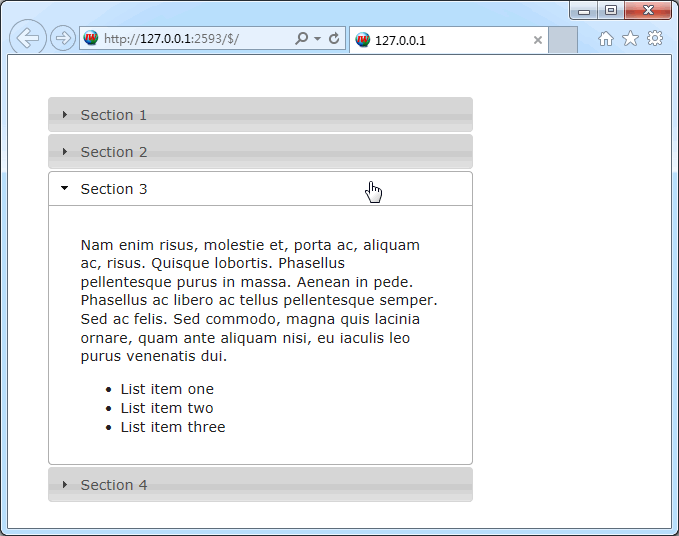
效果图:
此内容由惯性聚合(RSS阅读器)自动聚合整理,仅供阅读参考。 原文来自 — 版权归原作者所有。