https://learn.microsoft.com/zh-cn/dotnet/desktop/winforms/controls/virtual-mode-in-the-windows-forms-datagridview-control
WinForm 应用程序时,DataGridView 是我们常用的数据展示控件,然而,当面对十万、百万级记录的大数据量时,常常会遇到界面卡顿、内存占用过高等性能瓶颈,所以本文将系统讲解 DataGridView 在大数据量下的性能优化策略,需要的朋友可以参考下
前言
WinForm 应用程序时,DataGridView 是我们常用的数据展示控件。然而,当面对十万、百万级记录的大数据量时,常常会遇到界面卡顿、内存占用过高、加载时间过长等性能瓶颈。如何高效地处理大量数据,实现流畅的用户体验?
本文将系统讲解 DataGridView 在大数据量下的性能优化策略,包括虚拟模式、缓存机制和异步加载等关键技术,帮助大家开发高效稳定的数据展示界面。
一、性能挑战分析
在处理大数据量时,DataGridView 主要面临以下三个方面的性能问题:
- 内存占用过高:一次性加载全部数据会导致内存压力过大。
- UI线程阻塞:长时间的数据加载操作会造成界面冻结,影响用户体验。
- 渲染性能问题:大量行的渲染导致滚动卡顿,响应迟缓。
为了解决这些问题,我们需要采用不同的数据加载策略,根据实际需求选择合适的方案。
二、三种数据加载策略
1、延迟加载(Lazy Loading)
适合数据量中等的情况,在用户触发特定动作(如点击按钮或翻页)时才加载数据。
2、分批加载(Batch Loading)
适用于需要获取全量数据但总量较大的场景,通过分多次加载固定数量的数据,降低单次内存压力。
3、虚拟模式(Virtual Mode)【重点】
适用于海量数据展示,仅加载当前可视区域内的数据,是本文的重点优化手段。
|
1
2
3
4
5
6
7
|
public enum LoadStrategy
{
Lazy,
Batch,
Virtual
}
|
三、虚拟模式实现
1、数据源接口设计
定义一个通用的数据源接口,支持按需分段获取数据:
|
1
2
3
4
5
|
public interface IDataSource<T>
{
List<T> GetData(int startIndex, int count);
int GetTotalCount();
}
|
2、实体类定义
以一个包含多个字段的实体类为例:
|
1
2
3
4
5
6
7
8
|
public class LargeDataEntity
{
public long Id { get; set; }
public string Name { get; set; }
public DateTime CreatedTime { get; set; }
public decimal Amount { get; set; }
public string Description { get; set; }
}
|
3、虚拟数据源实现
模拟一个百万级数据源,只生成请求范围内的数据:
|
1
2
3
4
5
6
7
8
9
10
11
12
13
14
15
16
17
18
19
20
21
22
23
24
|
public class VirtualDataSource : IDataSource<LargeDataEntity>
{
public List<LargeDataEntity> GetData(int startIndex, int count)
{
var result = new List<LargeDataEntity>();
for (int i = startIndex; i < startIndex + count; i++)
{
result.Add(new LargeDataEntity
{
Id = i,
Name = $"数据{i}",
CreatedTime = DateTime.Now.AddMinutes(-i),
Amount = i * 100,
Description = $"大数据测试记录{i}"
});
}
return result;
}
public int GetTotalCount()
{
return 1_000_000;
}
}
|
四、高效缓存机制
提升虚拟模式的性能,需要引入缓存机制来避免重复加载相同数据块。
缓存设计要点:
- 按块缓存数据:每次加载固定大小(如1000条)的数据块。
- LRU缓存策略:当缓存块超过限制时,移除最早使用的块。
- 按需加载:只有当用户滚动到特定区域时才加载对应数据块。
|
1
2
3
4
5
6
7
8
9
10
11
12
13
14
15
16
17
18
19
20
21
22
23
24
25
26
27
28
29
30
31
32
33
34
35
36
37
38
|
private Dictionary<int, List<LargeDataEntity>> dataCache = new Dictionary<int, List<LargeDataEntity>>();
private const int CacheSize = 1000;
private void DataGridView_CellValueNeeded(object sender, DataGridViewCellValueEventArgs e)
{
int blockIndex = e.RowIndex / CacheSize;
if (!dataCache.TryGetValue(blockIndex, out var blockData))
{
blockData = dataSource.GetData(blockIndex * CacheSize, CacheSize);
dataCache[blockIndex] = blockData;
if (dataCache.Count > 10)
{
var oldestBlock = dataCache.Keys.Min();
dataCache.Remove(oldestBlock);
}
}
var rowInBlock = e.RowIndex % CacheSize;
if (rowInBlock < blockData.Count)
{
var currentRow = blockData[rowInBlock];
switch (e.ColumnIndex)
{
case 0: e.Value = currentRow.Id; break;
case 1: e.Value = currentRow.Name; break;
case 2: e.Value = currentRow.CreatedTime; break;
case 3: e.Value = currentRow.Amount; break;
case 4: e.Value = currentRow.Description; break;
default: e.Value = string.Empty; break;
}
}
else
{
e.Value = string.Empty;
}
}
|
五、异步加载实现方案
进一步提升用户体验,我们可以使用异步加载机制,在不阻塞主线程的前提下加载数据。
|
1
2
3
4
5
6
7
8
9
10
11
12
13
14
15
16
17
18
19
20
21
|
public async Task LoadDataAsync(int startIndex, int count, CancellationToken cancellationToken)
{
try
{
UpdateLoadingStatus(true);
var data = await Task.Run(() => dataSource.GetData(startIndex, count), cancellationToken);
UpdateGridView(data);
}
catch (OperationCanceledException)
{
MessageBox.Show("数据加载已取消");
}
catch (Exception ex)
{
MessageBox.Show($"加载错误:{ex.Message}");
}
finally
{
UpdateLoadingStatus(false);
}
}
|
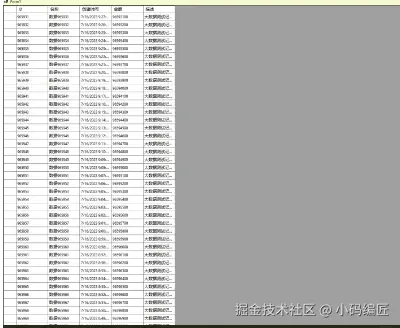
六、完整示例
将上述技术整合到窗体应用中,初始化并配置DataGridView:
|
1
2
3
4
5
6
7
8
9
10
11
12
13
14
15
16
17
18
19
20
|
public partial class Form1 : Form
{
public Form1()
{
InitializeComponent();
var dataSource = new VirtualDataSource();
ConfigureDataGridView(dataSource);
}
private void ConfigureDataGridView(VirtualDataSource dataSource)
{
dataGridView1.Columns.Add("Id", "ID");
dataGridView1.Columns.Add("Name", "名称");
dataGridView1.Columns.Add("CreatedTime", "创建时间");
dataGridView1.Columns.Add("Amount", "金额");
dataGridView1.Columns.Add("Description", "描述");
var performanceLoader = new HighPerformanceDataLoader(dataGridView1, dataSource);
}
}
|
总结
通过采用 虚拟模式、数据缓存机制 和 异步加载 等关键技术,可以显著提升DataGridView在大数据量场景下的性能表现。这些优化不仅适用于DataGridView,也可以扩展到其他类似控件的数据处理逻辑中。
合理选择数据加载策略、设计高效的缓存结构、结合异步编程模型,是构建高性能数据展示界面的关键。
以上就是C#中DataGridView处理大数据量的技巧分享的详细内容,更多关于C# DataGridView处理大数据量的资料请关注脚本之家其它相关文章!






