







You just launched your new WordPress website.
The design looks great, everything works and you’re ready to share it with the world.
Then you run a quick speed test… and it’s slow.
Your first instinct? The theme is the problem. Is Astra slow?
It’s a natural reaction. The theme is what you see, what you chose and what you installed most recently.
But website performance is the sum of its parts. It’s not just the theme, it’s an ecosystem.
Every WordPress site depends on a chain of components working together:
Host (server) → WordPress (core) → Theme (Astra) → Plugins → Your content
If any link in that chain underperforms, the entire system slows down.
A weak server, too many plugins, or unoptimized content can drag down even the fastest theme.
At Astra, we occasionally see users claim their site feels slow “because of the theme.”
Our hypothesis? Astra itself is rarely the problem.
It’s one of the most efficient themes ever built for WordPress. It’s known for performance.
The real bottleneck often lies elsewhere, usually with the hosting environment, and we’re going to prove it!

We picked hosts that real WordPress users choose. Each one represents a distinct approach to speed and price.
For fairness, we used a clean WordPress install with the default Astra theme on every host. No extra plugins, no custom code and identical settings across the board.
That levels the playing field with the host as the only variable.
Here’s a summary table of all findings with the top performers highlighted in green.
As you can see, while the numbers are similar in places, they vary widely in others.
All hosts performed well but some were better than others.
As the Astra theme setup was identical on all hosts, this clearly shows that even small differences in host configurations can make a real difference to performance!
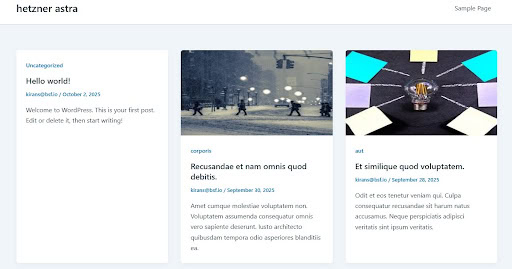
Before we show results, here’s exactly how we tested. No shortcuts, no cherry picking.

This setup lets us isolate the hosting environment.
If one site is slower, it is not because Astra changed. It’s because the server, network, or platform stack is different.
Test any of these sites yourself and you may see slight variance in the results. That’s normal when using GTMetrix.
The underlying performance should remain very close to our own findings whenever you try though.
When people talk about “site speed,” they often imagine a single number.
In reality, performance is a collection of different measurements that together describe how fast your site feels and functions.
The metrics fall into three categories:
Let’s decode each one so you can understand what the data really means.
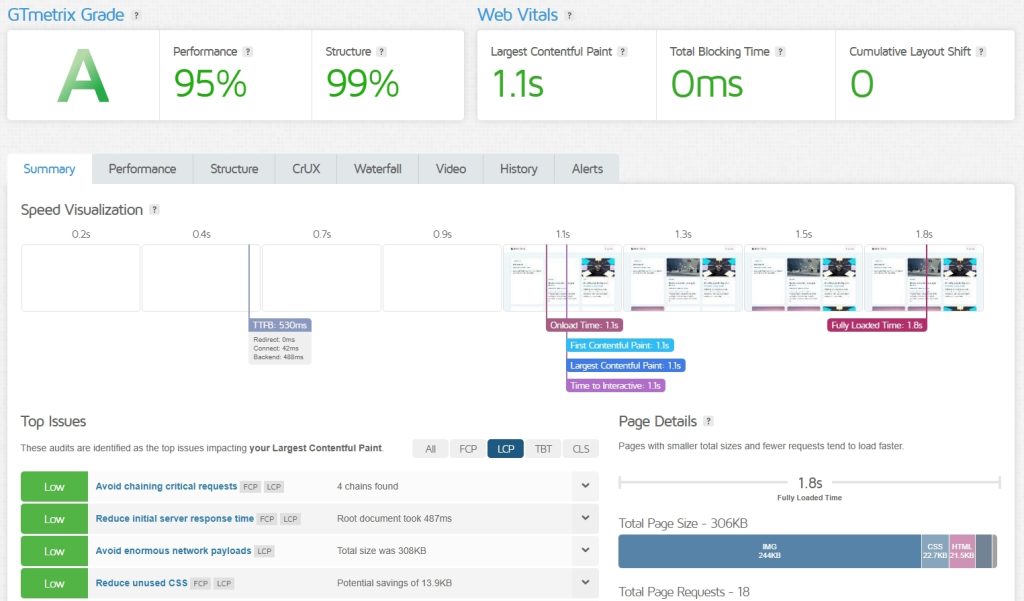
Google’s Core Web Vitals measure how your site feels in real use, not just how fast it loads on paper.
These are the metrics that directly affect both user experience and SEO.
What it is: The time it takes for the largest visible element (like a hero image, headline, or slider) to appear.
Why you should care: It answers the question, “Is this site loading or broken?” Anything slower than 2.5 seconds makes users think something’s wrong.
| Host | LCP Result | Google’s Rating |
| ZipWP | 412ms | Good (Excellent) |
| Hetzner | 454ms | Good (Excellent) |
| DreamHost | 450ms | Good (Excellent) |
| SiteGround | 583ms | Good (Excellent) |
| Cloudways | 1.3s | Needs Improvement |
| Hostinger | 3.6s | Poor |
| Upcloud | 542ms | Good (Excellent) |
Observation: The same Astra site loaded 40ms quicker than the next fastest and nearly nine times faster on ZipWP than on Hostinger.
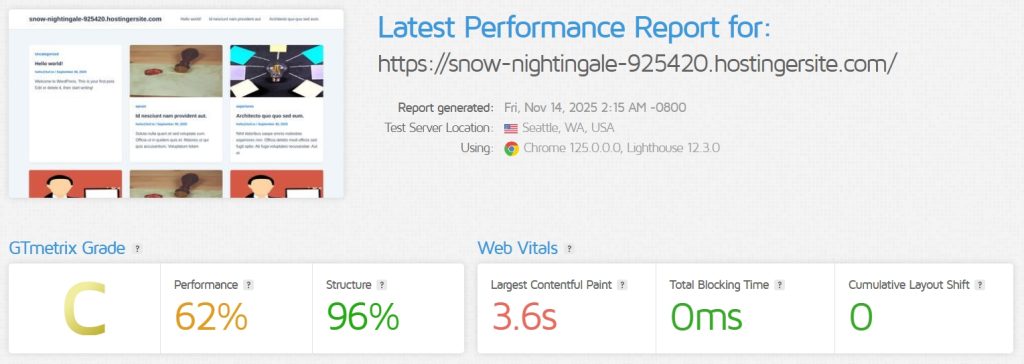
This shows how much your host dictates how fast your site feels.
What it is: Measures how long the page is blocked by scripts before a user can scroll, click or type.
Why you should care: It’s the “why won’t this button work?!” metric.
Result: All 7 hosts – 0ms
Observation: A perfect score across every host proves Astra’s code never freezes the browser.
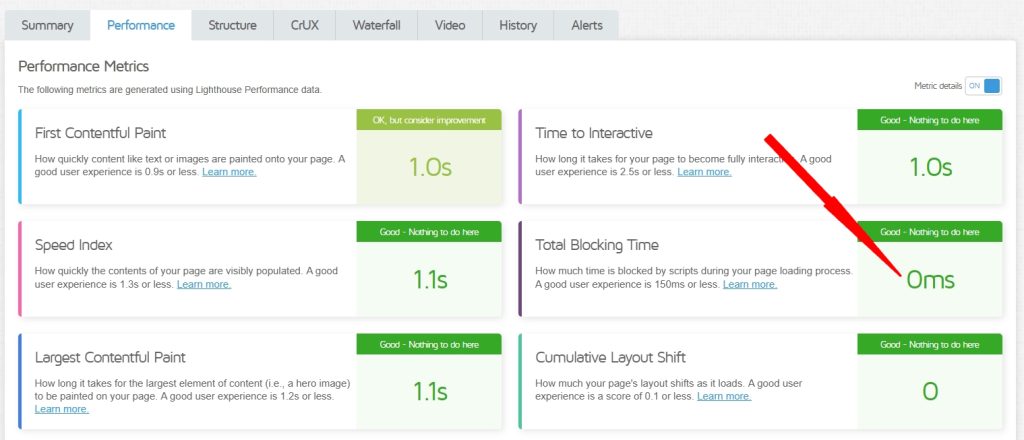
If your site hangs, it’s usually because of a plugin or custom script, not Astra.
What it is: Tracks how much elements shift on the screen while they load.
Why you should care: It’s the “I tried to click Home, but the page jumped and I hit an ad” metric.
Result: All 7 hosts – 0 CLS
Observation: Another perfect score. Astra’s layout is stable by default. If your page jumps, that’s down to ads, widgets, or injected scripts, not the theme.
These numbers measure your site like a stopwatch would. How big it is, how quickly it starts loading and how long it takes to finish.
What it is: How “heavy” your page is, measured in kilobytes (KB).
Why you should care: Smaller pages load faster, especially on mobile.
| Host | Total Page Size (KB) | Rating |
| Hostinger | 222 | Good (Excellent) |
| UpCloud | 280 | Good (Excellent) |
| ZipWP | 287 | Good (Excellent) |
| Hetzner | 313 | Good (Excellent) |
| Cloudways | 352 | Good (Excellent) |
| SiteGround | 395 | Good (Excellent) |
| DreamHost | 403 | Needs Improvement |
Observation: Every page here is tiny. In a world where large pages are the norm, Astra’s 403 KB “heaviest” example is still exceptional.
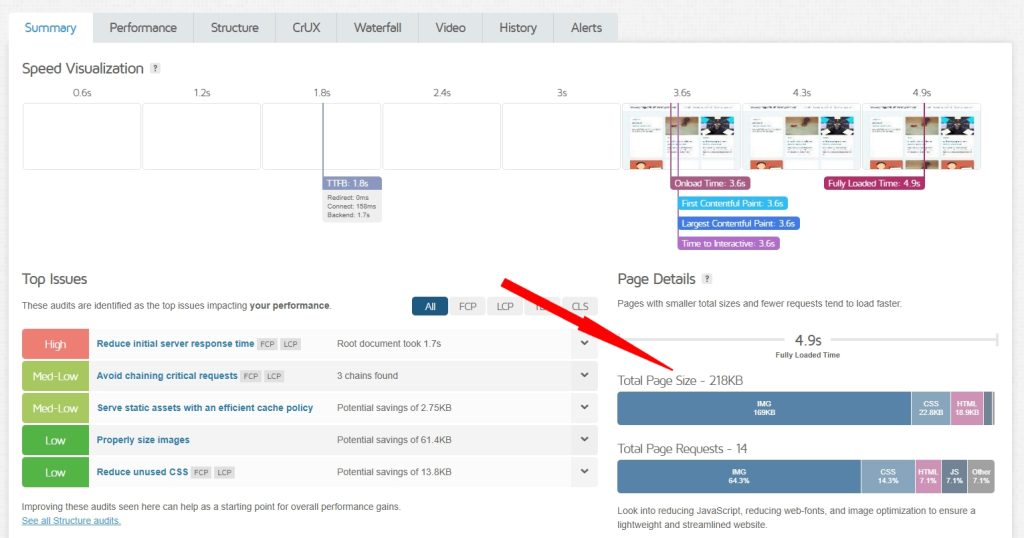
What it is: The number of images, scripts, or styles the browser must fetch to load a page.
Why you should care: Fewer requests mean faster load times.
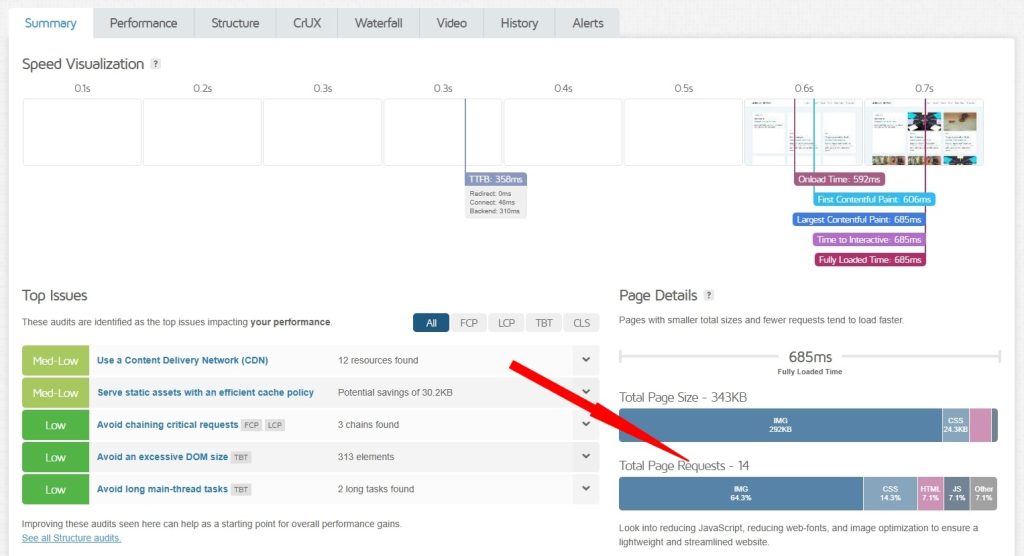
| Host | Requests | Rating |
| DreamHost | 22 | Good (Excellent) |
| Hostinger | 14 | Good (Excellent) |
| ZipWP | 15 | Good (Excellent) |
| SiteGround | 16 | Good (Excellent) |
| Cloudways | 17 | Good (Excellent) |
| Hetzner | 19 | Good (Excellent) |
| UpCloud | 20 | Good (Excellent) |
Observation: These are all lean numbers. Astra keeps requests minimal, which means less overhead for your browser and faster page loads.
ZipWP’s 15 requests means faster load times, Hostinger’s 14 is slightly ahead while Dreamhost’s 22 requests is still respectable.
What it is: How long the server takes to respond with the first byte of data.
Why you should care: It’s entirely the host’s responsibility. No theme can fix this.
| Host | TTFB | Rating |
| Hetzner | 60ms | Good (Excellent) |
| UpCloud | 60ms | Good (Excellent) |
| DreamHost | 227ms | Good (Excellent) |
| SiteGround | 264ms | Good (Excellent) |
| ZipWP | 445ms | Good (Excellent) |
| Cloudways | 907ms | Poor |
| Hostinger | 1.9s | Terrible |
Observation: This is the smoking gun. Hetzner and UpCloud’s TTFB is blazing fast while everyone except Hostinger and Cloudways still delivered in great time.
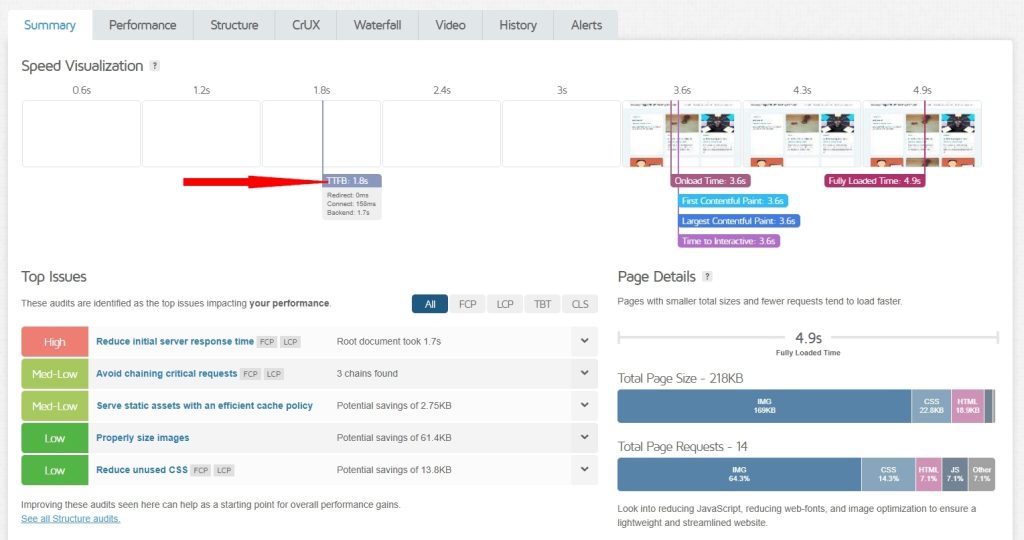
If your site feels laggy before anything even appears, start with your host.
What it is: The total time for all page assets to finish loading, including background scripts.
Why you should care: This is the number most users focus on and it’s heavily influenced by your TTFB.
| Host | Fully Loaded Time | Rating |
| DreamHost | 489ms | Good (Excellent) |
| SiteGround | 712ms | Good (Excellent) |
| ZipWP | 1.1s | Good (Excellent) |
| Hetzner | 1.3s | Good (Excellent) |
| UpCloud | 1.3s | Good (Excellent) |
| Cloudways | 2.1s | Poor |
| Hostinger | 5.5s | Poor |
Observation: The slowest TTFB produced the slowest fully loaded time.
This is cause and effect in action.
These reveal how “light” Astra is on your server. Think of this as the quiet roommate test, does Astra use resources efficiently or hog them?
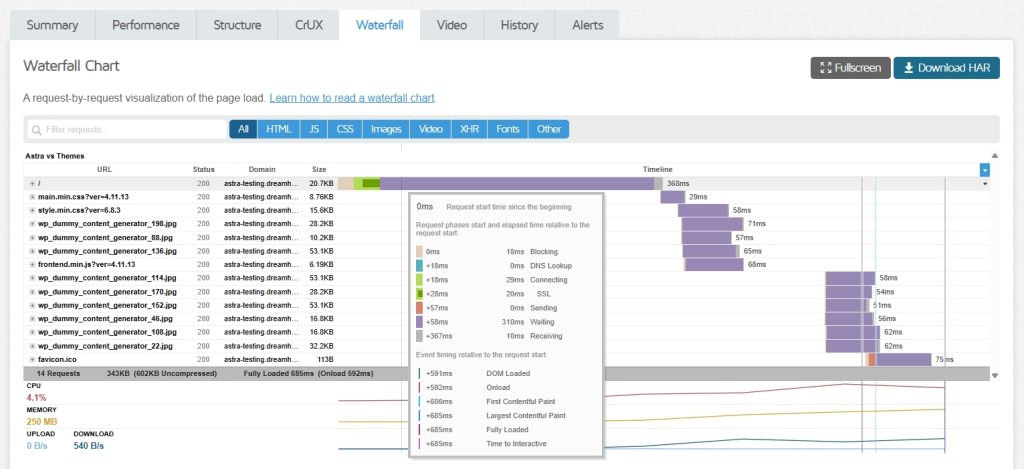
What it is: How long it takes for the server to assemble a page using PHP and the database.
Why you should care: It measures pure code efficiency.
| Host | Page Generation Time | Rating |
| ZipWP | 0.054s | Good (Excellent) |
| Hetzner | 0.064s | Good (Excellent) |
| UpCloud | 0.067s | Good (Excellent) |
| SiteGround | 0.1085s | Good (Excellent) |
| DreamHost | 0.1364s | Good (Excellent) |
| Hostinger | 0.1417s | Good (Excellent) |
| Cloudways | 0.4483s | Good (Excellent) |
Observation: Astra consistently builds pages in under 0.15s across most hosts, especially ZipWP. That’s exceptional efficiency!
What it is: The maximum amount of server memory used to build one page.
Why you should care: Shared hosting plans have tight limits and exceeding them can crash your site.
| Host | Memory Usage | Rating |
| Hetzner | 8 MB | Good (Excellent) |
| UpCloud | 8.1 MB | Good (Excellent) |
| ZipWP | 8.3 MB | Good (Excellent) |
| DreamHost | 10.9 MB | Good (Excellent) |
| Hostinger | 18.2 MB | Good (Excellent) |
| Cloudways | 42.7 MB | Good |
| SiteGround | 44.9 MB (Highest) | Good |
Observation: Even the highest value is tiny. Astra runs comfortably within the memory limits of budget hosting plans.
Hetzner, Upcloud and ZipWP all deserve a special mention for utilizing memory very efficiently!
What it is: Data WordPress automatically loads on every page view. Autoloaded options include plugin and widget settings, global site settings and more.
Why you should care: Too much bloat here slows every single request.
| Host | Autoloaded Data | Rating |
| Cloudways | 32.2 KB (Lowest) | Good (Excellent) |
| ZipWP | 33 KB | Good (Excellent) |
| Hostinger | 36.2 KB | Good (Excellent) |
| UpCloud | 36.36 KB | Good (Excellent) |
| Hetzner | 36.7 KB | Good (Excellent) |
| DreamHost | 37.2 KB | Good (Excellent) |
| SiteGround | 38 KB | Good (Excellent) |
Observation: GTMetrix doesn’t measure autoloaded options but you can see them in phpMyAdmin or via a WordPress plugin like AAA Option Automizer.
Cloudways and ZipWP are most efficient at managing autoloaded options but all hosts manage it well.
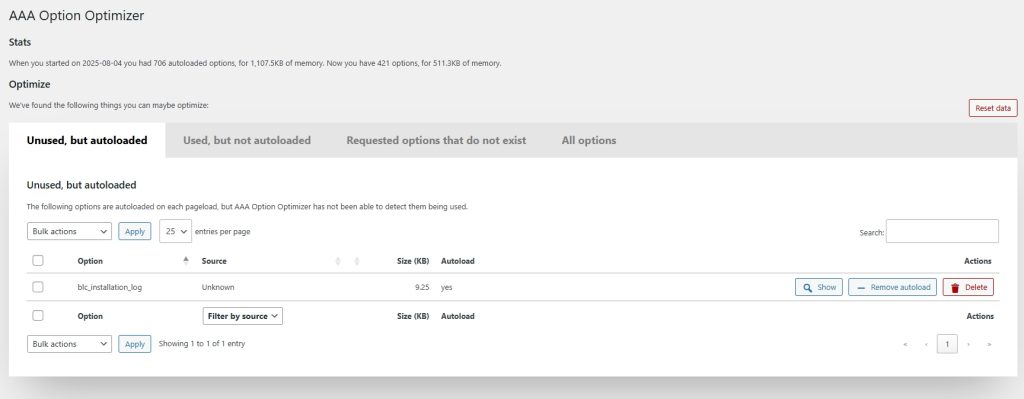
Astra’s autoload footprint is impressively small and consistent. The 6 KB variation is negligible, confirming that Astra doesn’t clutter your database.
What it is: How many database queries WordPress needs to make to generate a page.
Why you should care: The more queries, the longer it takes to build a page.
| Host | Queries | Rating |
| SiteGround | 24 | Good (Excellent) |
| ZipWP | 24 | Good (Excellent) |
| Cloudways | 24 | Good (Excellent) |
| Hetzner | 31 | Good (Excellent) |
| Hostinger | 32 | Good (Excellent) |
| DreamHost | 32 | Good (Excellent) |
| UpCloud | 38 | Good (Excellent) |
Observation: GTMetrix doesn’t directly show database queries but they are reflected within the TTFB metric.
All counts are low for all hosts, especially SiteGround, ZipWP and Cloudways.
Many themes exceed 100 queries, so under 40 proves Astra keeps things efficient and lean.
What it is: The percentage of CPU consumed per page load.
Why you should care: High CPU use can get your site throttled or suspended on shared plans.
| Host | CPU Usage | Rating |
| ZipWP | 1–3% | Good (Excellent) |
| Hetzner | 1–3% | Good (Excellent) |
| UpCloud | 1–3% | Good (Excellent) |
| Cloudways | 1–4% | Good (Excellent) |
| DreamHost | 2–4% | Good (Excellent) |
| SiteGround | 1–5% | Good (Excellent) |
| Hostinger | 1–3% | Good (Excellent) |
Observation: Every host stayed comfortably low. Astra doesn’t strain the server, it’s a lightweight, well-behaved theme that won’t trigger resource limits.
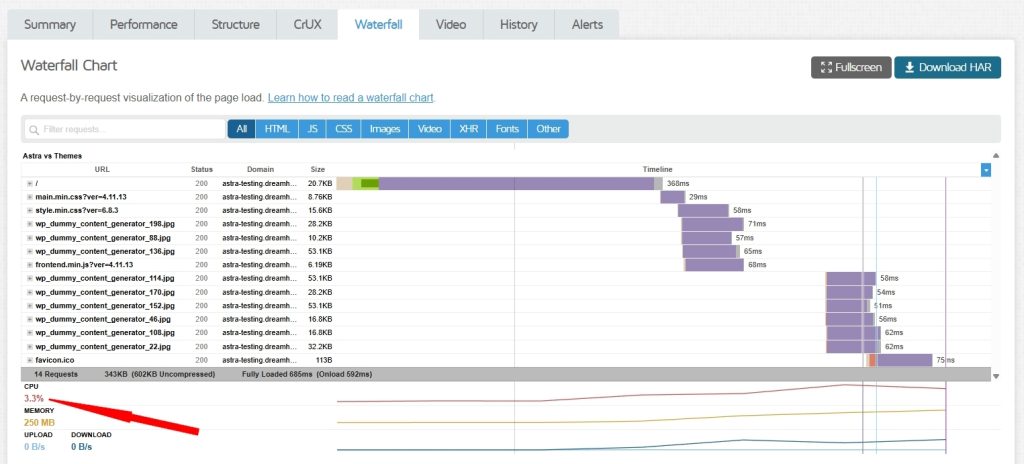
Note: RAM usage per page load was excluded due to inconsistent reporting. Including partial data would weaken the integrity of the findings.
Astra consistently performs at or near perfect efficiency across every measurable category.
When speed drops, the culprit is almost always the hosting environment, not the theme itself.
We’ve defined the metrics, seen the numbers and explored what each one means. Now it’s time to turn data into insight.
Here’s what the results really tell us:
Evidence: Every host scored a perfect 0ms Total Blocking Time and 0 CLS.
What it means: Astra’s code doesn’t freeze, stutter, or jump. Your visitors can scroll and click instantly and layouts stay locked in place while loading.
Conclusion: Astra is perfectly stable out of the box. If your site hangs, jumps, or shifts, the cause lies elsewhere, typically an ad network, third-party script, or poorly written plugin.
Evidence: A direct comparison of LCP and TTFB shows a dramatic difference between fast and slow hosts.
| Host | TTFB | LCP |
| ZipWP | 445ms | 412ms |
| Hetzner | 60ms | 454ms |
| Hostinger | 1.9s | 3.6s |
If this were a bar chart, Hostinger’s bars would tower over the rest. A 31× slower TTFB directly created a 9× slower LCP.
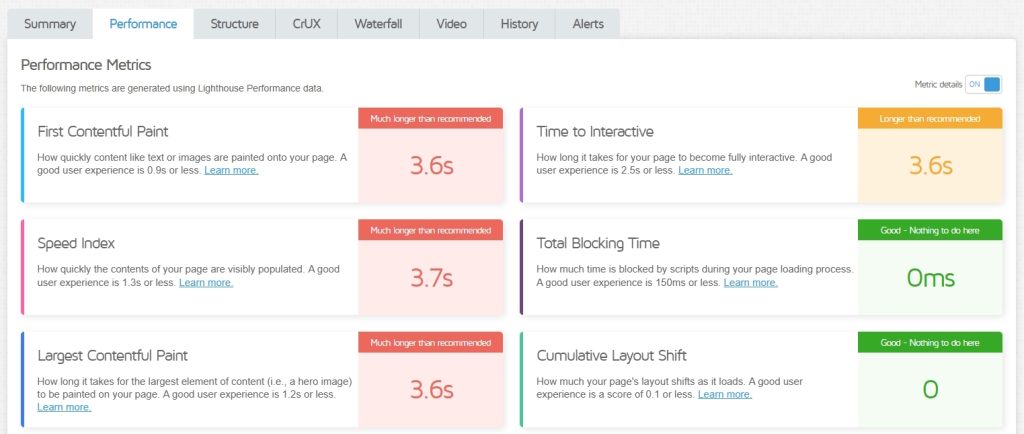
Conclusion: The bottleneck is the host, not Astra. A slow server response time delays everything else that follows, images, scripts, even the first visible paint.
If your site feels sluggish, this is the metric to check first.
Evidence: Across all tests, Astra used less than 45 MB of memory and between 1–5% CPU per page load.
What it means: Astra runs comfortably within safe resource limits even on the cheapest shared hosting plans.
Conclusion: Astra is the “good neighbor” of WordPress themes. It sips memory, stays within its limits and won’t trigger suspension warnings from your host.
We tested seven hosts under identical conditions. One consistently came out on top, the one built for Astra.
The “Feel”: ZipWP delivered the fastest LCP at 412 ms, giving visitors the quickest visible load and best first impression.
The “Brain”: It had the fastest page generation time at 0.054 s, meaning its PHP stack and database respond almost instantly.
The “Footprint”: ZipWP tied for the lowest number of database queries (24) and showed one of the smallest memory footprints (8.3 MB). It’s fast, stable and efficient.
The Conclusion: Astra performs well everywhere, but it performs best on ZipWP.
The combination of lightning-fast LCP, the quickest “thinking time” and an ultra-light footprint makes ZipWP the ideal optimized home for any Astra-powered site.
So, is the Astra theme slow? Our data provides a clear, evidence-backed answer: No.
Astra is one of the lightest, most efficient, and most stable WordPress themes we have ever tested.
It scored perfect 0ms TBT and 0 CLS, proving that its code never blocks or shifts during loading.
It uses minimal memory and CPU, even on budget hosting plans.
If your Astra site feels slow, the problem almost certainly isn’t the theme. The real culprits are usually your host, plugins, or unoptimized images.
Before you switch themes or start overhauling your design, follow these 3 simple steps.
Use a testing tool like GTmetrix or Google PageSpeed Insights to check your site’s Time To First Byte (TTFB).
Why:
If your TTFB is above 600ms, your host is your number one problem.
Our data showed slow hosts taking up to 1.9s (1900ms) to respond. That’s an unacceptable delay that no theme can overcome.
The Fix:
Complain to your host or, better yet, switch to a faster one. A good host can transform your site speed overnight.
If your Total Blocking Time (TBT) or Cumulative Layout Shift (CLS) isn’t where you would like, a plugin or script is likely freezing or jumping your page.
Why:
We proved Astra’s TBT and CLS are 0. If yours aren’t, something you installed is the issue.
The Fix:
Disable all plugins and test again.
If the score returns to 0, reactivate plugins one by one until you find the offender. Remove or replace that plugin.
If your hosting dashboard shows you’re hitting memory or CPU limits, Astra isn’t to blame.
Why:
Astra uses less than 45MB of memory. If your host is warning you about limits, either a plugin is consuming too much or you’ve outgrown your low-cost plan.
The Fix:
Upgrade to a higher hosting tier or switch to a platform that can handle the workload.
A fast theme like Astra gives you a huge head start in the race for website speed. But it can’t win the race if your host, plugins, or scripts are forcing it to run through mud.
Combine Astra with ZipWP Cloud and you have a powerful combination that delivers performance, reliability and capability in one neat package!

Abhijeet Kaldate is the co-founder and CRO of Brainstorm Force. With a keen eye for detail and a knack for getting things done, Abhijeet oversees the company's operations, managing key areas such as HR, marketing, design and finance.
Disclosure: This blog may contain affiliate links. If you make a purchase through one of these links, we may receive a small commission. Read disclosure. Rest assured that we only recommend products that we have personally used and believe will add value to our readers. Thanks for your support!
Join 1,587,020 Subscribers
Get exclusive access to new tips, articles, guides, updates, and more.
此内容由惯性聚合(RSS阅读器)自动聚合整理,仅供阅读参考。 原文来自 — 版权归原作者所有。