








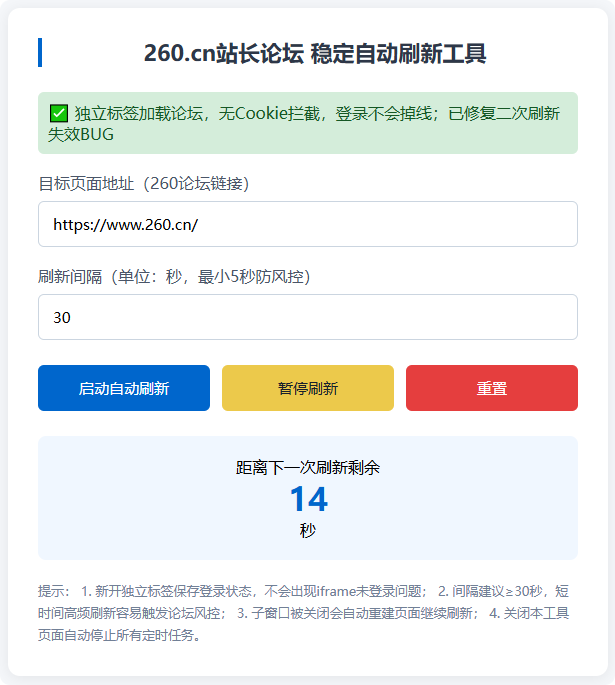
直接新建hmtl文件,复制代码放入
<!DOCTYPE html>
<html lang="zh-CN">
<head>
    <meta charset="UTF-8">
    <meta name="viewport" content="width=device-width, initial-scale=1.0">
    <title>260.cn站长论坛 稳定自动刷新工具</title>
    <style>
        * {
            margin: 0;
            padding: 0;
            box-sizing: border-box;
            font-family: "Microsoft Yahei", sans-serif;
        }
        body {
            background: #f5f7fa;
            padding: 40px 20px;
        }
        .container {
            max-width: 600px;
            margin: 0 auto;
            background: #fff;
            border-radius: 12px;
            padding: 30px;
            box-shadow: 0 2px 15px rgba(0,0,0,0.08);
        }
        h1 {
            text-align: center;
            color: #2d3748;
            font-size: 22px;
            margin-bottom: 25px;
            border-left: 4px solid #0066cc;
            padding-left: 10px;
        }
        .success-tip {
            margin-top:10px;
            padding:10px;
            background:#d4edda;
            border-radius:6px;
            color:#155724;
            margin-bottom:15px;
        }
        .input-box {
            margin: 18px 0;
        }
        label {
            display: block;
            margin-bottom: 8px;
            color: #4a5568;
            font-weight: 500;
        }
        input[type="number"], input[type="text"] {
            width: 100%;
            padding: 12px 14px;
            border: 1px solid #cbd5e0;
            border-radius: 6px;
            font-size: 15px;
        }
        .btn-group {
            display: flex;
            gap: 12px;
            margin: 25px 0;
        }
        button {
            flex: 1;
            padding: 13px;
            border: none;
            border-radius: 6px;
            font-size: 15px;
            cursor: pointer;
            transition: 0.2s;
        }
        #startBtn {
            background: #0066cc;
            color: #fff;
        }
        #pauseBtn {
            background: #ecc94b;
            color: #1a202c;
        }
        #resetBtn {
            background: #e53e3e;
            color: #fff;
        }
        .count-box {
            text-align: center;
            margin-top: 20px;
            padding: 20px;
            background: #f0f7ff;
            border-radius: 8px;
        }
        #countText {
            font-size: 32px;
            color: #0066cc;
            font-weight: bold;
        }
        .tip {
            margin-top: 20px;
            font-size: 13px;
            color: #718096;
            line-height: 1.7;
        }
    </style>
</head>
<body>
    <div class="container">
        <h1>260.cn站长论坛 稳定自动刷新工具</h1>
        <div class="success-tip">
            ✅ 独立标签加载论坛,无Cookie拦截,登录后不会掉线;
        </div>

        <div class="input-box">
            <label>目标页面地址(260论坛链接)</label>
            <input type="text" id="targetUrl" placeholder="https://www.260.cn/xxx" value="https://www.260.cn/">
        </div>

        <div class="input-box">
            <label>刷新间隔(单位:秒,最小5秒防风控)</label>
            <input type="number" id="intervalTime" value="30" min="5">
        </div>

        <div class="btn-group">
            <button id="startBtn">启动自动刷新</button>
            <button id="pauseBtn">暂停刷新</button>
            <button id="resetBtn">重置</button>
        </div>

        <div class="count-box">
            <div>距离下一次刷新剩余</div>
            <div id="countText">--</div>
            <div>秒</div>
        </div>

        <div class="tip">
            提示:
            1. 新开独立标签保存登录状态,不会出现iframe未登录问题;
            2. 间隔建议≥30秒;
            3. 子窗口被关闭会自动重建页面继续刷新;
            4. 关闭本工具页面自动停止所有定时任务。
        </div>
    </div>

    <script>
        const targetUrl = document.getElementById('targetUrl');
        const intervalTime = document.getElementById('intervalTime');
        const startBtn = document.getElementById('startBtn');
        const pauseBtn = document.getElementById('pauseBtn');
        const resetBtn = document.getElementById('resetBtn');
        const countText = document.getElementById('countText');

        let countDownTimer = null;
        let remainSec = 0;
        let isRunning = false;
        let forumWin = null;
        const winName = "forum260_auto_refresh";

        // 刷新子窗口,增加容错:窗口失效则重建
        function refreshForumWin() {
            const url = targetUrl.value.trim();
            if (!url) {
                alert('请填写260论坛目标链接');
                return false;
            }
            // 判断窗口是否有效
            if (forumWin && !forumWin.closed) {
                try {
                    forumWin.location.reload();
                } catch (e) {
                    // 浏览器拦截跨域重载,直接重建窗口
                    forumWin = window.open(url, winName);
                }
            } else {
                forumWin = window.open(url, winName);
            }
            return true;
        }

        // 倒计时核心逻辑(杜绝负数、循环稳定执行)
        function startCountDown() {
            clearInterval(countDownTimer);
            remainSec = Number(intervalTime.value);
            countText.innerText = remainSec;
            countDownTimer = setInterval(() => {
                remainSec--;
                countText.innerText = remainSec;
                if (remainSec <= 0) {
                    refreshForumWin();
                    // 立刻重置倒计时,不会出现负数
                    remainSec = Number(intervalTime.value);
                    countText.innerText = remainSec;
                }
            }, 1000);
        }

        // 启动刷新
        startBtn.addEventListener('click', () => {
            if (isRunning) return;
            let sec = Number(intervalTime.value);
            if (sec < 5) {
                alert('刷新间隔不能小于5秒!防止账号风控');
                return;
            }
            isRunning = true;
            startCountDown();
            alert('自动刷新已启动,请在新开标签页登录账号,登录状态永久保留');
        })

        // 暂停刷新
        pauseBtn.addEventListener('click', () => {
            clearInterval(countDownTimer);
            isRunning = false;
            countText.innerText = '--';
        })

        // 重置全部(修复之前变量绑定错误)
        resetBtn.addEventListener('click', () => {
            clearInterval(countDownTimer);
            isRunning = false;
            countText.innerText = '--';
            intervalTime.value = 30;
            targetUrl.value = 'https://www.260.cn/';
            if (forumWin && !forumWin.closed) {
                forumWin.close();
                forumWin = null;
            }
        })

        // 页面关闭销毁定时器
        window.onbeforeunload = () => {
            clearInterval(countDownTimer);
        }
    </script>
</body>
</html>
此内容由惯性聚合(RSS阅读器)自动聚合整理,仅供阅读参考。 原文来自 — 版权归原作者所有。