








Earlier this year, Truesec CSIRT responded to multiple incidents related to the two FortiCloud single-sign-on (SSO) vulnerabilities from December 2025 (tracked as CVE-2025-59718 and CVE-2025-59719). In this blog post, we share our insights into threat actors’ activities and methods for compromising an environment.
Other incident responders have already shared insights about threat actor activities within the network once a device has been compromised; for instance, SentinelOne has done a great job explaining threat actor movements within the environment. In this blog post, we will focus on the FortiGate device itself, the types of information a threat actor can extract from it, and how they use that information. In an upcoming follow up, we will discuss how you can protect your environment and which types of configurations you should avoid on your network devices.
Besides having a working exploit, the following requirements need to be met for an exploitation attempt to be successful:
Typically, an attacker would launch their attack from the internet, meaning that the management interface needs to be exposed to the internet. There are a few common administrative mistakes that result in unintentional exposure of the management interface of FortiGate devices, which was also the case in the incidents Truesec CSIRT responded to.
It is worth noting that the management interface does not need to be exposed to the internet for the exploit to work; it just needs to be reachable (IP connectivity) from where the attacker launches their attack. For instance, the exploitation is possible if an attacker is already inside an environment and has IP access to the management interface of a vulnerable FortiGate firewall. For example, the attack could be launched from any previously compromised employee device or by a contractor connecting an infected device to the network, etc.
In short, to successfully exploit a vulnerable device, the attacker needs a valid account in the FortiCloud portal. This account can be created and is not related to the attacked organization. The valid account is used to generate an authenticated session. The parameters from this authenticated session are then used to generate a malicious SAML assertion, which is then relayed to the vulnerable device. The device grants administrative access even though the account used is not authorized in the attacked organization.
The account used in the attack will be stored in the firewall configuration and is found in the system administrator section. Unknown administrative accounts, which are inherited from FortiCloud are indicators of compromise (see Figure 1).

In one of the investigations, there were enough logs from the compromised FortiGate firewall to understand, or at least shed some light on, the attacker’s actions and modus operandi. Some of the available logs in the firewall covered approximately two weeks in time, which was enough to analyze the later parts of the attack, in other words, just the time frame prior to the ransomware deployment.
The forensic evidence gathered from the rest of the environment (mainly Windows servers) showed that a threat actor had been in the environment at least a month before the period covered by the firewall logs. Other evidence, such as firewall configuration backups, suggested that the environment had been compromised even earlier.
In these types of incidents, when perimeter protection is the suspected initial access, quickly gathering all available logs is crucial. In FortiGate devices, if logs are not collected elsewhere, traffic logs are rotated fast. However, the device allocates a certain amount of space (in its memory, in this case) for the so-called “System Event Logs”. This is a much appreciated approach, as valuable logs are retained even though other features/functions quickly fill their allocated log space.
For this type of investigation, the most interesting firewall logs are:
Analyzing these logs, the first sign of malicious activity was found in the “General Event logs”, which showed a malicious administrative login, followed by the configuration file download. Both activities were sourced from a suspicious external IP address. The account used for these two activities was an account named “infrastructure_admin”. The account was not recognized by the firewall administrator. Presumably, this account had been created by the threat actor at an earlier stage of the attack.
In the “VPN Event Logs” it was seen that shortly after the configuration file download, an SSL Client VPN connection was established using a valid (existing) account. The VPN connection originated from the same public IP address seen accessing the firewall’s management interface (see Figure 2).

This procedure was repeated about 1.5 hours later, using a different source IP address. A couple of hours later, that same evening, the threat actor logged in to the firewall’s management interface again and made two configuration changes. First, they added all RFC1918 networks as permitted destinations to the policy rule applied to the SSL Client VPN address pool. Before this change, the address pool was only permitted to reach a small internal subnet. After that, they first disabled the already configured source NAT for the SSL Client VPN address pool and then reenabled it, as shown in Figure 3.

Based on the Microsoft Windows logs from the servers, the threat actor had tampered with the source NAT function throughout the attack. This was most likely a way for the threat actor to affect their reach within the compromised environment.
After these configuration changes and onward, the threat actor initiated aggressive network scanning, exfiltrated data, and then deployed ransomware via the Domain Controller.
Interestingly, the threat actor managed to compromise the environment and deploy ransomware solely by using information found in the firewall configuration, i.e., valid VPN accounts and a domain admin account. This highlights the importance of hardening and monitoring such devices, as they could contain data that enables a rapid compromise of the entire infrastructure after the initial compromise of a single perimeter device.
The exploitation of these vulnerabilities leads to unauthorized administrative access to an affected device. This gives a malicious actor full control over the compromised device, allowing them to essentially alter the configuration as they please. They can, for instance, add users with permissions to use the SSL Client VPN, change an existing user’s password, alter policy rules, remove MFA enforcement, etc.
Evidently, a threat actor gains full administrative control over the device when exploiting these vulnerabilities, but they will likely maintain a certain level of stealth in their approach. Some configuration changes can go by unnoticed, while others might quickly raise suspicion. For example, editing an existing firewall policy rule will likely go unnoticed, but changing the password of a local account (e.g., one used for SSL Client VPN) may raise suspicions if the account owner can no longer log in, potentially alerting administrators.
From this point of view, one of the most important leverage points a threat actor has is the ability to run offline password attacks against the encrypted credentials they find in a device’s configuration. If successful, those credentials will at least grant access to the Remote Access VPN service, allowing the threat actor to hide in plain sight (unlike adding a new user or changing the password of an existing one). This is good from an attacker’s perspective, but even better for them is the high probability that the cracked credentials will be reused within the environment, enabling easy lateral movement.
Many times, offline password attacks (though highly dependent on password complexity and the encryption algorithms used) require substantial computing capacity and may take a long time to succeed. The good news about these vulnerabilities, from a defender’s perspective, is that most of the affected devices run newer FortiOS versions. More recent FortiGate OS versions use a stronger encryption method for stored local accounts than older versions. There is, at least to Truesec’s knowledge, no publicly known method to decrypt passwords encrypted in newer FortiOS versions, meaning that password attacks will most likely take a brute-force type of approach and will depend on the complexity of the stolen passwords.
But why crack the passwords the new, hard way when you can do it the old, easy way?
Earlier FortiGate OS versions used a weak encryption method for storing encrypted passwords in the configuration file. There are known methods to crack the encrypted passwords for older FortiOS versions.
The trick threat actors (most likely) use to bypass strong password encryption is to simply pour the stolen configuration (with the strong encryption methods) into a firewall running a version that supports the newer encryption method, then downgrade the firewall to an old version with the weak encryption method. The downgrade procedure solves the compatibility issue and re-encrypts the passwords using the old, unsecure version. Now, in a matter of minutes, the threat actor has the clear-text versions of the passwords stored in the configuration, regardless of the password’s complexity.
Let’s see what that looks like.
In this example, our FortiGate is running FortiOS 7.4.4 (see Figure 4). This FortiOS version uses a strong encryption method.

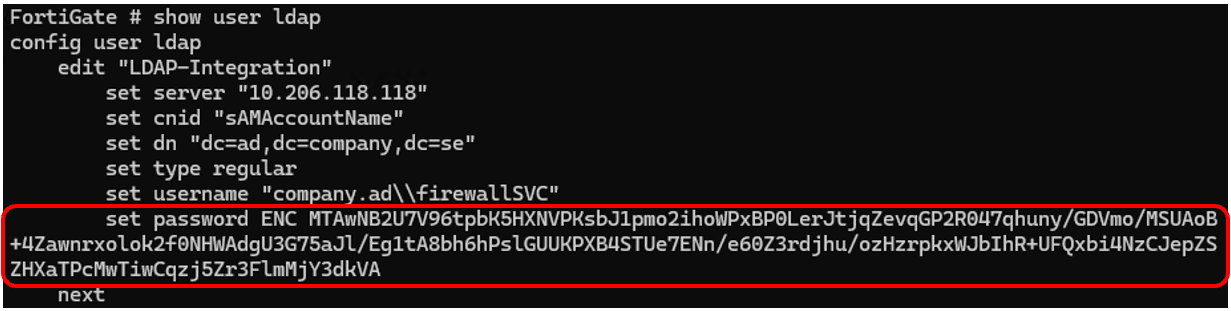
A stolen configuration has been applied to the device. In the configuration, there is an LDAP user for AD integration (see Figure 5).
The configuration also contains a local user account used for SSL VPN Access (see Figure 6).

Now, we simply downgrade the firmware to a version (7.4.1) which runs the old unsecure password encryption method, as shown in Figure 7 and Figure 8.
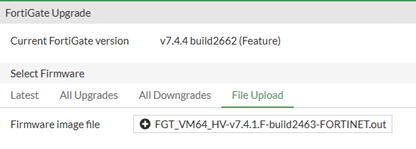

Note that the firmware version downgrade procedure requires the device to be registered and licensed.
We confirm that the downgrade was successful (see Figure 9).

Reviewing the local accounts, we can see that the encrypted passwords have changed; the passwords are now easily crackable, as shown in Figure 10 and Figure 11.
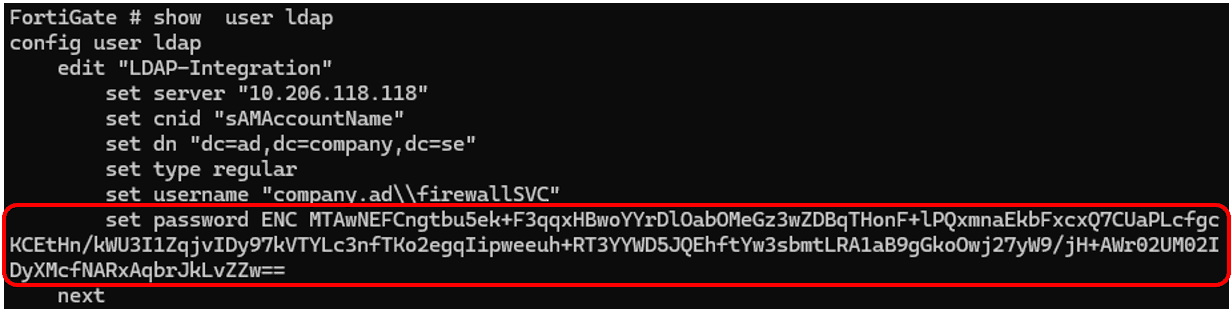

By running the encrypted version of the passwords through a password decryptor such as FortiGate Password Decrypt, the plain text versions of the passwords can be found in seconds (see Figure 12).

In less than five minutes, we were able to take a stolen configuration, apply it to a firewall we control, and then decrypt the password for two different accounts, one of which permits access to the SSL Client VPN service and one which lets us query the Active Directory (as the AD integration account is de facto an AD account). And who knows, if we’re lucky, the AD account is a Domain Admin too.
Many consider network devices “black boxes,” and they are often treated as inherently safe or somehow exempt from cyberattacks. It is therefore not uncommon for them to fall outside of the wider resilience strategy. As the experience with SSO vulnerabilities shows, these devices are integral to an organization’s overall security posture. If not handled carefully, compromising a network device can lead to a full domain takeover.
In the upcoming blog post, we will discuss how to secure a network device and what approach you should follow to avoid compromise. We will also discuss how to minimize the impact of a compromise if it occurs.
此内容由惯性聚合(RSS阅读器)自动聚合整理,仅供阅读参考。 原文来自 — 版权归原作者所有。