




Explore the latest features in Android 17, including faster multitasking, improved creator tools and security enhancements.
General summary
Android 17 is rolling out now to Pixel devices, bringing new multitasking tools like floating Bubbles, improved screen recording, and optimized gaming modes for foldables. You also get better privacy controls, including temporary location access and enhanced security features to lock your device if it is stolen. Check your settings for the update and visit android.com/17 to explore all the new features.
Summaries were generated by Google AI. Generative AI is experimental.
Bullet points
- Android 17 is here with new tools to boost your productivity and device security.
- Use Bubbles to turn any app into a floating window for easier multitasking.
- Record your screen and reactions at the same time with the new toolbar.
- Foldable gaming mode optimizes your screen layout for a better mobile gaming experience.
- New security features help you lock lost phones and control app data access better.
Summaries were generated by Google AI. Generative AI is experimental.
Basic explainer
Android 17 is rolling out with cool new features like floating app bubbles for easier multitasking and better gaming modes for foldable phones. You can now record your reactions over videos and keep your data safer with smarter security tools. It also helps your phone run smoother and last longer by managing how apps use memory. Keep an eye out for these updates coming to your device soon.
Summaries were generated by Google AI. Generative AI is experimental.
Explore other styles:
Your browser does not support the audio element.
Listen to article
This content is generated by Google AI. Generative AI is experimental
[[duration]] minutes
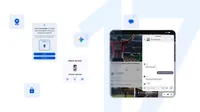
Android 17 is here, bringing a suite of features designed to enhance your productivity, entertainment, security and safety. It’s rolling out first to Pixel today, followed by other eligible Android devices throughout 2026. Select advanced devices will get Gemini Intelligence later this summer, helping you stay a step ahead and work proactively to get things done throughout your day.
Here are some of the noteworthy features.
Multitask better with Bubbles

Bubbles allows you to turn any app into a compact, floating window so you can stay in the flow. Long-press any app icon to convert it into a bubble that floats on top of other apps. On large screen devices, bubbles are docked in a dedicated bubble bar at the bottom of your screen so you can switch between apps with one tap and resize or maximize them to full-screen for faster multitasking.
Handy for travel, entertainment and work, Bubbles lets you easily reference notes or maps, watch tutorials and even check sports. It keeps everything you need in reach but out of the way.
Express yourself with Screen Reactions
We’ve updated screen recording and annotation with a new toolbar and improved flow. You can also share your perspective quickly with Screen Reactions. In just a few taps you can record yourself using your device’s selfie camera and capture your phone screen at the same time.
Add your thoughts and reactions over sites, apps and trending videos without the need for a green screen and switching between apps. It's that easy.
Elevate gameplay with foldable gaming

Android 17 helps you level up your gaming with foldable gaming mode, which makes full use of your phone screen real estate while you’re battling, puzzling and winning. Foldable devices now feature an optimized 50/50 layout with a game view on top and a dynamic gamepad below to maximize the view and button-mashing spaces. Foldable gaming mode is enabled in Android 17 and will be available in the coming months. You can further tailor your gaming experience if you use an external controller with native controller remapping.
We’ve also reduced frame drops and stutters by making memory cleanup more efficient for high-def gaming.
Get peace of mind with security and safety updates
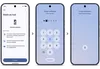
Android 17 also brings new security and safety features. You can now grant an app temporary access to your precise location, and share only specific contacts — instead of your entire address book — for more control. An enhanced “Mark as lost” feature in Find Hub lets you lock a missing phone with your biometrics, so even if a thief has your passcode, they can't access information on your phone or turn off tracking.
This update boosts your security, too. Improvements to Live Threat Detection block more suspicious apps and scams, and enhanced Advanced Protection mode helps keep you safe from sophisticated threats. To stop a thief who's trying to guess their way into your phone, we also reduced the number of times someone can guess your PIN and added longer wait times between failed attempts.
Look for even more updates and improvements
There is a lot more to explore in Android 17 — including a setting to hide app names on your home screen, the expansion of Parental Controls to all Android devices, a dedicated volume control for your assistant and more control over the expanded dark theme — plus, Pixel devices are getting additional updates today.
Under the hood, Android 17 introduces app memory limits to ensure apps never use too much RAM, helping improve your device’s overall performance and battery life.
See all the Android 17 features at android.com/17, and also check out our latest Android Drop to learn what’s new for all Android devices.
Done. Just one step more.
Check your inbox to confirm your subscription.
You are already subscribed to our newsletter.
You can also subscribe with a