


Your browser does not support the audio element.
Listen to article
This content is generated by Google AI. Generative AI is experimental
[[duration]] minutes
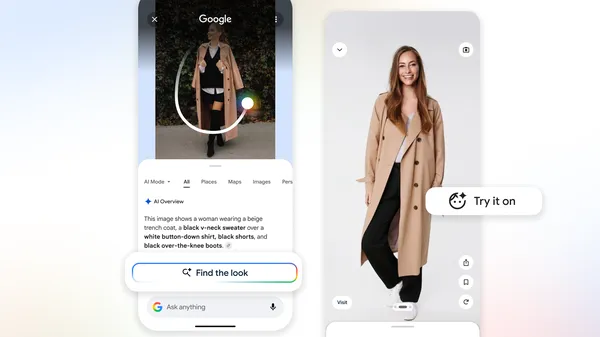
We’ve all been there: You see a photo of a perfectly styled living room or a well-curated street-style outfit, and you want to know where everything came from. Until recently, visual search was a one-item-at-a-time process. But a major update to Circle to Search and Lens now allows Google to break down and search for multiple objects within a single image simultaneously. This means if you use Circle to Search on Android to search for an entire outfit, you’ll see results for every component of a look, not just one piece at a time. In recent months, we’ve also launched several updates that enhance both visual search and image results in AI Mode, so you can better find inspiration as you search.
To better understand these breakthroughs, we talked to Search Senior Engineering Director Dounia Berrada.
What part of Search do you work on?
I focus on multimodal search, aka Google Lens — essentially, enabling Google to help with your most complex questions about images, PDFs and anything you see. Visual search is redefining how we interact with information; Lens should be intelligent enough to understand the "why" behind your search, making it effortless to get help with what you see on your screen, or in the world around you. That means building a tool that can just as easily explain a complex math problem as it can identify a rare succulent or help you track down a pair of shoes you love.
How does it do that?
Imagine you’re redesigning a room so you upload a photo of a mid-century modern space for inspiration. You probably aren’t just looking for the side table; you want to recreate the entire vibe. Previously, you’d have to search for the lamp, then the rug, then the chair individually. Now, AI Mode can break down that complex image, identify each individual piece and issue multiple visual searches simultaneously. You can see this in action right now using Circle to Search.
What powers these types of visual search responses?
Our advanced Gemini models make AI Mode possible, and its multimodal capabilities benefit from the visual expertise we've built into Lens over the years. When you search with an image, Gemini analyzes the image alongside your question to decide which tools to use. Let's say you're scrolling on your phone and see an outfit on social media that you love. When you search it, the model knows to use Lens to retrieve image results for the hat, shoes and jacket of the outfit simultaneously. It then weaves those individual results into one easy-to-read response.
Think of it this way: The AI model acts as the "brain" that can “see” the image, while the visual search backend acts as the "library" containing billions of web results. The AI performs multi-object reasoning to understand what you’re looking at. Then it uses a "fan-out" technique which triggers multiple searches at once, reads through the results and presents a single, cohesive response with helpful links — all in seconds.
Can you explain the fan-out technique?
AI Mode is basically doing a dozen searches for you in the time it takes to do one. If you upload a photo of a garden you admire, you might have several questions: Will these plants survive in the shade? Are they right for my climate? How much maintenance do they need?
Before, you’d ask those one by one. Now, AI Mode identifies all those necessary "fan-out" searches. This way, it gathers care requirements for every plant in the photo using helpful web results, breaks down the info and even suggests next steps you might want to take. Since AI Mode is uncovering more visual results from a single search, it's easier than ever to find just what you're looking for, and stumble upon something new that sparks your interest.
Do you have to start with an image to get this kind of help in AI Mode?
Not at all! You can start with a simple text search in AI Mode, like "visual inspo for work outfits." When you see a result you like, you can just say, "Show me more options like the second skirt." The system immediately takes that specific image and begins the fan-out process from there.
It definitely seems great for shopping — what else could you use it for?
You could take a photo of a wall at a museum and ask for explanations of each painting. Or take a photo of a bakery window and ask what all the different pastries are. It’s about moving from "What is this one thing?" to "Explain this entire scene to me."
Sounds like I’ve got some photos to take and a lot more to discover. I'm off to put these tools to the test!
Done. Just one step more.
Check your inbox to confirm your subscription.
You are already subscribed to our newsletter.
You can also subscribe with a
此内容由惯性聚合(RSS阅读器)自动聚合整理,仅供阅读参考。 原文来自 — 版权归原作者所有。