







We’re responsibly bringing Gemini to teenage students to help them learn confidently, and adding dozens of new AI-powered tools to Chromebooks and Google Workspace for Education to help educators make learning more personal and engaging.
General summary
Google is committed to making AI accessible to educators and students. Gemini, an AI chatbot, will be available to teen students in over 100 countries, free of charge. Read Along in Classroom, now a Google Workspace for Education service, helps students get real-time support with the help of AI. Google Classroom enables differentiated instruction with features informed by LearnLM, a new family of models fine-tuned for learning. Chromebook Plus, starting at $350, brings Gemini and other productivity features to teachers and staff. Google Vids, a collaborative video creation app, will have a version without generative AI exclusively for students and educators with Google Workspace for Education Plus later this year.
Summaries were generated by Google AI. Generative AI is experimental.
Basic explainer
Google is making learning more fun and easier with AI tools.
Students can chat with Gemini, a helpful AI assistant, to get personalized help with their schoolwork.
Teachers can use AI to create custom lessons and activities for their students.
New security and accessibility features help keep students safe and make learning more inclusive.
Summaries were generated by Google AI. Generative AI is experimental.
Explore other styles:
Editor’s note: This week we’re joining thousands of educators and students at ISTE, the United States’ biggest educational technology exhibition. Visit us at Booth 1424, where you can check out new Chromebooks and features in Google Workspace for Education. Follow along on Twitter and Facebook for the latest updates.
Every teacher and student deserves to have access to meaningful educational experiences and AI is helping us make that possible. As part of our commitment to make AI broadly accessible, we're providing a variety of tools for educators and learners to use in the classroom. Last year we released a responsible Gemini experience for teens using their personal Google Accounts after consulting with child safety and development experts to help shape our content policies and an experience that prioritizes safety. Since then we’ve taken a number of additional steps to ensure we’re bringing this technology to students responsibly, partnering with learning science experts, testing with youth advisory panels and committing to add extra data protection for all education users free of charge, meaning Google will not use data from chats to improve AI models.
In the coming months, we're making Gemini available to teen students in over 100 countries around the world, free of charge. Part of our commitment to making AI helpful for everyone, in the classroom and beyond, Gemini and other AI-powered tools can be used to personalize and enhance the learning experience across Google Workspace for Education and Chromebooks.
How we’re making learning more personal and differentiation more achievable
- Helping teen students learn responsibly and confidently in an AI-first future with Gemini: In the coming months, teen students that meet our minimum age requirements will be able to chat with Gemini in English with added data protection while using their school-issued accounts, free of charge. To ensure schools are always in control, Gemini will be off by default for teens until admins choose to turn it on as an Additional Service in Admin console. After enabling it, admins can install the Gemini web app on Chromebooks so everyone has easy access. Parents and guardians can learn more about using AI with teens in our Guardian's Guide to AI in education.
- Grow reading skills with Read Along in Classroom: Now a Google Workspace for Education service, Read Along in Classroom helps students get real-time support with the help of AI. Educators can assign reading activities for individual students based on Lexile® measure, grade level or phonics skills, with over 800 books from Heggerty, ReadWorks and more to choose from. Educators can also view insights on reading accuracy, speed and comprehension. Going forward, we’re piloting the ability for teachers to generate personalized stories tailored to student needs, and you can sign up to be a part of the pilot program. Read Along in Classroom will be available globally, so students around the world can practice their reading skills in English. Teachers can also enable additional support in a student’s native language, starting with Spanish, for certain books.
- Enable differentiated instruction with Google Classroom: To make lesson and content planning easier, we’re piloting Gemini in Classroom features informed by LearnLM, our new family of models fine-tuned for learning, based on Gemini and grounded in educational research. Separately, educators will soon be able to define groups of students in Classroom to assign different content based on each group’s needs. AI-suggested questions for certain science videos are also available now in English to help quickly create YouTube assignments.
- Supercharge teacher productivity with Gemini in Chromebook Plus: We recently announced that we’re bringing Gemini to Chromebook Plus, powerful devices to supercharge productivity for both teachers and staff, starting at just $350. With new features for all users over the age of 18 coming soon like Help me write, Help me read, generative AI backgrounds, AI powered noise cancellation and admin policies to control all of the features, Chromebook Plus will be your trusted teaching companion. Choose from devices from Acer, ASUS, and now, CTL, too, like the new CTL Chromebook Plus PX141GXT.
- Create videos for teaching and learning with Google Vids: We recently announced Google Vids, a collaborative video creation app in Google Workspace that makes it easy to make engaging videos and inspire the next wave of storytellers. We’re releasing a version of Vids without generative AI exclusively to students and educators with Google Workspace for Education Plus later this year; the version powered by generative AI will be available with a Gemini for Google Workspace add on.
- Helping young people safely navigate an AI internet with a new media literacy curriculum: Developed with leading experts, including NAMLE (National Association of Media Literacy Education), Google’s Be Internet Awesome launched a new Media Literacy Handbook for teachers designed to build the foundational media literacy skills needed to prepare students for a future with AI.
Gemini can help teen students learn responsibly and confidently in an AI-first future.
Google Vids: Easy video creation for teaching and learning.
Read Along in Classroom: Assign different reading activities, based on phonics skills, Lexile® measure, or grade level.

Right-click on any text box and Help me write can suggest a clever lesson title, condense or emojify your text

Be Internet Awesome launches new Media Literacy handbook for teachers
How we’re helping educators and students connect across our platforms and products
Making sure our products and services work together seamlessly is another way we help educators and students have a great experience. Here are some of the new ways we're creating connectivity across not only our own products, but also other apps you know and love.
- Stay organized with Google Task and Calendar integrations. Check and update your to-do lists right from your Chromebook desktop. Students can also use Google Classroom to help them track assignments and complete their work on time, rolling out in the coming weeks.
- Collaborate with Meet and Assignments in your LMS. Google Workspace Learning Tools Interoperability (LTI)™ is our collection of products that connect Google Workspace for Education with popular learning management systems (LMS). In the coming weeks, students and educators who use Canvas and PowerSchool Schoology Learning will be able to access Google Meet directly from their LMS with Google Meet LTI. Educators who use Canvas have already been using Assignments LTI to better distribute, analyze and grade student work. In the coming weeks, Assignments LTI 1.3 will be available in PowerSchool Schoology Learning as well.
- Integrate your Student information System (SIS) with Google Classroom to enable educators to export grades to select SIS gradebooks. Soon, you can set up classes with OneRoster SIS partners, including Aspen, Infinite Campus, Skyward and PowerSchool SIS and import information like student lists, co-teachers and grading settings.
- Discover new apps that integrate with Workspace for Education and Chromebooks in the Google for Education App Hub. We’re launching 16 new Classroom add-ons (Kami, Quizizz, Screencastify, Boom Learning and more) and expanding the app licensing program with six new partners coming soon (Canva, codeSpark, Equatio, Genially, Sora, and Sumo), providing educators with a wider range of integrated tools to enrich the teaching and learning experience.
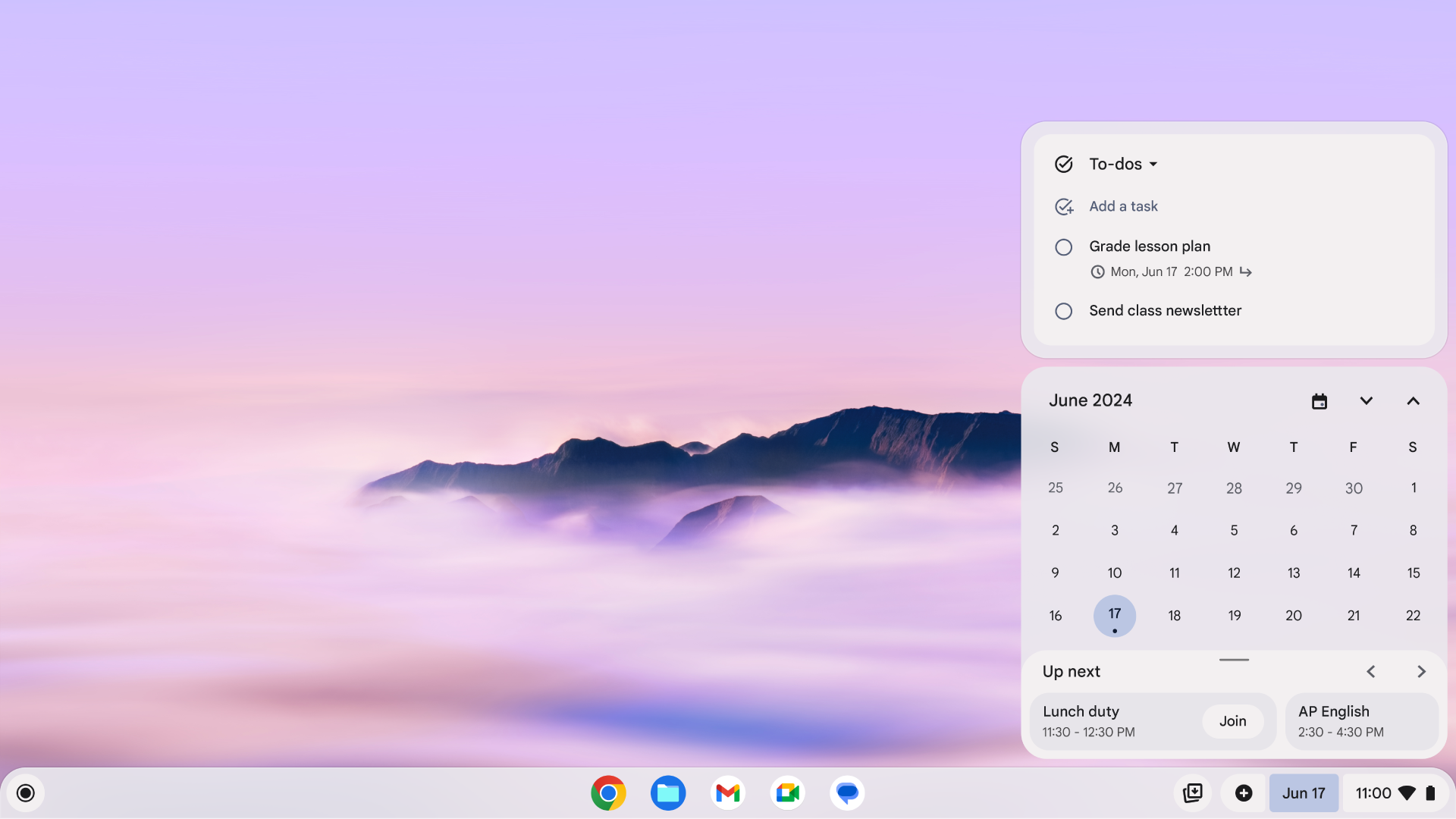
Check and update your to-do lists right from your Chromebook desktop with the Task integration
Students can check their Classroom assignments and due dates, all on their Chromebook desk top.
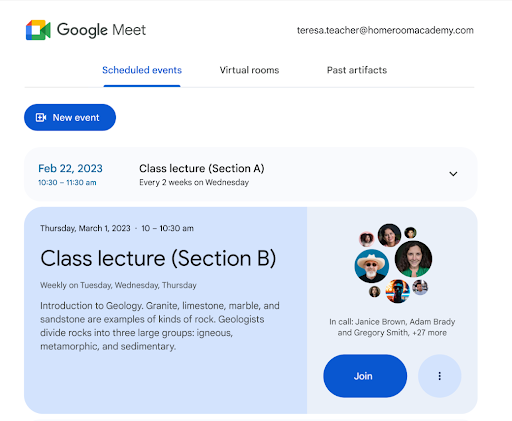
Use Google Meet directly in Canvas and Powerschool Schoology Learning with Google Meet LTI.
Expand your teaching toolkit with 10 new Classroom add-ons for seamless integration
How we’re supporting safe, secure and inclusive learning
As part of our commitment to fostering safe and inclusive learning environments, we’re rolling out new security and accessibility features across Chromebooks and Google Workspace for Education.
- Chat safer with new settings for students in Google Chat. In the coming months, admins will be able to restrict students from initiating direct messages and creating spaces, helping provide a safer and easier way for teachers to communicate with students.
- Protect data with improved controls in Admin console. Now available, multi-party approval allows admins to require additional approval by another admin to complete a sensitive action, like changing two-step verification settings. And, admins can now proactively block compromised mobile devices using context-aware access. With Chrome Education Upgrade, admins can configure apps and extension permissions in Google Admin console for groups - now, admins can do so for user and browser settings, too. And on the revamped device hub and details page, you'll notice a refreshed device list page with integrated notifications and a dedicated dashboards tab to help you be more proactive in managing devices. You can simply click on a notification and get a filtered device list affected by that notification and an info icon providing you with information on how to remediate that notification or link to relevant help center articles or settings within the admin console.
- Support inclusion with new accessibility features. On Chromebooks, we’re adding a new read aloud feature to reading mode in Chrome browser. And to make PDFs accessible by screen readers, you can now extract text from PDFs using Optical Character Recognition on Chrome browser and in the Gallery app on Chromebooks. And later this year, you’ll be able to control your Chromebook actions hands free with your facial expressions and head movements. We’re also adding new handwriting fonts in Google Workspace for Education to help educators teach handwriting based on regional research.
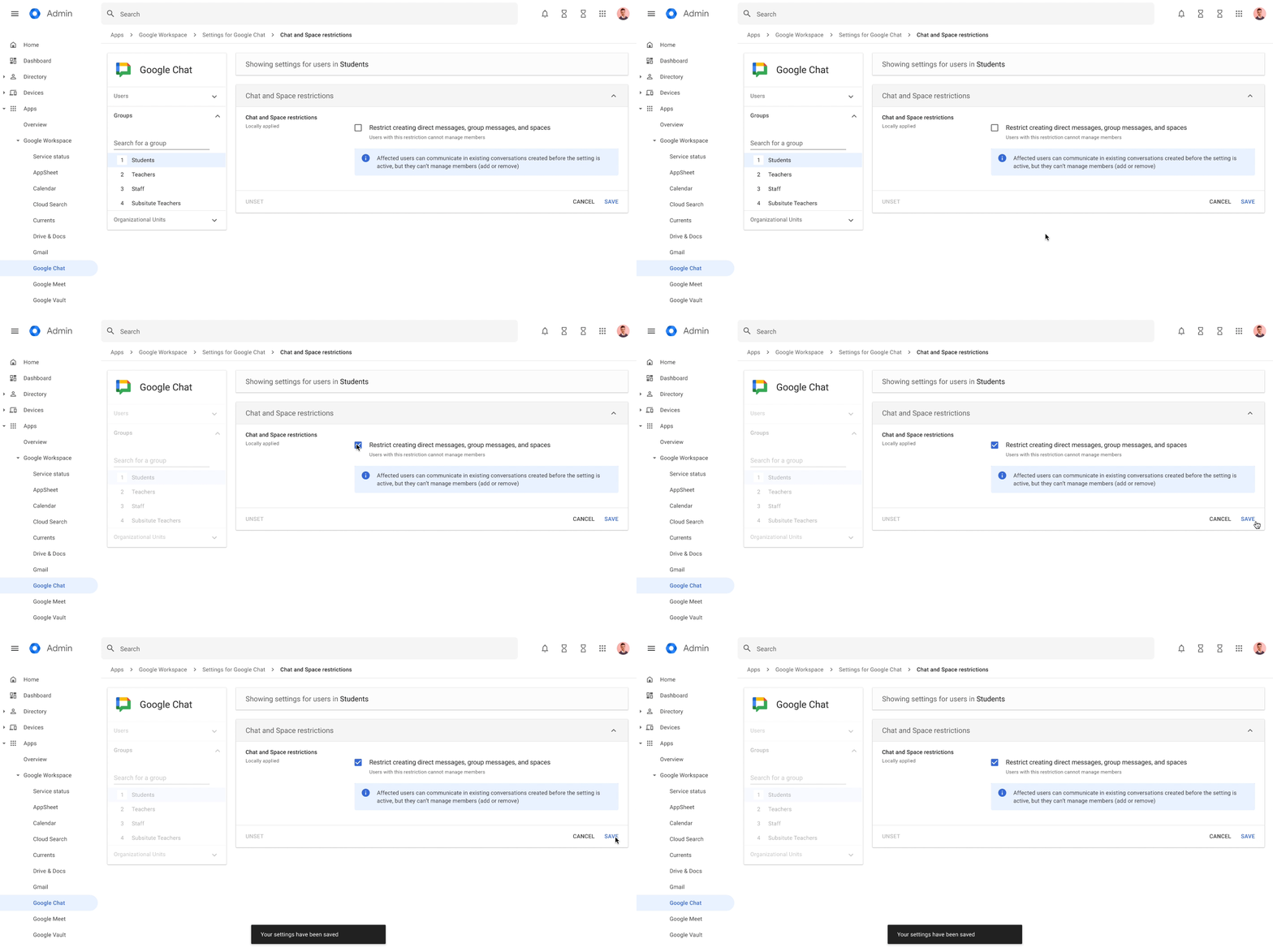
Admins will soon be able to restrict students from initiating direct messages and creating spaces, helping provide a safer and easier way for teachers to communicate with students.
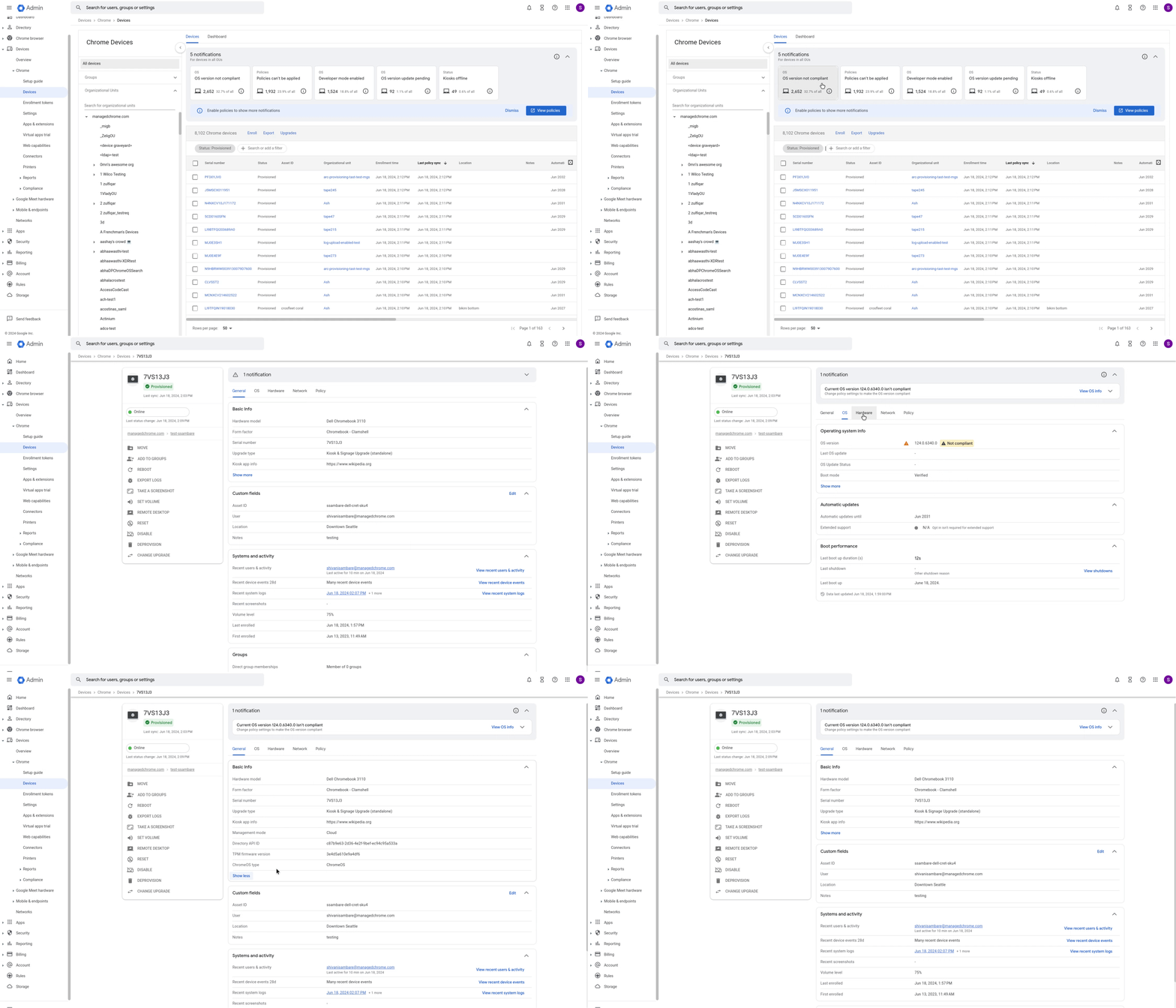
The new Device Hub in admin console helps you proactively manage your fleet of Chromebooks.
Reading mode now has new features including read aloud and line focus, and natural sounding text-to-speech voices on ChromeOS.
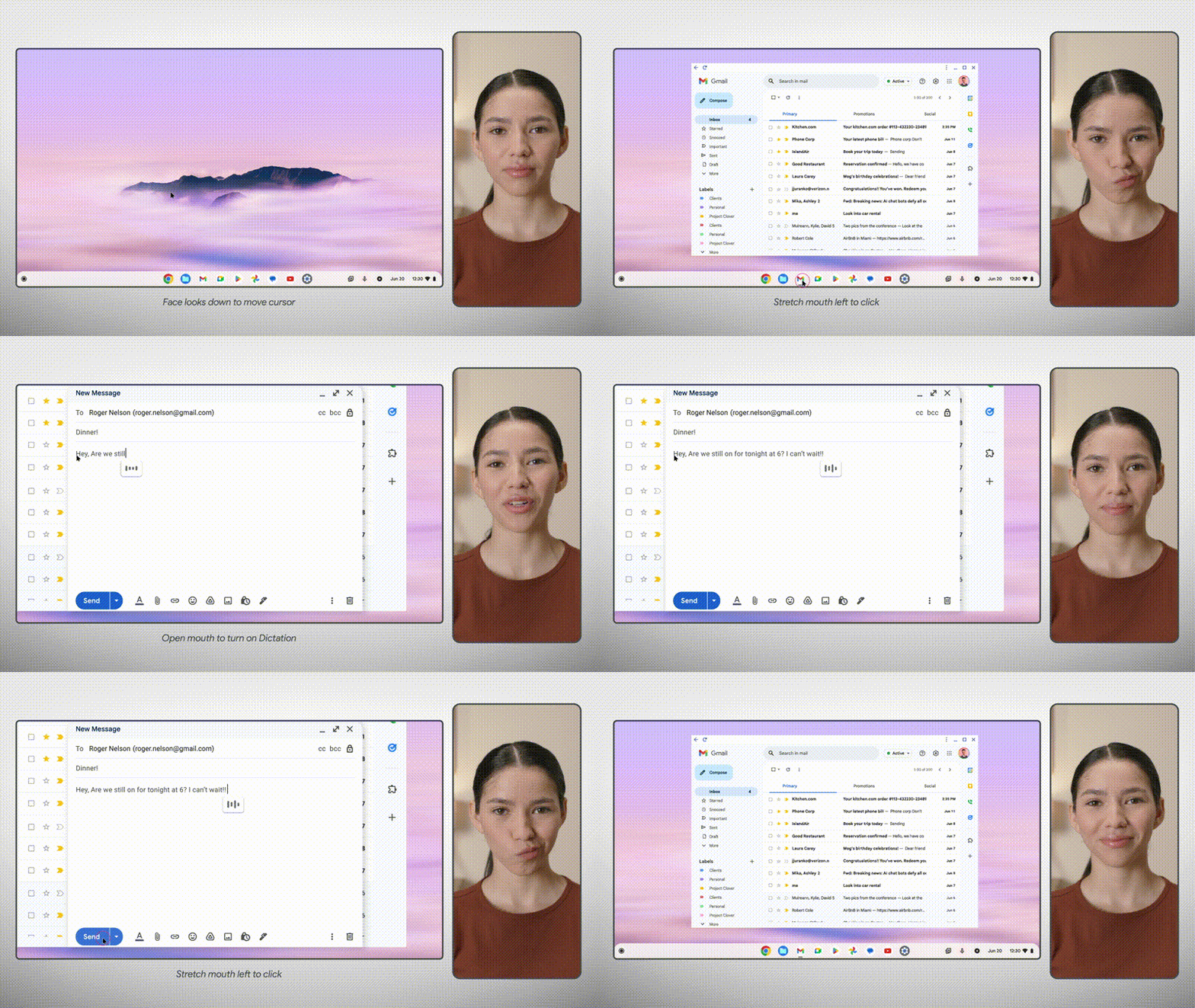
Soon, you’ll be able to control your Chromebook hands free
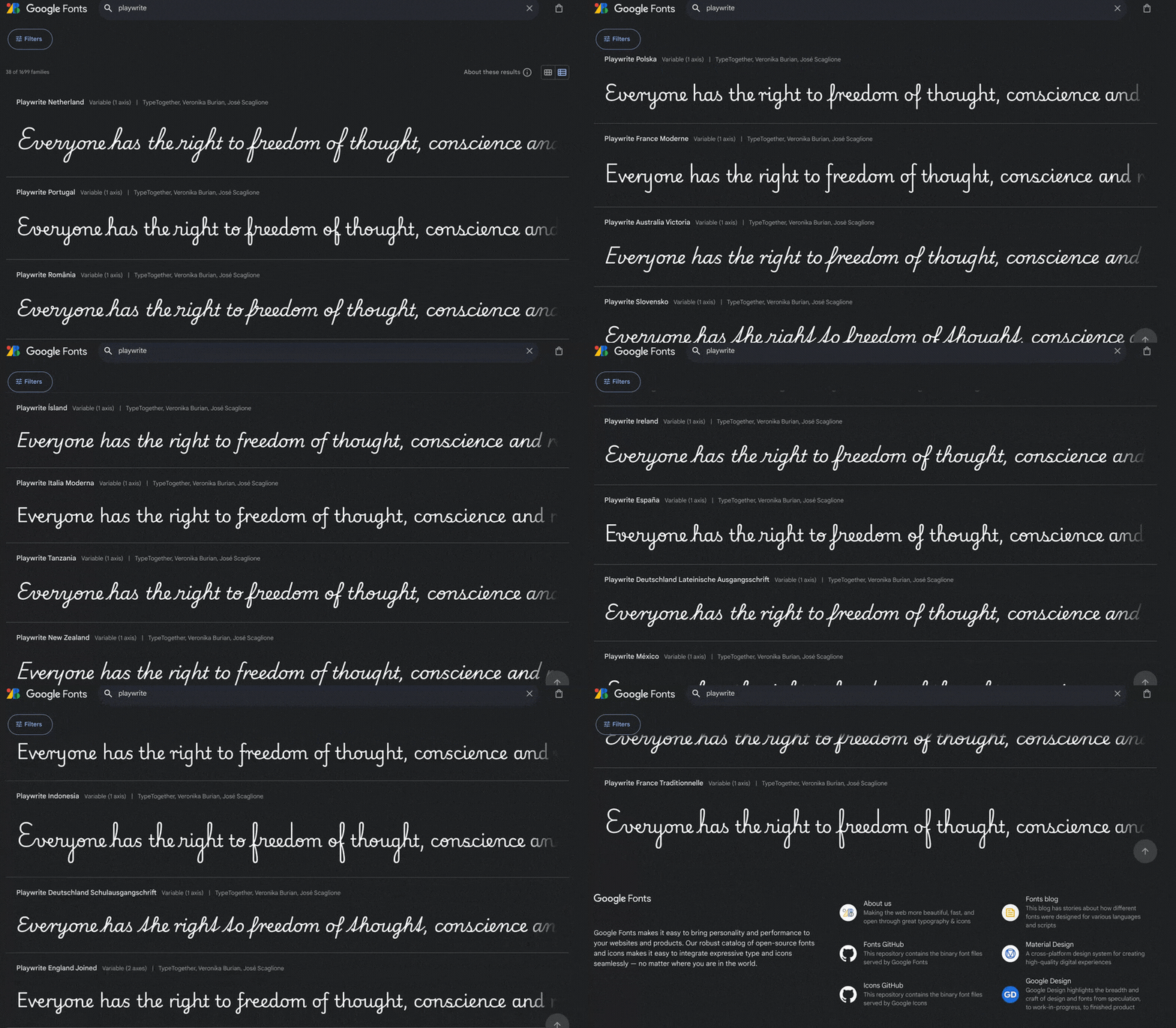
We’ve added 51 new handwriting fonts in Google Workspace for Education
We’re all about making things easier for teachers and students by giving them the best tools and resources to help them thrive in this ever-changing world. Reference this guide for each feature’s availability, including the Google Workspace for Education edition or add-on required to access them. We’re excited to see what you do with them next school year.