










General summary
Android users, rejoice! Five new features are here to enhance your experience. TalkBack now offers detailed audio descriptions of images, powered by Gemini models. Instantly search for songs with Circle to Search, even if they're playing from social media or nearby speakers. Listen to web pages read aloud in Chrome, with customizable listening speed, voice, and language. Stay earthquake-ready with the Android Earthquake Alerts System, now expanded to all U.S. states and six territories. Explore new cities like a pro with offline maps on your Wear OS watch, and enjoy two new shortcuts for voice search and map viewing. Discover more at android.com/updates and look out for Android 15 rolling out to more devices later this year.
Summaries were generated by Google AI. Generative AI is experimental.
Bullet points
- Android updates bring new features to phones, tablets, and Wear OS watches.
- TalkBack now provides detailed audio descriptions of images using Gemini models.
- Circle to Search lets you search for music you hear without leaving the app you're in.
- Chrome now offers text-to-speech functionality for web pages.
- Android Earthquake Alerts System expands to all U.S. states and six territories.
- Offline maps on Wear OS watches help you navigate without cell phone service.
Summaries were generated by Google AI. Generative AI is experimental.
Explore other styles:

Want to do more with your favorite Android apps and features? With five new updates to phones, tablets and Wear OS watches, you can use offline maps right from your wrist, be better prepared for earthquakes and more. Here’s what’s new:
1. Hear detailed audio descriptions of images — now powered by Gemini
TalkBack, Android’s screen reader that is designed for people who are blind or have low vision, will now make digital images even more accessible with detailed audio descriptions powered by Gemini models on supported devices. Whether you’re looking at online product images, photos in your camera roll, pictures in text messages or images of what’s happening on social media, Android’s screen reader uses the best of Google AI to bring images to life.
Hear richer audio descriptions for images.
2. Search music you hear in the moment with Circle to Search
Instantly search the songs you hear without switching apps. Whether it’s a song playing on social media from your phone or music that’s playing from speakers near you, just long press the Home button or navigation bar to activate Circle to Search, then tap the music button to identify the track name, artist and even open a YouTube video to explore more — then get right back to what you’re doing.
Search songs you hear without switching apps.
3. Listen to web pages read aloud as you explore online
For those who prefer listening over reading, you can now listen to pages in Chrome — from blog posts to recipes to the latest news articles. You can even choose your preferred listening speed, type of voice and language.
Hear text on webpages read aloud in Chrome and personalize the speed and voice.
4. Stay earthquake-ready with Android no matter where you are in the U.S.
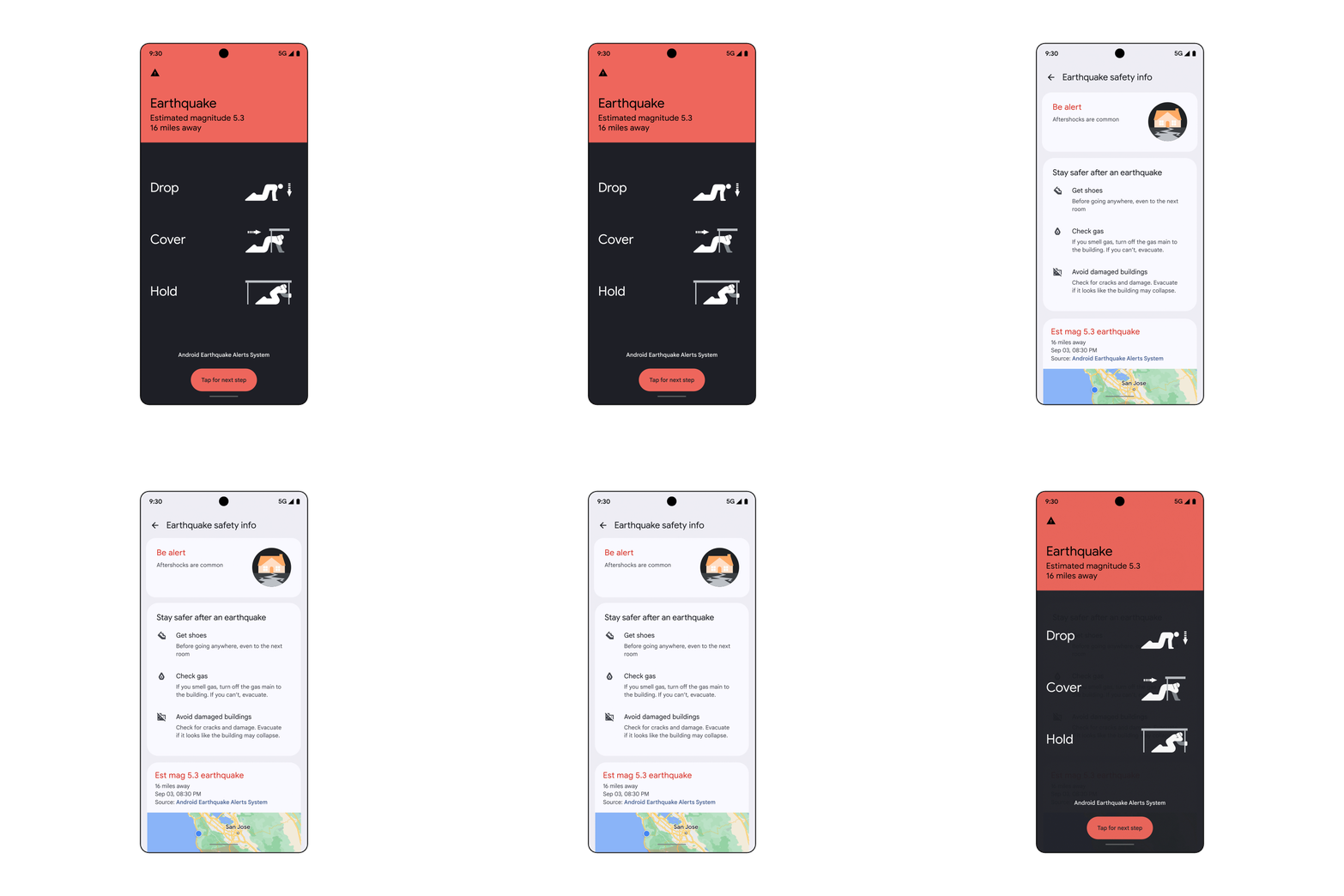
The Android Earthquake Alerts System is expanding to all U.S. states and six territories. With crowd-sourced earthquake detection technology, we’ve extended the reach of alerts to provide you with potentially life-saving warnings seconds before shaking starts. Once the shaking is over, you can tap for tips on what to do next.
React faster with early earthquake alerts.
5. Explore a new city like a pro with Google Maps features for Wear OS watches
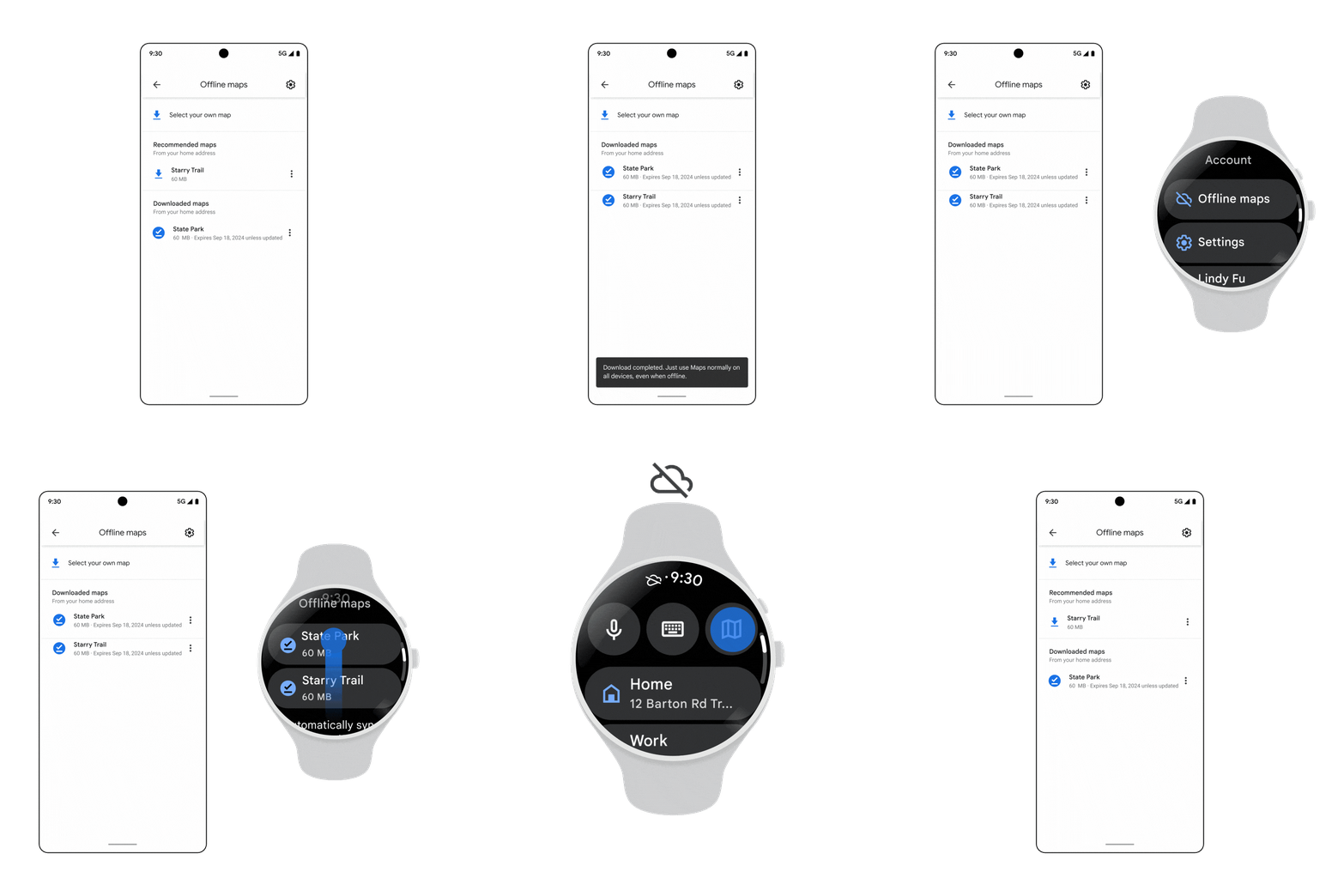
Get your bearings without cell phone service using offline maps on your Wear OS smartwatch. When you download a map to your phone, you can access it right from Google Maps on your watch — so you can easily orient yourself even if you leave your phone behind. And with two new shortcuts into Google Maps, you can search for destinations using your voice when you’re back online or view your location on the map with a tap on your watch face.
Find your bearings with offline maps on your Wear OS watch.
Find out more about everything that’s new in Android at android.com/updates. And stay tuned for more updates as Android 15 rolls out to more devices later this year including Pixel and other devices.