


Figure out how to use your “power hours” and plan for “future you” in “Uptime: A Practical Guide to Personal Productivity and Wellbeing.”
General summary
Want to be more productive? Google’s productivity expert, Laura Mae Martin, shares five tips from her new book, “Uptime.” First, identify and protect your “Power Hours” when you’re most focused and alert. Create “hot spots” for specific tasks and “not spots” where you never work. Treat email like laundry: sort it into “respond,” “read,” and “revisit” piles, and tackle each pile at a time. Prioritize downtime to rest your brain and fuel creativity. Finally, plan for “Future You” by considering how your present decisions will affect your future self.
Summaries were generated by Google AI. Generative AI is experimental.
Basic explainer
Google's productivity expert, Laura Mae Martin, has some tips to help you be more productive and have more fun.
- Find your "Power Hours" when you're most focused and do your important work then.
- Create "hot spots" where you do certain tasks and "not spots" where you never work.
- Treat email like laundry and sort it into "respond," "read," and "revisit" piles.
- Take downtime to rest and refresh your brain.
- Plan for "Future You" and consider how your present decisions will affect your future self.
Summaries were generated by Google AI. Generative AI is experimental.
Haiku-ish
Power Hours, hot spots,
Focus time, sort your emails,
Plan for future self.
Create "not spots" too,
For relaxation, downtime,
Creativity boost.
Prioritize breaks,
Downtime fuels big-picture thinking,
Inspiration flows.
Summaries were generated by Google AI. Generative AI is experimental.
Explore other styles:

In the pursuit of productivity, the ultimate goal is to shrink whatever we have to do in order to make more time for what we want to do. For tips on getting the most out of our time, we caught up with Executive Productivity Advisor Laura Mae Martin who, as part of her role at Google, recently published a book called “Uptime: A Practical Guide to Personal Productivity and Wellbeing.”
Here are five tips Laura shared to up your productivity and enjoy more you time.
1. Identify and protect your “Power Hours”
You blocked off 3-4:30 p.m. on your calendar to work on a new project. After wrapping up a meeting, you sit down to start at 3:08. But first, you check your email real quick. It’s 3:19 when a chat comes in, pulling you into yet another tab. That reminds you that you forgot to respond to something else that feels easier to work on. When you look up, it’s 4:15 — is it even worth getting started on that new project now?
“You made the time for the project, but was 3-4:30 the right time? Each of us has ‘Power Hours,’ the daily time slot when we naturally find ourselves more focused, alert and strategic. Being intentional about your Power Hours is how you match both time and energy to ensure excellence in execution,” Laura says.
Tackle your top priorities during your Power Hours.

To figure out your Power Hours, keep a notepad with you for two weeks and jot down the times and conditions when you feel particularly productive. “Notice patterns, and do the same with the times you feel your least inspired — your ‘Off-Peak’ hours,” Laura advises. “Once identified, block your Power Hours even just one or two times a week so that you can dedicate them to tackling your most important projects. Then, reserve activities like low-energy meetings or administrative tasks for your Off-Peak Hours.”
2. Create "hot spots" and "not spots"
“Our brains take in more than just what we’re doing at any given time; they also catalog context clues like where we are, what we smell and what we hear — information we then associate with what we were thinking about or doing,” Laura says.
We can use this tendency to associate certain places with certain tasks to our advantage by designating "hot spots" for specific types of work. Maybe you always do expenses at your kitchen table with a cup of coffee or start your in-office days by catching up on news during your commute. “By being consistent about the places we do certain work, we’re training ourselves to slip into a rhythm of productivity when we enter these spaces,” Laura says.
Associating certain locations with particular work trains your brain to easily slip into activities.
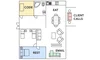
Conversely, create "not spots" — areas where you never do work or difficult tasks. For Laura, that place is her “cozy corner,” a space in her bedroom where she’s placed a large comfy armchair and bookshelf. “The cozy corner is where I finish my coffee before my kids wake up. It’s where I read books or meditate. It’s where my daughter meets me in the morning, bringing a book of her own,” she says. “I sometimes catch myself wanting to bring my laptop there, but I resist because I associate that corner 100% with my kids, reading and relaxing. It’s so easy for me to unwind there. Why would I ruin that?”
3. Treat email like laundry: Sort it!
Managing email can feel like a never-ending laundry pile. “Checking email 15 or more times a day without clearing your inbox is like opening your dryer throughout your day, even though you don’t have time to fold and put away your clothes,” Laura says. “We should set aside specific time for it instead of poking around constantly.”
Laura recommends treating sorting, reading and answering emails as distinct activities and dedicate specific time to each. Start by sorting your emails into three “piles”: respond, read and revisit. “Then, do all of a pile at one time, like emptying the dryer,” Laura says. “This simple mental shift, followed by a change in the structure of your inbox, can make you feel completely on top of your email.”
Sort emails like you’d sort your laundry.

4. Prioritize downtime
Being busy doesn’t necessarily equal being productive. Downtime allows your brain to rest and refresh, enabling you to return to tasks with renewed energy and focus.
“Uptime in computers is any time a machine is on, operational and productive. I define it the same in our world. Finding your uptime is that feeling of being in the flow, on top of things, productive and well,” Laura says. “And just like your computer needs to shut down and reboot to avoid burnout, you need the same. Without breaks to relax and process information and ideas, we cannot sustain uptime.”
Plus, downtime is often the best time for creativity. “Your greatest ideas are more likely to come to you while on a walk or cooking dinner than during your 10th meeting of the day,” Laura says. “You have to allow for downtime in your schedule to fuel your own propensity for big-picture thinking and inspiration.”
5. Plan for “Future You”
Sometimes we fail to consider how our present-day decisions may affect our future selves. For example, you might schedule six meetings back-to-back on the day you’ll return from vacation without envisioning how that future version of you will feel.
“Instead of planning for who we are now, we want to be constantly planning for our future self,” Laura says. “What will Future You wish you had scheduled — or not scheduled — after that four-hour meeting block next week? What will End-of-Year You wish you had spent more time on? Less time on? This perspective helps us prioritize activities, allocate our time wisely and make decisions that align with our long-term wellbeing and productivity.”