Working on the Google Home team has helped me figure out exactly how to best celebrate the season.
General summary
The author shares eight ways she uses Google Home to create a festive holiday atmosphere. She uses smart devices to play holiday music, control lights, display photos, adjust the thermostat, and even create a snowy ambiance. These features help her manage the holiday chaos and create a cozy, welcoming environment for guests.
Summaries were generated by Google AI. Generative AI is experimental.
Bullet points
- This article shares eight ways to use Google Home to create a cozy and festive holiday atmosphere.
- Start your day with holiday music playing on your Nest Mini and Nest Audio.
- Control your smart lights with the Google Home app, saving time and effort.
- Display a slideshow of holiday photos on your Nest Hub Max for a personal touch.
- Adjust your Nest Learning Thermostat from multiple devices to keep your home comfortable.
- Create a snowy ambiance with Ambient screensavers on your Google TV Streamer.
- Use Google TV's AI-powered recommendations to find the perfect holiday movies.
Summaries were generated by Google AI. Generative AI is experimental.
Basic explainer
This article is about how someone uses Google Home to make their holidays more festive and less stressful. They use it to play holiday music, control smart lights, show holiday photos, and even create a snowy scene on their TV. They also use it to set timers, control the thermostat, and play holiday movies. Google Home helps them make their home cozy and festive, and it makes hosting easier.
Summaries were generated by Google AI. Generative AI is experimental.
Explore other styles:
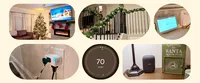
From my first day on the Google Home PR team three years ago, I’ve been excited to introduce as much smart home technology into my home as possible. I dabbled while living in my New York City apartment, but since my husband and I bought our first home this year, I’ve been able to dive head first into the world of Google Home.
Now, the holidays are upon us, and my Google Home is primed to create holiday magic. But, let's be honest, amidst all the joy and merriment, the holidays can also be a bit chaotic, especially if you love to host.
Between decorating, shopping, cooking and entertaining, it's easy to feel overwhelmed. That's where my devices, automations and routines come in. Google Home has become my secret for navigating the holiday season with ease and keeping the festive spirit alive. Here are eight ways I use my Google Nest devices and the Google Home ecosystem to create my own winter wonderland for the holidays.
Embracing the holiday spirit
1. Jingle all the way with festive music
I start by filling my home with Christmas cheer every morning as a part of my wake up routine. So at 6:30 a.m., when my morning routine begins, my instrumental holiday playlist gently plays on my Nest Mini in my bedroom and my Nest Audio in my living room.
2. Twinkle, twinkle, automated lights
Being that this is the first year in our home, I went all out with the holiday decor, especially the holiday lights. I was sure to use compatible smart outlets so I can control them directly in the Google Home app. Now, instead of spending time going around to each individual room to turn them on or off, I can simply tap which lights I want on and off in the app, saving both me (and my husband) time at the end of night.
3. Put memory lane on display
My guests love checking out the Nest Hub Max in our kitchen that doubles as a digital photo frame. I love showing a rotating slideshow of my favorite photos from years past. It's a wonderful way to reminisce and add a personal touch to my holiday decor.
Getting comfy and cozy
4. Make things warm and toasty
With Google Home, I can adjust my Nest Learning Thermostat (4th gen) across multiple surfaces, including my Pixel 9 Pro Fold, Pixel Tablet, Pixel Watch and even the home panel on Google TV. It’s the perfect helper while hosting, too, as it automatically adjusts to keep the room comfy for everyone.
5. Let it (virtually) snow
As a Midwest native now living in the South, I often miss snow during this time of year. One of my favorite features of the new Google TV Streamer are the Ambient screensavers. Now, thanks to Google AI, I can describe the exact snowy scene I want to display and use it as the screensaver on my TV.
6. Go for a holiday movie marathon
Nothing says cozy quite like a movie night. As soon as December hits, I commit to watching one Christmas movie or episode a day. Thankfully, Google TV and the Google TV Streamer make it easy. It uses Google AI to make finding what to watch easier with personalized recommendations from across my subscription services and helpful AI-generated overviews of popular movies and shows.
Becoming the ultimate holiday hostess
7. Pull off a perfectly-timed meal
Timing is everything when you're cooking a holiday feast. "Hey Google, set a timer for 20 minutes" is my constant refrain in the kitchen. With hands-free timers and reminders, I can focus on curating the vibe and crafting culinary masterpieces without worrying about burning the roast.
8. Make a festive entrance
My nieces and nephews always get a kick out of my doorbell chimes when they come over during the holidays. From December through January, our Nest Doorbell (wired) has just as much holiday spirit as we do thanks to the seasonal doorbell chimes.
From setting the mood to simplifying my to-do list, these devices are a game-changer. And if you need more inspiration, here are even more ways Google products can make your holiday season easier to navigate and more special than ever.