


惯性聚合 高效追踪和阅读你感兴趣的博客、新闻、科技资讯
阅读原文 在惯性聚合中打开

推荐订阅源

Threat Intelligence Blog | Flashpoint
W
WeLiveSecurity
O
OpenAI News
N
News and Events Feed by Topic
K
KPMG report finds enterprise disconnect between AI and its ROI | CIO
cs.CV updates on arXiv.org
Webroot Blog
Webroot Blog
Google Online Security Blog
云风的 BLOG
云风的 BLOG
N
News | PayPal Newsroom
H
Hacker News: Front Page
博客园_首页
Exploit-DB.com RSS Feed
The Last Watchdog
The Last Watchdog
钛媒体:引领未来商业与生活新知
钛媒体:引领未来商业与生活新知
H
Heimdal Security Blog
cs.AI updates on arXiv.org
S
Schneier on Security
宝玉的分享
宝玉的分享
H
Hackread – Cybersecurity News, Data Breaches, AI and More
Recent Commits to openclaw:main
Y
Y Combinator Blog
Cyberwarzone
Cyberwarzone
Microsoft Security Blog
C
CXSECURITY Database RSS Feed - CXSecurity.com
GbyAI
GbyAI
Cloudbric
Cloudbric
TaoSecurity Blog
TaoSecurity Blog
人人都是产品经理
人人都是产品经理
P
Palo Alto Networks Blog
M
MIT News - Artificial intelligence
G
GRAHAM CLULEY
C
Check Point Blog
Apple Machine Learning Research
Last Week in AI
Last Week in AI
T
Troy Hunt's Blog
L
Lohrmann on Cybersecurity
www.infosecurity-magazine.com
P
Proofpoint News Feed
Blog — PlanetScale
Blog — PlanetScale
量子位
博客园 - 聂微东
S
Securelist
博客园 - 三生石上(FineUI控件)
F
Full Disclosure
G
Google Developers Blog
L
LINUX DO - 热门话题
P
Proofpoint News Feed
AI
AI
PCI Perspectives
PCI Perspectives

Google Health

Bryson DeChambeau partners with Google Health Google Fitbit Air is now HSA/FSA eligible in the U.S. The latest AI news we announced in May 2026 Google Health brings your data into one place, on your terms Google Health Coach is becoming globally available Introducing the all-new Fitbit Air A new era for your health and wellness A new era for your wellness: Introducing the Google Health app Pre-order Stephen Curry’s special edition Fitbit Air The latest AI news we announced in April 2026 Fitbit's personal health coach is now even more personalized. Fitbit’s personal health coach is expanding to reach 37 countries and 32 languages. The latest AI news we announced in March 2026 New personal health coach features are coming to Fitbit. Get a fuller picture with Fitbit's personal health coach Fitbit’s personal health coach is expanding to more people in public preview. 3 Fitbit holiday health stats to help you plan for 2026 goals Hands on with Fitbit’s personal health coach Fitbit's personal health coach in public preview is here Learn more about the research behind the new personal health coach A new, personal health coach is coming to Fitbit Loss of Pulse Detection has received U.S. FDA clearance, and is now available on Pixel Watch 3.
4 Fitbit features I'm using to become a more efficient runner
Molly McHugh-Johnson · 2025-04-19 · via Google Health

Fitbit won’t only track for your runs, it will also analyze them for you. Here are a few ways to learn more about your running.

Illustration of a smartwatch on a wrist displays a graph, with blurred phone screens in the background.

Here in the Pacific Northwest, it’s finally warming up — and that means it’s running season! This year I’ve decided to take on more trail running. While I’m very familiar with road running, trail running is pretty new to me: It requires different shoes, there’s more difficult terrain and I’ll need to learn how to pace myself for big elevation changes. I love to take on a challenge but I also want to be prepared, so I’m relying on my Pixel Watch 3 and Fitbit running features to become a more efficient runner. Here are four features I’m using to train.
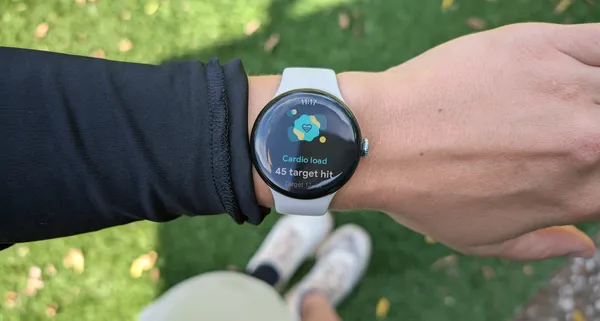
Photo showing a person's arm and wrist wearing a Pixel Watch 3. The display shows a heart icon and the words "Cardio Load. 45 target hit." In the background are slightly blurred tennis shoes and a green lawn.

1. Compare charts

After a training run, I head straight to my running performance stats and select “visualize your run performance.” Here I get a detailed breakdown of my run, and the option to “compare charts.” This allows me to choose different stats and see how they affect each other — for example, I can select just my pace, heart rate and stride length. This can help me get an idea of how hard I’m working when I take bigger or smaller strides. The idea is for my body to not work so hard, so I can preserve my energy (especially for long trail runs when I need it). If I’m noticing a trend where I’m taking longer strides and seeing my heart rate increase and pace decrease, that’s something I can try and pay more attention to in training.
A smartphone screen displays a "Choose charts to compare" menu within a "Run performance" app. Several metrics are listed with checkboxes, some selected (checked) and others not.

2. Form analysis

I also like to look at my form analysis, which takes data from my runs over the last six months and compares that recent run against them. Specifically, form analysis tracks my stride length, step cadence, ground contact time, vertical ratio and vertical oscillation. This is the perfect way to see if I’m staying consistent or even improving. I like to look at this especially when a run felt either really good or really off — did anything stick out in my form analysis that could have contributed to that? While something like pace feels a bit easier to notice, I can’t say I’m always aware of how much I’m bouncing or what my ground contact time is — and those things definitely matter.
A smartphone displays an elevation chart with a peak of 3,119 ft. Below, form analysis, stride length (0.86m), and step cadence (164 steps/min) are shown with corresponding personal ranges.

3. AI running recommendations

I’m also using Fitbit’s AI-powered running recommendations, which is a Fitbit Premium feature found under the Coach tab. These are personalized workout recommendations — like whether I run intervals or a consistent tempo run — based on my Target Load (which takes into account my recent workouts and how ready my body is for exertion) and Cardio Load (which assesses my cardio fitness). I want to make sure I’m strength training in addition to piling on the mileage, too, and I can easily find classes under the Coach tab to get stronger and work on my mobility.
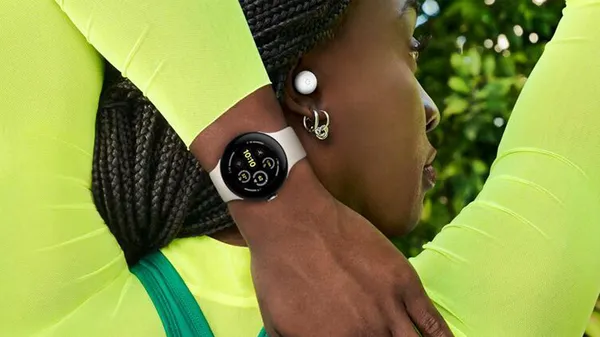
Google Pixel Watch 3

4. Share to Gemini

Charts, graphs and stats are great — but I often want to get a more conversational take on a run. When viewing my running performance metrics, sometimes I like to hit the share icon at the top of the page, share them to Gemini and then select the “talk Live about this” option. I’ll ask Gemini questions like “can you summarize this run for me?” or “what’s a good recovery plan I can follow?” or “I’m doing a similar run next weekend — how should I eat the day before to fuel up?” This is helpful to use when I’m actually on a run and want to think about how my last training session went — Gemini Live is right in my ear and can give me quick stats. And I always have a transcript to review after our chat, if something helpful comes up and I want to review it later.

A dark-themed chat interface on a smartphone shows a conversation titled "Impressive Run, Training?". The user describes a run with almost 20 miles and 3,000 feet of elevation gain. Gemini responds, acknowledging the impressive feat and inquiring about training goals and hill training. The user replies it was their first such run and the elevation was the hardest part.

Plus, it’s also nice to simply reflect on my run: Gemini Live asks me questions like which miles felt the best, and why, and what parts of the scenery were my favorite. These are the things that make me love running — it’s not all about the data.

Related stories