


The latest NotebookLM update introduces Deep Research, helping users add diverse, high-quality sources and broadens the types of content you can analyze, including sheets and Word docs.
Shan Wang
Senior UX Designer
General summary
NotebookLM now helps you find and use sources more effectively. Use Deep Research to automate complex online research and generate insightful reports. You can also upload more file types like Google Sheets images and Microsoft Word documents.
Summaries were generated by Google AI. Generative AI is experimental.
Bullet points
- NotebookLM's new features help you find and use research sources more effectively.
- Deep Research acts like a dedicated researcher, creating reports and recommending sources.
- You can add Deep Research reports and sources directly into your NotebookLM notebook.
- NotebookLM now supports Google Sheets, Drive URLs, images, PDFs from Drive, and .docx files.
- Uploading more file types to NotebookLM helps you analyze notes, drafts, and other documents.
Summaries were generated by Google AI. Generative AI is experimental.
Explore other styles:
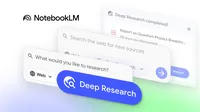
A strong set of trusted sources is the foundation of any research project, and the foundation of how you use NotebookLM. Today, NotebookLM is introducing new ways to help you find and use sources more effectively: using Deep Research agents and supporting more of the file types you use every day.
Expand your sources with Deep Research
We are now rolling out Deep Research to automate and simplify complex online research. It acts like your dedicated researcher, synthesising a detailed report or recommending relevant articles, papers or websites — and you can direct this "researcher" to search specific places, too.
With your guidance, Deep Research takes your question, creates a research plan and browses hundreds of websites on your behalf, refining its search as it learns. In a few minutes, it generates an organized, insightful, source-grounded report.
Here’s what makes NotebookLM's Deep Research different: the report is just the beginning. You can add the report and its sources directly into your notebook. You can continue to add other sources while Deep Research runs in the background, helping you assemble a rich knowledge base on any topic without leaving your workflow. And you can then use any of NotebookLM’s capabilities, such as Audio or Video overviews, to pull insights or transform content to understand the topic better.
Here’s how to try Deep Research in NotebookLM:
- Start your search: In the source panel, select Web as a source.
- Choose your research style:
- Fast Research: Best for a quick search. It rapidly scans for information, letting you immediately review and import sources.
- Deep Research: Best for a full briefing. It performs an in-depth analysis to find high-quality sources. This runs in the background so you can continue your work.
Upload information in more file types
Your work spans multiple file types, and your research tool should, too. Based on your feedback, we’re adding support for new file types:
- Google Sheets: Add structured data and ask information on key statistics or generate summaries from your spreadsheets.
- Drive files as URLs: Add drive files as URLs, with a simple copy-paste, just like any website or YouTube video. You can even add multiple links, separated with commas
- Images: Upload a photo of your hand-written notes or a brochure you got.
- PDFs from Google Drive: Add research papers, reports or ebooks directly from Drive, skipping downloading and re-uploading.
- Microsoft Word documents (.docx): Upload your .docx files to analyze notes, drafts and other documents.
All these features will be available to all users over the next week with images becoming available over the next few weeks. We’re looking forward to seeing how you’ll boost your research with all these new sources in NotebookLM.