





在信息爆炸的数字时代,用户对内容检索的效率和精准度要求日益提升。对于文档类网站(如技术手册、知识库、产品文档等)而言,一套高效的搜索系统不仅能显著提升用户体验,更能降低用户获取信息的成本,让知识传递更顺畅。
Algolia 正是为此而生的搜索即服务(Search-as-a-Service)平台。它以毫秒级响应速度、高度相关的搜索结果和灵活的定制能力著称,已成为全球众多知名企业和开发者在构建搜索功能时的首选方案。无论是小型文档站还是大型内容平台,Algolia 都能通过其强大的索引能力、智能排序算法和丰富的 API 生态,快速集成并提供接近 "所想即所得" 的搜索体验。
对于 VitePress 构建的文档网站而言,Algolia 的价值尤为突出:它能自动爬取并索引 Markdown 文档内容,支持关键词高亮、模糊匹配、结果过滤等高级功能,且无需开发者从零构建复杂的搜索引擎。只需简单配置,就能让用户在海量文档中迅速定位所需信息,大幅提升文档的实用性和用户留存率。
本文档将带你从零开始,完成 Algolia 与 VitePress 的集成配置,让你的文档网站拥有专业级的搜索体验。
访问 Algolia 官网 注册账号,可以直接使用 Github 或者其他邮箱注册登录。登录后进入控制台
提示
新注册账号会自动创建一个 Application ,也可以自己创建一个新的
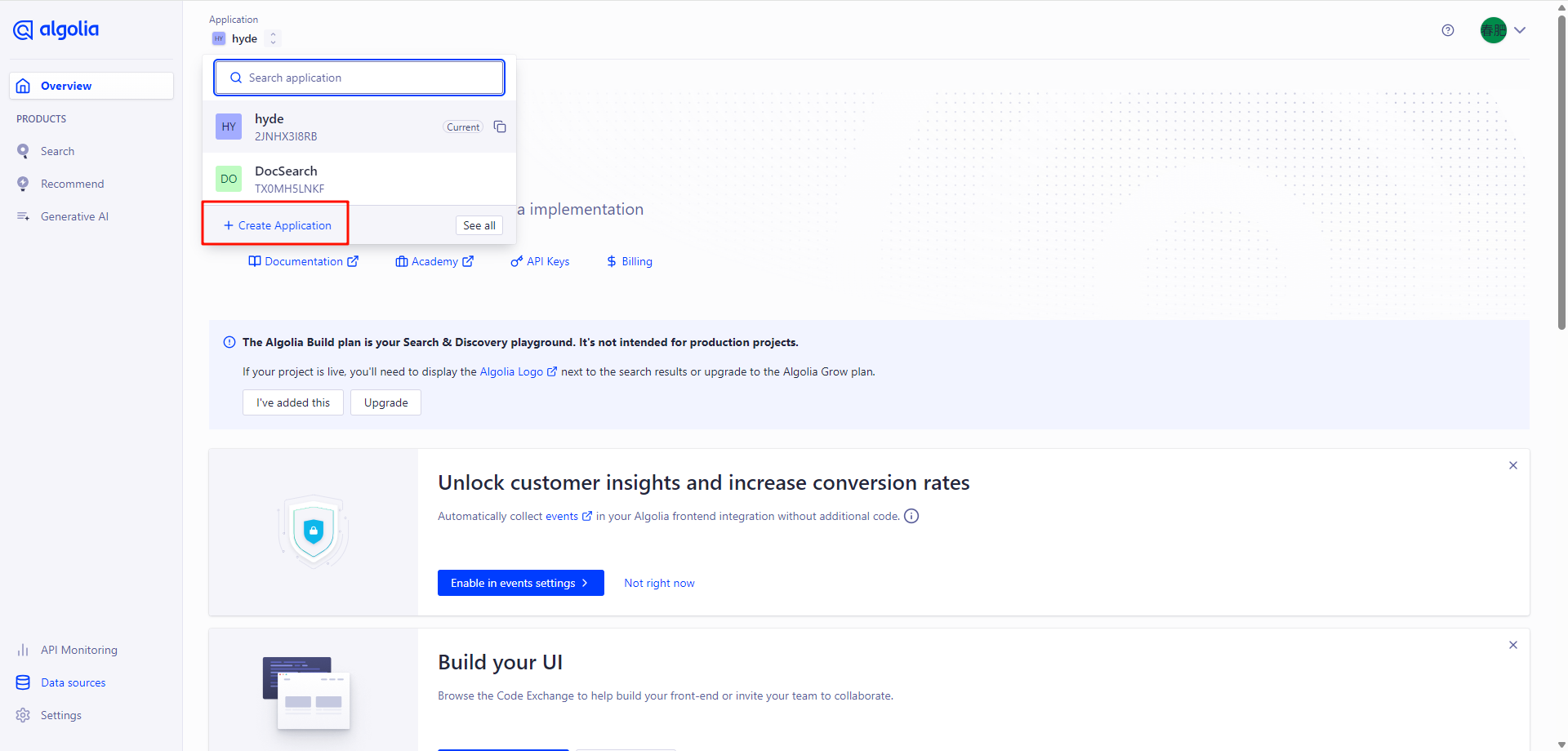
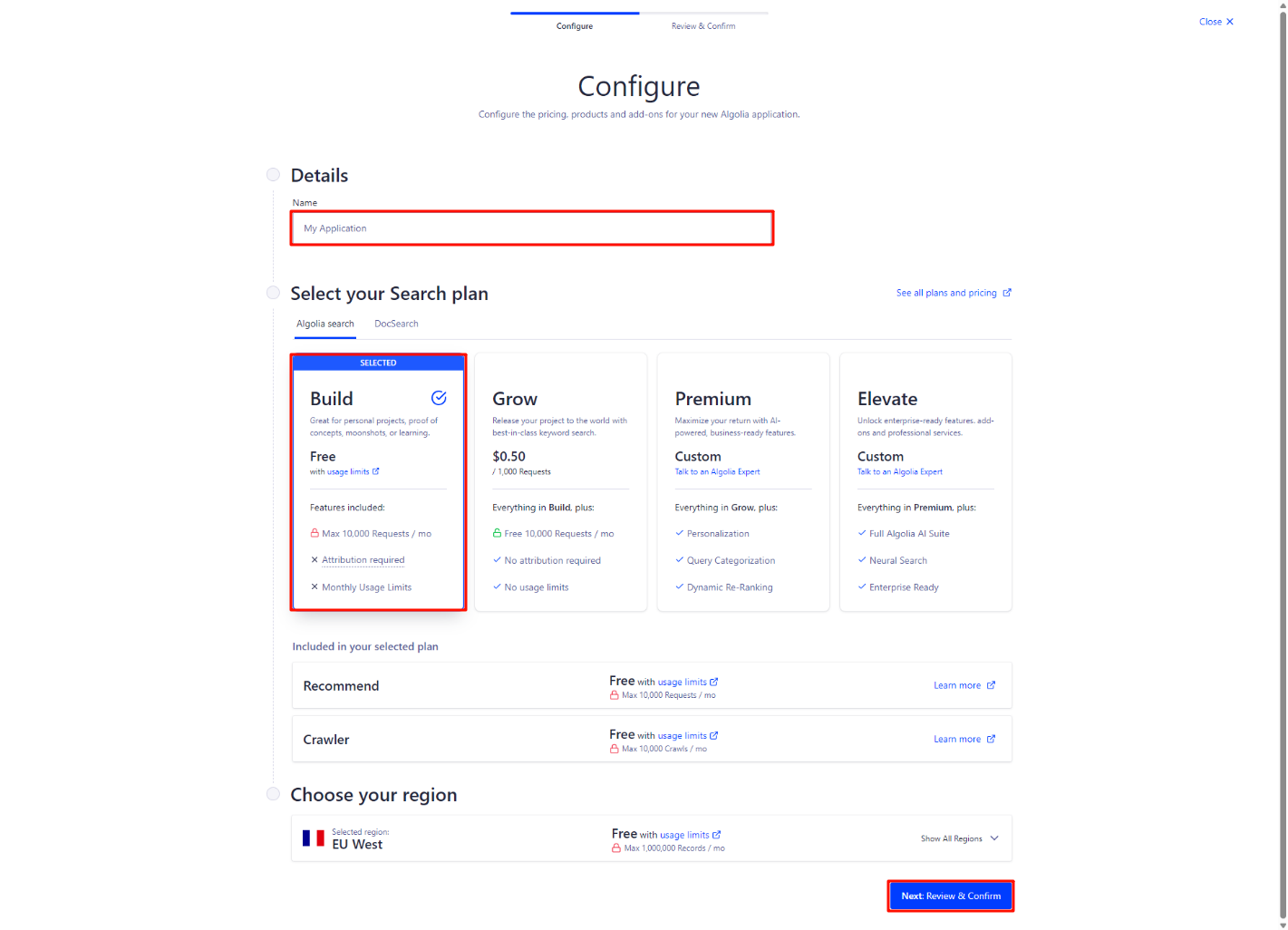
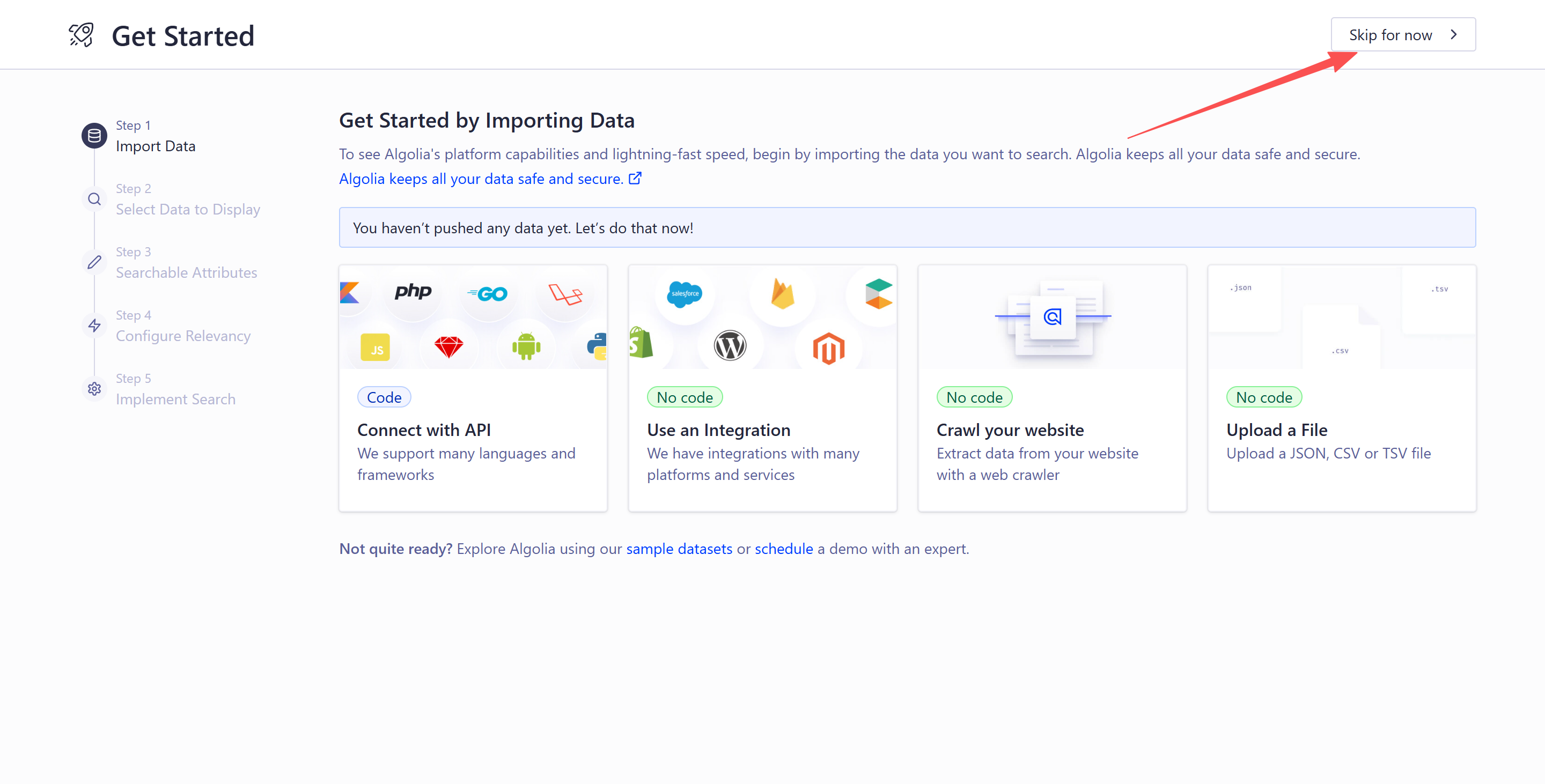
点击确定后接着下一个页面继续点击 create Application 按钮,然后点击 NEXT 就创建了一个新的 Application,创建完成后点击 Skip for now,不然会根据域名生成 index 名称,爬虫配置也不对
Data sources,进入 Indices 标签,点击 Create Index 按钮,输入索引名称(如 "docs",后续配置会用到),点击 "Create"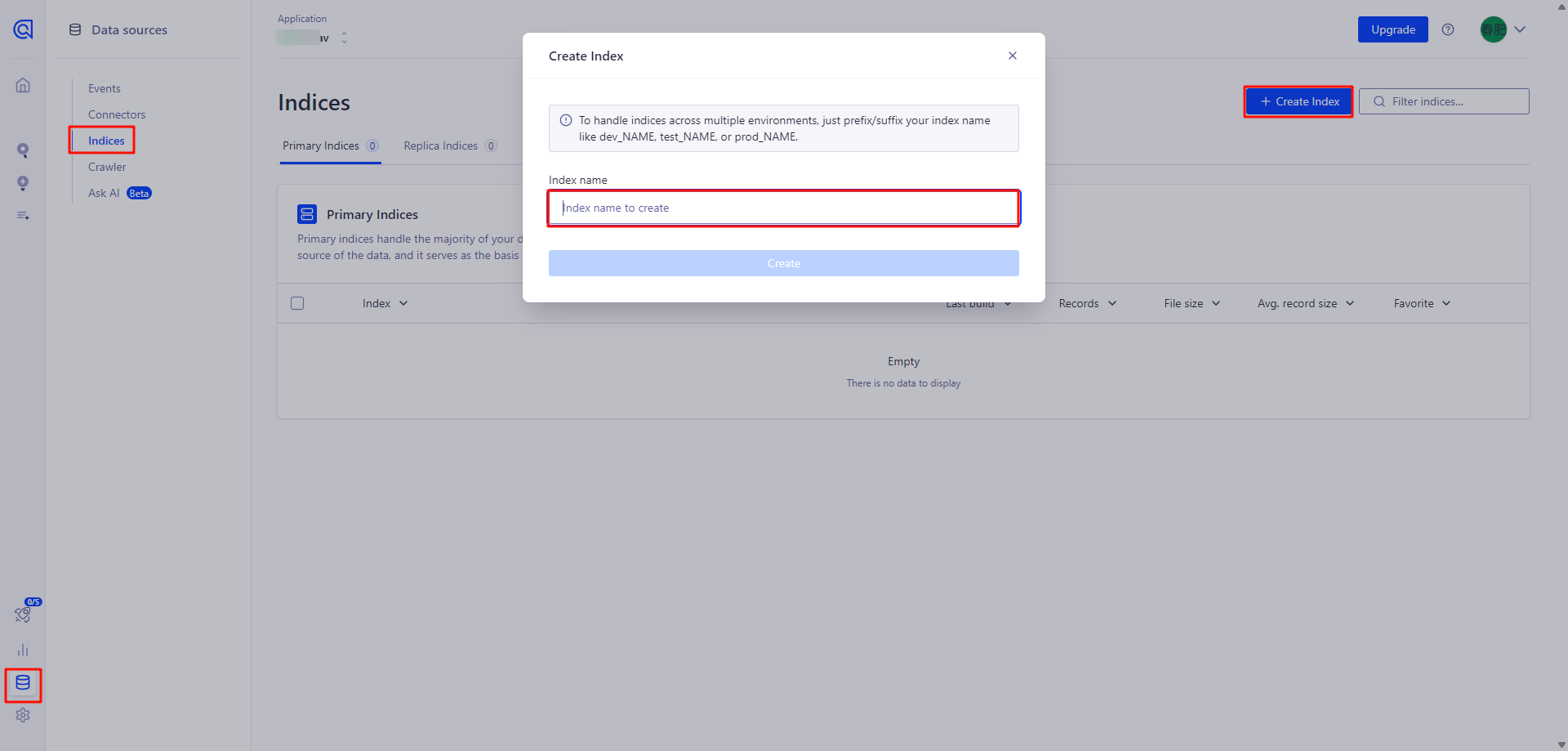
Data sources,进入 Crawler 标签,点击 Domains ,点击 Add your first domain 按钮,输入你的域名,点击 Add Domain 按钮;按要求完成域名验证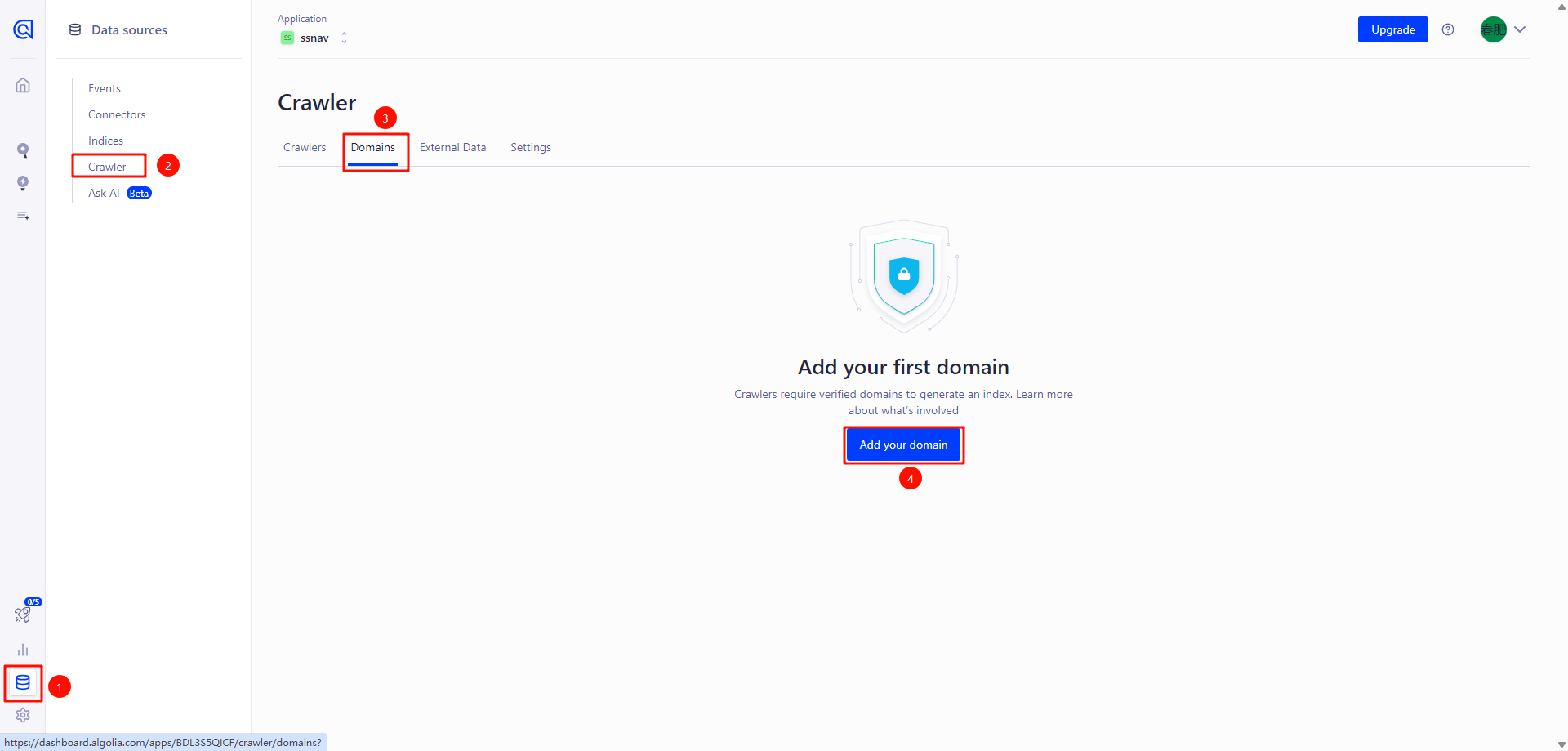
这边是在Head中的Meat元素标签进行验证,验证完成后点击 Try again 按钮
ts
["meta", { name: "algolia-site-verification", content: "6B185Dxxxxx3AC7E" }], // Algolia 站点验证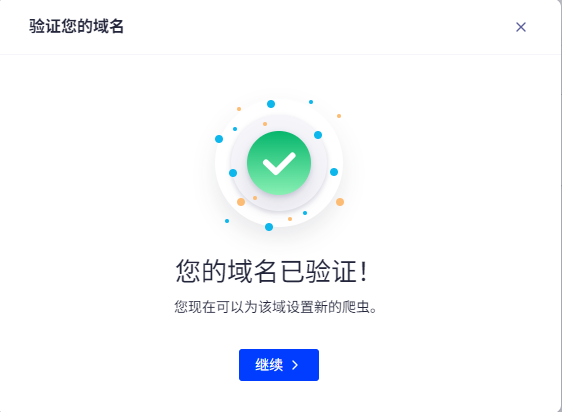
域名验证成功后,点击继续配置爬虫
或者在左侧导航栏选择 Data sources,进入 Crawler 标签,点击 Setup crawler 按钮,Crawler name*输入爬虫名称和Start URL爬虫 URL,点击 "Create"
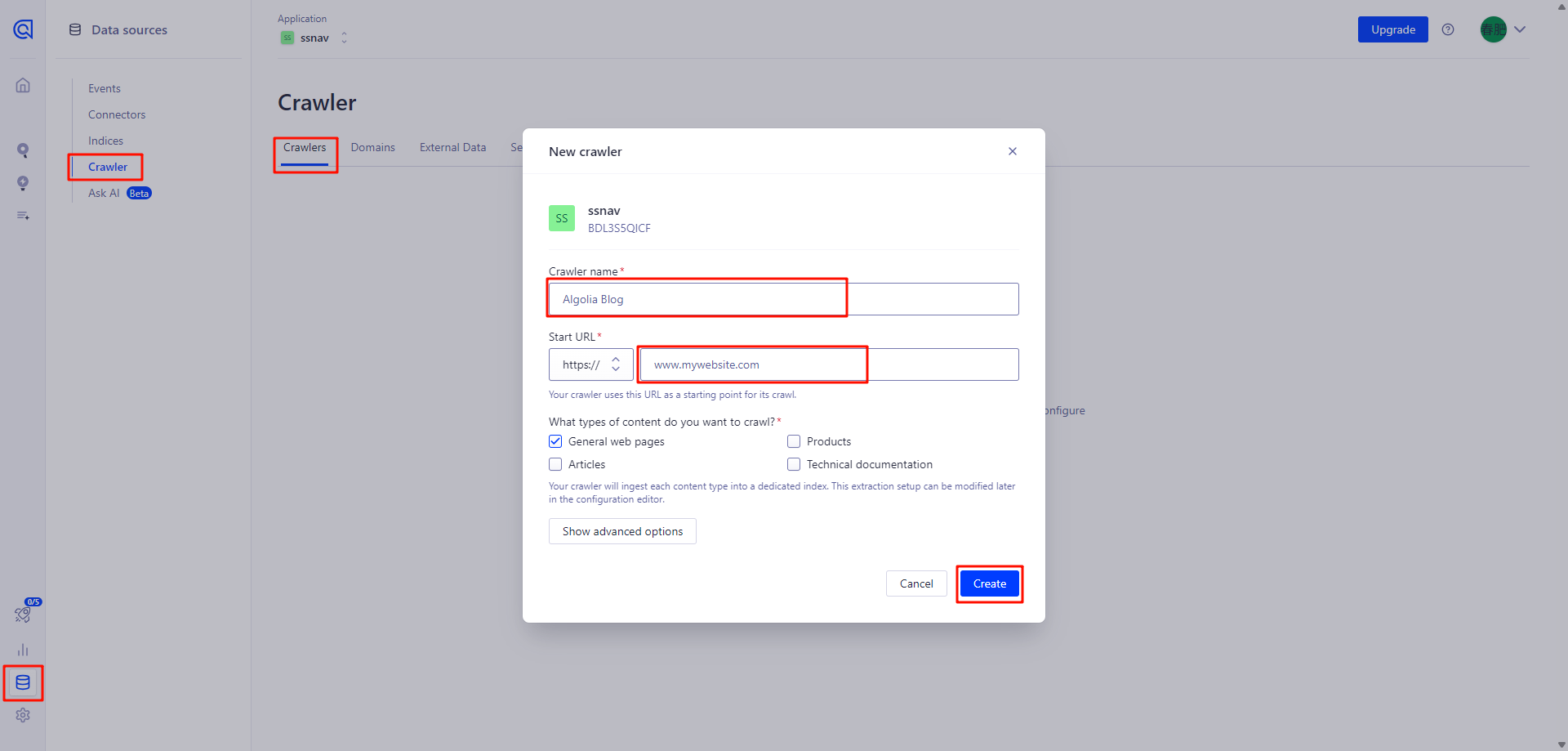
Data sources,进入 Crawler 标签,点击爬虫名称进入爬虫应用,接着点击Editor进入编辑模式ts
new Crawler({
  // 1. 基础身份认证配置(必须修改)
  appId: "YOUR_ALGOLIA_APP_ID", // 替换为你的Algolia应用ID(在【settings】-【API Keys】页面获取,其中Application ID就是)
  apiKey: "YOUR_ALGOLIA_ADMIN_API_KEY", // 替换为你的Admin API Key(建议使用首次生成的密钥)
  indexPrefix: "", // 索引前缀(多环境区分时使用,如"dev_",单环境留空)

  // 2. 爬取速率控制
  rateLimit: 8, // 每秒最大爬取页面数,服务器性能弱可设低(如5)

  // 3. 爬取范围配置(必须修改)
  startUrls: ["https://your-docs-site.com/"], // 替换为你的网站首页URL
  renderJavaScript: false, // 若网站是JS动态渲染(如SPA),设为true
  sitemaps: ["https://your-docs-site.com/sitemap.xml"], // 替换为你的网站首页URL(无则删除)
  exclusionPatterns: [], // 不需要爬取的路径(如["/**/private/**"])
  ignoreCanonicalTo: false, // 是否忽略页面的canonical链接(一般保持false)
  discoveryPatterns: ["https://your-docs-site.com/**"], // 限制爬虫只爬取该域名下的内容,替换为你的网站首页URL

  // 4. 索引更新调度
  schedule: "at 03:00 every 1 day", // 每日凌晨3点自动更新,可改为"weekly"等

  // 5. 索引规则配置(核心)
  actions: [
    {
      indexName: "hyde_blog", // 替换为你的索引名称(与VitePress配置一致)
      pathsToMatch: ["https://your-docs-site.com/**"], // 需索引的页面路径(与域名匹配)。替换为你的网站首页URL
      recordExtractor: ({ $, helpers }) => {
        // 提取页面内容并转换为Algolia可索引的格式
        return helpers.docsearch({
          recordProps: {
            lvl1: ".content h1", // h1标题选择器(需与你的页面HTML结构匹配)
            content: ".content p, .content li", // 正文内容选择器(p标签和列表项)
            lvl0: {
              selectors: "nav.active-category", // 顶级分类选择器(如激活的导航项)
              defaultValue: "Documentation", // 默认分类名称
            },
            lvl2: ".content h2", // h2标题选择器
            lvl3: ".content h3", // h3标题选择器
            lvl4: ".content h4", // h4标题选择器
            lvl5: ".content h5", // h5标题选择器
          },
          indexHeadings: true, // 是否索引标题内容
        });
      },
    },
  ],

  // 6. 索引高级设置(需与indexName一致)
  initialIndexSettings: {
    hyde_blog: {
      // 此处键名必须与上面的indexName完全一致
      attributesForFaceting: ["type", "lang"], // 可用于过滤的字段(如语言、类型)
      attributesToRetrieve: ["hierarchy", "content", "anchor", "url"], // 搜索时返回的字段
      attributesToHighlight: ["hierarchy", "hierarchy_camel", "content"], // 需要高亮的字段
      attributesToSnippet: ["content:10"], // 内容摘要长度(10个单词)
      camelCaseAttributes: ["hierarchy", "hierarchy_radio", "content"], // 支持驼峰式搜索

      // 搜索权重配置(决定结果排序优先级)
      searchableAttributes: [
        "unordered(hierarchy_radio_camel.lvl0)",
        "unordered(hierarchy_radio.lvl0)",
        "unordered(hierarchy_radio_camel.lvl1)",
        "unordered(hierarchy_radio.lvl1)",
        "unordered(hierarchy_radio_camel.lvl2)",
        "unordered(hierarchy_radio.lvl2)",
        "unordered(hierarchy_radio_camel.lvl3)",
        "unordered(hierarchy_radio.lvl3)",
        "unordered(hierarchy_radio_camel.lvl4)",
        "unordered(hierarchy_radio.lvl4)",
        "unordered(hierarchy_radio_camel.lvl5)",
        "unordered(hierarchy_radio.lvl5)",
        "content", // 正文内容权重最低
      ],

      distinct: true, // 启用去重(避免同一页面多条结果)
      attributeForDistinct: "url", // 基于URL去重

      // 自定义排序规则
      customRanking: [
        "desc(weight.pageRank)", // 页面权重(越高越靠前)
        "desc(weight.level)", // 标题级别(h1 > h2 > ...)
        "asc(weight.position)", // 在页面中的位置(越前越靠前)
      ],

      // 搜索算法配置
      ranking: [
        "words", // 关键词匹配度
        "filters", // 过滤条件
        "typo", // 容错能力(错别字)
        "attribute", // 属性权重
        "proximity", // 关键词距离
        "exact", // 精确匹配
        "custom", // 自定义排序
      ],

      // 高亮样式(需与前端CSS配合)
      highlightPreTag: '<span class="algolia-highlight">',
      highlightPostTag: "</span>",

      // 容错配置
      minWordSizefor1Typo: 3, // 最少3个字符允许1个错别字
      minWordSizefor2Typos: 7, // 最少7个字符允许2个错别字
      allowTyposOnNumericTokens: false, // 数字不允许错别字

      // 其他优化配置
      minProximity: 1, // 关键词最小距离
      ignorePlurals: true, // 忽略复数形式(如"cat"匹配"cats")
      advancedSyntax: true, // 启用高级搜索语法(如AND/OR)
      removeWordsIfNoResults: "allOptional", // 无结果时移除可选关键词
    },
  },
});编辑好后,点击右下角的Review and Publish(审核并发布),然后点击右上角start Crawling开始爬取网站内容
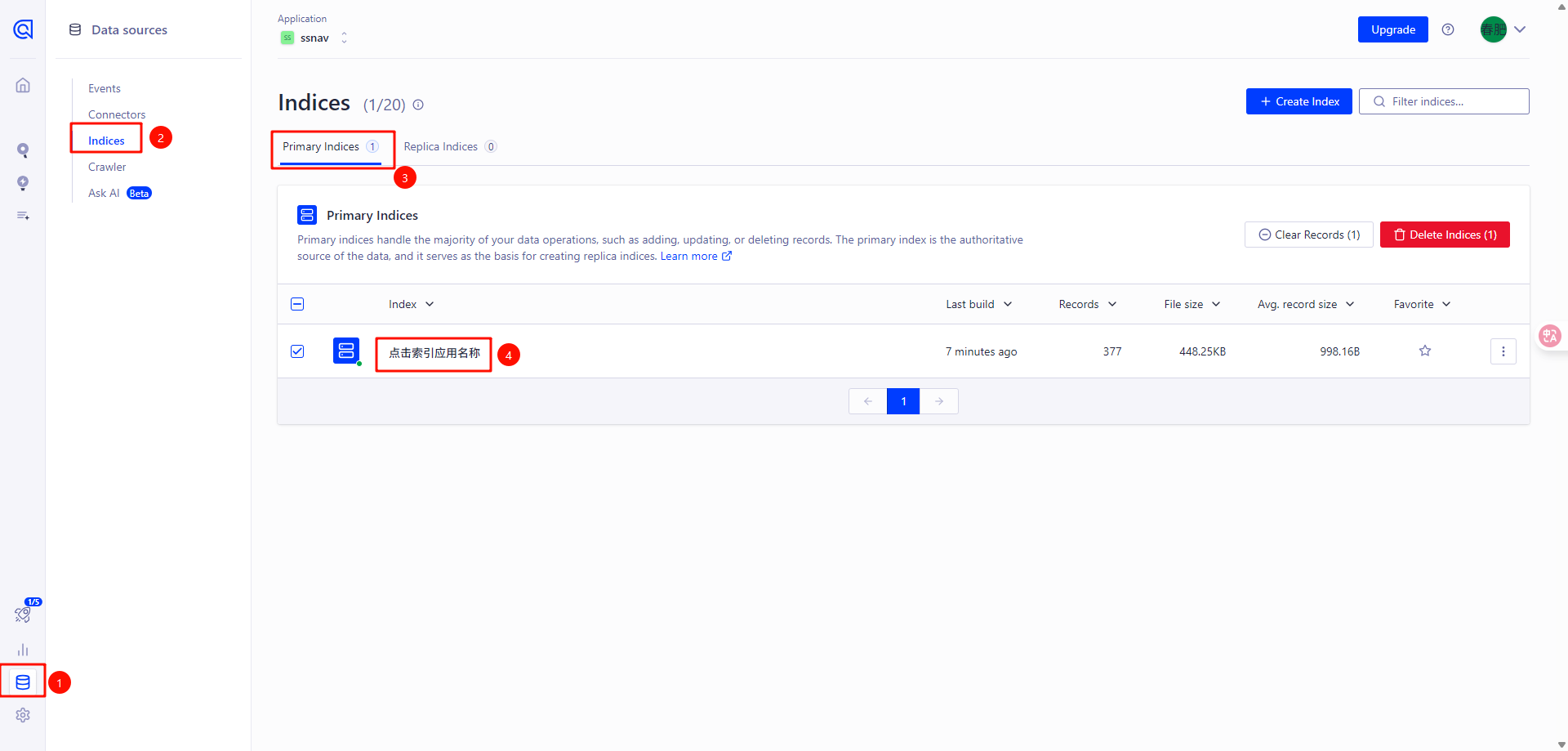
爬取完成后,点击左侧导航栏选择 Data sources,进入 Indices 标签,点击 您的索引名称,进入索引详情,可以看到已经爬取了所有内容
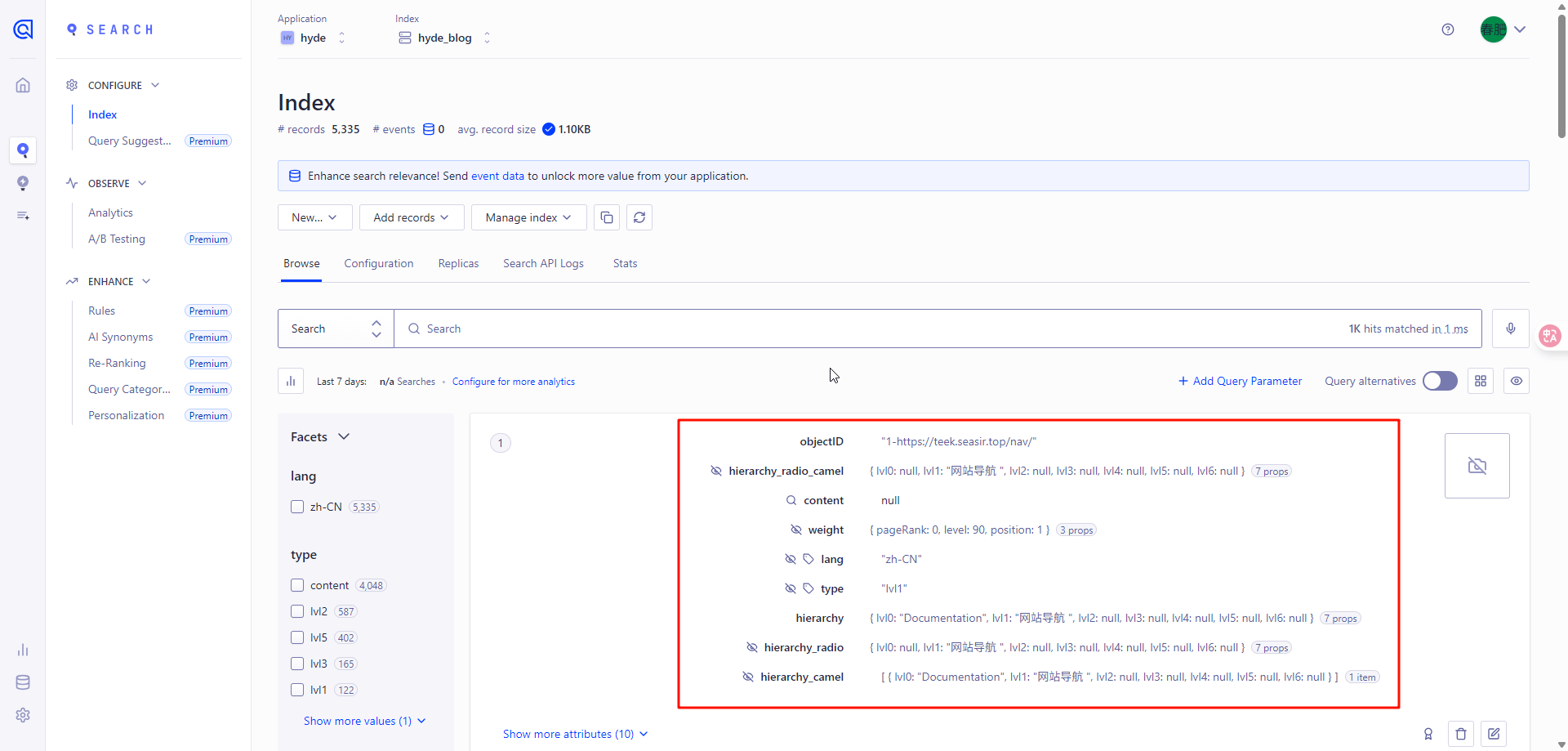
接着配置索引,点击Configuration,点击Searchable attributes,滑动到最下面点击Add a Searchable Attribute,比如想搜索content_camel的内容,就添加content_camel,否则搜索不到
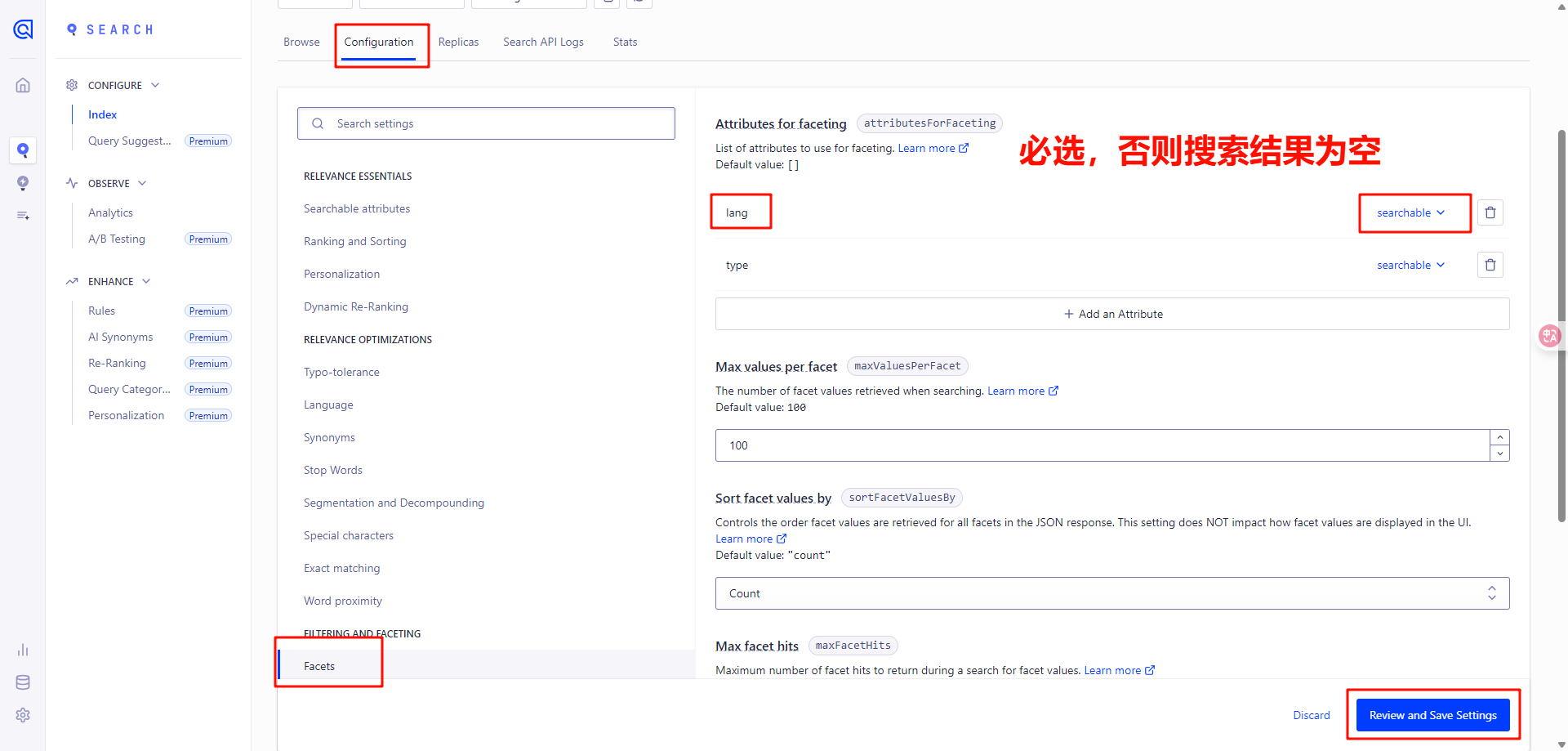
接着配置 facets,这是实现高级搜索和筛选功能的核心特性之一,主要作用是帮助用户快速缩小搜索范围,提升搜索体验,这里要重点注意 lang 必须被选择,否则网页搜索为空
docs\.vitepress\config.ts 中添加搜索代码ts
export default defineConfig({
  themeConfig: {
    search: {
      provider: "algolia",
      options: {
        appId: "2JNHX3I8RB", // 替换为你的Algolia应用ID(在【settings】-【API Keys】页面获取,其中Application ID就是)
        apiKey: "84a579c812901faa463103fb5ab52c4c", // 替换为你的Search API Key(在【settings】-【API Keys】页面获取,其中Search API Key就是)
        indexName: "hyde_blog", // 替换为你的索引名称(与爬虫配置一致)
        locales: {
          root: {
            placeholder: "搜索文档",
            translations: {
              button: {
                buttonText: "搜索文档",
                buttonAriaLabel: "搜索文档",
              },
              modal: {
                searchBox: {
                  resetButtonTitle: "清除查询条件",
                  resetButtonAriaLabel: "清除查询条件",
                  cancelButtonText: "取消",
                  cancelButtonAriaLabel: "取消",
                },
                startScreen: {
                  recentSearchesTitle: "搜索历史",
                  noRecentSearchesText: "没有搜索历史",
                  saveRecentSearchButtonTitle: "保存至搜索历史",
                  removeRecentSearchButtonTitle: "从搜索历史中移除",
                  favoriteSearchesTitle: "收藏",
                  removeFavoriteSearchButtonTitle: "从收藏中移除",
                },
                errorScreen: {
                  titleText: "无法获取结果",
                  helpText: "你可能需要检查你的网络连接",
                },
                footer: {
                  selectText: "选择",
                  navigateText: "切换",
                  closeText: "关闭",
                  searchByText: "搜索提供者",
                },
                noResultsScreen: {
                  noResultsText: "无法找到相关结果",
                  suggestedQueryText: "你可以尝试查询",
                  reportMissingResultsText: "你认为该查询应该有结果?",
                  reportMissingResultsLinkText: "点击反馈",
                },
              },
            },
          },
        },
      },
    },
  },
});
此内容由惯性聚合(RSS阅读器)自动聚合整理,仅供阅读参考。 原文来自 — 版权归原作者所有。