bash
pnpm add vitepress-plugin-rssdocs\.vitepress\config.ts 配置文件中添加配置使用,下面是最基础的使用配置ts
import { RSSOptions, RssPlugin } from "vitepress-plugin-rss";

const baseUrl = "https://teek.seasir.top";
const RSS: RSSOptions = {
  title: "Hyde Blog",
  baseUrl,
  copyright: "Copyright 2021-2025 Hyde Blog",
};

export default defineConfig({
  vite: {
    // ↓↓↓↓↓
    plugins: [RssPlugin(RSS)], //开启RSS功能
    // ↑↑↑↑↑
  },
});然后运行 build 命令,你可以看到在 rendering pages...后打印了生成 feed.rss 日志...
bash
🎉 RSS generated feed.rss
rss filepath: D:\code\teek-hyde\docs\.vitepress\dist\feed.rss
rss url: https://teek.seasir.top/feed.rss
include 77 posts
✓ generating RSS: 7.924s

build complete in 131.45s.
同时会在导航栏的 socialLinks 中添加 rss 图标链接,点击即可跳转到 rss 链接
包含 publish: false 的文章将不会出现在最终的 rss 文件中,可以用来忽略目标文章
ts
const RSS: RSSOptions = {
  // necessary(必选参数)
  title: "粥里有勺糖",
  baseUrl,
  copyright: "Copyright (c) 2018-present, 粥里有勺糖",

  // optional(可选参数)
  description: "大前端相关技术分享",
  language: "zh-cn",
  author: {
    name: "粥里有勺糖",
    email: "engineerzjl@foxmail.com",
    link: "https://sugarat.top",
  },
  icon: true,
  authors: [
    {
      name: "粥里有勺糖",
      email: "engineerzjl@foxmail.com",
      link: "https://sugarat.top",
    },
    {
      name: "sugar",
      email: "",
      link: "https://github.com/atqq",
    },
  ],
  filename: "feed.rss",
  log: true,
  ignoreHome: true,
  ignorePublish: false,
  filter: (post, idx) => {
    return true;
  },
};支持所有 feed Options
同时插件还额外定义了一些配置项
下面是类型的定义
ts
import type { Author, FeedOptions } from "feed";

export type RSSOptions = Omit<FeedOptions, "id"> & {
  id?: string;
  /**
   * 过滤目标文章
   * @param post 文章相关信息
   */
  filter?: (value: PostInfo, index: number, array: PostInfo[]) => boolean;
  /**
   * 你的站点地址
   * @example 'https://sugarat.top'
   */
  baseUrl: string;
  /**
   * 线上访问的RSS地址
   * @default
   * ```ts
   * `${baseUrl + VPConfig.site.base + (filename || 'feed.rss'}`
   * ```
   */
  url?: string;
  /**
   * 输出的RSS文件名
   * @default 'feed.rss'
   */
  filename?: string;
  /**
   * RSS的图标展示(你也可以传入一个svg字符串进行自定义,SVG 图标可访问 https://www.xicons.org/# 获取)
   * @default true
   */
  icon?: boolean | string;
  /**
   * 是否打印过程提示
   * @default true
   */
  log?: boolean;
  /**
   * 是否过滤 layout:home
   * @default true
   */
  ignoreHome?: boolean;
  /**
   * 是否忽略 frontmatter publish 控制
   * @default false
   */
  ignorePublish?: boolean;
  /**
   * 博客站点内容涉及的作者列表
   */
  authors?: Author[];
  /**
   * 自定义文章摘要生成逻辑
   */
  renderExpect?: (
    fileContent: string,
    frontmatter: Record<string, any>
  ) => string | Promise<string>;
  /**
   * 限制输出文件包含的文章数量
   * @default 0
   * @description (0 不限制;> 1 会按照日期排序对输出内容进行调整)
   */
  limit?: number;
  /**
   * 手动控制生成 HTML的逻辑,或不是用 vitepress 内置的 HTML 渲染逻辑
   * @default true
   */
  renderHTML?: ((filecontent: string) => string | Promise<string>) | boolean;
  /**
   * 国际化支持
   */
  locales?: Record<string, Omit<RSSOptions, "locales">>;
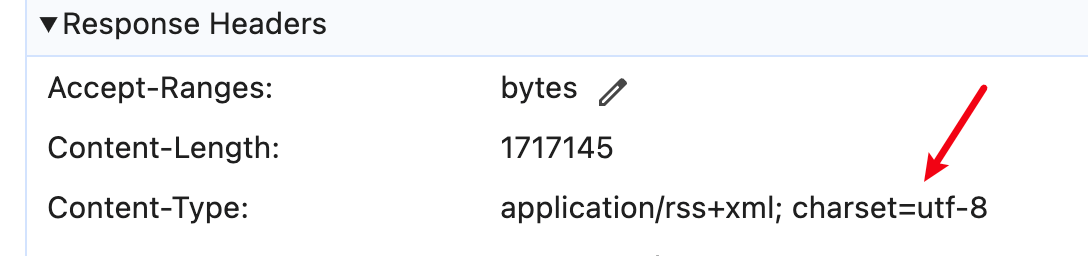
};以 Nginx 为例,可以添加如下配置
location ~ \.rss$ {
  charset utf-8;
}此内容由惯性聚合(RSS阅读器)自动聚合整理,仅供阅读参考。 原文来自 — 版权归原作者所有。