
惯性聚合 高效追踪和阅读你感兴趣的博客、新闻、科技资讯
阅读原文 在惯性聚合中打开

推荐订阅源

V
Visual Studio Blog
OSCHINA 社区最新新闻
OSCHINA 社区最新新闻
N
Netflix TechBlog - Medium
博客园 - 叶小钗
大猫的无限游戏
大猫的无限游戏
S
SegmentFault 最新的问题
V
V2EX
IT之家
IT之家
J
Java Code Geeks
Hacker News - Newest:
Hacker News - Newest: "LLM"
cs.AI updates on arXiv.org
GbyAI
GbyAI
D
Docker
S
Secure Thoughts
Recent Announcements
Webroot Blog
Webroot Blog
Application and Cybersecurity Blog
云风的 BLOG
云风的 BLOG
博客园_首页
cs.CV updates on arXiv.org
Cyber Security Advisories - MS-ISAC
Security Archives - TechRepublic
酷 壳 – CoolShell
酷 壳 – CoolShell
让小产品的独立变现更简单 - ezindie.com
N
News | PayPal Newsroom
S
Security @ Cisco Blogs
I
InfoQ
Last Week in AI
Last Week in AI
SecWiki News
SecWiki News
钛媒体:引领未来商业与生活新知
钛媒体:引领未来商业与生活新知
W
WeLiveSecurity
T
Troy Hunt's Blog
Recent Commits to openclaw:main
H
Hackread – Cybersecurity News, Data Breaches, AI and More
Attack and Defense Labs
美团技术团队
T
The Blog of Author Tim Ferriss
Google DeepMind News
Martin Fowler
Martin Fowler
B
Blog
CTFtime.org: upcoming CTF events
Scott Helme
Scott Helme
T
Tor Project blog
Know Your Adversary
Know Your Adversary
有赞技术团队
有赞技术团队
Hugging Face - Blog
Hugging Face - Blog
Recorded Future
Recorded Future
C
Cyber Attacks, Cyber Crime and Cyber Security
AI
AI
G
Google Developers Blog

Obsidian Blog

Obsidian Sync audits by Cure53 and Trail of Bits The future of Obsidian plugins Obsidian October 2025 Less is safer: how Obsidian reduces the risk of supply chain attacks Obsidian is now free for work 2024 Gems of the year winners 2024 Gems of the year nominations Second audit of Obsidian apps completed by Cure53 Obsidian Softwear: new Fractal t-shirts and hoodies Save the web Obsidian October 2024 Obsidian Sync now starts at $4 per month with the new Standard plan Announcing JSON Canvas: an open file format for infinite canvas data 2023 Gems of the year winners New security page and independent audit completed by Cure53 2023 Gems of the year nominations New Obsidian Sync plans: bigger, better, faster, smoother Goodbye legacy editor Obsidian Importer now converts Apple Notes to portable, durable files Obsidian October 2023 Free your notes How to verify Obsidian Sync's end-to-end encryption The new Obsidian icon New developer documentation site Obsidian Publish now offers more for less: a lower price, with new features, improved SEO and accessibility 2022 Gems of the year winners I’m joining Obsidian full-time as CEO New Code of Conduct for our community 2022 Gems of the year nominations Obsidian October 2022 winners Obsidian October 2022 1.0 Theme migration guide How to update your plugin to support pop-out windows Plugin developers: CodeMirror 6 migration guide for v6.0 2021 Gems of the year winners 2021 Gems of the year nominations Obsidian October 2021 winners Obsidian October 2021: make plugins and themes together and win awards! Last chance to get early bird discount for Sync and Publish 2020 Gems of the year winners 2020 Gems of the year nominations
Live Preview update
silver · 2021-12-15 · via Obsidian Blog

Obsidian 0.13 introduces a brand new editor engine that comes with several enhancements to your editing experience. In this post, we’ll take a closer look at one of the biggest improvements in the latest release: Live Preview.

Live Preview is a new editor mode that lets you preview your notes in the same view that you’re writing them in. Live Preview delivers a cleaner writing experience by only displaying Markdown syntax around the cursor. Let’s see an example!

This is what your editing experience used to look like:
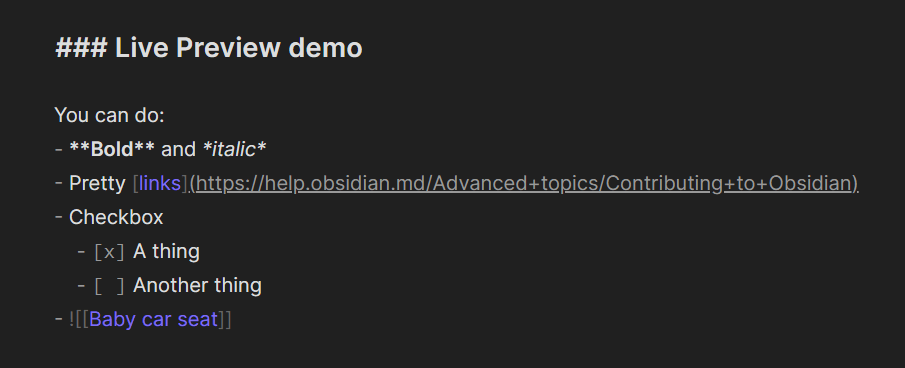
Source view

And here’s the same note using Live Preview:
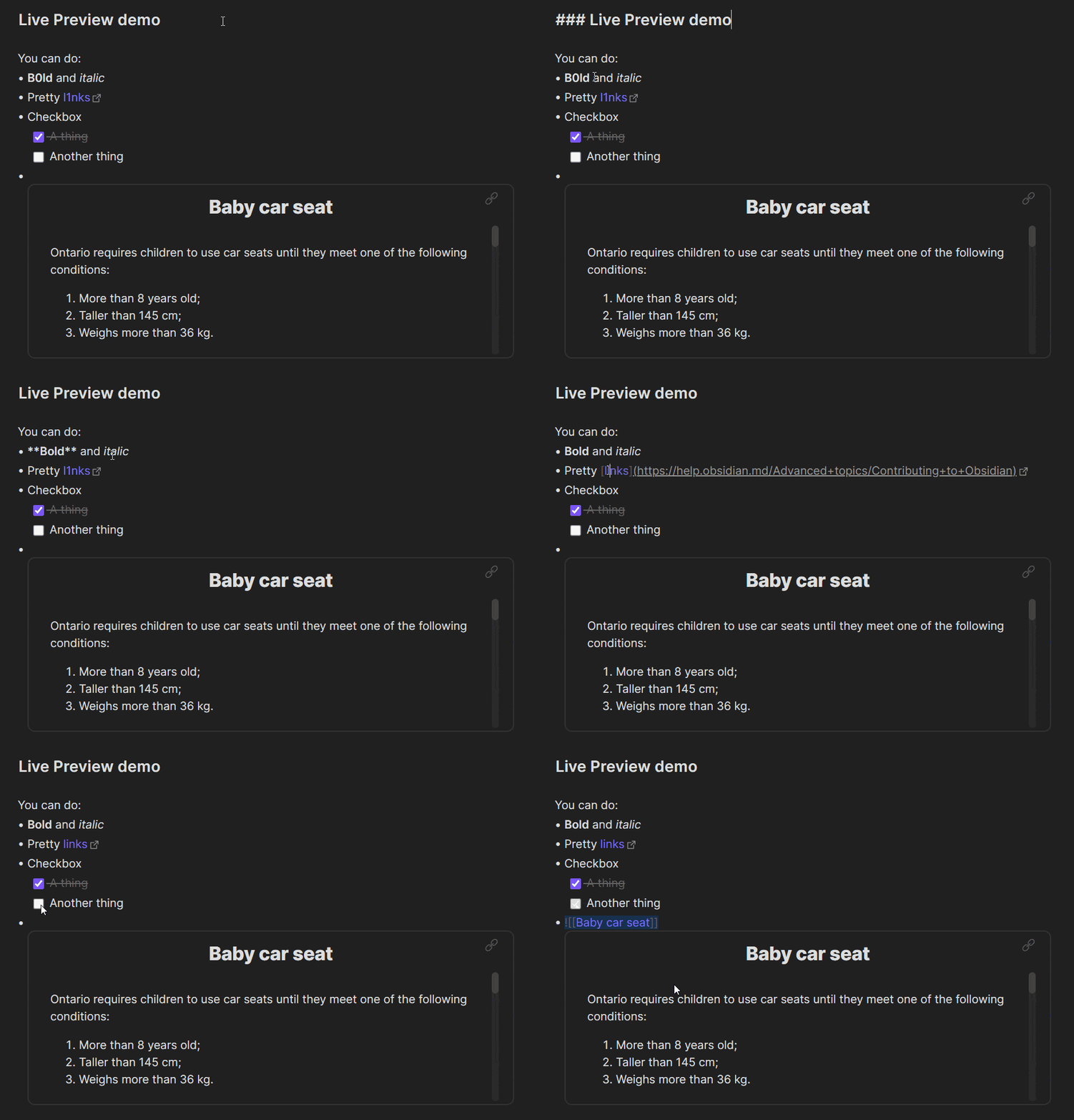
Livew Preview

Live Preview gives you an improved editing experience that lets you see how your Markdown note will look like, without having to switch between Edit and Preview.

To enable Live Preview for an existing vault:

  1. Open Settings.
  2. In the sidebar, click Editor.
  3. Under General, disable Legacy Editor.
  4. Click on the Relaunch button for the change to take effect.
  5. After Obsidian restarts, open Settings.
  6. In the sidebar, click Editor.
  7. Under General, set Default editing mode to Live Preview.

When you open a new pane, it’ll use Live Preview by default. If you already have some panes open, they’ll be in Source mode.

Edit notes using Live Preview or Source mode

We think you’re going to love Live Preview. But if you want to keep your current editing experience, we’ve got you covered. You can keep editing your notes the same way as before by switching to the new Source mode.

To toggle between Live Preview and Source mode:

  1. In the upper right corner of the pane, click More options (the three dots).
  2. Select Toggle source/live preview mode.

You can also toggle the editing view by opening the Command palette and searching for the Toggle source/live preview mode command, or change it permanently by setting Default editing mode to Source mode.

Live Preview and Source mode are two ways to edit your Markdown notes in Obsidian. Try them out to see which one you prefer!

If you want to know how the terminology changes with the new features, here’s a handy chart by Argentum:
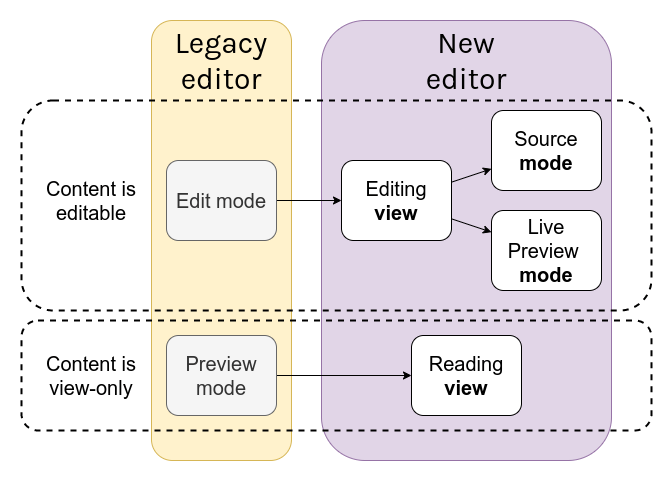
Editor update chart

Wait, I’m not ready to switch!

Some plugins and themes may not be fully compatible with the new editor. If your favorite plugin doesn’t yet support the new editor, you can switch back to the old one by enabling the Legacy editor.

  1. Open Settings.
  2. In the sidebar, click Editor.
  3. Under General, enable Legacy Editor.
  4. Click on the Relaunch button for the change to take effect.

Use the legacy editor if you’re not ready to upgrade to the new editor. You’ll miss out some sweet features, but know that you can switch to the new editor at any time.