



惯性聚合 高效追踪和阅读你感兴趣的博客、新闻、科技资讯
阅读原文 在惯性聚合中打开

推荐订阅源

T
Tailwind CSS Blog
P
Proofpoint News Feed
V
Visual Studio Blog
H
Hackread – Cybersecurity News, Data Breaches, AI and More
爱范儿
爱范儿
Microsoft Azure Blog
Recent Announcements
Vercel News
Vercel News
Hugging Face - Blog
Hugging Face - Blog
GbyAI
GbyAI
博客园 - 聂微东
D
DataBreaches.Net
酷 壳 – CoolShell
酷 壳 – CoolShell
Microsoft Security Blog
L
LangChain Blog
美团技术团队
H
Help Net Security
aimingoo的专栏
aimingoo的专栏
C
Check Point Blog
U
Unit 42
博客园 - 叶小钗
有赞技术团队
有赞技术团队
M
MIT News - Artificial intelligence
MongoDB | Blog
MongoDB | Blog

Release notes from textgen

Release v4.9 · oobabooga/textgen Release v4.7.3 · oobabooga/textgen Release v4.7.2 · oobabooga/textgen Release v4.7.1 · oobabooga/textgen Release v4.7 · oobabooga/textgen Release v4.6.2 · oobabooga/textgen Release v4.6.1 · oobabooga/textgen Release v4.6 · oobabooga/textgen Release v4.5.2 · oobabooga/textgen
Release v4.8 · oobabooga/textgen
oobabooga · 2026-05-19 · via Release notes from textgen

Changes

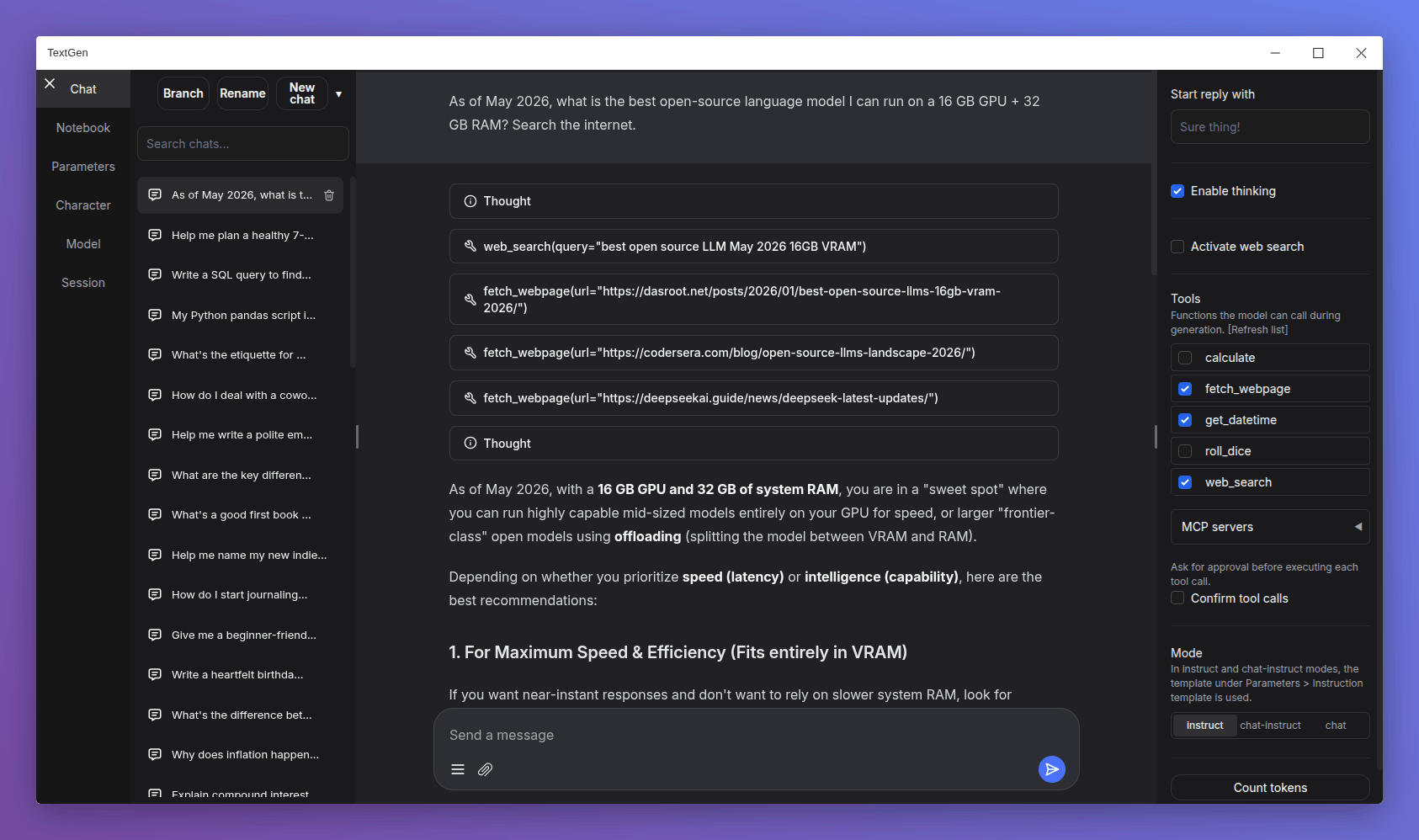
  • Redesigned chat composer: Taller input area with the paperclip and message-action buttons pinned to the bottom, similar to Gemini and DeepSeek.
  • Smooth scroll animation when sending a new message: Inspired by Gemini's chat UI.
  • Electron improvements:
    • Persist window bounds and maximize state across launches.
    • Add a --no-electron flag to skip the desktop window and use the web UI in the browser instead.
    • Disable spellcheck in the chat input.
  • API: Add support for list-format content in tool and assistant messages.
  • Add more space below the last chat/chat-instruct message so its action buttons have breathing room.

Bug fixes

  • Electron:
    • Fix --listen mode in the launcher.
    • Fix missing log colors on Windows.
    • Fix big character picture failing to load (#7540).
  • Fix speculative decoding broken by upstream llama.cpp arg renames (#7541).
  • Fix truncation length reverting after model load on UI reload (#7540).
  • Don't clear the chat input when sending a message with no model loaded (#7542).

Dependency updates

Portable builds

TextGen is now a desktop app for local LLMs. Download, unzip, double-click.

Note

NVIDIA GPU: If nvidia-smi reports CUDA Version >= 13.1, use the cuda13.1 build. Otherwise, use cuda12.4.

ik_llama.cpp is a llama.cpp fork with new quant types. If unsure, use the llama.cpp column.

Windows

GPU/Platform llama.cpp ik_llama.cpp
NVIDIA (CUDA 12.4) Download (891 MB) Download (1.23 GB)
NVIDIA (CUDA 13.1) Download (817 MB) Download (1.33 GB)
AMD/Intel (Vulkan) Download (336 MB)
AMD (ROCm 7.2) Download (604 MB)
CPU only Download (319 MB) Download (334 MB)

Linux

GPU/Platform llama.cpp ik_llama.cpp
NVIDIA (CUDA 12.4) Download (848 MB) Download (1.20 GB)
NVIDIA (CUDA 13.1) Download (803 MB) Download (1.33 GB)
AMD/Intel (Vulkan) Download (324 MB)
AMD (ROCm 7.2) Download (396 MB)
CPU only Download (307 MB) Download (334 MB)

macOS

macOS note: You need to run xattr -cr /path/to/your/textgen-folder on the extracted folder before launching. See #7558.

Architecture llama.cpp
Apple Silicon (arm64) Download (271 MB)
Intel (x86_64) Download (283 MB)

Updating a portable install:

  1. Download and extract the latest version.
  2. Replace the user_data folder with the one in your existing install. All your settings and models will be moved.

Starting with 4.0, you can also move user_data one folder up, next to the install folder. It will be detected automatically, making updates easier:

textgen-4.6/
textgen-4.7/
user_data/    <-- shared by both installs