

惯性聚合 高效追踪和阅读你感兴趣的博客、新闻、科技资讯
阅读原文 在惯性聚合中打开

推荐订阅源

罗磊的独立博客
Apple Machine Learning Research
The Cloudflare Blog
WordPress大学
WordPress大学
钛媒体:引领未来商业与生活新知
钛媒体:引领未来商业与生活新知
奇客Solidot–传递最新科技情报
奇客Solidot–传递最新科技情报
博客园 - 叶小钗
博客园 - 聂微东
阮一峰的网络日志
阮一峰的网络日志
腾讯CDC
博客园 - 三生石上(FineUI控件)
V
V2EX
有赞技术团队
有赞技术团队
V
Visual Studio Blog
小众软件
小众软件
Jina AI
Jina AI
酷 壳 – CoolShell
酷 壳 – CoolShell
博客园 - Franky
量子位
T
Tailwind CSS Blog
cs.CV updates on arXiv.org
P
Palo Alto Networks Blog
Cisco Talos Blog
Cisco Talos Blog
I
Intezer
Project Zero
Project Zero
A
Arctic Wolf
P
Privacy International News Feed
V
Vulnerabilities – Threatpost
L
Lohrmann on Cybersecurity
S
Securelist
C
Cybersecurity and Infrastructure Security Agency CISA
C
CXSECURITY Database RSS Feed - CXSecurity.com
T
Tor Project blog
Hacker News - Newest:
Hacker News - Newest: "LLM"
S
Security @ Cisco Blogs
cs.AI updates on arXiv.org
Threat Intelligence Blog | Flashpoint
Google DeepMind News
N
News and Events Feed by Topic
TaoSecurity Blog
TaoSecurity Blog
L
LINUX DO - 热门话题
G
GRAHAM CLULEY
Help Net Security
Help Net Security
N
News | PayPal Newsroom
W
WeLiveSecurity
G
Google Developers Blog
Microsoft Security Blog
Engineering at Meta
Engineering at Meta
MongoDB | Blog
MongoDB | Blog
C
Check Point Blog

Rc-2020 on Julia Evans

Day 57: Trying to set up GitHub Actions Day 56: A little WebAssembly Day 53: a little nginx, IPv6, and wireguard Day 52: testing how many Firecracker VMs I can run Day 51: Fixed my logging and made a couple of puzzles Day 50: Building some tarballs for puzzles, and trying to make a kernel boot faster Day 49: making the VMs boot faster Day 48: Another Go program, and a little vim configuration Day 47: Using device mapper to manage Firecracker images Day 46: debugging an iptables problem Day 44: Building my VMs with Docker Day 43: Building VM images Day 42: Writing a Go program to manage Firecracker VMs Day 41: Trying to understand what a bridge is Day 40: screen flickering & a talk about containers Day 38: Modifying gotty to serve many different terminal applications at once Day 37: A new laptop and a little Vue Day 35: Launching my VMs more reliably Day 34: Learning about qemu Day 33: pairing is magic and beautiful git diffs Day 32: A Rails model that doesn't use the database with ActiveHash Day 24: a short talk about blogging myths, and a debugging tip Day 23: a little Rails testing Day 22: getting OAuth to work in Rails Day 21: wrangling systemd & setting up git deploys to a VM Day 19: Clustering faces (poorly) using an autoencoder Day 20: trying to figure out how Google Cloud IAM works Day 18: an answer to an autoencoder question Day 17: trying to wrap my head around autoencoders Day 13: BPTT, and debugging why a model isn't training is hard Day 11: learning about learning rates Day 10: Training an RNN to count to three Day 9: Generating a lot of nonsense with an RNN Day 8: Start with something that works Day 5: drawing lots of faces with sketch-rnn Day 3: an infinitely tall fridge Day 2: Rails associations & dragging divs around Day 1: a confusing Rails error message I'm doing another Recurse Center batch!
Day 39: Customizing gotty's terminal
Julia Evans · 2021-01-15 · via Rc-2020 on Julia Evans

Yesterday I spent some time customizing gotty’s terminal from its default white on black. I couldn’t find any explanation on the internet of how to do this, so here’s what I did.

I knew that gotty used HTerm, so I googled “HTerm themes” and found this list of Blink Shell’s themes.

Blink Shell is an open source iPad SSH app (which I actually use sometimes on my iPad!). It works great, but the important point here is that they apparently use HTerm as their terminal and so they have a bunch of HTerm themes on GitHub.

For example, here’s the code for the Solarized theme:

t.prefs_.set('color-palette-overrides',["#002831", "#d11c24", "#738a05", "#a57706", "#2176c7", "#c61c6f", "#259286", "#eae3cb", "#001e27", "#bd3613", "#475b62", "#536870", "#708284", "#5956ba", "#819090", "#fcf4dc"]);
t.prefs_.set('foreground-color', "#536870");
t.prefs_.set('background-color', "#fcf4dc");
t.prefs_.set('cursor-color', 'rgba(83,104,112,0.5)');

step 2: integrate it into gotty

At first I tried just including that Javascript in my HTML file. But it said t was an undefined variable, so that didn’t work.

So instead I modified gotty.js to add these 3 lines:

if (setPrefs) { // julia: added this to set terminal colors
    setPrefs(term)
}

and put the theme code inside a setPrefs function:

function setPrefs(t) {
t.prefs_.set('color-palette-overrides',["#002831", "#d11c24", "#738a05", "#a57706", "#2176c7", "#c61c6f", "#259286", "#eae3cb", "#001e27", "#bd3613", "#475b62", "#536870", "#708284", "#5956ba", "#819090", "#fcf4dc"]);
t.prefs_.set('foreground-color', "#536870");
t.prefs_.set('background-color', "#fcf4dc");
t.prefs_.set('cursor-color', 'rgba(83,104,112,0.5)');
}

here are the two files I used:

it still doesn’t look as good as I’d like

I’m not sure why, but even though the background color is right, it doesn’t look as good as the Solarized theme I have in my terminal on my laptop.

Here’s my laptop’s terminal:
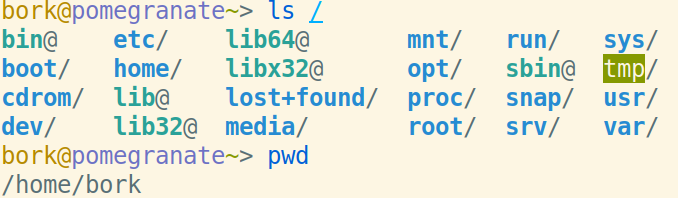
and here’s the VM terminal via gotty:
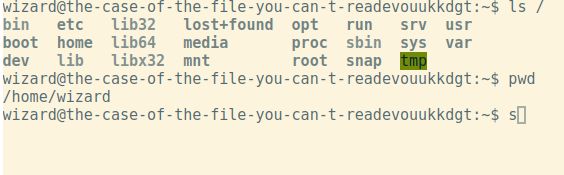
I think some of the differences are because I’m using fish on my laptop and bash on the VM, but the gray directories really seem wrong to me.

I’ve never really understand shell colors so maybe this will be the reason I finally learn.

also started pushing images to github’s container registry

I also improved my deployment a bit yesterday by pushing Docker images to a registry instead of building them on my server.

This was important because the server is pretty slow, so it would use 100% of the CPU for like 5 minutes on building the images when I deployed and make the server super slow.

So now when I deploy, instead of running this on the server:

docker-compose build; docker-compose up

I run

docker-compose pull; docker-compose up

It’s way faster and also feels like it’s going to be more reliable. I also wasted a bunch of hours trying to build the images in CI but in the end I decided to just build them om my laptop because I couldn’t get Docker image caching to work with github actions.

This took a long time like things like this always do but it was pretty boring so I don’t have much more to say about it.