惯性聚合 高效追踪和阅读你感兴趣的博客、新闻、科技资讯
阅读原文 在惯性聚合中打开

推荐订阅源

WordPress大学
WordPress大学
The GitHub Blog
The GitHub Blog
F
Fortinet All Blogs
Cloudbric
Cloudbric
P
Palo Alto Networks Blog
T
Threatpost
T
Tor Project blog
T
Tenable Blog
AWS News Blog
AWS News Blog
Project Zero
Project Zero
L
LangChain Blog
Cyberwarzone
Cyberwarzone
Engineering at Meta
Engineering at Meta
雷峰网
雷峰网
C
CERT Recently Published Vulnerability Notes
钛媒体:引领未来商业与生活新知
钛媒体:引领未来商业与生活新知
Security Latest
Security Latest
云风的 BLOG
云风的 BLOG
I
Intezer
cs.CL updates on arXiv.org
P
Proofpoint News Feed
A
Arctic Wolf
Cyber Security Advisories - MS-ISAC
Google DeepMind News
V
Vulnerabilities – Threatpost
C
Cybersecurity and Infrastructure Security Agency CISA
MongoDB | Blog
MongoDB | Blog
aimingoo的专栏
aimingoo的专栏
K
Kaspersky official blog
Jina AI
Jina AI
N
News | PayPal Newsroom
T
The Blog of Author Tim Ferriss
D
DataBreaches.Net
A
About on SuperTechFans
博客园 - 三生石上(FineUI控件)
博客园 - 【当耐特】
Hugging Face - Blog
Hugging Face - Blog
Recorded Future
Recorded Future
cs.AI updates on arXiv.org
S
Secure Thoughts
TaoSecurity Blog
TaoSecurity Blog
P
Privacy & Cybersecurity Law Blog
P
Proofpoint News Feed
MyScale Blog
MyScale Blog
IT之家
IT之家
Forbes - Security
Forbes - Security
The Hacker News
The Hacker News
Last Week in AI
Last Week in AI
T
Threat Research - Cisco Blogs
Y
Y Combinator Blog

Mac 归档 | Jack's Space

这个桌面宠物也太可爱了吧! MacOS Sequoia 网络问题 Instapaper 还是 Pocket?不妨试试这款新应用 — MarkMark 关闭Mac自动生成的 .DS_Store 文件 Mac 软件推荐
限制 Mac 微信偷传数据
阿杰 Jack · 2022-11-24 · via Mac 归档 | Jack's Space

即使微信保持后台静默的情况下,Mac上的微信依然会生成大量加密的xlog文件,并上传至腾讯的服务器。由于其已经加密,已经无法得知具体包含了什么信息,但就着保护隐私的想法,我们可以进行简单的设置回收该文件夹的写权限,限制 微信偷传数据 这一行为。

更多关于微信偷传数据的信息可参考下面的推特视频

https://twitter.com/9527kw/status/1595597634596925440?s=46&t=QY5WaDWfMw4NpCJ6EV7zgA
  1. 在Mac路径Users/jack/Library/Containers/com.tencent.xinWeChat/Data/Library/Caches/com.tencent.xinWeChat/2.0b4.0.9/log 中会自动生成加密的xlog数据(我这里的路径已经和推特视频中,你可以在附近文件夹中寻找或者使用视频中xcode进行搜索)
  2. 删除掉该文件下所有文件
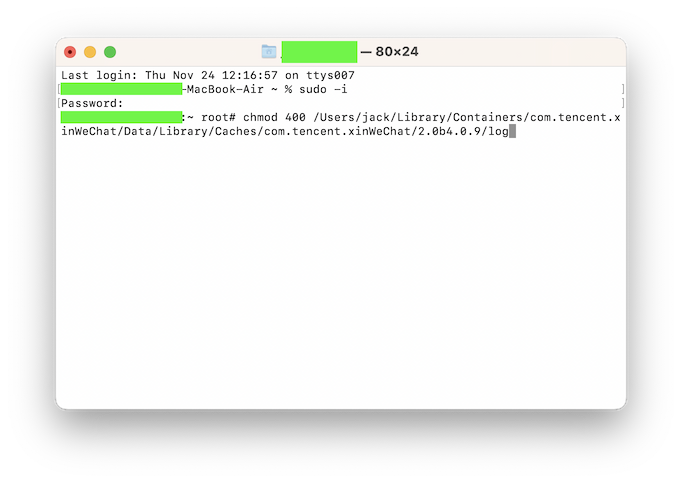
  3. 通过 终端 修改log文件夹的权限
    ① 首先打开应用程序 终端
    ② 输入sudo -i切换超级用户权限,会提示输入密码(即Mac电脑的密码),输入过程中不会看到任何变化,直接输入并回车即可;
    ③ 输入chomod 400 Users/jack/Library/Containers/com.tencent.xinWeChat/Data/Library/Caches/com.tencent.xinWeChat/2.0b4.0.9/log
    ④ 上面的路径根据自己的情况修改。现在该文件夹被修改为了只读权限,微信将无法写入数据,在不使用root用户权限的情况下访问该目录也会提示访问失败;