


问题在哪里
当你使用 Vercel 自动化部署 Hexo 博客时会发现,每次 git push 都会导致文章更新时间变为此次提交修改时间,然而实际上文章并没有进行任何修改。
这个问题是由于 git 在推送更新时不会保存文件创建和修改时间等文件元数据。
所以当你每次使用 git clone 上传或下载的项目的文件元数据都是当前系统时间,而不是项目的创建时间。
而在 Hexo 中,文章默认会使用 文件的最后修改时间 作为文章的更新时间,所以CI构建之后进入博客就会看到所有文章修改时间都会变为“刚刚”或者”X分钟以前“这种地狱绘图,因为 git push 上去的文件不会保存元数据。
怎么修复
这里只提供一个很有效但稍有些麻烦的方法(但也没找到更简单的方法),同时也是本站正在使用的方法
由于每次更新推送后 Vercel 都会自动构建部署,我们无法对构建流程进行修改,因此需要关闭 Vercel 的自动构建,转而使用 Github Action来将Hexo 自动化部署到 Vercel。
实现原理
在Next主题issue #893 中@wylu提到了这个问题,@sli1989 提出了以下解决方案
Hi, the updated time with CI deployment can be fixed using this. please check Continuous Integration configurations carefully.
yaml # Restore last modified time - "git ls-files -z | while read -d '' path; do touch -d \"$(git log -1 --format=\"@%ct\" \"$path\")\" \"$path\"; done"
该条命令会将文件的最后修改时间修改为 Git 仓库中文件的最后提交时间,即文章的更新时间。
同样使用 find 命令也可以实现这个功能:
find source/_posts -name '*.md' | while read file; do touch -d "$(git log -1 --format="@%ct" "$file")" "$file"; done
准备工作
首先,将 Vercel 项目 与 Github 仓库 的绑定关系解除,因为我们将要在 Github Action 中手动部署 Hexo 到 Vercel。
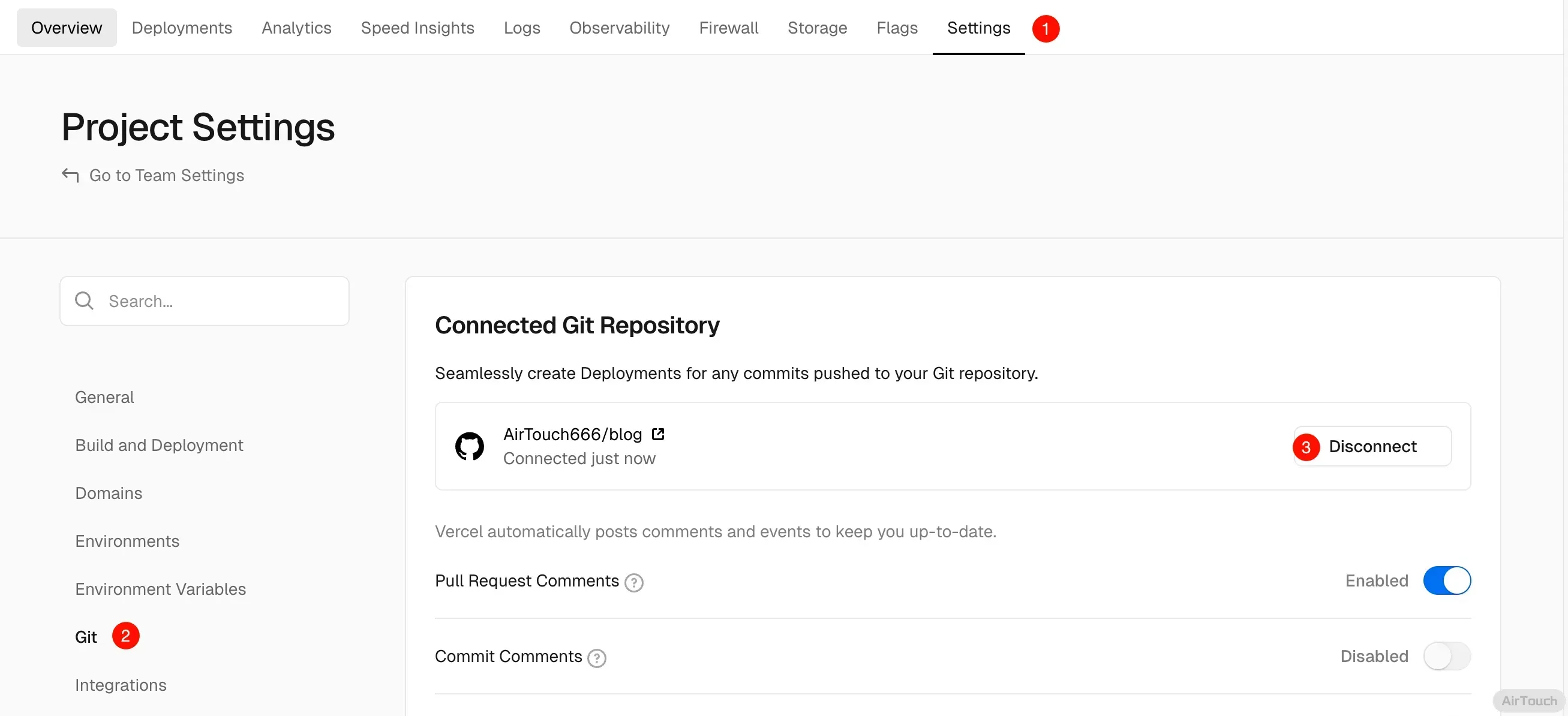
在 Github Action 中需要使用以下两个环境变量和一个秘钥:
- VERCEL_ORG_ID
- VERCEL_PROJECT_ID
- VERCEL_TOKEN
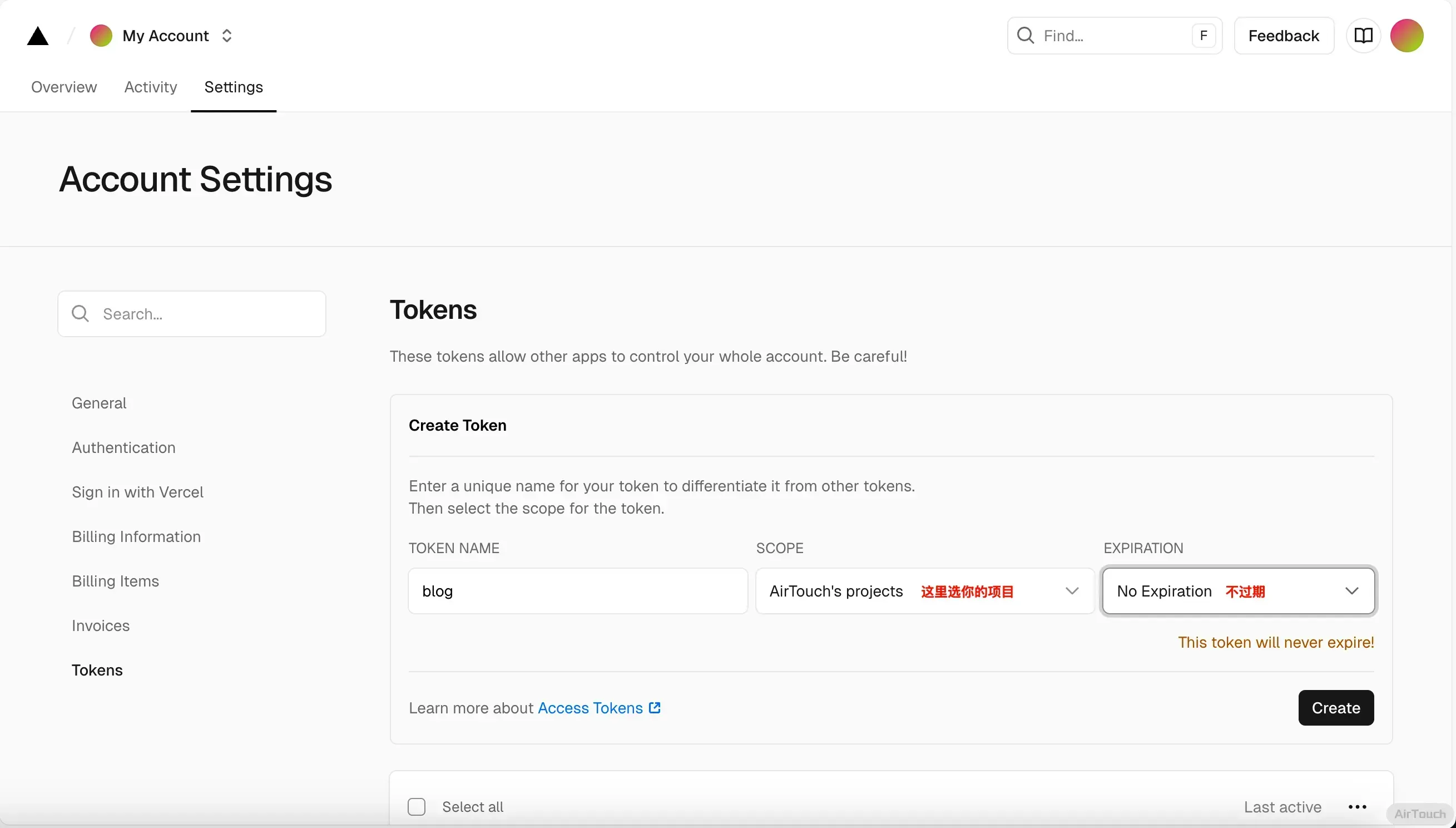
获取Vercel Access Token
我们需要在 Vercel 中获取一段 Vercel Access Token 用于 Github Action 自动化部署。
获取 VERCEL_ORG_ID 和 VERCEL_PROJECT_ID的值
先安装vercel-cli
npm i -g vercel
然后在博客根目录下执行(如果博客目录下有 .vercel 文件夹记得删掉)
vercel link
来创建一个 Vercel 项目,此操作会在博客根目录下生成一个 .vercel 文件夹,在.vercel/project.json 里面包含了 VERCEL_ORG_ID和 VERCEL_PROJECT_ID。

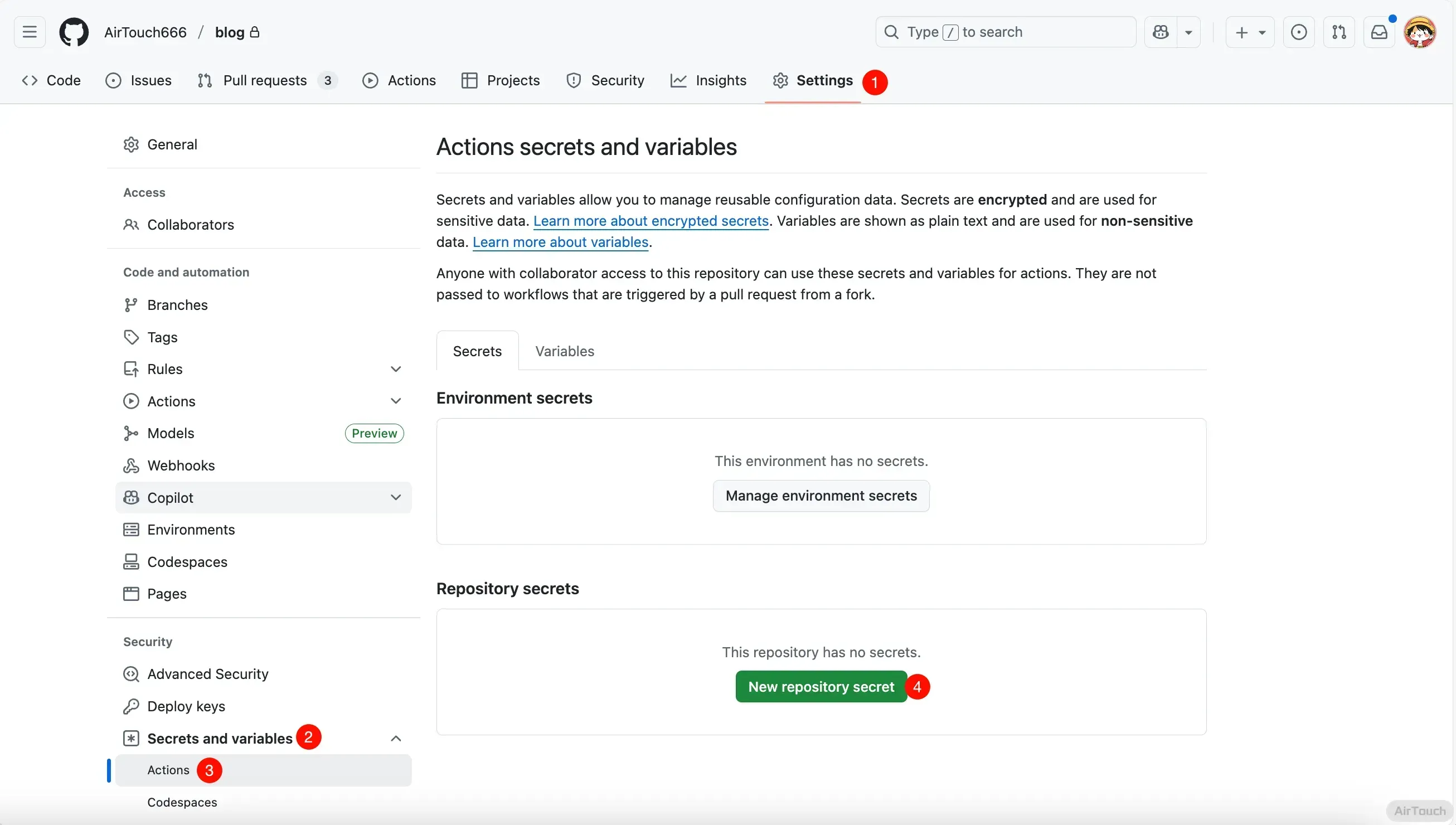
在 Github 仓库中添加 secrets
在你的博客所在的 Github 仓库中,点击 Settings -> Secrets and Variables -> Actions 中添加以下秘钥和环境变量:
- VERCEL_TOKEN ——前面创建的Vercel Access Token
- VERCEL_ORG_ID ——
.vercel/project.json中的"orgId"字段 - VERCEL_PROJECT_ID ——
.vercel/project.json中的"projectId"字段
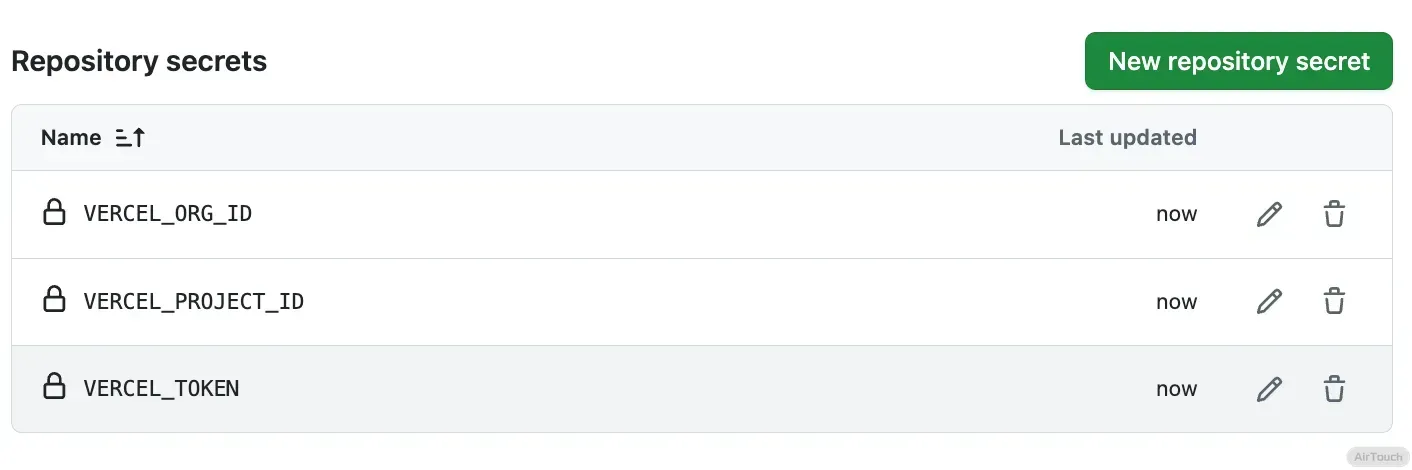
填完了之后是这样的
创建 Github Action
在博客创建 .github/workflows/deploy.yml 文件,写入以下内容
name: Deploy Blog to Vercel Production Deployment
env:
  VERCEL_ORG_ID: ${{ secrets.VERCEL_ORG_ID }}
  VERCEL_PROJECT_ID: ${{ secrets.VERCEL_PROJECT_ID }}
on:
  push:
    branches:
      - main
jobs:
  build-and-deploy:
    runs-on: ubuntu-latest
    steps:
      - uses: actions/checkout@v2
        with:
          persist-credentials: false
          # 0 indicates all history for all branches and tags.
          fetch-depth: 0
      - name: Restore file modification time 🕒
        run: find source/_posts -name '*.md' | while read file; do touch -d "$(git log -1 --format="@%ct" "$file")" "$file"; done
        # run: "git ls-files -z | while read -d '' path; do touch -d \"$(git log -1 --format=\"@%ct\" \"$path\")\" \"$path\"; done"
      - name: Install Vercel-cli🔧
        run: npm install --global vercel@latest
      - name: Pull Vercel Environment Information
        run: vercel pull --yes --environment=production --token=${{ secrets.VERCEL_TOKEN }}
      - name: Build Project Artifacts
        run: vercel build --prod --token=${{ secrets.VERCEL_TOKEN }}
      - name: Deploy Project Artifacts to Vercel
        run: vercel deploy --prebuilt --prod --token=${{ secrets.VERCEL_TOKEN }}
推送你的博客
现在就大功告成啦~
使用 git push 把本地推送上去,Github Actions 会自动构建并推送到 Vercel
参考文章
blog.oxysc.cc
https://blog.oxysc.cc/GhActionHexo/
www.izeka.eu.org
https://www.izeka.eu.org/2023/08/18/%E4%BF%AE%E5%A4%8DVercel%E9%83%A8%E7%BD%B2hexo%E5%AF%BC%E8%87%B4%E6%96%87%E7%AB%A0%E7%9A%84%E6%9B%B4%E6%96%B0%E6%97%B6%E9%97%B4%E9%94%99%E8%AF%AF/
blog.im0o.top
https://blog.im0o.top/posts/c6d9de72.html