前言
将大量DOM元素直接渲染到页面性能是很差的,存在的问题:
- 大量DOM元素重绘,CPU开销大,滚动卡顿。
- GPU渲染能力不够,跳屏。
- 页面等待、布局时间长,白屏问题。
- 大量DOM元素内存占用大。
传统的做法是随着滚动增量渲染,堆积的DOM元素也会越来越多,会出现同样的性能问题。
虚拟列表的核心思想是动态计算、按需渲染,是一种根据滚动容器元素的可视区域来渲染长列表数据中部分数据的技术。
在线感受虚拟列表的魅力:virtual-list-demo
虚拟列表可以简单分为以下几类:
- 定高:每个DOM元素高度确定
- 不定高:每个DOM元素高度不确定
- 瀑布流:例如小红书首页,是普通瀑布流的优化,也属于不定高类型。
原生JS定高
![]()
定高的原理比较简单,也是其它虚拟列表的基础,这里使用原生JS实现。
这是预期的DOM结构:
1
2
3
4
5
6
7
8
|
<div class="virtual-list-container">

  <div class="virtual-list">

    <div class="virtual-list-item">1</div>
  </div>
</div>
|
virtual-list-container 外层的滚动容器元素,由它确定可视区域。
virtual-list 实际列表容器,撑起滚动高度。
virtual-list-item 动态渲染的虚拟列表项。
撑起滚动高度
由于是动态渲染,滚动高度不能再由列表项元素撑起,为了维持正常的滚动条,需要如下技巧。
在滚动过程中,对 virtual-list 设置 transform: translateY() 撑起卷去高度(滚动的偏移量),模拟滚动效果,再设置 height 为初始列表高度减去滚动的偏移量。
基本数据结构
基本的数据结构:封装 virtualList 类方便调用。
1
2
3
4
5
6
7
8
9
10
11
12
13
14
15
16
17
18
19
| class virtualList {
constructor(el, itemHeight) {
this.state = {
data: [],
itemHeight: itemHeight || 100,
viewHeight: 0,
renderCount: 0,
};
this.startIndex = 0;
this.endIndex = 0;
this.renderList = [];
this.scrollStyle = {
height: "0px",
transform: "translateY(0px)",
};
this.el = document.querySelector(el);
this.init();
}
}
|
state 是一些基本数据,包括列表数据、每一项高度、可视区域高度、渲染项数。
根据滚动状态计算 startIndex、endIndex,由这两者确定 renderList 实际渲染的列表数据,以及 scrollStyle 虚拟滚动样式。
挂载
mount() 创建虚拟列表预期的DOM结构,并挂载到指定元素上。
1
2
3
4
5
6
7
8
9
10
11
12
13
| mount() {
this.oContainer = document.createElement("div");
this.oContainer.className = "virtual-list-container";
this.oList = document.createElement("div");
this.oList.className = "virtual-list";
this.oContainer.appendChild(this.oList);
this.el.innerHTML = "";
this.el.appendChild(this.oContainer);
}
|
初始化
init() 进行必要的初始化,进行挂载、计算基本数据、绑定事件(主要是滚动事件),当然还需要进行一次初始渲染。
1
2
3
4
5
6
7
8
9
10
| init() {
this.mount();
this.state.viewHeight = this.oContainer.offsetHeight;
this.state.renderCount =
Math.ceil(this.state.viewHeight / this.state.itemHeight) + 1;
this.render();
this.bindEvent();
}
|
offsetHeight 只读属性,它返回该元素的像素高度,高度包含该元素的垂直内边距、边框和滚动条,且是一个整数。使用它作为可视区域的高度正合适。
计算 renderCount 时需要至少多渲染一项,避免滚动时出现空白。
渲染数据
render() 进行一些必要的计算后,渲染出列表子项,并设置虚拟滚动样式。
1
2
3
4
5
6
7
8
9
10
11
12
13
14
15
| render() {
this.computeEndIndex();
this.computeRenderList();
this.computeScrollStyle();
const items = this.renderList.map((item) => {
return `<div class="virtual-list-item" style="height: ${this.state.itemHeight}px;">${item}</div>`;
});
const template = items.join("");
this.oList.innerHTML = template;
this.oList.style.height = this.scrollStyle.height;
this.oList.style.transform = this.scrollStyle.transform;
}
|
一些计算
每次渲染前需要计算必要的数据,包括末索引、渲染列表、滚动样式。
计算结束渲染的索引1
2
3
4
5
6
7
| computeEndIndex() {
this.endIndex = this.startIndex + this.state.renderCount - 1;
if (this.endIndex > this.state.data.length - 1) {
this.endIndex = this.state.data.length - 1;
}
}
|
计算渲染的列表1
2
3
4
| computeRenderList() {
this.renderList = this.state.data.slice(this.startIndex, this.endIndex + 1);
}
|
计算虚拟滚动样式1
2
3
4
5
6
7
8
9
10
11
| computeScrollStyle() {
const scrollTop = this.startIndex * this.state.itemHeight;
this.scrollStyle = {
height: `${this.state.data.length * this.state.itemHeight - scrollTop}px`,
transform: `translateY(${scrollTop}px)`,
};
}
|
绑定事件
绑定滚动事件,注意要将滚动回调的this绑定到当前类实例。
1
2
3
4
5
| bindEvent() {
const handle = this.rafThrottle(this.handleScroll.bind(this));
this.oContainer.addEventListener("scroll", handle);
}
|
滚动回调:
在滚动过程中计算起始索引,即将 scrollTop (卷去高度)除以每项高度,并向下取整。还需要调用渲染函数,不断渲染最新DOM元素。
1
2
3
4
5
6
7
8
| handleScroll() {
this.startIndex = Math.floor(
this.oContainer.scrollTop / this.state.itemHeight
);
this.render();
}
|
完整代码
1
2
3
4
5
6
7
8
9
10
11
12
13
14
15
16
17
18
19
20
21
22
23
24
25
26
27
28
29
30
31
32
33
34
35
36
37
38
39
40
41
42
43
44
45
46
47
| <!DOCTYPE html>
<html lang="en">
<head>
<meta charset="UTF-8">
<meta name="viewport" content="width=device-width, initial-scale=1.0">
<title>原生JS固高虚拟列表</title>
<style>
.container {
width: 600px;
height: 500px;
border: 1px solid #333;
margin: 150px auto;
}
.virtual-list-container {
width: 100%;
height: 100%;
overflow: auto;
}
.virtual-list {
width: 100%;
height: 100%;
}
.virtual-list-item {
width: 100%;
display: flex;
justify-content: center;
align-items: center;
border: 1px solid #333;
box-sizing: border-box;
text-align: center;
font-size: 20px;
font-weight: bold;
}
</style>
</head>
<body>
<div class="container"></div>
<script src="index.js"></script>
</body>
</html>
|
1
2
3
4
5
6
7
8
9
10
11
12
13
14
15
16
17
18
19
20
21
22
23
24
25
26
27
28
29
30
31
32
33
34
35
36
37
38
39
40
41
42
43
44
45
46
47
48
49
50
51
52
53
54
55
56
57
58
59
60
61
62
63
64
65
66
67
68
69
70
71
72
73
74
75
76
77
78
79
80
81
82
83
84
85
86
87
88
89
90
91
92
93
94
95
96
97
98
99
100
101
102
103
104
105
106
107
108
109
110
111
112
113
114
115
116
117
118
119
120
121
122
123
124
125
126
127
128
129
130
131
132
133
134
135
136
137
138
139
140
|
class virtualList {
constructor(el, itemHeight) {
this.state = {
data: [],
itemHeight: itemHeight || 100,
viewHeight: 0,
renderCount: 0,
};
this.startIndex = 0;
this.endIndex = 0;
this.renderList = [];
this.scrollStyle = {
height: "0px",
transform: "translateY(0px)",
};
this.el = document.querySelector(el);
this.init();
}
init() {
this.mount();
this.state.viewHeight = this.oContainer.offsetHeight;
this.state.renderCount =
Math.ceil(this.state.viewHeight / this.state.itemHeight) + 1;
this.render();
this.bindEvent();
}
mount() {

  this.oContainer = document.createElement("div");
  this.oContainer.className = "virtual-list-container";

  this.oList = document.createElement("div");
  this.oList.className = "virtual-list";

  this.oContainer.appendChild(this.oList);

  this.el.innerHTML = "";
  this.el.appendChild(this.oContainer);
}
computeEndIndex() {
this.endIndex = this.startIndex + this.state.renderCount - 1;
if (this.endIndex > this.state.data.length - 1) {
this.endIndex = this.state.data.length - 1;
}
}
computeRenderList() {
this.renderList = this.state.data.slice(this.startIndex, this.endIndex + 1);
}
computeScrollStyle() {
const scrollTop = this.startIndex * this.state.itemHeight;
this.scrollStyle = {
height: `${this.state.data.length * this.state.itemHeight - scrollTop}px`,
transform: `translateY(${scrollTop}px)`,
};
}
render() {
this.computeEndIndex();
this.computeRenderList();
this.computeScrollStyle();
const items = this.renderList.map((item) => {
return `<div class="virtual-list-item" style="height: ${this.state.itemHeight}px;">${item}</div>`;
});
const template = items.join("");
this.oList.innerHTML = template;
this.oList.style.height = this.scrollStyle.height;
this.oList.style.transform = this.scrollStyle.transform;
}
throttle(fn, delay = 50) {
let lastTime = 0;
return function () {
const now = Date.now();
if (now - lastTime > delay) {
fn.apply(this, arguments);
lastTime = now;
}
};
}
rafThrottle(fn) {
let ticking = false;
return function () {
if (ticking) return;
ticking = true;
window.requestAnimationFrame(() => {
fn.apply(this, arguments);
ticking = false;
});
};
}
handleScroll() {
this.startIndex = Math.floor(
this.oContainer.scrollTop / this.state.itemHeight
);
this.render();
}
bindEvent() {
const handle = this.rafThrottle(this.handleScroll.bind(this));
this.oContainer.addEventListener("scroll", handle);
}
setData(data) {
this.state.data = data;
this.render();
}
}
const list = new virtualList(".container", 50);
list.setData(new Array(1000).fill(0).map((item, index) => index + 1));
|
Vue3定高
原理相同,不需要自己操作DOM更加方便。增加了触底增量等功能。在线效果。
1
2
3
4
5
6
7
8
9
10
11
12
13
14
15
16
17
18
19
20
21
22
23
24
25
26
27
28
29
30
31
32
33
34
35
36
37
38
39
40
41
42
43
44
45
46
47
48
49
50
51
52
53
54
55
56
57
58
59
60
61
62
63
64
65
66
67
68
69
70
71
72
73
74
75
76
77
78
79
80
81
82
83
84
85
86
87
88
89
90
91
92
93
94
95
96
97
98
99
100
101
102
103
104
105
106
107
108
109
110
111
112
113
114
115
116
117
118
119
120
121
122
123
124
125
126
127
128
129
130
131
132
133
134
135
136
137
138
139
140
141
142
143
144
145
146
147
148
149
150
151
152
153
154
155
156
157
158
159
160
| <template>
<div class="virtual-list-panel" v-loading="props.loading">
<div class="virtual-list-container" ref="container">
<div class="virtual-list" :style="listStyle" ref="list">
<div
class="virtual-list-item"
:style="{
height: props.itemHeight + 'px',
}"
v-for="(i, index) in renderList"
:key="startIndex + index"
>
<slot name="item" :item="i" :index="startIndex + index"></slot>
</div>
</div>
</div>
</div>
</template>
<script setup lang="ts" generic="T">
import { CSSProperties } from "vue";
const props = defineProps<{
loading: boolean;
itemHeight: number;
dataSource: T[];
}>();
const emit = defineEmits<{
addData: [];
}>();
defineSlots<{
item(props: { item: T; index: number }): any;
}>();
const container = ref<HTMLDivElement | null>(null);
const list = ref<HTMLDivElement | null>(null);
const state = reactive({
viewHeight: 0,
renderCount: 0,
});
const startIndex = ref(0);
const endIndex = computed(() => {
const end = startIndex.value + state.renderCount;
if (end > props.dataSource.length) {
return props.dataSource.length;
}
return end;
});
const renderList = computed(() => {
return props.dataSource.slice(startIndex.value, endIndex.value);
});
const listStyle = computed(() => {
const scrollTop = startIndex.value * props.itemHeight;
const listHeight = props.dataSource.length * props.itemHeight;
return {
height: `${listHeight - scrollTop}px`,
transform: `translate3d(0, ${scrollTop}px, 0)`,
} as CSSProperties;
});
const createHandleScroll = () => {
let lastScrollTop = 0;
return () => {
if (!container.value) return;
startIndex.value = Math.floor(container.value.scrollTop / props.itemHeight);
const { scrollTop, clientHeight, scrollHeight } = container.value;
const bottom = scrollHeight - clientHeight - scrollTop;
const isScrollingDown = scrollTop > lastScrollTop;
lastScrollTop = scrollTop;
if (bottom < 20 && isScrollingDown) {
!props.loading && emit("addData");
}
};
};
const handleScroll = rafThrottle(createHandleScroll());
const handleResize = rafThrottle(() => {
if (!container.value) return;
state.viewHeight = container.value.offsetHeight ?? 0;
state.renderCount = Math.ceil(state.viewHeight / props.itemHeight) + 1;
startIndex.value = Math.floor(container.value.scrollTop / props.itemHeight);
});
const init = () => {
state.viewHeight = container.value?.offsetHeight ?? 0;
state.renderCount = Math.ceil(state.viewHeight / props.itemHeight) + 1;
container.value?.addEventListener("scroll", handleScroll);
window.addEventListener("resize", handleResize);
};
const destroy = () => {
container.value?.removeEventListener("scroll", handleScroll);
window.removeEventListener("resize", handleResize);
};
onMounted(() => {
init();
});
onUnmounted(() => {
destroy();
});
</script>
<style lang="scss">
.virtual-list-panel {
width: 100%;
height: 100%;
.virtual-list-container {
overflow: auto;
width: 100%;
height: 100%;
.virtual-list {
width: 100%;
height: 100%;
.virtual-list-item {
width: 100%;
height: 50px;
border: 1px solid #333;
box-sizing: border-box;
}
}
}
}
</style>
|
使用:
1
2
3
4
5
6
7
8
9
10
11
12
13
14
15
16
17
18
19
20
21
22
23
24
25
26
27
28
29
30
31
32
33
34
35
36
37
38
39
40
41
42
43
44
45
46
47
| <template>
<div class="list-container">
<VirtualList
:loading="loading"
:data-source="data"
:item-height="60"
@add-data="addData"
>
<template #item="{ item, index }">
<div>{{ index + 1 }} - {{ item.content }}</div>
</template>
</VirtualList>
</div>
</template>
<script setup lang="ts">
import Mock from "mockjs";
const data = ref<
{
content: string;
}[]
>([]);
const loading = ref(false);
const addData = () => {
loading.value = true;
setTimeout(() => {
data.value = data.value.concat(
new Array(5000).fill(0).map((_, index) => ({
content: Mock.mock("@csentence(100)"),
}))
);
loading.value = false;
}, 1000);
};
onMounted(() => {
addData();
});
</script>
<style scoped lang="scss">
.list-container {
max-width: 600px;
width: 100%;
height: calc(100vh - 100px);
border: 1px solid #333;
}
</style>
|
Vue3不定高
不定高即每个列表项高度不确定,核心原理和定高一样,找到 startIndex 和 endIndex 确定实际渲染列表、虚拟滚动样式,再由 transform 模拟滚动。在线效果。
但不定高,确定 startIndex 以及计算位置信息就需要额外设计。
数据结构
通常做法是由外部传入一个适中的平均高度,作为每项的初始高度,并确定一个固定的渲染数量。
组件 props:
1
2
3
4
5
6
| interface EstimatedListProps<T> {
loading: boolean;
estimatedHeight: number;
dataSource: T[];
}
const props = defineProps<EstimatedListProps<T>>();
|
为了方便计算和使用位置信息,使用一个数组,对应记录 dataSource 中每一项的顶部位置、底部位置、高度、高度差。
1
2
3
4
5
6
7
| interface PosInfo {
top: number;
bottom: number;
height: number;
dHeight: number;
}
const positions = ref<PosInfo[]>([]);
|
列表的状态:
1
2
3
4
5
6
7
| const state = reactive({
viewHeight: 0,
listHeight: 0,
startIndex: 0,
renderCount: 0,
preLen: 0,
});
|
结束索引 endIndex 是一个计算属性:
1
2
3
| const endIndex = computed(() =>
Math.min(props.dataSource.length, state.startIndex + state.renderCount)
);
|
渲染列表同样由 startIndex 和 endIndex 确定。
1
2
3
| const renderList = computed(() =>
props.dataSource.slice(state.startIndex, endIndex.value)
);
|
计算动态样式,使用 transform 模拟滚动,使用 translate3d 可以调用 GPU 辅助计算,性能更好。
1
2
3
4
5
6
7
8
| const listStyle = computed(() => {
const preHeight = positions.value[state.startIndex]?.top;
return {
height: `${state.listHeight - preHeight}px`,
transform: `translate3d(0, ${preHeight}px, 0)`,
} as CSSProperties;
});
|
挂载初始化
在组件挂载后调用 init()。
1
2
3
| onMounted(() => {
init();
});
|
初始化获取可视区域高度、计算渲染数量、绑定事件。
1
2
3
4
5
6
7
| const init = () => {
state.viewHeight = contentRef.value?.offsetHeight ?? 0;
state.renderCount = Math.ceil(state.viewHeight / props.estimatedHeight) + 1;
contentRef.value?.addEventListener("scroll", handleScroll);
window.addEventListener("resize", handleResize);
};
|
滚动事件
滚动事件的核心是调用 findStartingIndex() 找到起始索引,在后续根据起始索引计算位置信息。
1
2
3
4
5
6
7
8
9
10
11
12
13
14
15
16
17
18
19
20
21
22
|
const createHandleScroll = () => {
let lastScrollTop = 0;
return () => {
if (!contentRef.value) return;
const { scrollTop, clientHeight, scrollHeight } = contentRef.value;
state.startIndex = findStartingIndex(scrollTop);
const bottom = scrollHeight - clientHeight - scrollTop;
const isScrollingDown = scrollTop > lastScrollTop;
lastScrollTop = scrollTop;
if (bottom < 20 && isScrollingDown) {
!props.loading && emit("addData");
}
};
};
const handleScroll = rafThrottle(createHandleScroll());
|
查找起始索引
使用二分查找,找到第一个 bottom 大于或等于 scrollTop 的 item。
1
2
3
4
5
6
7
8
9
10
11
12
13
14
15
16
17
18
19
20
21
22
23
24
| const findStartingIndex = (scrollTop: number) => {
let left = 0;
let right = positions.value.length - 1;
let mid = -1;
while (left < right) {
const midIndx = Math.floor((left + right) / 2);
const midValue = positions.value[midIndx].bottom;
if (midValue === scrollTop) {
return midIndx;
} else if (midValue < scrollTop) {
left = midIndx + 1;
} else {
right = midIndx;
if (mid === -1 || mid > midIndx) {
mid = midIndx;
}
}
}
return mid;
};
|
计算位置信息
不定高虚拟列表的核心就是计算每一项的位置信息,再根据这些信息去渲染。
使用 watch 监听数据源的变化、Dom变化,计算位置信息。先初始化位置信息,再在下一次渲染时更新实际位置信息。
1
2
3
4
5
6
7
|
watch([() => listRef.value, () => props.dataSource], () => {
props.dataSource.length && initPositions();
nextTick(() => {
updatePositions();
});
});
|
当 startIndex 变化时,也需要更新位置信息。
1
2
3
4
5
6
7
8
9
|
watch(
() => state.startIndex,
() => {
nextTick(() => {
updatePositions();
});
}
);
|
初始化位置信息
位置信息需要与数据源一一对应,初始的高度就是预设高度。
1
2
3
4
5
6
7
8
9
10
11
12
13
14
15
16
17
18
| const initPositions = () => {
const pos: PosInfo[] = [];
const disLen = props.dataSource.length - state.preLen;
const preTop = positions.value[state.preLen - 1]?.bottom ?? 0;
const preBottom = positions.value[state.preLen - 1]?.bottom ?? 0;
for (let i = 0; i < disLen; i++) {
pos.push({
height: props.estimatedHeight,
top: preTop + i * props.estimatedHeight,
bottom: preBottom + (i + 1) * props.estimatedHeight,
dHeight: 0,
});
}
positions.value = [...positions.value, ...pos];
state.preLen = props.dataSource.length;
};
|
更新位置信息
在实际DOM渲染完成后,获取实际位置信息,并更新 positions。
这里是不定高虚拟列表计算量最大的地方:
- 获取DOM上已渲染的item,累加一个高度差偏移量,根据实际DOM更新对应的位置信息。
- 更新后续所有未渲染的item的位置信息、以及列表总高度。
1
2
3
4
5
6
7
8
9
10
11
12
13
14
15
16
17
18
19
20
21
22
23
24
25
26
27
28
29
30
31
32
33
34
35
36
37
38
39
40
41
42
43
44
45
46
47
48
| const updatePositions = () => {
const itemNodes = listRef.value?.children;
if (!itemNodes || !itemNodes.length) return;
let dHeightAccount = 0;
for (let i = 0; i < itemNodes.length; i++) {
const node = itemNodes[i];
const rect = node.getBoundingClientRect();
const id = state.startIndex + i;
const itemPos = positions.value[id];
const dHeight = rect.height - itemPos.height;
dHeightAccount += dHeight;
if (dHeight) {
itemPos.height = rect.height;
itemPos.dHeight = dHeight;
itemPos.bottom = itemPos.bottom + dHeightAccount;
}
if (i !== 0) {
itemPos.top = positions.value[id - 1].bottom;
}
}
const endID = endIndex.value;
for (let i = endID; i < positions.value.length; i++) {
const itemPos = positions.value[i];
itemPos.top = positions.value[i - 1].bottom;
itemPos.bottom = itemPos.bottom + dHeightAccount;
if (itemPos.dHeight) {
dHeightAccount += itemPos.dHeight;
itemPos.dHeight = 0;
}
}
state.listHeight = positions.value[positions.value.length - 1].bottom;
};
|
完整代码
1
2
3
4
5
6
7
8
9
10
11
12
13
14
15
16
17
18
19
20
21
22
23
24
25
26
27
28
29
30
31
32
33
34
35
36
37
38
39
40
41
42
43
44
45
46
47
48
49
50
51
52
53
54
55
56
57
58
59
60
61
62
63
64
65
66
67
68
69
70
71
72
73
74
75
76
77
78
79
80
81
82
83
84
85
86
87
88
89
90
91
92
93
94
95
96
97
98
99
100
101
102
103
104
105
106
107
108
109
110
111
112
113
114
115
116
117
118
119
120
121
122
123
124
125
126
127
128
129
130
131
132
133
134
135
136
137
138
139
140
141
142
143
144
145
146
147
148
149
150
151
152
153
154
155
156
157
158
159
160
161
162
163
164
165
166
167
168
169
170
171
172
173
174
175
176
177
178
179
180
181
182
183
184
185
186
187
188
189
190
191
192
193
194
195
196
197
198
199
200
201
202
203
204
205
206
207
208
209
210
211
212
213
214
215
216
217
218
219
220
221
222
223
224
225
226
227
228
229
230
231
232
233
234
235
236
237
238
239
240
241
242
243
244
245
246
247
248
249
250
251
252
253
254
255
256
257
258
259
260
261
262
263
| <template>
<div class="virtual-list-container" v-loading="props.loading">
<div class="virtual-list-content" ref="contentRef">
<div class="virtual-list" ref="listRef" :style="listStyle">
<div
class="virtual-list-item"
v-for="(i, index) in renderList"
:id="String(state.startIndex + index)"
:key="state.startIndex + index"
>
<slot name="item" :item="i" :index="state.startIndex + index"></slot>
</div>
</div>
</div>
</div>
</template>
<script setup lang="ts" generic="T">
import { CSSProperties } from "vue";
interface EstimatedListProps<T> {
loading: boolean;
estimatedHeight: number;
dataSource: T[];
}
interface PosInfo {
top: number;
bottom: number;
height: number;
dHeight: number;
}
const props = defineProps<EstimatedListProps<T>>();
const emit = defineEmits<{
addData: [];
}>();
defineSlots<{
item(props: { item: T; index: number }): any;
}>();
const state = reactive({
viewHeight: 0,
listHeight: 0,
startIndex: 0,
renderCount: 0,
preLen: 0,
});
const endIndex = computed(() =>
Math.min(props.dataSource.length, state.startIndex + state.renderCount)
);
const renderList = computed(() =>
props.dataSource.slice(state.startIndex, endIndex.value)
);
const positions = ref<PosInfo[]>([]);
const listStyle = computed(() => {
const preHeight = positions.value[state.startIndex]?.top;
return {
height: `${state.listHeight - preHeight}px`,
transform: `translate3d(0, ${preHeight}px, 0)`,
} as CSSProperties;
});
const contentRef = ref<HTMLDivElement>();
const listRef = ref<HTMLDivElement>();
const initPositions = () => {
const pos: PosInfo[] = [];
const disLen = props.dataSource.length - state.preLen;
const preTop = positions.value[state.preLen - 1]?.bottom ?? 0;
const preBottom = positions.value[state.preLen - 1]?.bottom ?? 0;
for (let i = 0; i < disLen; i++) {
pos.push({
height: props.estimatedHeight,
top: preTop + i * props.estimatedHeight,
bottom: preBottom + (i + 1) * props.estimatedHeight,
dHeight: 0,
});
}
positions.value = [...positions.value, ...pos];
state.preLen = props.dataSource.length;
};
const updatePositions = () => {
const itemNodes = listRef.value?.children;
if (!itemNodes || !itemNodes.length) return;
let dHeightAccount = 0;
for (let i = 0; i < itemNodes.length; i++) {
const node = itemNodes[i];
const rect = node.getBoundingClientRect();
const id = state.startIndex + i;
const itemPos = positions.value[id];
const dHeight = rect.height - itemPos.height;
dHeightAccount += dHeight;
if (dHeight) {
itemPos.height = rect.height;
itemPos.dHeight = dHeight;
itemPos.bottom = itemPos.bottom + dHeightAccount;
}
if (i !== 0) {
itemPos.top = positions.value[id - 1].bottom;
}
}
const endID = endIndex.value;
for (let i = endID; i < positions.value.length; i++) {
const itemPos = positions.value[i];
itemPos.top = positions.value[i - 1].bottom;
itemPos.bottom = itemPos.bottom + dHeightAccount;
if (itemPos.dHeight) {
dHeightAccount += itemPos.dHeight;
itemPos.dHeight = 0;
}
}
state.listHeight = positions.value[positions.value.length - 1].bottom;
};
const createHandleScroll = () => {
let lastScrollTop = 0;
return () => {
if (!contentRef.value) return;
const { scrollTop, clientHeight, scrollHeight } = contentRef.value;
state.startIndex = findStartingIndex(scrollTop);
const bottom = scrollHeight - clientHeight - scrollTop;
const isScrollingDown = scrollTop > lastScrollTop;
lastScrollTop = scrollTop;
if (bottom < 20 && isScrollingDown) {
!props.loading && emit("addData");
}
};
};
const handleScroll = rafThrottle(createHandleScroll());
const findStartingIndex = (scrollTop: number) => {
let left = 0;
let right = positions.value.length - 1;
let mid = -1;
while (left < right) {
const midIndx = Math.floor((left + right) / 2);
const midValue = positions.value[midIndx].bottom;
if (midValue === scrollTop) {
return midIndx;
} else if (midValue < scrollTop) {
left = midIndx + 1;
} else {
right = midIndx;
if (mid === -1 || mid > midIndx) {
mid = midIndx;
}
}
}
return mid;
};
const handleResize = rafThrottle(() => {
if (!contentRef.value) return;
state.viewHeight = contentRef.value.offsetHeight ?? 0;
state.renderCount = Math.ceil(state.viewHeight / props.estimatedHeight) + 1;
state.startIndex = findStartingIndex(contentRef.value.scrollTop);
});
const init = () => {
state.viewHeight = contentRef.value?.offsetHeight ?? 0;
state.renderCount = Math.ceil(state.viewHeight / props.estimatedHeight) + 1;
contentRef.value?.addEventListener("scroll", handleScroll);
window.addEventListener("resize", handleResize);
};
const destroy = () => {
contentRef.value?.removeEventListener("scroll", handleScroll);
window.removeEventListener("resize", handleResize);
};
watch([() => listRef.value, () => props.dataSource], () => {
props.dataSource.length && initPositions();
nextTick(() => {
updatePositions();
});
});
watch(
() => state.startIndex,
() => {
nextTick(() => {
updatePositions();
});
}
);
onMounted(() => {
init();
});
onUnmounted(() => {
destroy();
});
</script>
<style lang="scss">
div.virtual-list-container {
width: 100%;
height: 100%;
div.virtual-list-content {
width: 100%;
height: 100%;
overflow: auto;
div.virtual-list {
div.virtual-list-item {
width: 100%;
box-sizing: border-box;
border: 1px solid #333;
}
}
}
}
</style>
|
使用:
1
2
3
4
5
6
7
8
9
10
11
12
13
14
15
16
17
18
19
20
21
22
23
24
25
26
27
28
29
30
31
32
33
34
35
36
37
38
39
40
41
42
43
44
45
46
47
48
49
| <template>
<div class="list-container">
<EstimatedVirtualList
:data-source="data"
:loading="loading"
:estimated-height="40"
@addData="addData"
:height="500"
:width="600"
>
<template #item="{ item, index }">
<div>{{ index + 1 }} - {{ item.content }}</div>
</template>
</EstimatedVirtualList>
</div>
</template>
<script setup lang="ts">
import Mock from "mockjs";
const data = ref<
{
content: string;
}[]
>([]);
const loading = ref(false);
const addData = () => {
loading.value = true;
setTimeout(() => {
data.value = data.value.concat(
new Array(2000).fill(0).map((_, index) => ({
content: Mock.mock("@csentence(40, 100)"),
}))
);
loading.value = false;
}, 1000);
};
onMounted(() => {
addData();
});
</script>
<style scoped lang="scss">
.list-container {
max-width: 600px;
width: 100%;
height: calc(100vh - 100px);
border: 1px solid #333;
}
</style>
|
瀑布流
在实现虚拟瀑布流之前,需要先学习下普通的瀑布流。在线效果。
通常通过绝对定位实现瀑布流,动态计算布局,且元素通常带有图片。
对于图片的处理,常见的优化是由后端预先传图片的宽高,这样能减少计算布局的次数。
不过在普通瀑布流这,我还是采用了前端计算,即在图片 load 完后再次计算布局,实际上性能还可以。在之后的虚拟瀑布流实现,就允许传入宽高信息,减少计算量。
布局计算:每次找到最小高度列,添加元素。
DOM结构
使用插槽,允许自定义每项的DOM结构。
1
2
3
4
5
6
7
8
9
10
11
12
13
14
15
16
17
18
19
20
21
22
23
24
25
26
| <template>
<div class="water-fall-panel" v-loading="props.loading">
<div class="water-fall-container" ref="containerRef" @scroll="handleScroll">
<div
class="water-fall-content"
ref="contentRef"
:style="{
height: state.maxHeight + 'px',
}"
>
<div
class="water-fall-item"
v-for="(i, index) in props.data"
:style="{
width: state.columnWidth + 'px',
}"
:key="index"
>
<slot name="item" :item="i" :index="index" :load="imgLoadHandle">
<img :src="i.src" @load="imgLoadHandle" />
</slot>
</div>
</div>
</div>
</div>
</template>
|
数据结构
每项数据定义:需要一个图片地址,当然也可以加入其它东西,毕竟使用了插槽,DOM结构是允许自定义的。
1
2
3
4
| interface imgData {
src: string;
[key: string]: any;
}
|
组件 props:
传入列数、每项之间的间距、以及数据源。
1
2
3
4
5
6
| const props = defineProps<{
loading: boolean;
column: number;
space: number;
data: imgData[];
}>();
|
基本状态:
主要是列宽和最高列高,三种数据长度只是辅助计算需要。
1
2
3
4
5
6
7
8
9
10
11
12
13
| const state = reactive<{
columnWidth: number;
maxHeight: number;
firstLength: number;
lastLength: number;
loadedLength: number;
}>({
columnWidth: 0,
maxHeight: 0,
firstLength: 0,
lastLength: 0,
loadedLength: 0,
});
|
挂载初始化
计算一次布局,绑定事件,滚动事件已经通过模板语法 @scroll 绑定。
1
2
3
4
5
6
7
8
| const init = () => {
computedLayout();
window.addEventListener("resize", resizeHandler);
};
onMounted(() => {
init();
});
|
计算布局
计算布局分为两部:先计算列宽,再计算每项位置信息。
1
2
3
4
| const computedLayout = rafThrottle(() => {
computedColumWidth();
setPositions();
});
|
列宽通过容器宽度除以列数即可,当然还要考虑间距。
1
2
3
4
5
6
7
8
|
const computedColumWidth = () => {
const containerWidth = contentRef.value?.clientWidth || 0;
state.columnWidth =
(containerWidth - (props.column - 1) * props.space) / props.column;
};
|
计算位置信息
初始化每列高度为0,遍历所有图片元素,每次找到最小高度列添加元素。
代码中有一大段是为了实现动画效果。
1
2
3
4
5
6
7
8
9
10
11
12
13
14
15
16
17
18
19
20
21
22
23
24
25
26
27
28
29
30
31
32
33
34
35
36
37
38
39
40
41
42
43
44
| const setPositions = () => {
const columnHeight = new Array(props.column).fill(0);
const imgItems = contentRef.value?.children;
if (!imgItems || imgItems.length === 0) return;
if (state.firstLength === 0) {
state.firstLength = imgItems.length;
}
for (let i = 0; i < imgItems.length; i++) {
const img = imgItems[i] as HTMLDivElement;
const minHeight = Math.min.apply(null, columnHeight);
const minHeightIndex = columnHeight.indexOf(minHeight);
img.style.setProperty(
"--img-tr-x",
`${minHeightIndex * (state.columnWidth + props.space)}px`
);
img.style.transform = `translate3d(var(--img-tr-x), var(--img-tr-y), 0)`;
if (!img.classList.contains("animation-over")) {
img.classList.add("animation-over");
img.style.transition = "none";
if (i >= state.firstLength) {
img.style.setProperty("--img-tr-y", `${minHeight + 60}px`);
} else {
img.style.setProperty("--img-tr-y", `${minHeight}px`);
}
img.offsetHeight;
img.style.transition = "all 0.3s";
img.style.setProperty("--img-tr-y", `${minHeight}px`);
} else {
img.style.setProperty("--img-tr-y", `${minHeight}px`);
}
columnHeight[minHeightIndex] += img.offsetHeight + props.space;
}
state.maxHeight = Math.max.apply(null, columnHeight);
};
|
每当有图片加载完,也要重新计算布局。
1
2
3
4
| const imgLoadHandle = () => {
state.loadedLength++;
computedLayout();
};
|
完整代码
1
2
3
4
5
6
7
8
9
10
11
12
13
14
15
16
17
18
19
20
21
22
23
24
25
26
27
28
29
30
31
32
33
34
35
36
37
38
39
40
41
42
43
44
45
46
47
48
49
50
51
52
53
54
55
56
57
58
59
60
61
62
63
64
65
66
67
68
69
70
71
72
73
74
75
76
77
78
79
80
81
82
83
84
85
86
87
88
89
90
91
92
93
94
95
96
97
98
99
100
101
102
103
104
105
106
107
108
109
110
111
112
113
114
115
116
117
118
119
120
121
122
123
124
125
126
127
128
129
130
131
132
133
134
135
136
137
138
139
140
141
142
143
144
145
146
147
148
149
150
151
152
153
154
155
156
157
158
159
160
161
162
163
164
165
166
167
168
169
170
171
172
173
174
175
176
177
178
179
180
181
182
183
184
185
186
187
188
189
190
191
192
193
194
195
196
197
198
199
200
201
202
203
204
205
206
207
208
209
210
211
212
213
214
215
216
217
218
219
220
221
222
223
224
225
226
227
228
229
230
231
232
| <template>
<div class="water-fall-panel" v-loading="props.loading">
<div class="water-fall-container" ref="containerRef" @scroll="handleScroll">
<div
class="water-fall-content"
ref="contentRef"
:style="{
height: state.maxHeight + 'px',
}"
>
<div
class="water-fall-item"
v-for="(i, index) in props.data"
:style="{
width: state.columnWidth + 'px',
}"
:key="index"
>
<slot name="item" :item="i" :index="index" :load="imgLoadHandle">
<img :src="i.src" @load="imgLoadHandle" />
</slot>
</div>
</div>
</div>
</div>
</template>
<script setup lang="ts">
interface imgData {
src: string; // 图片地址
[key: string]: any;
}
const props = defineProps<{
loading: boolean; // 加载状态
column: number; // 列数
space: number; // 间距
data: imgData[]; // 数据
}>(); // 定义props
const emit = defineEmits<{
addData: [];
}>(); // 定义emit
// 定义插槽
defineSlots<{
// 插槽本质就是个函数,接收一个参数props,props是一个对象,包含了插槽的所有属性
item(props: {
item: imgData;
index: number;
load: typeof computedLayout;
}): any;
}>();
// 状态
const state = reactive<{
columnWidth: number; // 列宽
maxHeight: number; // 最高列高
firstLength: number; // 第一次加载的数据长度
lastLength: number; // 最后一次加载的数据长度
loadedLength: number; // 已加载的数据长度
}>({
columnWidth: 0,
maxHeight: 0,
firstLength: 0,
lastLength: 0,
loadedLength: 0,
});
// 获取dom元素
const contentRef = ref<HTMLDivElement | null>(null);
const containerRef = ref<HTMLDivElement | null>(null);
// 计算列宽
const computedColumWidth = () => {
// 获取容器宽度
const containerWidth = contentRef.value?.clientWidth || 0;
// 计算列宽
state.columnWidth =
(containerWidth - (props.column - 1) * props.space) / props.column;
};
// 设置每个图片的位置
const setPositions = () => {
// 每列的高度初始化为0
const columnHeight = new Array(props.column).fill(0);
// 获取所有图片元素
const imgItems = contentRef.value?.children;
if (!imgItems || imgItems.length === 0) return;
if (state.firstLength === 0) {
state.firstLength = imgItems.length;
}
// 遍历图片元素
for (let i = 0; i < imgItems.length; i++) {
const img = imgItems[i] as HTMLDivElement;
// 获取最小高度的列
const minHeight = Math.min.apply(null, columnHeight);
// 获取最小高度的列索引
const minHeightIndex = columnHeight.indexOf(minHeight);
// 设置图片位置
// img.style.top = minHeight + "px";
// img.style.left = minHeightIndex * (state.columnWidth + props.space) + "px";
img.style.setProperty(
"--img-tr-x",
`${minHeightIndex * (state.columnWidth + props.space)}px`
);
img.style.transform = `translate3d(var(--img-tr-x), var(--img-tr-y), 0)`;
if (!img.classList.contains("animation-over")) {
img.classList.add("animation-over");
img.style.transition = "none";
if (i >= state.firstLength) {
img.style.setProperty("--img-tr-y", `${minHeight + 60}px`);
} else {
img.style.setProperty("--img-tr-y", `${minHeight}px`);
}
img.offsetHeight; // 强制渲染
img.style.transition = "all 0.3s";
img.style.setProperty("--img-tr-y", `${minHeight}px`);
} else {
img.style.setProperty("--img-tr-y", `${minHeight}px`);
}
// 更新列高
columnHeight[minHeightIndex] += img.offsetHeight + props.space;
}
// 更新最高列高
state.maxHeight = Math.max.apply(null, columnHeight);
};
const imgLoadHandle = () => {
state.loadedLength++;
computedLayout();
};
// 计算布局
const computedLayout = rafThrottle(() => {
computedColumWidth();
setPositions();
});
// 尺寸变化后计算布局
const createResizeComputedLayout = () => {
let timer: number;
return () => {
computedColumWidth();
window.requestAnimationFrame(() => {
timer = setTimeout(() => {
setPositions();
}, 300);
});
};
};
const resizeComputedLayout = createResizeComputedLayout();
// 监听列数和间距变化,重新计算布局
watch(
() => [props.column, props.space],
() => {
// console.log("change column or space");
resizeComputedLayout();
}
);
const resizeHandler = debounce(() => {
resizeComputedLayout();
}, 300);
const init = () => {
computedLayout();
window.addEventListener("resize", resizeHandler);
};
onMounted(() => {
init();
});
onUnmounted(() => {
window.removeEventListener("resize", resizeHandler);
});
// 滚动回调
const createHandleScroll = () => {
let lastScrollTop = 0;
return () => {
if (!containerRef.value) return;
const { scrollTop, clientHeight, scrollHeight } = containerRef.value;
const bottom = scrollHeight - clientHeight - scrollTop;
// 判断是否向下滚动
const isScrollingDown = scrollTop > lastScrollTop;
// 记录上次滚动的距离
lastScrollTop = scrollTop;
if (bottom < 20 && isScrollingDown) {
// 只有本次加载的数据加载完毕后才能继续加载
if (state.loadedLength >= props.data.length - state.lastLength) {
// 记录上次加载的数据长度
state.lastLength = props.data.length;
state.loadedLength = 0;
// 加载新数据
!props.loading && emit("addData");
}
containerRef.value.offsetHeight;
}
};
};
const handleScroll = rafThrottle(createHandleScroll());
</script>
<style lang="scss">
.water-fall-panel {
height: 100%;
width: 100%;
.water-fall-container {
height: 100%;
width: 100%;
overflow-y: auto;
overflow-x: hidden;
.water-fall-content {
height: 100%;
width: 100%;
position: relative;
.water-fall-item {
position: absolute;
transition: all 0.3s;
overflow: hidden;
img {
width: 100%;
object-fit: cover;
overflow: hidden;
display: block;
}
}
}
}
}
</style>
|
使用:
1
2
3
4
5
6
7
8
9
10
11
12
13
14
15
16
17
18
19
20
21
22
23
24
25
26
27
28
29
30
31
32
33
34
35
36
37
38
39
40
41
42
43
44
45
46
47
48
49
50
51
52
53
54
55
56
57
58
59
60
61
62
63
64
65
66
67
68
69
70
71
72
73
74
75
76
77
78
79
80
81
82
83
84
85
86
87
88
89
90
| <template>
<div class="list-container">
<WaterFallList
:data="data"
:loading="loading"
:column="column"
:space="space"
@add-data="addData"
>
<template #item="{ item, index, load }">
<div
:style="{
display: 'flex',
flexDirection: 'column',
}"
>
<img :src="item.src" @load="load" />
<span>{{ item.title }}</span>
</div>
</template>
</WaterFallList>
</div>
</template>
<script setup lang="ts">
import Mock from "mockjs";
const data = ref<
{
src: string;
title: string;
}[]
>([]);
const loading = ref(false);
const column = ref(4);
const space = ref(10);
let size = 40;
let page = 1;
const addData = () => {
simulatedData();
};
const simulatedData = () => {
loading.value = true;
setTimeout(() => {
data.value = data.value.concat(
new Array(size * 2).fill(0).map((_, index) => ({
src: Mock.Random.dataImage(),
title: Mock.mock("@ctitle(5, 15)"),
}))
);
loading.value = false;
}, 1000);
};
const fetchData = () => {
loading.value = true;
fetch(
`https://www.vilipix.com/api/v1/picture/public?limit=${size}&offset=${
(page - 1) * size
}&sort=hot&type=0`
)
.then((res) => res.json())
.then((res) => {
page++;
const list = res.data.rows;
data.value = data.value.concat(
list.map((item: any) => ({
src: item.regular_url,
title: item.title,
}))
);
loading.value = false;
});
};
onMounted(() => {
addData();
});
</script>
<style scoped lang="scss">
.list-container {
max-width: 800px;
width: 100%;
height: calc(100vh - 100px);
border: 1px solid #333;
}
</style>
|
虚拟瀑布流
虚拟瀑布流将虚拟列表和瀑布流相结合,保证在大量图片、DOM元素的情况下,能够正常渲染。在线效果。
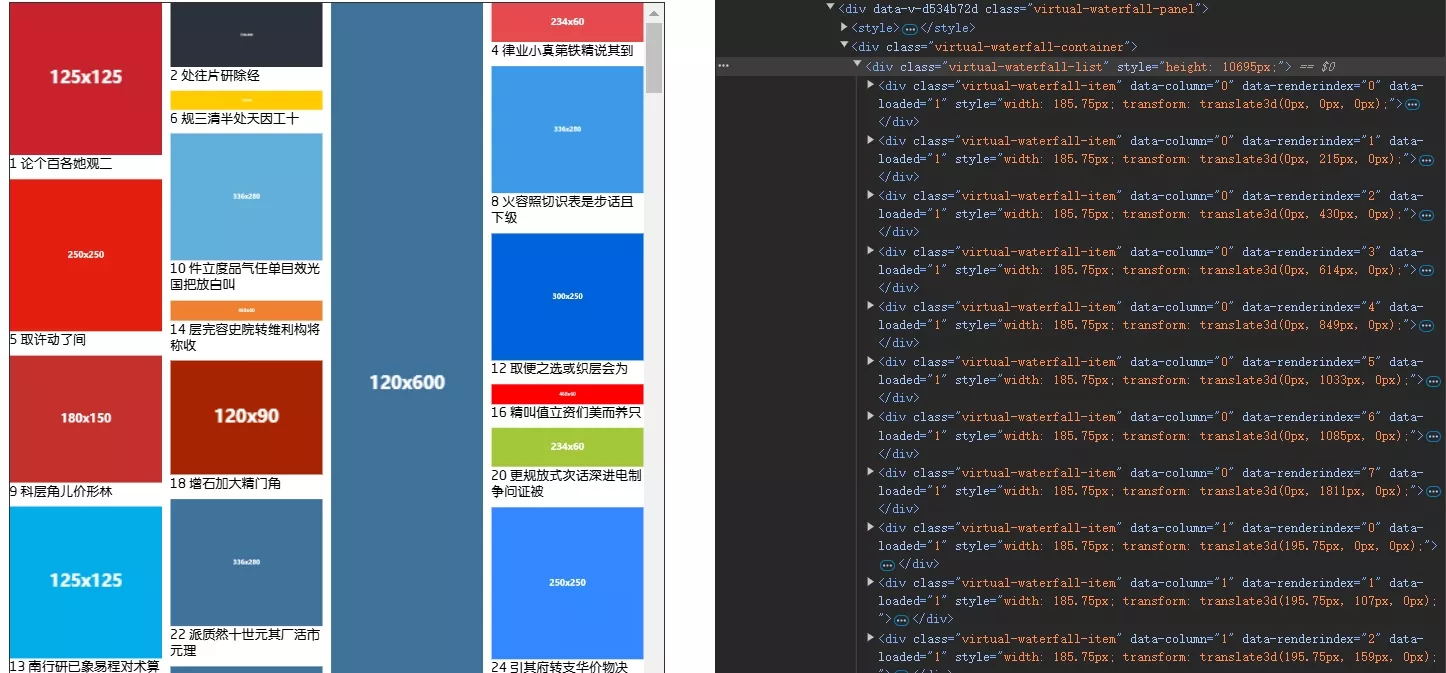
DOM结构
1
2
3
4
5
6
7
8
9
10
11
12
13
14
15
16
17
18
19
20
21
22
23
24
25
26
27
28
29
30
31
32
33
34
35
36
37
38
39
40
| <template>
<div class="virtual-waterfall-panel" v-loading="props.loading">
<component :is="'style'">{{ animationStyle }}</component>
<div class="virtual-waterfall-container" ref="containerRef">
<div
class="virtual-waterfall-list"
ref="listRef"
:style="{
height: state.minHeight + 'px',
}"
>
<div
class="virtual-waterfall-item"
v-for="i in state.renderList"
:style="i.style"
:data-column="i.column"
:data-renderIndex="i.renderIndex"
:data-loaded="i.data.src ? 0 : 1"
:key="i.index"
>
<div class="animation-box">
<slot
name="item"
:item="i"
:index="i.index"
:load="imgLoadedHandle"
>
<img
:src="i.data.src"
@load="imgLoadedHandle"
v-if="props.compute"
/>
<img :src="i.data.src" v-else />
</slot>
</div>
</div>
</div>
</div>
</div>
</template>
|
数据结构
虚拟瀑布流的数据结构较为复杂,需要额外维护渲染队列和渲染列表。
数据源:允许传入宽高,以减少计算量。
1
2
3
4
5
6
7
|
interface ImgData {
src: string;
height?: number;
width?: number;
[key: string]: any;
}
|
虚拟瀑布流需要多维护一个渲染队列,保存瀑布流中每列的渲染列表、列高度,而渲染列表中保存了渲染项的元数据。
1
2
3
4
5
|
interface columnQueue {
height: number;
renderList: RenderItem[];
}
|
每个渲染项元数据包括了其在数据源的索引、所在列、渲染索引、Y轴偏移量、样式等。
其中 offsetY 是关键,它参与计算量该项是否要渲染,以及渲染的高度(Y轴位置)。
1
2
3
4
5
6
7
8
9
10
|
interface RenderItem {
index: number;
column: number;
renderIndex: number;
data: ImgData;
offsetY: number;
height: number;
style: CSSProperties;
}
|
组件 props:
允许自定义动画、设置缓冲高度、以及设置 compute 动态计算尺寸。
仍然需要传入 estimatedHeight 预设高度,因为其本质也是不定高的,需要预设高度完成每项的初始计算,当然外部传入宽高将在计算时覆盖预设高度。
1
2
3
4
5
6
7
8
9
10
11
12
13
14
15
16
17
|
interface Props {
loading: boolean;
column: number;
estimatedHeight: number;
gap?: number;
dataSource: ImgData[];
compute?: boolean;
animation?: boolean | string;
bufferHeight?: number;
}
const props = withDefaults(defineProps<Props>(), {
gap: 0,
compute: true,
animation: true,
bufferHeight: -1,
});
|
基本状态:
state.renderList 保存了实际需要渲染的渲染元数据。注意与 queueList[number].renderList 区分。
还需记录最高、最低列高,方便计算。
1
2
3
4
5
6
7
8
9
10
11
12
13
14
15
|
const state = reactive({
columnWidth: 0,
viewHeight: 0,
queueList: Array.from({ length: props.column }).map<columnQueue>(() => ({
height: 0,
renderList: [],
})),
renderList: [] as RenderItem[],
maxHeight: 0,
minHeight: 0,
preLen: 0,
isScrollingDown: true,
});
|
最后,还需要保存渲染高度范围。
1
2
3
4
|
const start = ref(0);
const end = computed(() => start.value + state.viewHeight);
|
初始化
除了熟悉的绑定事件外,调用了两个简单的计算函数。
computedViewHeight() 计算容器视口高度。computedColumWidth() 计算列宽。
1
2
3
4
5
6
| onMounted(() => {
computedViewHeight();
computedColumWidth();
containerRef.value?.addEventListener("scroll", handleScroll);
window.addEventListener("resize", resizeHandler);
});
|
布局计算使用了 watch 监听。当数据源发生变化后,分别计算渲染队列和渲染列表。
1
2
3
4
5
6
7
8
9
10
11
12
13
14
15
16
17
| watch(
() => props.dataSource,
(a, b) => {
state.preLen = b?.length ?? 0;
if (!a.length) return;
if (isReload) {
isReload = false;
return;
}
computedQueueList();
computedRenderList();
},
{
deep: false,
immediate: true,
}
);
|
计算渲染队列
遍历数据源,每次找到高度最小的队列添加该渲染项的元数据。
1
2
3
4
5
6
7
8
9
10
11
12
13
14
15
16
17
18
19
20
21
22
23
24
25
26
27
28
29
30
31
32
33
34
35
36
37
38
39
40
41
42
43
44
45
46
47
48
49
50
51
52
|
const computedQueueList = (total: boolean = false) => {
const startIndex = total ? 0 : state.preLen;
total && initQueueList();
for (let i = startIndex; i < props.dataSource.length; i++) {
const img = props.dataSource[i];
const minColumn = getMinHeightColumn();
let imgHeight = props.estimatedHeight ?? 50;
if (img.height && img.width) {
imgHeight = (state.columnWidth / img.width) * img.height;
}
const offsetY = minColumn.column.height;
minColumn.column.renderList.push({
index: i,
column: minColumn.index,
renderIndex: minColumn.column.renderList.length,
data: img,
offsetY: offsetY,
height: imgHeight,
style: getRenderStyle(minColumn.index, offsetY),
});
minColumn.column.height += imgHeight + props.gap;
}
updateMinMaxHeight();
};
const getMinHeightColumn = () => {
let minColumnIndex = 0;
let minColumn = state.queueList[minColumnIndex];
for (let i = 1; i < state.queueList.length; i++) {
if (state.queueList[i].height < minColumn.height) {
minColumn = state.queueList[i];
minColumnIndex = i;
}
}
return {
index: minColumnIndex,
column: minColumn,
};
};
|
计算渲染列表
state.renderList 是实际需要渲染的渲染列表。在渲染队列中找到所有 offsetY 在 start、end 范围内的渲染项元数据。
可以使用计算属性实现:
1
2
3
4
5
6
7
8
| const renderList = computed(() => {
return state.queueList.reduce<RenderItem[]>((prev, cur) => {
const filteredRenderList = cur.renderList.filter(
(i) => i.height + i.offsetY > start.value && i.offsetY < end.value
);
return prev.concat(filteredRenderList);
}, []);
});
|
但offsetY是有序的,二分查找性能更好:
1
2
3
4
5
6
7
8
9
10
11
12
13
14
15
16
17
18
19
20
21
22
23
24
25
26
27
28
29
30
31
32
33
34
35
36
37
38
39
40
41
42
43
44
45
46
|
const binarySearch = (arr: any[], target: number) => {
let left = 0;
let right = arr.length - 1;
while (left <= right) {
const mid = Math.floor((left + right) / 2);
if (arr[mid].offsetY === target) {
return mid;
} else if (arr[mid].offsetY < target) {
left = mid + 1;
} else {
right = mid - 1;
}
}
return left;
};
const computedRenderList = rafThrottle(() => {
const nextRenderList: RenderItem[] = [];
const pre = props.bufferHeight >= 0 ? props.bufferHeight : state.viewHeight / 2;
const top = start.value - pre;
const bottom = end.value + pre;
updateMinMaxHeight();
for (let i = 0; i < state.queueList.length; i++) {
const renderList = state.queueList[i].renderList;
const startIndex = binarySearch(renderList, top);
const endIndex = binarySearch(renderList, bottom);
for (let j = startIndex - 1; j < endIndex + 1; j++) {
const item = renderList[j];
if (item && item.offsetY < state.minHeight) {
nextRenderList.push(item);
}
}
}
state.renderList = nextRenderList;
nextTick(() => {
computedLayoutAll();
});
});
|
计算布局
在计算完渲染队列且渲染完成后,需要根据实际DOM计算布局。
1
2
3
4
5
6
|
const computedLayoutAll = () => {
for (let i = 0; i < props.column; i++) {
computedLayout(i);
}
};
|
computedLayout(column) 计算某列或某个元素的布局。
该函数的逻辑较为复杂,因为涉及到大量计算,进行了较多优化。
- 先获取 DOM 上为当前列的元素。
- 再确定渲染索引范围,firstRenderIndex 和 lastRenderIndex。
- 将第一个元素的 offsetY 作为初始偏移量。
- 遍历该列所有元素,根据实际 DOM 更新其元数据信息。
- 如果是向下滚动,还需要预加载一部分后续元素,以进行优化。
1
2
3
4
5
6
7
8
9
10
11
12
13
14
15
16
17
18
19
20
21
22
23
24
25
26
27
28
29
30
31
32
33
34
35
36
37
38
39
40
41
42
43
44
45
46
47
48
49
50
51
52
53
54
55
56
57
58
59
60
61
62
63
64
65
66
67
68
69
70
71
72
73
74
|
const computedLayout = (
column: number,
targetRenderIndex: number | number[] | undefined = undefined
) => {
const isArrayTarget = Array.isArray(targetRenderIndex);
let list = [];
for (let i = 0; i < listRef.value!.children.length; i++) {
let child = listRef.value!.children[i] as HTMLDivElement;
if (child.matches(`[data-column='${column}']`)) {
list.push(child);
}
}
if (!list.length) return;
const queue = state.queueList[column];
const firstRenderIndex = parseInt(
list[0].getAttribute("data-renderIndex") || "0"
);
const lastRenderIndex = firstRenderIndex + list.length - 1;
let offsetYAccount = queue.renderList[firstRenderIndex].offsetY;
for (let i = 0; i < list.length; i++) {
const item = list[i];
const renderItem =
queue.renderList[parseInt(item.getAttribute("data-renderIndex") || "0")];
if (
!targetRenderIndex ||
renderItem.renderIndex === targetRenderIndex ||
(isArrayTarget && targetRenderIndex.includes(renderItem.renderIndex))
) {
if (item.getAttribute("data-loaded") === "1") {
queue.height += item.offsetHeight - renderItem.height;
renderItem.height = item.offsetHeight;
}
}
renderItem.offsetY = offsetYAccount;
renderItem.style = getRenderStyle(column, offsetYAccount);
offsetYAccount += renderItem.height + props.gap;
}
if (!state.isScrollingDown) return;
const i = list.length * props.column + lastRenderIndex;
const preloadIndex =
i > queue.renderList.length ? queue.renderList.length : i;
for (let i = lastRenderIndex + 1; i < preloadIndex; i++) {
const item = queue.renderList[i];
item.offsetY = offsetYAccount;
item.style = getRenderStyle(column, offsetYAccount);
offsetYAccount += item.height + props.gap;
}
};
|
图片 load
在图片加载完成后,需要更新该元素的布局,并标记已加载,避免重复触发动画。
1
2
3
4
5
6
7
8
9
10
11
12
13
14
15
16
17
18
19
20
21
22
23
24
25
26
27
28
|
const imgLoadedHandle = function (e: Event) {
const target = e.target as HTMLImageElement;
const item = target.closest(".virtual-waterfall-item") as HTMLImageElement;
if (!item) return;
item.setAttribute("data-loaded", "1");
if (!props.compute) return;
computedLayout(
parseInt(item.getAttribute("data-column") || "0"),
parseInt(item.getAttribute("data-renderIndex") || "0")
);
};
|
滚动回调
在滚动过程中重新计算渲染列表,当向下触底、且当前渲染项都加载完毕时,增量加载新数据。
1
2
3
4
5
6
7
8
9
10
11
12
13
14
15
16
17
18
19
20
21
22
23
24
25
26
27
28
29
30
31
32
33
34
35
36
37
38
39
40
41
42
43
44
45
46
47
48
49
50
51
52
53
54
55
56
57
58
59
60
61
62
63
64
65
| const createHandleScroll = () => {
let lastScrollTop = 0;
let flag = true;
const fn = () => {
const { scrollTop, scrollHeight } = containerRef.value!;
start.value = scrollTop;
computedRenderList();
state.isScrollingDown = scrollTop > lastScrollTop;
lastScrollTop = scrollTop;
if (
!props.loading &&
state.isScrollingDown &&
scrollTop + state.viewHeight + 5 > scrollHeight
) {
const allLoaded = isAllLoad();
if (allLoaded) {
isReload && (isReload = false);
emit("addData");
}
}
flag = true;
};
const createHandle = (handle: Function) => {
return () => {
if (!flag) return;
flag = false;
handle();
};
};
if ("requestIdleCallback" in window) {
return createHandle(() => {
window.requestIdleCallback(fn);
});
} else if ("requestAnimationFrame" in window) {
return createHandle(() => {
window.requestAnimationFrame(fn);
});
}
return createHandle(fn);
};
const handleScrollFun = createHandleScroll();
const throttleHandleScroll = throttle(handleScrollFun, 250);
const debounceHandleScroll = debounce(handleScrollFun, 50);
const handleScroll = () => {
debounceHandleScroll();
throttleHandleScroll();
};
const isAllLoad = () => {
for (let i = 0; i < listRef.value!.children.length; i++) {
const child = listRef.value!.children[i] as HTMLDivElement;
if (child.matches("[data-loaded='0']")) {
return false;
}
}
return true;
};
|
完整代码
1
2
3
4
5
6
7
8
9
10
11
12
13
14
15
16
17
18
19
20
21
22
23
24
25
26
27
28
29
30
31
32
33
34
35
36
37
38
39
40
41
42
43
44
45
46
47
48
49
50
51
52
53
54
55
56
57
58
59
60
61
62
63
64
65
66
67
68
69
70
71
72
73
74
75
76
77
78
79
80
81
82
83
84
85
86
87
88
89
90
91
92
93
94
95
96
97
98
99
100
101
102
103
104
105
106
107
108
109
110
111
112
113
114
115
116
117
118
119
120
121
122
123
124
125
126
127
128
129
130
131
132
133
134
135
136
137
138
139
140
141
142
143
144
145
146
147
148
149
150
151
152
153
154
155
156
157
158
159
160
161
162
163
164
165
166
167
168
169
170
171
172
173
174
175
176
177
178
179
180
181
182
183
184
185
186
187
188
189
190
191
192
193
194
195
196
197
198
199
200
201
202
203
204
205
206
207
208
209
210
211
212
213
214
215
216
217
218
219
220
221
222
223
224
225
226
227
228
229
230
231
232
233
234
235
236
237
238
239
240
241
242
243
244
245
246
247
248
249
250
251
252
253
254
255
256
257
258
259
260
261
262
263
264
265
266
267
268
269
270
271
272
273
274
275
276
277
278
279
280
281
282
283
284
285
286
287
288
289
290
291
292
293
294
295
296
297
298
299
300
301
302
303
304
305
306
307
308
309
310
311
312
313
314
315
316
317
318
319
320
321
322
323
324
325
326
327
328
329
330
331
332
333
334
335
336
337
338
339
340
341
342
343
344
345
346
347
348
349
350
351
352
353
354
355
356
357
358
359
360
361
362
363
364
365
366
367
368
369
370
371
372
373
374
375
376
377
378
379
380
381
382
383
384
385
386
387
388
389
390
391
392
393
394
395
396
397
398
399
400
401
402
403
404
405
406
407
408
409
410
411
412
413
414
415
416
417
418
419
420
421
422
423
424
425
426
427
428
429
430
431
432
433
434
435
436
437
438
439
440
441
442
443
444
445
446
447
448
449
450
451
452
453
454
455
456
457
458
459
460
461
462
463
464
465
466
467
468
469
470
471
472
473
474
475
476
477
478
479
480
481
482
483
484
485
486
487
488
489
490
491
492
493
494
495
496
497
498
499
500
501
502
503
504
505
506
507
508
509
510
511
512
513
514
515
516
517
518
519
520
521
522
523
524
525
526
527
528
529
530
531
532
533
534
535
536
537
538
539
540
541
542
543
544
545
546
547
548
549
550
551
552
553
554
555
556
557
558
559
560
561
562
563
564
565
566
567
568
569
570
571
572
573
574
575
576
577
578
579
580
581
582
583
584
585
586
587
588
589
| <template>
<div class="virtual-waterfall-panel" v-loading="props.loading">
<component :is="'style'">{{ animationStyle }}</component>
<div class="virtual-waterfall-container" ref="containerRef">
<div
class="virtual-waterfall-list"
ref="listRef"
:style="{
height: state.minHeight + 'px',
}"
>
<div
class="virtual-waterfall-item"
v-for="i in state.renderList"
:style="i.style"
:data-column="i.column"
:data-renderIndex="i.renderIndex"
:data-loaded="i.data.src ? 0 : 1"
:key="i.index"
>
<div class="animation-box">
<slot
name="item"
:item="i"
:index="i.index"
:load="imgLoadedHandle"
>
<img
:src="i.data.src"
@load="imgLoadedHandle"
v-if="props.compute"
/>
<img :src="i.data.src" v-else />
</slot>
</div>
</div>
</div>
</div>
</div>
</template>
<script setup lang="ts">
import { CSSProperties, withDefaults } from "vue";
interface ImgData {
src: string;
height?: number;
width?: number;
[key: string]: any;
}
interface RenderItem {
index: number;
column: number;
renderIndex: number;
data: ImgData;
offsetY: number;
height: number;
style: CSSProperties;
}
interface columnQueue {
height: number;
renderList: RenderItem[];
}
interface Props {
loading: boolean;
column: number;
estimatedHeight: number;
gap?: number;
dataSource: ImgData[];
compute?: boolean;
animation?: boolean | string;
bufferHeight?: number;
}
const props = withDefaults(defineProps<Props>(), {
gap: 0,
compute: true,
animation: true,
bufferHeight: -1,
});
const emit = defineEmits<{
addData: [];
}>();
const animationStyle = computed(() => {
let animation = "WaterFallItemAnimate 0.25s";
if (props.animation === false) {
animation = "none";
}
if (typeof props.animation === "string") {
animation = props.animation;
}
return `
.virtual-waterfall-list>.virtual-waterfall-item[data-loaded="1"]>.animation-box {
animation: ${animation};
}
`;
});
const state = reactive({
columnWidth: 0,
viewHeight: 0,
queueList: Array.from({ length: props.column }).map<columnQueue>(() => ({
height: 0,
renderList: [],
})),
renderList: [] as RenderItem[],
maxHeight: 0,
minHeight: 0,
preLen: 0,
isScrollingDown: true,
});
const start = ref(0);
const end = computed(() => start.value + state.viewHeight);
const binarySearch = (arr: any[], target: number) => {
let left = 0;
let right = arr.length - 1;
while (left <= right) {
const mid = Math.floor((left + right) / 2);
if (arr[mid].offsetY === target) {
return mid;
} else if (arr[mid].offsetY < target) {
left = mid + 1;
} else {
right = mid - 1;
}
}
return left;
};
const computedRenderList = rafThrottle(() => {
const nextRenderList: RenderItem[] = [];
const pre = props.bufferHeight >= 0 ? props.bufferHeight : state.viewHeight / 2;
const top = start.value - pre;
const bottom = end.value + pre;
updateMinMaxHeight();
for (let i = 0; i < state.queueList.length; i++) {
const renderList = state.queueList[i].renderList;
const startIndex = binarySearch(renderList, top);
const endIndex = binarySearch(renderList, bottom);
for (let j = startIndex - 1; j < endIndex + 1; j++) {
const item = renderList[j];
if (item && item.offsetY < state.minHeight) {
nextRenderList.push(item);
}
}
}
state.renderList = nextRenderList;
nextTick(() => {
computedLayoutAll();
});
});
const updateMinMaxHeight = () => {
state.maxHeight = 0;
state.minHeight = state.queueList[0].height;
for (let i = 0; i < state.queueList.length; i++) {
const item = state.queueList[i];
if (item.height > state.maxHeight) {
state.maxHeight = item.height;
}
if (item.height < state.minHeight) {
state.minHeight = item.height;
}
}
};
const getRenderStyle = (column: number, offsetY: number) => {
return {
width: state.columnWidth + "px",
transform: `translate3d(${
column * (state.columnWidth + props.gap)
}px, ${offsetY}px, 0)`,
};
};
const initQueueList = () => {
state.queueList = Array.from({ length: props.column }).map<columnQueue>(
() => ({
height: 0,
renderList: [],
})
);
};
const computedQueueList = (total: boolean = false) => {
const startIndex = total ? 0 : state.preLen;
total && initQueueList();
for (let i = startIndex; i < props.dataSource.length; i++) {
const img = props.dataSource[i];
const minColumn = getMinHeightColumn();
let imgHeight = props.estimatedHeight ?? 50;
if (img.height && img.width) {
imgHeight = (state.columnWidth / img.width) * img.height;
}
const offsetY = minColumn.column.height;
minColumn.column.renderList.push({
index: i,
column: minColumn.index,
renderIndex: minColumn.column.renderList.length,
data: img,
offsetY: offsetY,
height: imgHeight,
style: getRenderStyle(minColumn.index, offsetY),
});
minColumn.column.height += imgHeight + props.gap;
}
updateMinMaxHeight();
};
const isAllLoad = () => {
for (let i = 0; i < listRef.value!.children.length; i++) {
const child = listRef.value!.children[i] as HTMLDivElement;
if (child.matches("[data-loaded='0']")) {
return false;
}
}
return true;
};
const getMinHeightColumn = () => {
let minColumnIndex = 0;
let minColumn = state.queueList[minColumnIndex];
for (let i = 1; i < state.queueList.length; i++) {
if (state.queueList[i].height < minColumn.height) {
minColumn = state.queueList[i];
minColumnIndex = i;
}
}
return {
index: minColumnIndex,
column: minColumn,
};
};
const computedViewHeight = () => {
if (!containerRef.value) return;
state.viewHeight = containerRef.value.clientHeight;
};
const listRef = ref<HTMLDivElement | null>(null);
const containerRef = ref<HTMLDivElement | null>(null);
const computedLayout = (
column: number,
targetRenderIndex: number | number[] | undefined = undefined
) => {
const isArrayTarget = Array.isArray(targetRenderIndex);
let list = [];
for (let i = 0; i < listRef.value!.children.length; i++) {
let child = listRef.value!.children[i] as HTMLDivElement;
if (child.matches(`[data-column='${column}']`)) {
list.push(child);
}
}
if (!list.length) return;
const queue = state.queueList[column];
const firstRenderIndex = parseInt(
list[0].getAttribute("data-renderIndex") || "0"
);
const lastRenderIndex = firstRenderIndex + list.length - 1;
let offsetYAccount = queue.renderList[firstRenderIndex].offsetY;
for (let i = 0; i < list.length; i++) {
const item = list[i];
const renderItem =
queue.renderList[parseInt(item.getAttribute("data-renderIndex") || "0")];
if (
!targetRenderIndex ||
renderItem.renderIndex === targetRenderIndex ||
(isArrayTarget && targetRenderIndex.includes(renderItem.renderIndex))
) {
if (item.getAttribute("data-loaded") === "1") {
queue.height += item.offsetHeight - renderItem.height;
renderItem.height = item.offsetHeight;
}
}
renderItem.offsetY = offsetYAccount;
renderItem.style = getRenderStyle(column, offsetYAccount);
offsetYAccount += renderItem.height + props.gap;
}
if (!state.isScrollingDown) return;
const i = list.length * props.column + lastRenderIndex;
const preloadIndex =
i > queue.renderList.length ? queue.renderList.length : i;
for (let i = lastRenderIndex + 1; i < preloadIndex; i++) {
const item = queue.renderList[i];
item.offsetY = offsetYAccount;
item.style = getRenderStyle(column, offsetYAccount);
offsetYAccount += item.height + props.gap;
}
};
const computedLayoutAll = () => {
for (let i = 0; i < props.column; i++) {
computedLayout(i);
}
};
const imgLoadedHandle = function (e: Event) {
const target = e.target as HTMLImageElement;
const item = target.closest(".virtual-waterfall-item") as HTMLImageElement;
if (!item) return;
item.setAttribute("data-loaded", "1");
if (!props.compute) return;
computedLayout(
parseInt(item.getAttribute("data-column") || "0"),
parseInt(item.getAttribute("data-renderIndex") || "0")
);
};
const computedColumWidth = () => {
if (!listRef.value) return;
state.columnWidth =
(listRef.value.clientWidth - (props.column - 1) * props.gap) / props.column;
};
let isReload = false;
const reload = () => {
isReload = true;
computedQueueList(true);
state.renderList = [];
containerRef.value!.scrollTop = 0;
start.value = 0;
nextTick(() => {
computedRenderList();
});
};
watch(
() => props.dataSource,
(a, b) => {
state.preLen = b?.length ?? 0;
if (!a.length) return;
if (isReload) {
isReload = false;
return;
}
computedQueueList();
computedRenderList();
},
{
deep: false,
immediate: true,
}
);
const createHandleScroll = () => {
let lastScrollTop = 0;
let flag = true;
const fn = () => {
const { scrollTop, scrollHeight } = containerRef.value!;
start.value = scrollTop;
computedRenderList();
state.isScrollingDown = scrollTop > lastScrollTop;
lastScrollTop = scrollTop;
if (
!props.loading &&
state.isScrollingDown &&
scrollTop + state.viewHeight + 5 > scrollHeight
) {
const allLoaded = isAllLoad();
if (allLoaded) {
isReload && (isReload = false);
emit("addData");
}
}
flag = true;
};
const createHandle = (handle: Function) => {
return () => {
if (!flag) return;
flag = false;
handle();
};
};
if ("requestIdleCallback" in window) {
return createHandle(() => {
window.requestIdleCallback(fn);
});
} else if ("requestAnimationFrame" in window) {
return createHandle(() => {
window.requestAnimationFrame(fn);
});
}
return createHandle(fn);
};
const handleScrollFun = createHandleScroll();
const throttleHandleScroll = throttle(handleScrollFun, 250);
const debounceHandleScroll = debounce(handleScrollFun, 50);
const handleScroll = () => {
debounceHandleScroll();
throttleHandleScroll();
};
const resizeHandler = rafThrottle(() => {
computedViewHeight();
computedColumWidth();
computedRenderList();
});
onMounted(() => {
computedViewHeight();
computedColumWidth();
containerRef.value?.addEventListener("scroll", handleScroll);
window.addEventListener("resize", resizeHandler);
});
onUnmounted(() => {
containerRef.value?.removeEventListener("scroll", handleScroll);
window.removeEventListener("resize", resizeHandler);
});
watch(
() => props.column,
() => {
computedColumWidth();
reload();
}
);
defineExpose({
reload,
});
</script>
<style lang="scss">
.virtual-waterfall-panel {
height: 100%;
width: 100%;
.virtual-waterfall-container {
height: 100%;
width: 100%;
overflow-y: scroll;
overflow-x: hidden;
.virtual-waterfall-list {
height: 100%;
width: 100%;
position: relative;
.virtual-waterfall-item {
position: absolute;
// transition: all 0.3s;
overflow: hidden;
box-sizing: border-box;
transform: translate3d(0);
> .content {
width: 100%;
height: auto;
}
> .animation-box {
visibility: hidden;
}
&[data-loaded="1"] {
> .animation-box {
visibility: visible;
// animation: WaterFallItemAnimate 0.25s;
}
}
img {
width: 100%;
object-fit: cover;
overflow: hidden;
display: block;
}
}
}
}
}
@keyframes WaterFallItemAnimate {
from {
opacity: 0;
transform: translateY(100px);
}
to {
opacity: 1;
transform: translateY(0);
}
}
</style>
|
使用:
1
2
3
4
5
6
7
8
9
10
11
12
13
14
15
16
17
18
19
20
21
22
23
24
25
26
27
28
29
30
31
32
33
34
35
36
37
38
39
40
41
42
43
44
45
46
47
48
49
50
51
52
53
54
55
56
57
58
59
60
61
62
63
64
65
66
67
68
69
70
71
72
73
74
75
76
77
78
79
80
81
82
83
84
85
86
87
88
89
90
91
92
93
94
95
96
97
98
99
100
101
102
103
104
105
106
107
108
109
110
111
112
113
114
115
116
117
118
119
120
121
122
123
124
125
126
127
128
129
130
131
132
133
134
135
136
137
138
139
140
141
142
143
144
145
146
147
148
149
150
151
152
153
154
155
156
157
158
159
160
161
162
163
164
165
166
167
168
169
170
171
172
173
174
175
176
177
178
179
180
181
182
183
184
185
186
187
188
189
190
191
192
193
194
195
196
197
198
199
200
| <template>
<div class="list-panel">
<div class="btn-box">
<el-button @click="changeMock(MockType.simulated)">模拟数据</el-button>
<el-button @click="changeMock(MockType.real)">真实数据</el-button>
<el-button @click="changeMock(MockType.noImg)">无图片</el-button>
</div>
<div class="list-container">
<virtual-water-fall-list
:dataSource="data"
:loading="loading"
:column="column"
:estimatedHeight="estimatedHeight"
:gap="gap"
:compute="true"
@add-data="addData"
:animation="animation"
ref="list"
>
<template #item="{ item, index, load }">
<div class="item-box">
<img :src="item.data.src" @load="load" />
<span>{{ index + 1 + " " + item.data.title }}</span>
</div>
</template>
</virtual-water-fall-list>
</div>
</div>
</template>
<script setup lang="ts">
import Mock from "mockjs";
import VirtualWaterFallList from "@/components/VirtualWaterFallList.vue";
const data = ref<
{
src: string;
title: string;
}[]
>([]);
const loading = ref(false);
const column = ref(4);
const estimatedHeight = ref(50);
const gap = ref(10);
const list = ref<InstanceType<typeof VirtualWaterFallList> | null>(null);
const animation = ref(true);
enum MockType {
simulated = 0,
real = 1,
noImg = 2,
}
const addData = async () => {
switch (mock.value) {
case MockType.simulated:
await simulatedData();
break;
case MockType.real:
await fetchData();
break;
case MockType.noImg:
await onImgData();
break;
}
};
const simulatedData = () => {
loading.value = true;
return new Promise((resolve) => {
setTimeout(() => {
data.value = data.value.concat(
new Array(size * 2).fill(0).map((_, index) => ({
src: Mock.Random.dataImage(),
title: Mock.mock("@ctitle(5, 15)"),
}))
);
loading.value = false;
resolve(null);
}, 1000);
});
};
let size = 40;
let page = 1;
const fetchData = () => {
loading.value = true;
return new Promise((resolve) => {
fetch(
`https://www.vilipix.com/api/v1/picture/public?limit=${size}&offset=${
(page - 1) * size
}&sort=hot&type=0`
)
.then((res) => res.json())
.then((res) => {
page++;
const list = res.data.rows;
data.value = data.value.concat(
list.map((item: any) => ({
src: item.regular_url,
title: item.title,
height: item.height,
width: item.width,
}))
);
loading.value = false;
resolve(null);
});
});
};
const onImgData = () => {
loading.value = true;
return new Promise((resolve) => {
setTimeout(() => {
data.value = data.value.concat(
new Array(500).fill(0).map((_, index) => ({
src: "",
title: Mock.mock("@ctitle(20, 100)"),
}))
);
loading.value = false;
resolve(null);
}, 1000);
});
};
onMounted(() => {
addData();
});
const mock = ref(MockType.simulated);
const changeMock = async (value: number) => {
if (loading.value) return;
loading.value = true;
mock.value = value;
switch (value) {
case MockType.simulated:
estimatedHeight.value = 50;
break;
case MockType.real:
estimatedHeight.value = 50;
break;
case MockType.noImg:
estimatedHeight.value = 50;
break;
}
page = 1;
data.value = [];
try {
await addData();
} catch (error) {
loading.value = false;
console.error("数据加载出错", error);
}
list.value?.reload();
};
</script>
<style scoped lang="scss">
.list-panel {
display: flex;
flex-direction: column;
align-items: center;
width: 100%;
.btn-box {
display: flex;
gap: 10px;
margin-bottom: 10px;
}
.list-container {
max-width: 800px;
width: 100%;
height: calc(100vh - 120px);
border: 1px solid #333;
.item-box {
display: flex;
flex-direction: column;
}
}
}
</style>
<style>
@keyframes ItemMoveAnimate {
from {
opacity: 0;
}
to {
opacity: 1;
}
}
</style>
|










