
惯性聚合 高效追踪和阅读你感兴趣的博客、新闻、科技资讯
阅读原文 在惯性聚合中打开

推荐订阅源

让小产品的独立变现更简单 - ezindie.com
人人都是产品经理
人人都是产品经理
Cisco Talos Blog
Cisco Talos Blog
钛媒体:引领未来商业与生活新知
钛媒体:引领未来商业与生活新知
V
V2EX
博客园 - 三生石上(FineUI控件)
Martin Fowler
Martin Fowler
WordPress大学
WordPress大学
D
Docker
S
SegmentFault 最新的问题
博客园 - 聂微东
美团技术团队
Apple Machine Learning Research
月光博客
月光博客
奇客Solidot–传递最新科技情报
奇客Solidot–传递最新科技情报
Last Week in AI
Last Week in AI
M
MIT News - Artificial intelligence
F
Fortinet All Blogs
freeCodeCamp Programming Tutorials: Python, JavaScript, Git & More
The GitHub Blog
The GitHub Blog
GbyAI
GbyAI
L
LangChain Blog
Vercel News
Vercel News
博客园 - 叶小钗
MongoDB | Blog
MongoDB | Blog
Stack Overflow Blog
Stack Overflow Blog
H
Help Net Security
OSCHINA 社区最新新闻
OSCHINA 社区最新新闻
The Cloudflare Blog
Engineering at Meta
Engineering at Meta
T
Threat Research - Cisco Blogs
T
Threatpost
Scott Helme
Scott Helme
T
Tailwind CSS Blog
Latest news
Latest news
Stack Overflow Blog
Stack Overflow Blog
Blog — PlanetScale
Blog — PlanetScale
The Register - Security
罗磊的独立博客
P
Proofpoint News Feed
腾讯CDC
S
Schneier on Security
雷峰网
雷峰网
A
About on SuperTechFans
T
Tenable Blog
F
Full Disclosure
Cyberwarzone
Cyberwarzone
博客园_首页
有赞技术团队
有赞技术团队
K
Kaspersky official blog

文章列表

NestJS实践杂记 React-记-3 React-记-2 React-记-1 闭包与内存泄漏 Git lint 相关 集成 lint 代码规范工具 Monorepo 单仓库多应用 Vue+TS 实现虚拟列表 开发了一个 Canvas 2D 渲染引擎 Canvas 2D 事件
Vue3.5 更新了啥
『轻笑Chuckle』 · 2024-09-12 · via

前言

2024 年 9 月 1 日,Vue 3.5“天元突破:红莲螺岩”版本发布完整更新日志

这次更新包含内部改进和实用的新功能,Vue 变得更加好用了!

在 3.5 中,Vue 的响应式系统经历了一次重大重构,在行为没有变化的情况下,实现了更好的性能和显著改善的内存使用率(-56%)。重构还解决了 SSR 期间计算值挂起导致的过时计算值和内存问题。
此外,3.5 还优化了大型、深度反应阵列的反应性跟踪,在某些情况下可使此类操作速度提高 10 倍。

响应式 Props 解构

终于能够使用原生 JS 的语法来响应式地解构 props 了!文档

先写一个父组件。

src\App.vue
1
2
3
4
5
6
7
8
9
10
11
12
<template>
<Hello :count="num"></Hello>
<button @click="add">增加</button>
</template>
<script setup lang="ts">
import { ref } from "vue";
import Hello from "./components/Hello.vue";
const num = ref(0);
const add = () => {
num.value++;
};
</script>

在以前,需要使用 withDefaults() 提供默认值,再使用 toRefs() 解构 props。

src\components\Hello.vue
1
2
3
4
5
6
7
8
9
10
11
12
13
14
15
16
17
18
19
20
<template>
<div>
<h2>{{ count }}</h2>
</div>
</template>
<script setup lang="ts">
import { toRefs, watchEffect } from "vue";
const props = withDefaults(
defineProps<{
count?: number;
}>(),
{
count: 0,
}
);
const { count } = toRefs(props);
watchEffect(() => {
console.log(count.value);
});
</script>

而现在,能使用原生 JS 的语法来解构 props,并指定默认值。

src\components\Hello.vue
1
2
3
4
5
6
7
8
9
10
11
12
13
14
15
16
17
18
19
20
import { toRefs, watchEffect } from "vue";

const { count = 0 } = defineProps<{
count?: number;
}>();

watchEffect(() => {

console.log(count);
});


VSC 插件优化

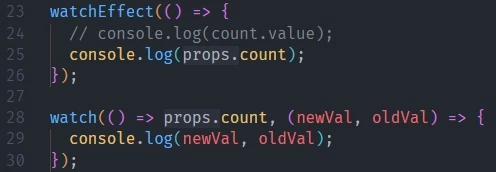
即使是基本类型,也不需要 .value。这个行为或许会带来一定的困惑。

所以 Vue - Official 插件也提供了一个视觉优化 vue.inlayHints.destructuredProps 选项,对于从 props 解构的变量,会在其左侧显示 props. 提示。
原理

在 vite 中外化 vue 依赖并取消压缩代码,方便查看构建产物

1
2
3
4
5
6
7
8
9
export default defineConfig({
plugins: [vue()],
build: {
rollupOptions: {
external: ["vue"],
},
minify: false,
},
});

在产物中可以看到,在编译时,count 会被转换为 __props.count,当然就不会丢失响应式了。

1
2
3
watchEffect(() => {
console.log(__props.count);
});

所以使用 watch 监视解构的 prop 变量时,需要使用 getter 函数包裹。

1
2
watch(count ) 
watch(() => count )

useTemplateRef 获取模板引用实例

可以使用 useTemplateRef() 获取模板引用实例,而不需要预先准备一个 ref。这有助于区分模板引用和响应式数据,且更符合原生获取 DOM 元素的语法习惯。文档

1
2
3
4
5
6
7
8
9
10

const data = ref("Hello World");
defineExpose({ data });


import { useTemplateRef } from "vue";
const helloRef = useTemplateRef('helloRef');
onMounted(() => {
console.log(helloRef.value?.data);
});

内置 Teleport 组件优化

内置 <Teleport> 组件的一个已知限制是,其目标元素必须在 <Teleport> 组件挂载时已存在。

在 3.5 中,<Teleport> 组件新增了 defer 属性,可以在当前渲染周期之后再挂载。

1
2
3
4
5
6
7
8
9
<Teleport defer to="#cont">
<div v-if="open">
<span>挂载到id为cont的div上</span>
<button @click="open = false">关闭</button>
</div>
</Teleport>

<div id="cont"></div>
<button @click="open = true">打开</button>

因为 #cont 在 <Teleport> 之后渲染,所以之前的 <Teleport> 无法将内容传送到 #cont。

1
2
3
main.ts:4 [Vue warn]: Failed to locate Teleport target with selector "#cont". Note the target element must exist before the component is mounted - i.e. the target cannot be rendered by the component itself, and ideally should be outside of the entire Vue component tree. 
at <Dialog>
at <App>

watch 函数相关

之前 watch 函数是和 Vue 组件以及生命周期一起实现的,源码在 runtime-core 模块中,有时只需要使用 vue 的响应式功能,即 reactivity 模块,但不得不引入 runtime-core 模块。

3.5 在 reactivity 模块中实现了一个和原来 watch API 一模一样的 watch,用法没有区别。详见:Vue3.5新增的baseWatch让watch函数和Vue组件彻底分手-前端欧阳

onWatcherCleanup

onWatcherCleanup() 用于在 watch 中注册清理回调。在组件卸载之前或者下一次 watch 回调执行之前会自动调用清理回调。

1
2
3
4
5
6
7
8
9
watch(num, () => {
const timer = setInterval(() => {
console.log("do something");
}, 200);
onWatcherCleanup(() => {
console.log("清理定时器");
clearInterval(timer);
});
});

不必再手动在 onBeforeUnmount 钩子中清理 watch 产生的副作用。

pause 和 resume

pauseresume 用于暂停和恢复 watch 的执行。

暂停后,watch 回调不会执行,恢复时,会立即执行一次回调

1
2
3
4
5
6
<button @click="watcher.pause()">暂停 watch</button>
<button @click="watcher.resume()">恢复 watch</button>

const watcher = watch(num, () => {
console.log(`num changed: ${num.value}`);
});

deep 支持传入数字

以前 deep 只能传入布尔值,现在支持传入数字,表明监控对象的深度。

1
2
3
4
5
6
7
8
9
10
11
12
13
14
15
16
17
18
19
20
21
22
const obj1 = ref({
x: 0,
a: {
b: 1,
},
});
setTimeout(() => {
obj1.value.x = 1;
setTimeout(() => {
obj1.value.a.b = 2;
}, 1000);
}, 1000);

watch(
obj1,
() => {
console.log("obj1 changed");
},
{
deep: 1,
}
);

SSR服务端渲染优化

3.5 中,SSR 期间计算值挂起导致的过时计算值和内存问题得到解决。

新增 useId 函数、Lazy Hydration 懒加载水合、data-allow-mismatch 等。

没用过 vue 的 SSR 就不看这块了,详见:文档

参考

Announcing Vue 3.5
这应该是全网最详细的Vue3.5版本解读
vue3.5最新发布,这几个新用法还不快来学习一下!